














Commercial
Hikvision Access Control Buying Guide
Buying Guide
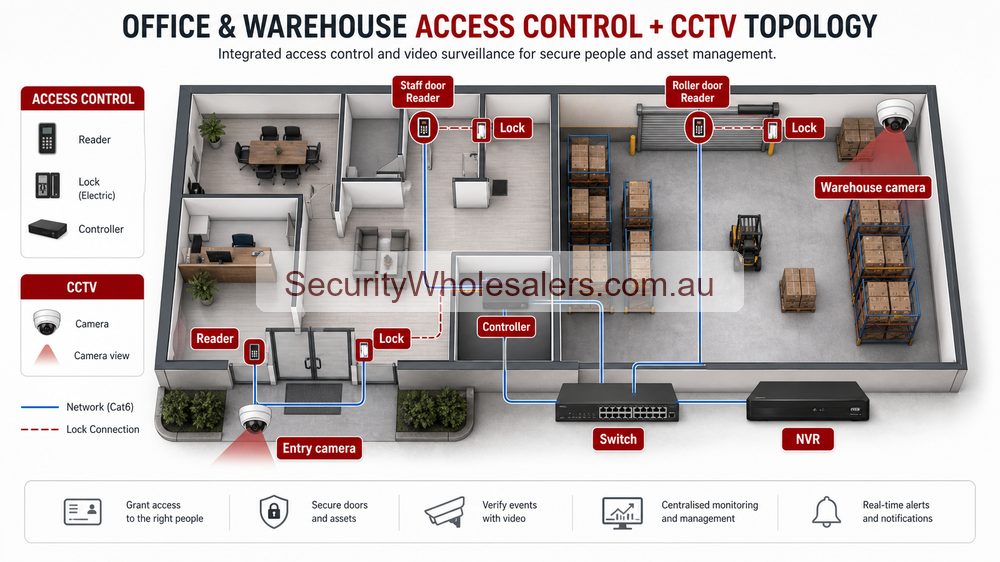
Start with the operating model, not the reader
Most Hikvision access-control jobs are specified badly when the discussion starts with a reader model instead of the operating requirement. A single staff door at a small office does not need the same hardware path as a clinic front door with visitor screening, and neither of those jobs should be treated like a multi-door tenancy or apartment building that needs audit trails, lift permissions, and administrator control.
In practice, the Hikvision buying decision is usually about choosing the right branch early. The branch then determines the hardware mix, the cabling, the lock path, and whether the site is going to need software licences from the start.
Hikvision solution table: what each path is really for
| Solution path | Usually best for | Typical Hikvision hardware | Sample application | What the installer needs to confirm |
|---|---|---|---|---|
| Standalone single-door access | One staff door, one storeroom door, or one rear entry where the site mainly wants controlled entry and simple credential management. | DS-K1T105AM, DS-K1T341AM, strike or maglock, exit button or REX, door contact, local power supply. | Small accountant's office with one front staff door and one restricted records cupboard that only office managers should open. | Door type, strike versus maglock suitability, egress path, whether logs matter, and whether the relay path should be protected on the secure side. |
| Intercom plus access | Front doors where staff need to identify visitors before unlocking, especially clinics, allied-health suites, offices, and small residential entries. | DS-KV6124-WBE1, indoor monitor, PoE switch, strike or gate relay, optional app answering. | Medical-centre front entry where reception wants keypad or Bluetooth for staff, app answering after hours, and the ability to unlock the strike only after seeing who is at the door. | Cat6 path from door station and monitor to PoE switch, router path for app answering, separate lock-release cabling, and whether the site needs only one door or future shared-entry expansion. |
| Controller-based small system | One to four important doors where the site wants logs, time schedules, user groups, and a cleaner management path. | DS-K2702X-P, readers or terminals, secure-side power supply, lock hardware, REX, door contacts. | Professional office with a front staff door, rear file room, and separate comms room where management wants to know exactly who entered after hours. | Controller cabinet location, secure relay layout, credential policy, battery backup, and whether the job is likely to grow past two doors. |
| Controller plus software and licences | Commercial and multi-tenant sites that need several doors, administrator hierarchy, reporting, lift control, or stronger operator workflow. | DS-K2210, multi-door controllers, face terminals or readers, HikCentral access-control licence path. | Apartment building with front and rear lobby doors, parking entry, and lift permissions that restrict residents to approved floors only. | Door count, floor logic, software scope, licence count, operator workflow, network segregation, and coordination with the lift contractor and fire contractor. |
Standalone access: use it where the question is still mainly about the lock
Standalone Hikvision access is usually the better path when the site has one controlled door and the customer mainly wants to replace keys with cards, PINs, Bluetooth, or face credentials. The job is still a hardware job first. It is about getting the terminal, lock, exit path, and power supply right rather than building a management platform.
That does not mean it should be quoted casually. A simple staff door can still fail if the strike is wrong for the frame, if the door closer is misaligned, if the exit device is missing, or if the installer leaves the relay path exposed on the insecure side. The simpler the system is, the more the physical doorwork matters.
Angela's bookkeeping office
Angela runs a seven-person bookkeeping office with one main glazed entry and one rear records cupboard. The front door only needs staff cards and a PIN fallback. The records cupboard only needs manager access. A standalone Hikvision path is enough if management does not need centralised reporting, but the rear door still needs the right strike, a secure relay arrangement, and a clear egress path so the project does not become a lock problem later.
Intercom plus access: use it when visitor screening matters as much as credential entry
This is the branch that often gets missed. Some sites do not really have an access-only problem. They have a front-entry workflow problem. Staff need to identify visitors, release the door remotely, and still keep a practical entry method for authorised users. That is where Hikvision intercom plus access hardware becomes the better fit than a simple terminal.
On these jobs the cabling is part of the decision. An IP intercom path normally means Cat6 from the door station to the PoE switch, Cat6 from the indoor monitor to the PoE switch, and an uplink from the PoE switch back to the router or modem if the site wants app answering. The lock cabling is separate again. The PoE path powers the intercom devices, but it does not replace the strike or maglock power path.
Dr Maya's allied-health clinic
Dr Maya's clinic wants the front door locked after 6 pm because practitioners finish at different times and reception is not always staffed. During the day, staff want keypad or Bluetooth entry. After hours, they want the indoor monitor and app to show visitors before the strike is released. That is not a reader-only job. It is a combined intercom and door-release job with separate network and lock cabling paths.
Controller-based systems: use them once the site starts asking management questions
The move from standalone hardware to controllers usually happens when the site wants logs, schedules, multiple permissions, after-hours accountability, or cleaner administration. The reason a controller matters is not only door count. It is because the business is now asking questions about who opened what, when, and under which schedule.
A two-door controller such as the DS-K2702X-P is often the right bridge here. It lets the installer keep lock relays and power infrastructure in a more secure cabinet layout while giving the client a proper event trail and better long-term flexibility than a basic terminal-only design.
Daniel's finance office
Daniel has a front office door, a rear document room, and a comms room where external IT contractors occasionally work. Staff can enter the front door at all times, but the document room needs manager-only access and the comms room needs contractor access only during approved hours. That is where a controller-based Hikvision design makes sense because the site is clearly asking for permissions, schedules, and an event trail rather than a simple unlock device.
Controller plus software and licences: this is where Hikvision becomes a platform
Once the site grows beyond a few doors, or once it adds multiple administrators, lifts, tenancies, or stronger reporting requirements, the software layer becomes part of the buying decision. This is the point where a quote should discuss not only controllers and terminals, but also licences, operator workflow, user import and maintenance, and how the system will actually be administered after handover.
For larger projects, the licence conversation should happen early. If the building is going to need multiple operator accounts, visitor workflows, lift permissions, or central event management, leaving the software path vague usually creates a messy retrofit later. The controller hardware might still look inexpensive on paper, but the real project is now a permissions-and-management system.
Northbank Apartments
Northbank is a four-level apartment project with front and rear lobby doors, one parking roller door, and two lifts. Residents need building entry, lift access only to approved floors, and a manager login for credential changes. Contractors need temporary access windows. That job should be specified as controller plus software from the outset, not as a stack of isolated readers, because the real challenge is permissions and administration rather than the physical act of unlocking a door.
Where face recognition fits in the Hikvision access-control branch
Face terminals belong naturally in the standalone and controller branches when the site wants hands-free staff entry or higher convenience at a controlled door. They are still access-control devices first. The installer must check mounting height, approach angle, lighting, and fallback credentials so the terminal remains usable in normal operation.
Face-recognition cameras are different. They sit inside the CCTV and software discussion and carry a bigger governance burden. When the customer starts talking about staff-door convenience, face terminals are usually the right discussion. When they start talking about recognising people inside a retail or reception workflow, the site may be moving into a camera-led project instead: Hikvision Face Recognition for Retail Businesses.
Installation points that matter across all Hikvision access-control jobs
Even when the hardware branch is chosen correctly, access-control jobs still fail at the same practical points. The installer needs to confirm whether the door is better suited to an electric strike, maglock, or another lock path. They need to check door closer pressure, frame condition, egress compliance, door contacts, fire release logic, and whether the lock relay should sit on the secure side.
On intercom and controller jobs, network and cabinet planning matter as well. Reader or terminal position, cable path back to the secure side, PoE versus local power, battery backup, and software commissioning time should all be part of the quote. The more doors and permissions the site has, the less sensible it is to treat commissioning as a minor final step.
Relevant SecurityWholesalers Categories and Products
These Hikvision products show the main access-control branches buyers usually compare: standalone terminals, intercom-plus-access hardware, controllers, face recognition, lift control, and software.
- Hikvision access control category - The best place to compare simple door hardware, controllers, terminals, and software-ready devices.
- DS-K1T105AM standalone terminal - A practical reference point for single-door keypad and card jobs.
- DS-K2702X-P two-door controller - A useful reference point for logged 1-2 door jobs and smaller controller-based systems.
- DS-K1T341AM face terminal - Relevant where the job is considering face recognition as a primary or optional credential path.
- DS-K1T344MBWX-E1 face terminal - A stronger option where the entry is more exposed and the site wants IP65, QR, Bluetooth, and a better all-weather staff-entry path.
- DS-K1T673DWX face terminal - Worth reviewing where the site wants a more substantial Pro-series interface, higher capacity, and a stronger commercial presentation.
- DS-KV6124-WBE1 intercom station - A useful front-entry reference for clinics, offices, and smaller shared-entry jobs that need intercom plus lock release.
- DS-K2210 lift controller - Important when apartment or multi-level jobs need credential-based lift control.
- Hikvision access-control base licence package - Relevant when the site is clearly moving into a controller-and-software operating model.
Sources and Further Reading
Frequently Asked Questions
-
When is a simple Hikvision terminal enough?
A simple terminal can be enough for a straightforward single-door job where the customer mainly wants controlled entry and does not need much reporting, growth, or software structure.
-
When should a Hikvision job move to door controllers?
Usually when the site wants logs, schedules, several doors, stronger permissions, or a platform that can grow without replacing everything later.
-
Can Hikvision access control include lift control?
Yes. On the right jobs, Hikvision can extend into lift permissions so residents, tenants, or staff can be restricted to the floors or areas that match their credentials.
-
Does face recognition change the rest of the design?
It can. Face recognition affects mounting height, approach distance, lighting, privacy handling, and the need for fallback credentials. It should be treated as a design choice, not just a flashy reader upgrade.
-
What software path should a commercial Hikvision access-control job expect?
Smaller jobs may stay simple, but once the site cares about logs, permissions, multiple doors, or stronger management, the software layer becomes part of the buying decision rather than an afterthought.
-
What should the installer confirm before quoting Hikvision access control?
Door type, strike or maglock suitability, egress and fire behaviour, cable path to the secure side, power-supply planning, reader position, controller location, and whether the customer really needs logs, schedules, or future multi-door growth.
-
Is retail face recognition usually a terminal job or a camera job?
Most of the time it starts as a terminal job because the retailer really wants authorised staff through a controlled door. It only becomes a camera job when the business has a clear reason to compare faces inside the CCTV workflow and is ready for the extra privacy, software, and scene-control requirements that come with that.
Related Pages
Hikvision Video Intercom Buying Guide
Choose the right Hikvision video intercom and understand the lock-release path.
Hikvision AX PRO vs AX Hybrid PRO
Compare Hikvision AX PRO and AX Hybrid Pro in practical deployment terms.
Hikvision Buying Guide
The main Hikvision guide for choosing the right branch of the range.
Hikvision Face Recognition for Retail Businesses
See where face terminals fit, where cameras fit, and when retail face recognition becomes a higher-risk project.
When to Use Hikvision Thermal Cameras
Understand where Hikvision thermal earns its keep and where it does not.


