Audio in the Hikvision world is not one thing. It can mean built-in microphone recording, deterrence speakers, intercom conversation, or software-managed speaker workflows. The useful choice depends on what the site is actually trying to achieve.
Explainer
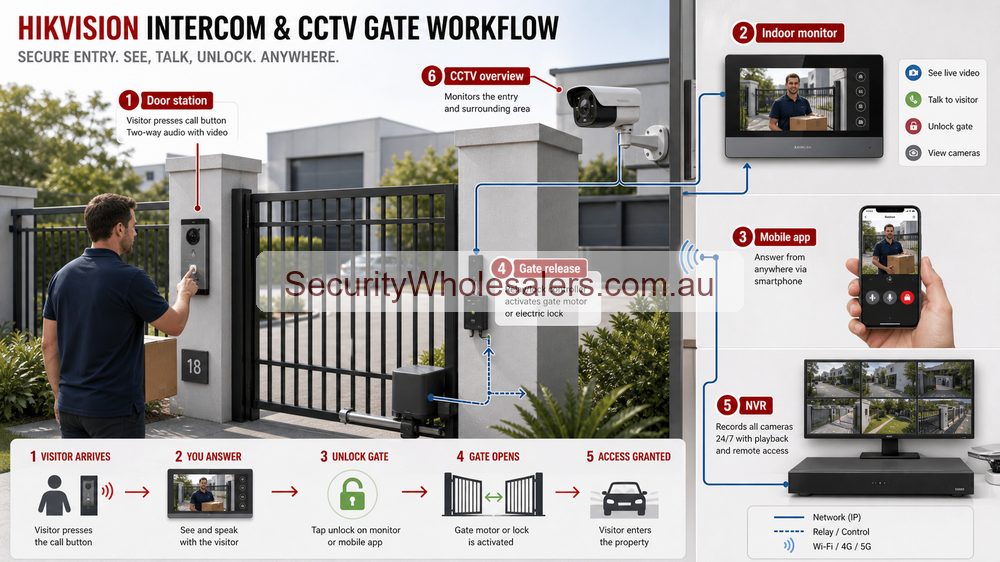
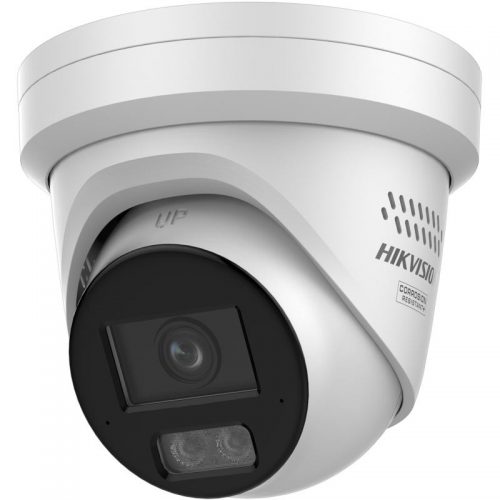
Use this Hikvision planning visual to match the product family to the site before choosing exact models.All-in-one Hikvision cameras with built-in microphone, speaker, and deterrence lighting are often the first step into the audio side of the range for homes, shops, and smaller commercial sites.
Think about audio by purpose, not by feature list
Some Hikvision audio is there to record context, some is there to warn, some is there to talk to a visitor, and some is there to feed a larger managed workflow. The buyer usually gets a better result when they decide which of those jobs matters before they start comparing devices.
The four audio paths most buyers actually see
Built-in microphone cameras for event context
Active deterrence cameras with speaker and strobe
Video intercom products for conversation and release control
Software-driven speaker or control-room style workflows on larger managed jobs
Those paths overlap, but they should not be treated as the same design problem.
Installation insight: audio quality is mostly a placement issue
Audio features often disappoint when the installer assumes the microphone or speaker placement will look after itself. Background noise, traffic, wind, reverberation, and poor mounting positions can all make recorded or live audio much less useful than expected. That is why the site should be clear about the purpose of the audio before it becomes a box-ticking exercise.
Use audio selectively
Selective use is usually stronger than blanket use. A few well-chosen audio points at entries, counters, front doors, or after-hours deterrence zones usually give better value than spreading the feature thinly across every camera on the site.
Relevant SecurityWholesalers Categories and Products
These products help visitors understand the main audio paths SecurityWholesalers buyers actually see in Hikvision jobs: camera audio, deterrence audio, intercom audio, and managed speaker-style workflows.
Capture useful context around a visitor or dispute.
Check privacy expectations and signage before enabling audio.
Rear business door
Support deterrence or event verification after hours.
Audio should support a clear workflow, not record casually.
Warehouse or yard
Speaker warning or operator talk-down.
Pair with tight detection zones and test nuisance behaviour.
Audio can make a system more useful, but it also changes the privacy and handover conversation. Buyers should know when audio is enabled, who can access it, how long it is retained and whether the site needs signage or policy controls.
Audio design examples
Site
Audio approach
Why
Retail counter
Use audio only where notice, policy and customer expectations are clear.
Audio is more sensitive than video and should not be added casually.
Warehouse rear lane
Speaker warning or audio-enabled deterrence may be useful after hours.
The purpose is response and deterrence, not general staff monitoring.
Home entry
Two-way talk may be useful near the front door or driveway.
Keep it focused on visitor or deterrence workflow.
The safest buying rule is simple: use Hikvision audio products where audio changes the outcome and the customer understands the privacy, signage and handover implications. If the camera only needs visual evidence, do not add audio just because the model supports it.
Practical buying scenarios
Small site: choose the simplest camera family that solves the evidence task. Medium site: separate identification views from overview views. Complex site: design the recorder, app handover, permissions and future expansion before choosing the most interesting camera model.
Quote-ready checks
What exact incident or workflow is this page trying to solve?
Which views need identification detail and which only need overview?
Does the recorder or management platform support the finished camera count?
What must be tested at handover: live view, playback, alerts, export, users and account ownership?
Where would this system become the wrong choice and need a different product family?
For Hikvision Audio Products Explained, the strongest Hikvision quote should read like a site plan, not a box list. It should explain why each camera or recorder path is being chosen, where the buyer should avoid overbuying, and what happens if the site expands later.
Small, medium and complex examples
Site size
Practical direction
What to avoid
Small
Keep the system simple and solve the main evidence points first.
Buying specialist features before the basic views are right.
Medium
Plan recorder headroom, remote access and stage-two expansion.
Filling the recorder or ignoring storage assumptions.
Complex
Document permissions, network design, response workflow and handover.
Choosing models without a support and review plan.
This extra planning step is often what separates a useful Hikvision system from a quote that only looks good on paper.
Audio use and privacy notes
Audio should have a purpose: deterrence, two-way talk, event context or intercom-style response. Do not add audio just because the camera supports it.
Placement matters: wind, traffic, ceiling height, hard surfaces and distance can make audio frustrating. A camera microphone near a noisy street may not produce useful evidence.
Policy matters: businesses should consider signage, staff expectations and whether audio recording is appropriate for the area being monitored.
Final buyer rule
For Hikvision Audio Products Explained, the final Hikvision choice should be easy to defend on site: the view is useful, the recorder is sized properly, and the handover proves the buyer can find footage later.
Audio use and privacy notes
Audio should have a purpose: deterrence, two-way talk, event context or intercom-style response. Do not add audio just because the camera supports it.
Placement matters: wind, traffic, ceiling height, hard surfaces and distance can make audio frustrating. A camera microphone near a noisy street may not produce useful evidence.
Policy matters: businesses should consider signage, staff expectations and whether audio recording is appropriate for the area being monitored.
Final buyer rule
For Hikvision Audio Products Explained, the final Hikvision choice should be easy to defend on site: the view is useful, the recorder is sized properly, and the handover proves the buyer can find footage later.
Frequently Asked Questions
What counts as an audio product in the Hikvision ecosystem?
It can mean several things: camera microphones, cameras with warning speakers, intercom stations, or more structured IP-speaker and software-led workflows. The useful choice depends on the job.
When is camera audio actually useful?
Camera audio is useful when context matters to the event review, such as an entry dispute, a counter interaction, or an external warning point where the customer wants more than silent video.
Should every Hikvision camera have audio?
Usually not. Audio should be used where it adds real operational value or clearer context, not just because the feature exists.
How is deterrence audio different from intercom audio?
Deterrence audio is usually a warning or response function tied to a security event, while intercom audio is a conversation path tied to visitor verification and controlled entry.
What should the installer confirm before specifying audio?
They should confirm why the site wants audio, how it will be used, whether recording audio is appropriate, where echo or noise will be a problem, and whether the job needs conversation, warning, or both.
Does audio affect recorder and storage planning?
Yes. Audio can increase storage demand and may also affect how the customer values the recorder path, especially if audio-rich events are expected to be reviewed often.
The main Hikvision guide for choosing the right branch of the range.
How to quote Hikvision Audio Products Explained properly
The practical value of Hikvision Audio Products Explained comes from how well it solves site-specific security design on a real Australian site. A strong recommendation should talk about evidence needs, mounting, lighting, recorder capacity, user permissions and handover, because those details decide whether the system is useful after the installer leaves.
The best quote explains the job of every camera and what the owner should expect from it after installation. This is where a good buying guide should help: it should make the trade-offs visible before the customer spends money, not after the first incident exposes a weak view.
Small site
For a small Hikvision Hikvision Audio Products Explained project, focus on the few views that would prove the most likely incident. It is better to have fewer well-planned cameras than more cameras that miss faces, plates, doors or night detail.
Medium site
For a medium Hikvision Audio Products Explained site, separate identification views from overview views. Use stronger cameras where people, vehicles or high-value stock must be identified, and use practical overview cameras where the goal is movement context.
Complex site
For a complex Hikvision Audio Products Explained site, plan the recorder, permissions and expansion path before finalising cameras. Larger jobs often fail because the hardware is good but the storage, network or user workflow was never properly designed.
What a 95/100 Hikvision quote should include
A short explanation of what each recommended camera is expected to prove.
Enough recorder storage and spare channels for realistic future expansion.
Notes on night performance, glare, weather exposure, mounting height and service access.
A simple handover plan covering app access, playback, footage export and user permissions.
For Hikvision Audio Products Explained, the best buying decision is the one that still feels obvious six months later. If the buyer can understand why each device was chosen, how footage will be found, and where the system can grow, the quote is far more likely to deliver long-term value.
Final checks before ordering Hikvision Audio Products Explained
Before ordering Hikvision Audio Products Explained, ask the installer or sales team to describe the weakest part of the proposed design. That question is useful because every security system has a trade-off: lens width versus detail, deterrence versus discretion, recorder cost versus retention, or simplicity versus future expansion.
For Hikvision Audio Products Explained, the better Hikvision purchase is usually the one with a clear explanation rather than the longest specification sheet. The quote should say which views are for identification, which are for overview, which settings need commissioning, and which parts of the system should be reviewed after the first few weeks of real use.
A final practical check for Hikvision Audio Products Explained is supportability. Choose a system that can be explained to the person who will actually use it: how to open the app, find yesterday's event, export a clip, add a user, and understand when a camera or recorder needs attention. That day-to-day clarity is what separates a decent product list from a genuinely useful Hikvision security solution.
Your Shopping Cart will be saved and you'll be given a link. You, or anyone with the link, can use it to retrieve your Cart at any time.
Back
Save & Share Cart
Your Shopping Cart will be saved with Product pictures and information, and Cart Totals. Then send it to yourself, or a friend, with a link to retrieve it at any time.