

















Commercial
How to Choose a Hikvision Camera
Buying Guide
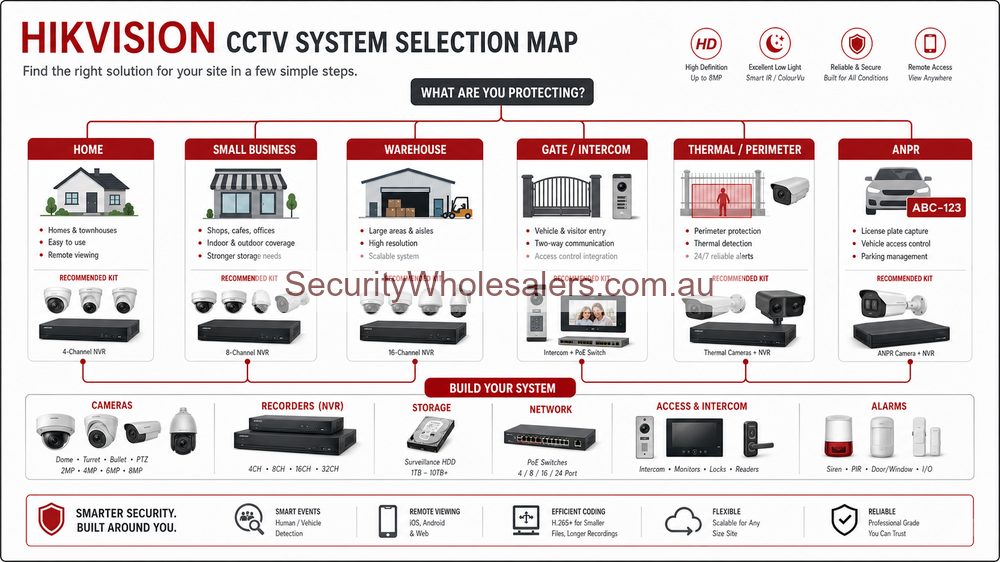
Quick answer
For most homes and small businesses, a good fixed turret is the sensible starting point. Choose a motorised lens when the view needs careful adjustment, ColorVu when colour at night matters, and a Live Guard or PTZ camera only when its warning or movement features solve a real problem.
The quickest way to narrow down your options
Work through these questions in order. You should end up with a camera type that suits the position, rather than simply choosing the most expensive specification.
1. What must this camera show?
Decide whether you need a face at a doorway, activity across a yard, detail at a gate, or general movement around the property.
2. Is the view simple or difficult to frame?
Use a fixed lens for a predictable doorway, corridor or side passage. Choose a motorised varifocal camera for a long driveway, loading area or awkward approach.
3. What happens after dark?
Standard infrared is discreet. ColorVu helps preserve colour, while Smart Hybrid Light can combine infrared and white light.
4. Do you want smarter alerts or an active warning?
AcuSense helps filter people and vehicles. Live Guard adds options such as a speaker and strobe where a visible warning is appropriate.
5. Can the recorder support the finished system?
Confirm channels, bandwidth, hard-drive capacity and compatible smart features using the Hikvision NVR guide before ordering.
A sensible starting point for most properties
Most homes and small businesses
Start with a fixed turret or bullet. Then decide whether that position needs AcuSense for cleaner alerts, ColorVu for colour at night, or simply good infrared footage.
Awkward frontages and long approaches
A motorised varifocal camera is worth considering when the installer needs to adjust the view on site instead of guessing the right fixed lens in advance.
After-hours problem points
Consider a Live Guard camera if a speaker or flashing light could genuinely discourage someone. Avoid it where repeated warnings would annoy neighbours, staff or customers.
Larger sites with live overview needs
A PTZ makes sense when someone will actively control it or use patrol presets. It should support fixed cameras, not replace the views that must always be recorded.
Give every camera one clear job
Instead of asking "which Hikvision camera is best?", ask what each view must prove after an incident. At a front door, that may be a clear face as someone crosses the threshold. Along a driveway, it may be a person or vehicle moving towards the property. Across a car park, one camera may provide the overview while another covers the entrance in greater detail.
This approach also makes mixed systems easier to understand. You can use straightforward fixed turrets for simple views and reserve motorised, PTZ or active-deterrence cameras for the positions where those features will actually help.
Choose the camera for the location
| Scene | Good starting point | What may change the choice |
|---|---|---|
| Front door or main entry | Fixed turret or bullet | Whether the site wants better night colour or cleaner analytics. |
| Driveway or gate | Fixed bullet or turret, sometimes motorised varifocal | Depth, plate capture expectations, and after-hours behaviour. |
| Rear lane or side path | Fixed camera with AcuSense or ColorVu | Whether the site only wants evidence or also wants deterrence. |
| Loading apron or awkward frontage | Motorised varifocal | How hard it is to judge the final framing before installation. |
| Broader yard or external grounds | Fixed evidence cameras first | Whether there is a real case for PTZ or TandemVu support. |
The main Hikvision camera types explained
| Camera type | Works well for | What to know |
|---|---|---|
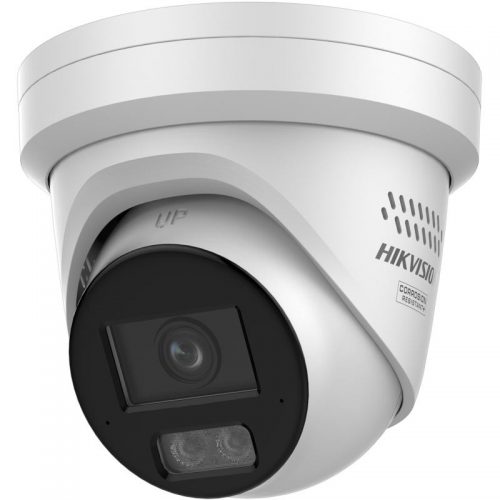
| Fixed turret or bullet | Entrances, counters, corridors, simple perimeter points | The lens and mounting height need to be right from the start. Then compare 6MP cameras with 8MP / 4K cameras based on the detail and storage the position genuinely needs. |
| Motorised varifocal | Long approaches, awkward frontages, loading areas, mixed-depth scenes | The installer can adjust the view after mounting. Remember that motorised varifocal does not mean the camera follows people; it normally stays aimed at the chosen view. |
| ColorVu or Smart Hybrid Light | Important low-light views where black-and-white IR is not enough | Think about visible light, neighbours and the way the area looks after dark. Compare Hikvision ColorVu cameras or Hikvision ColorVu packages when colour footage is important. |
| PTZ | Larger sites, broad external grounds, selected live-overview roles | Use it alongside fixed cameras. A PTZ can be looking in the wrong direction when an event happens, so important entrances and evidence views still need continuous fixed coverage. |
| Deterrence model with speaker and strobe | After-hours perimeter, remote gates, side entries, some retail-front jobs | Useful only when warning audio and a visible response make sense at that location. Compare it with the ColorVu / Smart Hybrid Light guide so night vision and deterrence are planned together. |
Night vision and smart alerts often decide the final choice
After choosing the housing and lens, ask what the camera must do at night. Standard infrared is discreet and works well when black-and-white footage is acceptable. ColorVu is useful when colour details such as clothing or vehicle colour matter. Smart Hybrid Light gives you more flexibility by combining infrared and visible white light.
Then think about alerts. AcuSense helps the system focus on people and vehicles instead of every moving leaf, insect or patch of rain. It can make notifications and playback far more useful, although good positioning and setup still matter.
6MP or 8MP: which resolution is worth buying?
| Resolution | Choose it when | Keep in mind |
|---|---|---|
| 6MP | You want strong detail for normal home and small-business views without pushing storage as hard as 8MP. | For many doors, paths, offices and general outdoor views, a well-positioned 6MP camera is already more than adequate. |
| 8MP / 4K | The position is important, the scene is wider, or you want more detail available when reviewing and digitally cropping footage. | 8MP uses more bandwidth and hard-drive space. It does not compensate for a poor lens, excessive height or a subject that is too far away. |
Lens choice matters as much as megapixels
| Lens | What the view feels like | Typical use |
|---|---|---|
| 2.8 mm fixed | Wider view with more of the surrounding area visible. | Front entries, rooms, short side paths and broad close-range coverage. |
| 4 mm fixed | Narrower view that brings a more distant target closer in the frame. | Driveways, gates, corridors and positions where a 2.8 mm lens would waste too many pixels on the surroundings. |
| Motorised varifocal | Adjustable from wider to tighter during installation. | Long approaches, loading docks, car-park entrances and any position where the ideal view is difficult to predict. |
Examples: where extra features are worth paying for
Small office entry
Keep it simple with a good fixed turret unless there is a genuine reason to tune depth or improve low-light performance. Most small entries do not need a specialist camera.
Retail shopfront with poor night detail
Choose ColorVu when the footage needs to tell a clearer story after dark and colour details genuinely matter.
Long warehouse apron
Choose a motorised varifocal camera when the installer needs more freedom to get the final framing right on site.
Large yard where management wants live overview
Only then does a PTZ, TandemVu, or other specialist camera start to justify itself, and even then it should support fixed views rather than replace them.
Common mistakes that lead to disappointing footage
- Mounting too high: the camera sees the top of a person's head instead of a useful face.
- Trying to cover too much: a very wide overview looks impressive but leaves too few pixels on the doorway, gate or vehicle that matters.
- Choosing 8MP as a cure-all: more resolution cannot fix the wrong lens, poor lighting, motion blur or excessive distance.
- Ignoring night conditions: headlights, glass reflections, floodlights and deep shadow can completely change the result after dark.
- Using a PTZ instead of fixed cameras: the PTZ may be pointing elsewhere when the incident happens.
- Forgetting storage: higher resolution, audio and longer retention all increase hard-drive requirements.
Before ordering, confirm the lens, height and cable route
The installer should walk the site with three things in mind: the actual target point, the realistic cable or conduit route, and the lighting conditions when the site really cares. A camera that looks perfect at midday from a ladder can still be wrong once the area is lit by cars, shop signs, floodlights, or deep shadow after hours.
Use the Camera Planner early if the site is large or the owner is still changing their mind on coverage. It is much cheaper to redraw a view than to move a cable path after the install is underway.
Make sure the NVR suits the cameras
A great Hikvision camera can still disappoint if the NVR lacks enough channels, bandwidth or storage. Confirm the recorder as soon as the camera plan is taking shape, especially when the system includes audio, several 8MP cameras or specialist models.
The next best page after this one is usually How to Choose a Hikvision NVR.
Useful next guides by camera type
Hikvision Camera Series Explained
Use this overview if you are still comparing AcuSense, ColorVu, Live Guard, TandemVu and Thermal.
Hikvision ColorVu Cameras Buying Guide
Best if the site cares more about better night colour than about general camera shape.
Hikvision AcuSense Cameras Buying Guide
Best if analytics, people-and-vehicle filtering, and cleaner alerts are shaping the shortlist.
Hikvision Motorised Varifocal Cameras Buying Guide
Best if the scene is awkward enough that the installer may need tuning freedom on site.
Hikvision PTZ Buying Guide
Best if the site is large enough that someone may genuinely use a controllable overview camera.
How to Choose a Hikvision NVR
Use this once the camera shortlist is clear and you need to confirm channels, PoE and storage.
Browse the most useful Hikvision categories and examples
These links take you from the buying advice to the relevant camera ranges and current product examples.
- Hikvision camera range - The broad view across fixed, bullet, turret, and more advanced IP camera options.
- Hikvision ColorVu - Useful where the site wants strong night-time colour on key views.
- Hikvision AcuSense - Useful when you want stronger human and vehicle filtering.
- DS-2CD2066G2H-IU bullet - A practical example of a straightforward fixed-lens outdoor IP camera.
- DS-2CD2387G3-LIS2UY/SL ColorVu 3.0 turret - A current 8MP fixed turret combining low-light colour, smart illumination, audio, strobe and speaker.
- Hikvision ColorVu packages - Useful when several important positions need colour-focused night coverage.
- DS-2CD2367G2H-LISU/SL Smart Hybrid Light deterrence turret - Shows where strobe, speaker, and smarter night illumination can be useful.
- DS-2CD2387G2P-LSU/SL panoramic active deterrence camera - Relevant where one very wide overview plus warning audio and strobe is genuinely useful.
Sources and Further Reading
Frequently Asked Questions
-
Should I start with a turret, bullet, PTZ, or deterrence camera?
Start with the scene and the review requirement. Fixed turrets and bullets handle most predictable evidence views. PTZs only make sense where one moving camera genuinely adds value, and deterrence models should be reserved for places where audio or strobe warning has a clear operational purpose.
-
When is a motorised lens worth paying for on Hikvision?
A motorised lens is worth it when the scene is hard to judge on paper, such as a long driveway, a loading apron, or a wide frontage where the installer needs tuning freedom on site instead of gambling on a fixed lens.
-
What is the difference between ColorVu and Smart Hybrid Light in practical terms?
ColorVu leans toward strong full-time colour performance. Smart Hybrid Light adds more flexibility by combining infrared and white-light behaviour depending on what the site needs after dark.
-
Does AcuSense matter when choosing a Hikvision camera?
Yes, if you want fewer nuisance alerts and easier event review. AcuSense is especially useful around driveways, perimeters, shopfronts and commercial sites after hours.
-
What does the installer need to confirm before final camera selection?
They need to confirm mounting height, cable path, backlight, night-time lighting, scene width, desired identification points, weather exposure, and whether the client wants audio, deterrence, or analytics. Those details usually matter more than one more megapixel.
-
Can one Hikvision project mix several camera types?
Yes, and it often should. A good design may use fixed turrets on predictable views, motorised lenses on difficult approaches, and only one or two specialised cameras where wider overview or active deterrence is justified.
Related Pages
How to Choose a Hikvision NVR
Choose the right Hikvision NVR for channel count, PoE, AI, storage, and growth.
Hikvision ColorVu vs Smart Hybrid Light
Compare Hikvision ColorVu and Smart Hybrid Light in practical site terms.
Hikvision AcuSense Cameras Buying Guide
Use this when cleaner alerts, smarter event filtering, and easier playback are the real buying drivers.
Hikvision Live Guard Cameras Buying Guide
Use this when the camera needs to do more than record and the site wants speaker and strobe response after hours.
Hikvision IP vs Turbo HD
Choose between Hikvision IP and Turbo HD based on cabling, expansion, and analytics.