

















Commercial
How to Choose a Hikvision NVR
Buying Guide
Quick answer
Most buyers should choose a Hikvision NVR by starting with the real camera count, then adding honest growth headroom. A compact PoE NVR usually suits smaller and simpler jobs. A 16-channel or larger recorder starts making more sense once the site expects growth, multiple zones, more serious storage needs, or a cleaner switch-led layout.
What most buyers should shortlist first
4 to 8 camera jobs
A compact PoE NVR is often the cleanest answer if the site is simple, self-contained, and unlikely to grow far beyond the first stage.
8 to 16 camera jobs
This is where many buyers should pause before defaulting to the smallest possible recorder. If growth is already visible, a 16-channel recorder is often the more honest answer.
Multi-zone or growing sites
A switch-led recorder design usually starts to make more sense once the site spans buildings, cabinets, or several separate camera zones.
Analytics-heavy jobs
If the site really cares about deeper search, smarter review, or more advanced workflows, it may be worth stepping into a stronger Hikvision NVR family earlier.
Recorder choice decides how the whole CCTV job behaves
An NVR is not only a box that records cameras. It determines how the site expands, where PoE lives, how easy playback is, how much storage really exists, and how the installer structures the recorder setup. A weak recorder choice can make a good camera plan feel cramped from the first week.
That is why the question is not only "how many channels?". It is also "what topology is sensible, what review tools matter, and how much spare room does the system need to grow without a forklift replacement?"
Channel count is only the first filter
A four-channel recorder may fit a small home or office. An eight-channel recorder may suit a modest retail or light-commercial job. But once the site expects more cameras, audio, or staged growth, the project often benefits from moving up sooner rather than later.
| NVR size | Usually right for | Step up when⦠|
|---|---|---|
| 4 channel | Very small homes or tiny offices | The site may gain even one or two more cameras, or already has separate entry and rear views in mind. |
| 8 channel | Small business, homes, compact retail, basic warehouse edge | The site expects staged growth, more audio, or several outdoor zones. |
| 16 channel | Growing business, school edge, larger home, warehouse, multi-zone site | The site is already broad enough that several buildings, yards, or recorder groups are being discussed. |
| 32 channel and above | Larger commercial jobs, broader campuses, depots, layered camera systems | The project is moving toward heavier storage, more advanced analytics, or multiple camera families at scale. |
| NVR style | Usually strongest for | Watch-out |
|---|---|---|
| Compact PoE NVR | Simple homes, small offices, compact shops | Can feel tight if the camera count or zone complexity grows quickly. |
| Mid-size NVR with more bays or more channels | Growing businesses, schools, medium warehouses, larger homes | Needs proper rack, UPS, and drive planning. |
| Higher-end analytics-capable NVR | Sites that care about deeper search, better event review, or more serious analytics workflows | Should only be chosen when the site will actually use the extra capability. |
PoE NVR vs switch-led architecture
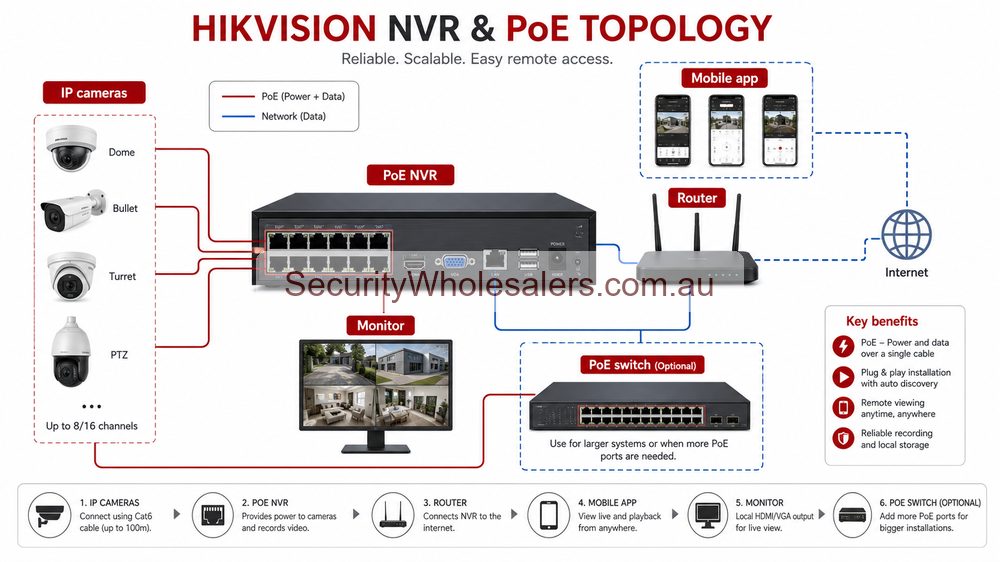
Many smaller Hikvision jobs are cleanest when cameras plug directly into a PoE NVR. The installer gets simple commissioning, fewer loose parts, and a tidy handover. But once the site spreads across long distances, several buildings, or remote cabinets, the better design is often a switch-led layout that uplinks back to the recorder.
This is one of the most important installation calls on a commercial Hikvision project. The wrong answer can produce messy cable runs, overloaded racks, or awkward maintenance later.
Choose PoE NVR first when
The site is compact, the cable runs are straightforward, and the customer mainly wants a cleaner plug-and-play setup.
Choose switch-led first when
The site spreads across zones, buildings, or cabinets, or when the installer wants a neater long-term path for expansion and maintenance.
Do not decide by channel count alone
An 8-channel PoE recorder is not automatically better than a 16-channel switch-led layout just because the initial camera count is small.
Installation insight: recorder sizing should be tied to storage and UPS on day one
If the job includes higher resolutions, microphones, more analytics, or longer retention, the NVR and hard-drive assumptions need to be tested immediately. Use the CCTV Storage Calculator to model the real retention target, then test the outage plan with the UPS Backup Time Calculator.
For many jobs, the best practice is to back up the NVR, the core PoE switch or distribution switch, and the modem or router path that supports remote review. Backing up only the recorder can leave the site with a live box and dead camera network.
Typical site pathways
Home or compact office
An 8-channel PoE NVR is often enough if the site is self-contained and the camera count is not likely to drift upward quickly.
Small business that may grow
A 16-channel recorder is often the smarter buy if the site already hints at more cameras, better storage expectations, or staged growth.
Warehouse or school edge
Recorder choice should be tied to zone layout, storage, and UPS planning, not only the first-stage camera count.
Larger yard or depot
A switch-led topology and a recorder with more channel and storage headroom usually become the more sensible long-term answer.
A useful Hikvision case-study mindset
Picture a medium warehouse with eight cameras now, room for four more, a front office, and two external zones that may gain active deterrence later. An 8-channel PoE NVR may look neat on day one, but a 16-channel recorder with sensible drive headroom and external switches may be the more honest answer if the growth path is already visible. That is the kind of decision this guide should help you make before the quote is finalised.
Hikvision recorder shortcuts
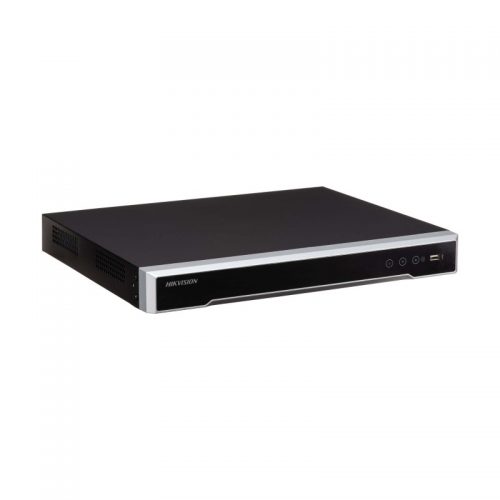
8-channel PoE NVR example
A strong example for simple jobs that want direct camera-to-recorder PoE and a tidy recorder setup.
AcuSense NVR example
Useful where recorder-side analytics and cleaner event review matter as much as the cameras.
Hikvision NVR category
The best place to compare compact PoE recorders, larger recorder setups, and more advanced Hikvision NVR families.
Relevant SecurityWholesalers Categories and Products
These Hikvision recorders and support categories help illustrate the difference between a compact direct-to-recorder PoE job and a more serious recorder design with expansion in mind.
- Hikvision NVR category - The main starting point for comparing compact PoE recorders, larger recorders, and more advanced analytics-capable options.
- DS-7608NI-M2/8P 8-channel PoE NVR - A common fit for smaller jobs that still need sensible storage headroom and plug-and-play PoE.
- iDS-7608NXI-M2/8P/X DeepinMind NVR - A good example of stepping up where analytics and higher-end review tools matter more.
- Surveillance hard drives - Important because recorder quality means little if the retention path is under-sized from day one.
Sources and Further Reading
NVR sizing examples
| Camera count | Better Hikvision NVR choice | Reason |
|---|---|---|
| 1 to 3 | 4-channel only if the site is genuinely finished. | Tiny homes and offices can stay compact, but expansion is limited. |
| 4 cameras | 8-channel is often safer. | Garage, rear door, stock room or external approach are common later additions. |
| 5 to 8 | 8-channel if stable, 16-channel if business growth is likely. | A filled recorder creates upgrade pressure too early. |
| 9 to 16 | 16-channel with storage and bandwidth planning. | Review workflow and retention become just as important as camera count. |
For many Hikvision buyers, the most useful upgrade is not a more dramatic camera. It is choosing a recorder with the right channels, HDD capacity, bandwidth, PoE layout and search workflow.
Frequently Asked Questions
- How should you choose between a 4, 8, 16, or 32 channel Hikvision NVR?Start with the real camera count, then add realistic expansion headroom. If the project already expects growth, it is usually better to leave space now than replace the recorder later because the site outgrew the first stage too quickly.
- When does a PoE NVR make sense?A PoE NVR makes sense on smaller or simpler jobs where direct plug-and-play camera connection keeps the layout clean. Once the site spreads across several zones or buildings, a switch-led architecture often becomes more sensible.
- Do camera analytics affect NVR choice?Yes. Some jobs are well served by a straightforward recorder, while others benefit from stepping up to a stronger Hikvision NVR family when smarter search, perimeter filtering, or deeper analytics matter to the client.
- How should storage be worked out?Storage should be based on camera count, bitrate, resolution, audio, retention days, and recording mode. The safest move is to test the assumptions with the CCTV Storage Calculator instead of guessing from channel count alone.
- What should the installer confirm before final NVR selection?They should confirm recorder location, rack space, airflow, monitor outputs, hard-drive capacity, UPS expectations, internet path, and whether the cameras will connect directly to the NVR or through external switches.
- Why does UPS matter for the NVR choice?Because cameras are only useful if the recording path survives a short outage. If the recorder, switch, router, or wireless uplink drops immediately, the site may lose the exact footage it expected to keep.
- Should I choose a Hikvision NVR with spare channels?Yes, if expansion is realistic. Spare channels often save you from replacing a recorder when they later add a rear door, garage, stock room or yard camera.
Related Pages
Hikvision IP vs Turbo HD
Choose between Hikvision IP and Turbo HD based on cabling, expansion, and analytics.
How to Choose a Hikvision Camera
Work out which Hikvision camera type fits the job, the lighting, and the installation.
Hikvision AcuSense Cameras Buying Guide
Use this when smarter search, cleaner human and vehicle events, and easier playback are shaping the recorder shortlist.
Hikvision ColorVu vs Smart Hybrid Light
Compare Hikvision ColorVu and Smart Hybrid Light in practical site terms.