

















Commercial
Hikvision Face Recognition for Retail Businesses
Retail Solution Guide
Most retail face-recognition projects should start with the door, not the shop floor
When a retailer says they want face recognition, the first useful question is where the identity decision actually has to happen. In many stores, the real need is not "recognise everyone walking in." It is "let authorised staff into the rear door, the stockroom, or the office without depending on a shared PIN or a borrowed card." That is usually an access-control problem, not a surveillance problem.
That matters because a staff-entry face terminal is often the cleaner, lower-risk, more reliable solution. It gives the store an enrolled-user workflow, audit trail, schedules, and fallback credentials without asking a general CCTV camera to do a specialist identity job from an uncontrolled scene.
The three Hikvision retail face-recognition paths
| Retail face-recognition path | Usually strongest for | What it normally requires | Main caution |
|---|---|---|---|
| Face terminal on a staff-only door | Back office, stockroom, rear lane staff entry, manager room, pharmacy dispensary back door | Face terminal, Cat6, PoE or 12V path, strike or maglock, exit button or REX, door contact, user database | Do not leave fallback credentials, battery backup, or secure-side relay planning as an afterthought |
| Weather-exposed face terminal at an external staff entry | Loading area, side staff lane, rear service entry, shopping-centre tenancy rear corridor door | Outdoor-rated face terminal, protected mounting, Cat6 to PoE switch, better attention to rain, glare, and lock hardware | Outdoor light, hats, glare, and rushed approach angles can hurt performance if the mount position is poor |
| Specialist face-capture or face-comparison camera | Selected loss-prevention or high-risk retail workflows where face comparison is a defined requirement | Controlled scene, specialist camera, compatible NVR or HikCentral path, privacy assessment, event workflow, limited deployment points | This is the highest-risk path from a privacy and governance perspective and should not be treated like ordinary CCTV |
What a practical small-retail Hikvision solution usually looks like
For a single independent store, boutique, pharmacy, or clinic-style retail site, the most practical Hikvision face-recognition job is often one staff entry plus maybe one restricted internal door. The store wants faster entry for authorised staff, a cleaner log of who accessed the back-of-house area, and less risk of shared card or PIN behaviour.
In that situation, a face terminal is usually the best fit. It is solving a controlled-entry problem at a known distance and angle, which is exactly where Hikvision face terminals are strongest. The CCTV system can still cover the retail floor, counter, and rear lane for evidence, but it does not have to carry the identity-verification burden by itself.
Useful decision rule
If the real question is "who should be allowed through this door?" start with a Hikvision face terminal. If the real question is "can the store compare faces inside a CCTV workflow?" then the project is larger, more technical, and much more sensitive from a privacy point of view.
Recommended Hikvision retail paths and when they fit
- DS-K1T341AM - A sensible entry point for a smaller retail site that wants a compact face terminal on a controlled staff door. It suits single-door back-office jobs where the business wants enrolled-user access and clean logs without immediately stepping into a larger controller project.
- DS-K1T344MBWX-E1 - A stronger fit when the store entry is more exposed, the business wants PoE and IP65, or the retailer expects mixed credentials such as face, card, PIN, or QR code. This is a strong answer for rear-lane staff doors, side entrances, and other more exposed retail entries.
- DS-K1T673DWX - A better direction when the store wants a more substantial Pro-series terminal, larger capacity, more event depth, or a more polished commercial front end for busier staff entrances or multi-zone retail sites.
- DS-K2702X-P - Useful when the store has moved beyond a simple local door terminal and now wants cleaner permissions, schedules, stronger after-hours accountability, or a path to more than one controlled door.
- Hikvision face recognition cameras - Relevant only when the retailer genuinely needs face capture or face comparison inside the CCTV layer and can support the scene design, software, and governance required for that to work well.
When a retail face-recognition camera option is actually justified
A retail face-recognition camera option only becomes worthwhile when the store has a controlled approach point and a real operational reason to compare faces. That might be a high-risk pharmacy entrance, a repeated offender workflow at a clearly defined threshold, or a specialist reception point where the business is prepared to manage the privacy and data-handling consequences properly.
It is not a good fit for broad shop-floor views, high-mounted overview cameras, or scenes with constantly changing head angles and lighting. Hikvision's own face-capture products are built for targeted face work, not casual, messy overview scenes. That is why specialist face cameras are better discussed as a narrow solution layer inside the wider CCTV and software design, not as the first camera the retailer buys.
If the retailer is considering a face-capture camera option, it is often better to keep those cameras limited to one or two well-controlled points and let ordinary CCTV handle the rest of the store. That makes the system easier to commission, easier to explain to staff, and easier to justify operationally later.
Installation insight: cabling and hardware path for the common retail door job
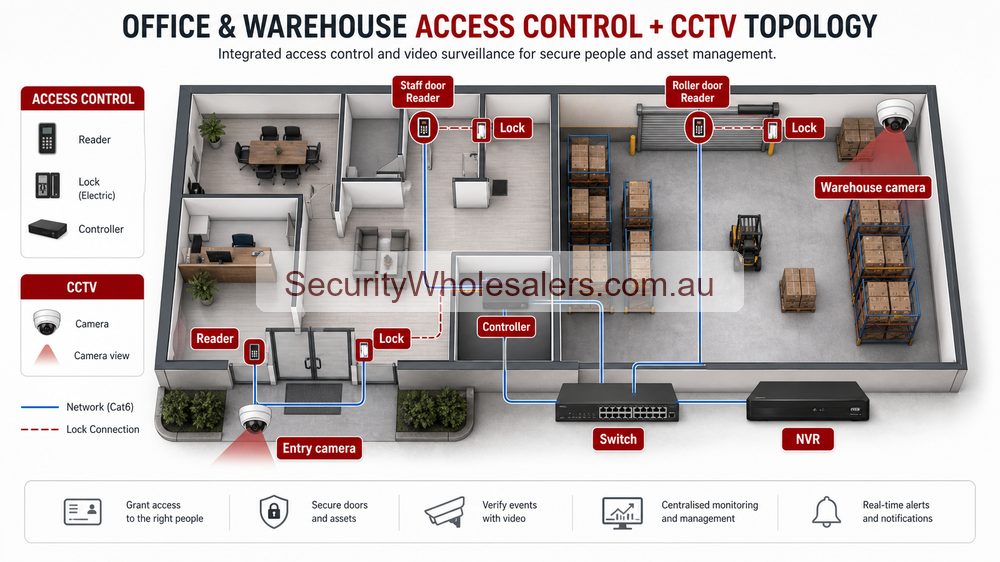
For a typical IP-based retail staff-entry job, the cabling logic is straightforward, but it still needs discipline. The face terminal normally wants a hardwired Cat6 path back to a PoE switch or network point, and the PoE switch then needs an uplink back to the store network or router if the customer expects browser configuration, remote management, or central software.
- Face terminal to PoE switch: 1 x Cat6
- PoE switch to modem, router, or main network: 1 x Cat6 uplink
- Lock path: separate low-voltage cabling for the electric strike or maglock
- Exit button or request-to-exit device: separate low-voltage cable on the secure side
- Door contact: separate low-voltage cable if the site wants door-status or forced-door logic
- UPS: recommended if the store expects access continuity and usable event logs during short outages
[Retail face terminal]
    |
    +--> Cat6 to [PoE switch] ---- Cat6 ----> [router / main network]
    |
    +--> relay or controller path ----> [electric strike or maglock]
    |
    +--> secure-side [exit button / REX]
    |
    +--> [door contact]
    |
    +--> [UPS-protected power supply design where outage continuity matters]
On the better jobs, the installer also decides whether the lock release should be protected on the secure side instead of leaving the whole release path exposed at the outside device position. That becomes more important on rear lanes, loading areas, and other doors where the external mounting point is easier to interfere with.
Software, logs, and event review
A single retail staff door may stay relatively simple, especially if the store only wants local management and a small enrolled-user base. But once the retailer asks for several doors, several stores, stronger permissions, or cleaner review of who accessed what and when, the software layer becomes part of the buying decision.
That is where a controller-based path and HikCentral-style management starts to make more sense. It gives the retailer stronger user management, cleaner event trails, and a more realistic way to coordinate doors with CCTV or other alerts. If the project is using specialist face-capture cameras rather than terminals, the software question is even more important because the face events need to be reviewed and handled consistently.
| Retail face path | Software need | Why it matters |
|---|---|---|
| One staff-only face terminal | Low to moderate | Local management may be enough if the site is small and the only question is who can enter one door. |
| Several face-controlled doors | Moderate to high | The store needs cleaner user management, logs, permissions, and event review than a one-door standalone setup provides. |
| Face-capture or face-comparison camera workflow | High | The face events are only useful if the store can manage libraries, searches, review logic, and operator process properly. |
Where face-camera workflows break down
Retail face-camera projects often fail for very predictable reasons. The scene is too wide. The camera is too high. People approach at the wrong angle. The lighting changes too much through the day. Caps, glasses, reflections, and crowding make the face event less reliable than the store expected. Or the store has no real process for what to do with the event once it is generated.
This is why many of these jobs should not start with a face camera. If the site cannot control the approach point and cannot explain who will manage the software, a face terminal on a door is usually the more useful and lower-risk deployment.
| What goes wrong | Why it happens | Better answer |
|---|---|---|
| Overview camera asked to do identity work | The camera was installed for broad coverage, not controlled face capture | Use a specialist face point or keep the task on a door terminal |
| Too many people, too much scene clutter | The store wants face comparison in a messy, uncontrolled customer flow | Limit the workflow to a controlled threshold or avoid public face comparison entirely |
| No one manages the watchlist or face events | The project bought AI language without buying process | Use a simpler access-control-focused deployment or define the review workflow before deployment |
Retail privacy and governance in Australia
Retail buyers should treat customer-facing facial recognition as more sensitive than ordinary CCTV. Even when the business feels the loss-prevention case is real, it still needs to ask whether the deployment is necessary, proportionate, and properly governed. Signage is useful, but signage by itself is not the same as a full privacy assessment or a clear legal basis.
That is why the lower-risk retail starting point is usually enrolled-user face recognition for staff-only access. The system is narrower, the purpose is clearer, the user population is defined, and the access-control benefits are easy to explain. Public watchlist or customer-identification workflows deserve a much more cautious conversation.
- Who is being enrolled and who approves that process?
- What exact retail problem is the system solving?
- Who can search, export, or review face events?
- How long are face-related records retained?
- What is the process if the business is challenged on the deployment?
Common mistakes on retail face-recognition jobs
- Using a general overview CCTV camera where the real job is a controlled identity check at a door.
- Mounting a face device where the customer approaches at the wrong angle or in heavy backlight.
- Forgetting fallback credentials, exit hardware, and outage behaviour.
- Assuming a face terminal and a face-capture camera are interchangeable because they both mention face recognition.
- Trying to roll face recognition across the whole retail floor instead of limiting it to the few points where it can actually work and be justified.
- Treating signage as if it solves the entire privacy question for public-facing identification.
Relevant SecurityWholesalers Categories and Products
These are the Hikvision categories and products that usually matter most once a retail face-recognition discussion becomes a real project rather than a vague AI idea.
- Hikvision face recognition terminals - The main category for enrolled-user face terminals on staff doors, back-office entries, and restricted retail zones.
- DS-K1T341AM - A practical smaller-store face terminal for controlled staff entry.
- DS-K1T344MBWX-E1 - Strong for more exposed retail entries that need IP65, PoE, QR, and mixed-auth flexibility.
- DS-K1T673DWX - Better where the store wants a stronger Pro-series commercial terminal and more capacity.
- DS-K2702X-P - Useful where the store wants logged multi-door control or a cleaner path into schedules and permissions.
- Hikvision face recognition cameras - A specialist camera option for face comparison or face capture in carefully controlled retail scenes.
- Hikvision NVRs - Important when the retailer wants the CCTV side, storage, and event review path sized properly around the face workflow.
- HikCentral access control base license - Relevant where the retailer wants a more structured management layer instead of a one-door standalone mindset.
Sources and Further Reading
Frequently Asked Questions
-
What is the most practical Hikvision face recognition starting point for retail?
For most retailers, the practical starting point is a face terminal on a staff-only door, stockroom, or office entry. That gives the business touch-free access control, event logs, and clearer governance without immediately turning the project into public-facing customer surveillance.
-
When is a face recognition camera actually justified in a retail environment?
A face recognition camera is justified only when the store has a controlled approach point, a defined identification purpose, and a software workflow that can actually use the face events properly. It is not the right default choice for a general overview camera on a sales floor.
-
Should a retail store use a face terminal or a face recognition camera at a staff door?
At a staff door, a face terminal is usually the cleaner answer. It is built for identity verification at the point of access and pairs more naturally with locks, schedules, permissions, and audit trails than a CCTV camera does.
-
What does the installer need to get right for retail face recognition?
They need to confirm mounting height, approach direction, lighting, background glare, Cat6 path, lock hardware, exit devices, fallback credentials, and whether the software setup is local, controller-based, or HikCentral-led. Face recognition is less forgiving than normal CCTV if those basics are wrong.
-
Is signage alone enough for public-facing retail face recognition in Australia?
No. Signage helps with notice, but public-facing facial recognition raises a broader privacy and governance question than ordinary CCTV. The retailer should test necessity, proportionality, data handling, and the legal basis for the system rather than assuming a sign solves the issue.
-
Does a retail face recognition job need software or can it stay simple?
A single staff door may stay comparatively simple, but once the project involves several entries, multiple stores, or any kind of face capture and comparison workflow, the software layer becomes part of the buying decision. That is especially true if the retailer expects usable logs, watchlists, or event review.
Related Pages
Hikvision Access Control Buying Guide
Decide whether the retail job belongs in a simple terminal path, a logged controller path, or a larger managed access-control design.
How to Choose a Hikvision Camera
Separate normal CCTV decisions from specialist face-capture or face-comparison camera decisions.
Best Hikvision CCTV System for Small Business
Plan the wider store CCTV, recorder, and after-hours strategy around the face-recognition layer.
Hikvision Buying Guide
Go back to the main Hikvision guide if the project is still being scoped at the ecosystem level.