

















Commercial
Hikvision Video Intercom Buying Guide
Buying Guide
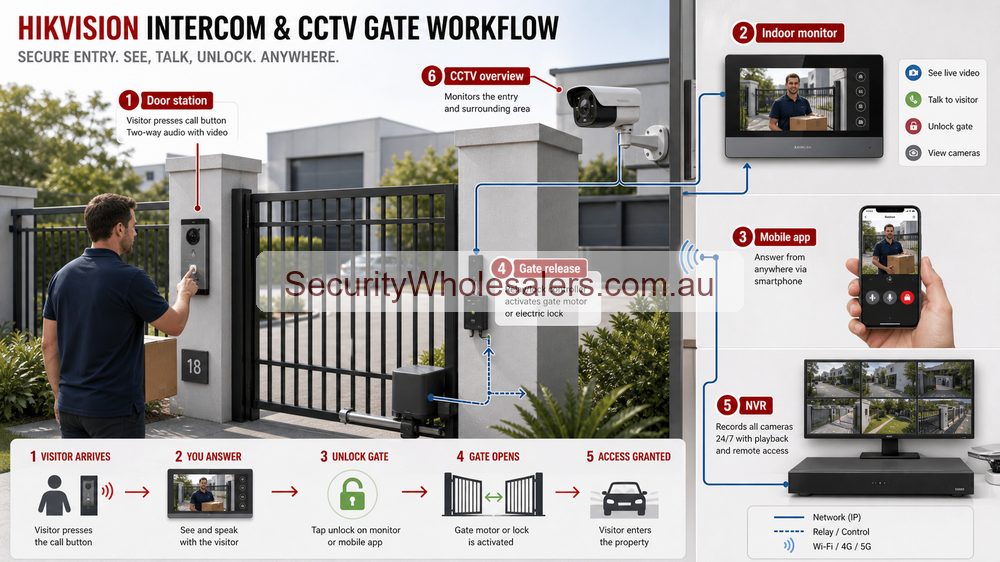
Intercom choice starts with the entry workflow
The first useful question is not "which intercom kit?" It is "who is at the door, who answers, how is the visitor verified, and what exactly releases if access is approved?" That entry workflow decides whether the site needs a simple villa-style kit, a more modular IP system, or a larger apartment-style structure with indoor stations and management layers.
Where Hikvision intercom usually fits best
Hikvision intercom is particularly strong where the site wants app access, indoor stations, CCTV crossover, or an intercom that can sit closer to access control rather than standing alone. Medical front doors, offices, villas, apartment buildings, and mixed-use entries are all good examples.
| Intercom setup | Usually strongest for | What the installer needs to think about |
|---|---|---|
| Simple villa or office door station | Homes, clinics, one main office entry, simple managed front doors | PoE or power supply design, strike or maglock choice, app handover, indoor monitor location. |
| Modular IP intercom | Higher-use offices, sites with keypad or credential overlap, more polished front entries | Secure relay design, module location, network connection, indoor and concierge endpoints. |
| Apartment or multi-tenant intercom | Strata, apartment, rooming-house, and mixed-use residential projects | Resident directory logic, tenant turnover workflow, lift and door integration, backbone wiring. |
Features buyers actually care about
Most visitors do not need every feature on day one, but they do need to understand the options that change how the site operates. The most important ones are usually app answering, indoor monitor support, keypad or credential support, dual lock control, relay output for gates or roller doors, time schedules, call forwarding, and whether the intercom is expected to sit alone or overlap with access control.
- App answering for owners or staff who are not always at the desk
- Indoor stations for sites that want fixed answering points as well as mobile use
- Keypad, Bluetooth, or credential support where trusted users also need direct entry
- Dual lock or gate outputs for sites that control both a pedestrian door and another access point
- Apartment directory and concierge workflow where the front entry is shared by many users
Installation insight: the lock-release design and cable path matter more than the brochure
A neat-looking intercom quote can still go wrong if the door hardware is not checked properly. The installer needs to confirm whether the door suits an electric strike or maglock, whether the release relay needs protection on the secure side, whether the site wants one or two locks, and how the indoor station, door station, and network connection will actually be cabled.
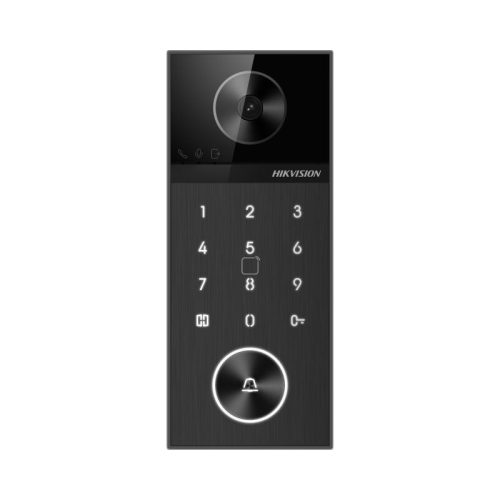
The DS-KV6124-WBE1 is a good example because it makes sense only when the installer has already worked out how the door should release and who is meant to use keypad or Bluetooth credentials at that entry.
What a straightforward Hikvision IP intercom installation usually requires
On a simple IP villa or office install, such as a DS-KIS602 IP kit, the normal starting point is one Cat6 cable from the door station back to a PoE switch, one Cat6 cable from the indoor monitor back to the same PoE switch, and one Cat6 uplink from the PoE switch to the modem or router if the client wants remote communication through the app.
That means the practical network connection is usually:
- Door station to PoE switch: 1 x Cat6
- Indoor monitor to PoE switch: 1 x Cat6
- PoE switch to modem or router: 1 x Cat6 uplink for app access and wider network communication
- Additional indoor monitors: 1 x Cat6 each back to the PoE switch or structured switch layer
That is the cleanest installer-led layout on many new or re-cabled jobs because it keeps the intercom devices on a proper wired network connection. App features and Bluetooth are useful, but they do not remove the value of stable Cat6 cabling and a sensible PoE design.
DS-KV6124-WBE1 style front-door implementation
The DS-KV6124-WBE1 is a good example of a front-door device that starts to blur the line between intercom and simple access control. It supports card, PIN, Bluetooth, Hik-Connect, indoor-station release, and dual lock control, so the installer has to think beyond just "where does the camera sit?"
On a medical centre or office front door, a common arrangement is a Cat6 from the door station to a PoE switch, a Cat6 from the reception monitor to the same PoE switch, and then an uplink from that switch to the modem or router. If the front door needs release, extra low-voltage lock cabling then has to be run from the relay connection to the strike, maglock, or gate input, and the installer needs to decide whether the relay arrangement should sit at the device or through a more protected secure-side relay or lock module.
What extra cabling is needed when the intercom also unlocks a door
The network connection alone is not enough if the intercom must actually release hardware. The installer normally needs to add a second layer of low-voltage lock wiring beyond the Cat6 runs.
- Electric strike: low-voltage cable from the relay connection to the strike, often with a dedicated lock power supply depending on current draw and hardware type
- Maglock: low-voltage cable through the chosen relay arrangement and a proper power supply design sized for the maglock
- Exit button or request-to-exit: extra secure-side low-voltage cable to the chosen release device
- Door contact: extra low-voltage cable if the design wants door status or alarm-style supervision
- Gate or roller-door trigger: low-voltage cable from the intercom relay connection to the operator"s dry-contact input, not directly to the motor side
It is also worth saying clearly that PoE is there to power the intercom equipment. It is not usually the right answer for powering the actual locking hardware. Many strikes and most maglocks are better handled from a dedicated low-voltage lock power supply.
A practical office or medical-centre case-study mindset
Picture a front door that stays locked, with staff wanting to see who is outside before they unlock. In that scenario, a combined intercom and access-style device can be a much cleaner answer than treating the intercom and lock hardware as unrelated purchases. The same logic often extends into medical centres, allied-health entries, and managed office front doors where the visitor experience matters more than the camera count.
A typical implementation may involve a door station at the entry, a secure-side relay or lock module, an electric strike or maglock chosen to suit the actual door, an indoor monitor at reception, app answering for backup, and in some cases a keypad or Bluetooth credential method for trusted staff. The installer still needs to test free egress, fire release behaviour where relevant, and what happens if the network or power supply design drops.
Apartment and multi-tenant intercom is a different project type
Apartment and rooming-house intercom should not be treated as a scaled-up villa kit. Once the site has several residences or tenancies, you need to think about resident directories, credential revocation, tenant turnover, mail or delivery flow, call routing, and sometimes concierge or manager response. That is where Hikvision's apartment intercom range becomes much more relevant than a single-door front-office mindset.
Installers on these jobs also need to think about risers, distribution between levels, cabinet location, managed switches where relevant, and whether the intercom should overlap with access control or lift permissions as the site grows.
Relevant SecurityWholesalers Categories and Products
These Hikvision intercom products show the main entry paths buyers typically compare: simple villa-style door stations, standard IP kits, concierge gear, and door stations that also bridge into access control.
- Hikvision video intercom category - The main place to compare villa, office, apartment, and modular Hikvision intercom options.
- Hikvision Gen2 intercoms - Useful when the project wants modern IP intercom hardware with flexible add-ons and app workflow.
- Hikvision apartment intercoms - Relevant for multi-tenant and strata-style projects with more structured resident and visitor flow.
- DS-KV6124-WBE1 villa door station - A strong example of combined intercom, keypad, Bluetooth, and lock-control logic on a front entry.
- DS-KIS602 IP villa kit - A useful reference for a straightforward IP intercom kit with indoor station, Cat6-to-PoE-switch cabling, and app workflow.
- DS-KM9503 concierge master station - Shows where a larger multi-tenant or managed-entry workflow becomes more structured.
Sources and Further Reading
Intercom quote scenarios
| Entry | Suggested path | Design note |
|---|---|---|
| Single home front gate | Door station, indoor monitor, app answering and gate release. | Check Wi-Fi/network connection and gate relay wiring early. |
| Small office | Door station, reception monitor, app backup and nearby CCTV overview. | Reception workflow matters as much as the hardware. |
| Warehouse gate | Intercom plus wider CCTV approach view and access-control thinking. | Vehicle approach and deliveries often need more than the intercom camera. |
Frequently Asked Questions
-
When is a simple Hikvision villa-style intercom enough?
It is usually enough for a single home, a straightforward office front door, or a small site where one main entry needs visitor verification, app access, and one or two lock releases without apartment-level complexity.
-
When should the project move into a more modular or apartment-style Hikvision intercom?
Usually when the site has several users, several units, a concierge workflow, or a more structured visitor experience that needs directories, indoor stations, and stronger management.
-
Can a Hikvision intercom also unlock doors?
Yes, but the lock-release design still needs proper design. The installer should confirm whether the site needs an electric strike, maglock, or gate or roller-door relay connection, how the lock is powered, and how the secure-side wiring is protected.
-
What cabling does a typical Hikvision IP intercom kit require?
On a typical IP kit, installers normally run one Cat6 cable from the door station back to a PoE switch, one Cat6 cable from the indoor monitor back to the PoE switch, and one Cat6 uplink from that switch to the modem or router if app access or remote communication is required.
-
Does Bluetooth or app access change the design?
It changes the user workflow more than the wiring basics. The site still needs correct power, Ethernet or network connection, indoor stations where required, and a lock release method that suits the actual door hardware.
-
What should the installer confirm before choosing a Hikvision intercom kit?
Door and frame type, lock hardware, cable route, whether PoE is available, whether the site wants one or multiple indoor stations, whether the lock should use a dedicated power supply, and whether the system should be simple local entry or part of a larger access-control workflow.
-
What extra wiring is needed if the intercom also has to unlock the door?
In addition to the network cabling, the installer usually needs low-voltage lock cabling between the relay connection and the electric strike, maglock, or gate input, plus extra cable for any exit button, door contact, or secure relay module that forms part of the release design.
-
Can Hikvision intercom overlap with access control?
Yes, very often. That overlap is one of the strongest reasons to choose Hikvision when the front door needs both visitor verification and a broader credential or lock strategy.
-
Does a Hikvision intercom replace CCTV at the front entry?
Not usually. The intercom camera is useful for calls, but a separate CCTV view often gives better approach, driveway, delivery and playback context.
Related Pages
Hikvision CCTV and Intercom for Front Entry and Gates
Use this if the site is really deciding how the door station and the wider approach cameras should work together.
Hikvision Access Control Buying Guide
Choose the right Hikvision access-control setup and understand what the install requires.
Hikvision CCTV and Access Control for Offices and Warehouses
Use this if the front entry is also becoming a stronger logged access-control job.
Hikvision AX PRO vs AX Hybrid PRO
Compare Hikvision AX PRO and AX Hybrid Pro in practical deployment terms.
Hikvision Buying Guide
The main Hikvision guide for choosing the right part of the range.
Hikvision IP vs Turbo HD
Choose between Hikvision IP and Turbo HD based on cabling, expansion, and analytics.