Useful product directions
Best place to compare terminals, controllers, readers, and software-ready Hikvision access paths.
A practical reference for logged small-business and office-warehouse door control.
Useful when the conversation shifts toward a cleaner managed entry experience rather than only a basic reader.
Combined CCTV and access control examples
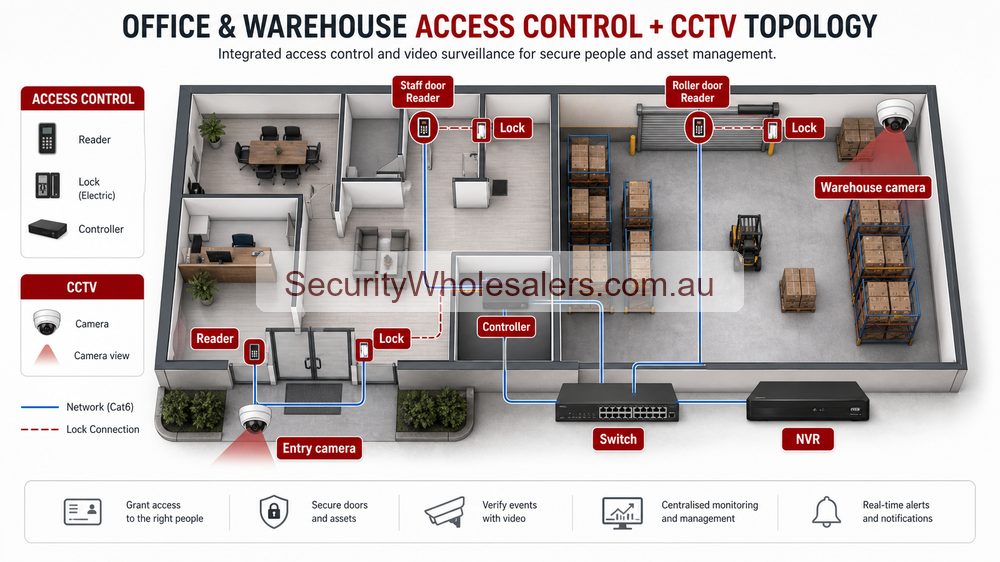
In a small office, CCTV and access control usually meet at the front door and staff entry. A useful design might include an intercom or access reader at the public entrance, a fixed camera aimed for face evidence, and a simple process for adding or removing staff. The buyer does not need an enterprise system; they need a clean handover and reliable door behaviour.
In a warehouse, the access-control value is often between the office, warehouse floor, restricted stock and rear or staff entry. CCTV should be aimed so door events are reviewable. If a credential opens a door at 9:14 pm, the manager should be able to see who used the door, what happened next and whether stock or equipment moved afterwards.
In a larger site, the design should include door groups, administrator roles, contractor access, after-hours rules, NVR retention and network backup. This is where a cheap door-only quote can become painful, because nobody planned who owns the system after installation.
Design checklist for combined jobs
- List every controlled door and every nearby camera evidence point.
- Confirm lock hardware, lock power, exit buttons and emergency egress before quoting.
- Decide whether the NVR, access controller, router and PoE switch need UPS protection.
- Document user-management responsibility before handover.
- Use camera names and door names that match each other.
- Test a real door event and then find the matching footage during commissioning.
Where buyers should spend money first
Spend first on the physical design: correct lock hardware, proper cabling, secure recorder placement, appropriate camera angles and a recorder with enough channel and storage allowance. Software features matter, but they cannot fix a poorly framed camera, an unsuitable lock or a system nobody knows how to administer.
Quoting combined systems by door and camera pair
A practical way to quote these jobs is to pair each controlled door with the camera evidence that supports it. For an office front door, that may be a reader or intercom plus a face-level entry camera. For a warehouse staff door, it may be a reader, exit button, strike and internal/external camera pair. For a restricted cage, it may be a reader and one dedicated stock-area camera.
This keeps the quote useful because the buyer can see why each item exists. It also prevents the common mistake of installing access control without footage that explains the event later. Door logs are useful, but they do not tell the whole story.
Office and warehouse package examples
Office only
Front door reader or intercom, 4 to 6 cameras, 8-channel NVR and documented staff user management. Good for small teams wanting clean entry control.
Warehouse office mix
8 to 16 cameras, staff entry control, office-to-warehouse door, rear-door camera evidence and UPS for recorder/network. Good for trade, logistics and light industrial sites.
Restricted operations
Multiple controlled doors, door groups, camera/event review, after-hours rules and possible AX PRO intrusion layer. Good where stock, plant or compliance areas matter.
Handover questions
- Who can add users, remove users and change door schedules?
- What happens when a staff member leaves?
- Can the manager find footage that matches a door event?
- What happens during a power failure?
- Who supports the system if the phone app, reader or lock stops behaving as expected?
Where combined systems usually go wrong
The most common mistake is designing access control and CCTV separately. The door installer thinks about locks and readers. The CCTV installer thinks about cameras. The buyer then discovers the door log is useful but the camera angle does not show the person clearly, or the camera is good but there is no clean way to review the event. A combined Hikvision design should connect those pieces from the beginning.
Door-by-door planning worksheet
| Door |
Access decision |
CCTV decision |
| Front office |
Reader, intercom or both depending on visitor workflow. |
Face-level evidence and approach view. |
| Staff rear door |
Reader, exit button, after-hours rule. |
Internal and external context if incidents happen after hours. |
| Warehouse link door |
Credential groups for office, warehouse and management. |
View showing movement between areas. |
| Restricted cage |
Limited user group, audit trail. |
Specific stock-area evidence, not just floor overview. |
This worksheet approach makes quotes easier to approve because each door has a security reason and each camera has an evidence reason.
Related Pages
Use this for the deeper terminal, controller, and lift-control logic.
Use this if the door scenes themselves still need a cleaner camera decision.
Use this once the combined site clearly needs a more structured recorder path.
Practical buying scenarios
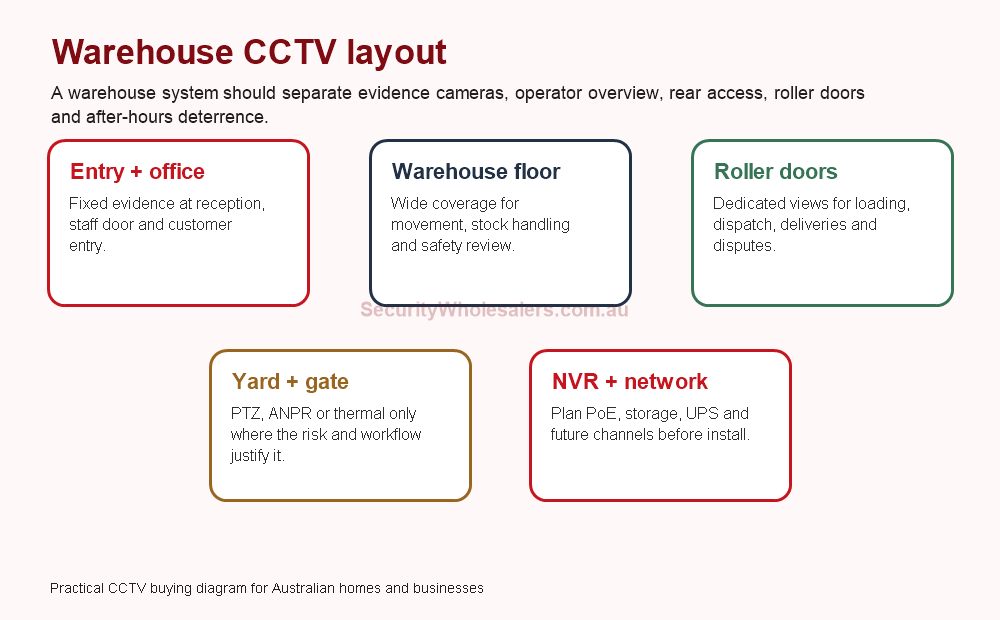
Small business: start with entry, counter or reception, rear door and stock/office views. Warehouse: separate roller-door evidence, dispatch, aisles, yard and office entry. Strata or shared site: document privacy, access rights, camera ownership and footage request workflow before installation.
Quote-ready checks
- What exact incident or workflow is this page trying to solve?
- Which views need identification detail and which only need overview?
- Does the recorder or management platform support the finished camera count?
- What must be tested at handover: live view, playback, alerts, export, users and account ownership?
- Where would this system become the wrong choice and need a different product family?
For Hikvision CCTV And Access Control For Offices And Warehouses, the strongest Hikvision quote should read like a site plan, not a box list. It should explain why each camera or recorder path is being chosen, where the buyer should avoid overbuying, and what happens if the site expands later.
Small, medium and complex examples
| Site size |
Practical direction |
What to avoid |
| Small |
Keep the system simple and solve the main evidence points first. |
Buying specialist features before the basic views are right. |
| Medium |
Plan recorder headroom, remote access and stage-two expansion. |
Filling the recorder or ignoring storage assumptions. |
| Complex |
Document permissions, network design, response workflow and handover. |
Choosing models without a support and review plan. |
This extra planning step is often what separates a useful Hikvision system from a quote that only looks good on paper.
Office and warehouse integration notes
Access control and CCTV should explain each other. A door event is more useful when the camera view shows who approached, whether they entered and what happened afterwards. CCTV is more useful when door events help narrow the search.
Warehouse example: use fixed cameras on roller doors, dispatch, pedestrian entries and office access. Use access control where doors need accountability. Use the NVR and user permissions so managers can review events without exposing the whole system unnecessarily.
Do not quote integration casually: confirm door hardware, exit buttons, fire egress, network path, user permissions and who manages credentials after staff changes.
Final buyer rule
For Hikvision CCTV And Access Control For Offices And Warehouses, the final Hikvision choice should be easy to defend on site: the view is useful, the recorder is sized properly, and the handover proves the buyer can find footage later.
Office and warehouse integration notes
Access control and CCTV should explain each other. A door event is more useful when the camera view shows who approached, whether they entered and what happened afterwards. CCTV is more useful when door events help narrow the search.
Warehouse example: use fixed cameras on roller doors, dispatch, pedestrian entries and office access. Use access control where doors need accountability. Use the NVR and user permissions so managers can review events without exposing the whole system unnecessarily.
Do not quote integration casually: confirm door hardware, exit buttons, fire egress, network path, user permissions and who manages credentials after staff changes.
Final buyer rule
For Hikvision CCTV And Access Control For Offices And Warehouses, the final Hikvision choice should be easy to defend on site: the view is useful, the recorder is sized properly, and the handover proves the buyer can find footage later.
Office and warehouse integration notes
Access control and CCTV should explain each other. A door event is more useful when the camera view shows who approached, whether they entered and what happened afterwards. CCTV is more useful when door events help narrow the search.
Warehouse example: use fixed cameras on roller doors, dispatch, pedestrian entries and office access. Use access control where doors need accountability. Use the NVR and user permissions so managers can review events without exposing the whole system unnecessarily.
Do not quote integration casually: confirm door hardware, exit buttons, fire egress, network path, user permissions and who manages credentials after staff changes.
Final buyer rule
For Hikvision CCTV And Access Control For Offices And Warehouses, the final Hikvision choice should be easy to defend on site: the view is useful, the recorder is sized properly, and the handover proves the buyer can find footage later.
How to quote Hikvision CCTV And Access Control For Offices And Warehouses properly
The practical value of Hikvision CCTV And Access Control For Offices And Warehouses comes from how well it solves entry control on a real Australian site. A strong recommendation should talk about door rules, lock power, egress, visitor handling, mobile answering, tenancy changes and video verification, because those details decide whether the system is useful after the installer leaves.
Design the user workflow before choosing devices. The system should make it obvious who can open which door and what evidence is recorded. This is where a good buying guide should help: it should make the trade-offs visible before the customer spends money, not after the first incident exposes a weak view.
Small site
For a small Hikvision Hikvision CCTV And Access Control For Offices And Warehouses project, focus on the few views that would prove the most likely incident. It is better to have fewer well-planned cameras than more cameras that miss faces, plates, doors or night detail.
Medium site
For a medium Hikvision CCTV And Access Control For Offices And Warehouses site, separate identification views from overview views. Use stronger cameras where people, vehicles or high-value stock must be identified, and use practical overview cameras where the goal is movement context.
Complex site
For a complex Hikvision CCTV And Access Control For Offices And Warehouses site, plan the recorder, permissions and expansion path before finalising cameras. Larger jobs often fail because the hardware is good but the storage, network or user workflow was never properly designed.
What a 95/100 Hikvision quote should include
- A short explanation of what each recommended camera is expected to prove.
- Enough recorder storage and spare channels for realistic future expansion.
- Notes on night performance, glare, weather exposure, mounting height and service access.
- A simple handover plan covering app access, playback, footage export and user permissions.
For Hikvision CCTV And Access Control For Offices And Warehouses, the best buying decision is the one that still feels obvious six months later. If the buyer can understand why each device was chosen, how footage will be found, and where the system can grow, the quote is far more likely to deliver long-term value.
Final checks before ordering Hikvision CCTV And Access Control For Offices And Warehouses
Before ordering Hikvision CCTV And Access Control For Offices And Warehouses, ask the installer or sales team to describe the weakest part of the proposed design. That question is useful because every security system has a trade-off: lens width versus detail, deterrence versus discretion, recorder cost versus retention, or simplicity versus future expansion.
For Hikvision CCTV And Access Control For Offices And Warehouses, the better Hikvision purchase is usually the one with a clear explanation rather than the longest specification sheet. The quote should say which views are for identification, which are for overview, which settings need commissioning, and which parts of the system should be reviewed after the first few weeks of real use.
A final practical check for Hikvision CCTV And Access Control For Offices And Warehouses is supportability. Choose a system that can be explained to the person who will actually use it: how to open the app, find yesterday's event, export a clip, add a user, and understand when a camera or recorder needs attention. That day-to-day clarity is what separates a decent product list from a genuinely useful Hikvision security solution.