Commercial

Hikvision CCTV and Intercom for Front Entry and Gates

A front entry or gate is often where buyers discover that one device is not doing every job. The intercom handles visitor interaction and release workflow. The CCTV handles the wider approach, context, and later review.

Combined Systems

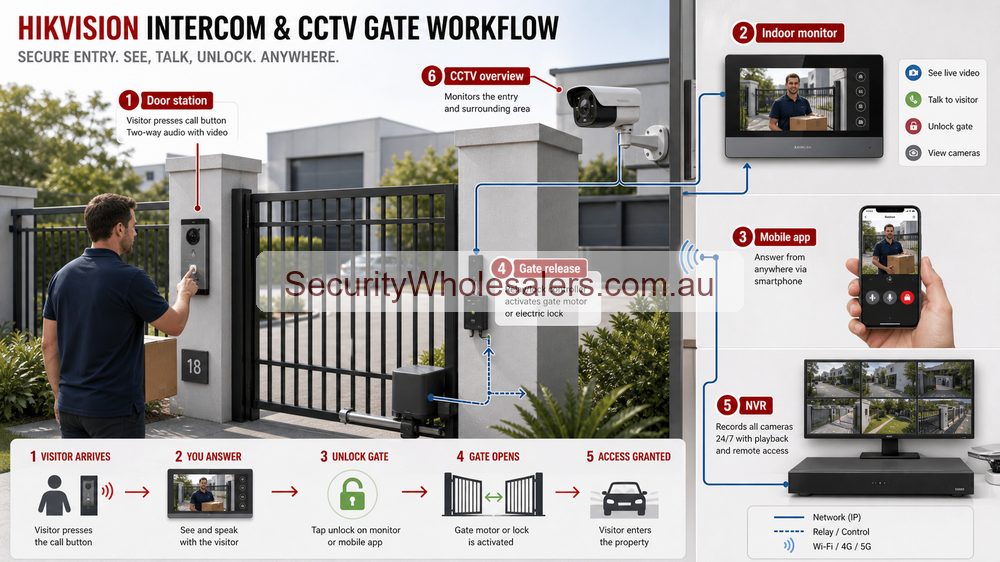
Hikvision CCTV and intercom front entry gate workflow diagram
Front-entry systems work best when intercom, app answering, lock release and CCTV overview are planned together.

Quick answer

Use a Hikvision intercom when the site needs calling, answering, app response, indoor monitor support, or lock release. Add Hikvision CCTV when the site also wants a wider or more stable view of the approach, the gate lane, the front door environment, or stronger later playback than the intercom view alone provides.
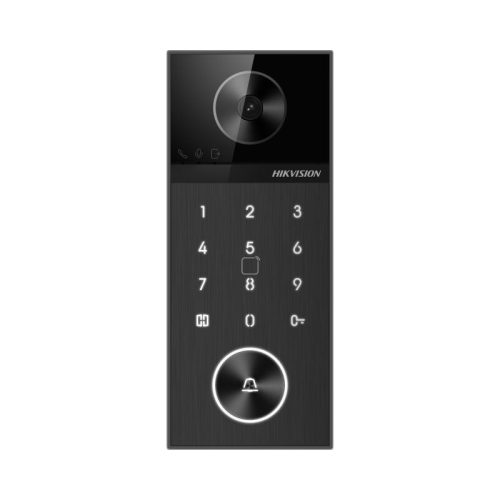
Hikvision villa intercom door station
An intercom door station is great for visitor interaction, but it does not always give the wider approach view a proper front entry or gate really needs.

Quote scenarios: front doors, gates and shared entries

Site Practical Hikvision path Why
Single home front door Villa intercom, indoor station or app access, nearby fixed CCTV overview. The intercom answers the visitor; the CCTV gives wider evidence around approach and parcels.
Driveway gate Intercom at gate, lock or relay planning, camera on vehicle approach, possible ANPR only if geometry suits. The gate device alone rarely covers the whole vehicle approach properly.
Strata or small apartment entry Intercom, common-entry camera, garage camera and clear user/admin rules. Shared sites need predictable user management and privacy expectations.

What the intercom does and what the camera does

Layer Main job Why it matters
Intercom Visitor interaction and release workflow Lets the site call, answer, verify, and unlock or trigger the entry path.
CCTV Approach coverage and review Shows the wider driveway, footpath, gate area, or front-door approach before and after the intercom event.
Combined design Better entry understanding Gives the user both the interaction layer and the wider visual layer around the threshold.

When the intercom alone is enough and when it is not

Usually enough

Simple single front doors where the main need is answering visitors and releasing one lock without worrying much about the wider approach.

Usually not enough

Longer driveways, front gates, visitor parking areas, clinics, offices, or managed entries where the site wants a broader view before unlocking.

Natural step-up

Add one or two fixed Hikvision cameras when the site wants stronger context, better review, or a clearer view of the approach lane.

Real front entry and gate scenarios

Home with front gate

The intercom handles calling and gate release. A separate camera covers the driveway or approach so the owner can see more than just the face at the panel.

Office or medical front door

The intercom lets reception verify and release the door, while a fixed camera shows the wider front entry zone and who else is waiting or moving nearby.

Rooming house or managed entry

The intercom handles the entry interaction, but CCTV usually becomes important because the site wants more reliable review of how the entry was used later.

Small commercial gate

An intercom can trigger the gate, but a separate camera often does a much better job on the vehicle lane, approach timing, or overall context around the entry.

Typical Hikvision pathways

Site type Usually start with Then add Why this path works
Simple front door Villa-style intercom kit Separate fixed camera only if the wider approach matters The site may only need visitor verification and door release, not a much larger visual system.
Office or clinic entry IP intercom with monitor or app workflow One fixed camera on the front approach Reception can answer the door while still seeing the wider entry environment.
Gate or longer approach Intercom plus separate camera Possibly access control logic if trusted users also need direct entry The intercom camera usually does not replace a proper wider or more stable approach view.
Managed multi-user front entry More structured IP intercom path CCTV, access control, and stronger release design The site is no longer only an intercom job. It is becoming a combined front-entry system.

What changes the installation

  • Whether the intercom is only calling, or also releasing a strike, maglock, gate, or roller-door trigger
  • Whether a PoE switch and Cat6 path are already planned for both the intercom and camera branches
  • Whether the site wants indoor monitor answering, app answering, or both
  • Whether the intercom camera can genuinely do the whole job or whether a separate fixed camera is the honest answer
  • Whether the entry is simple local use or part of a broader access-control workflow

Useful product directions

Hikvision DS-KV6124-WBE1 door station

DS-KV6124-WBE1

A strong reference point where intercom, keypad, Bluetooth, and door release all meet at the front entry.

Hikvision DS-KIS602 intercom kit

DS-KIS602 IP kit

A useful starting path for straightforward IP intercom installs that still want app and monitor workflow done properly.
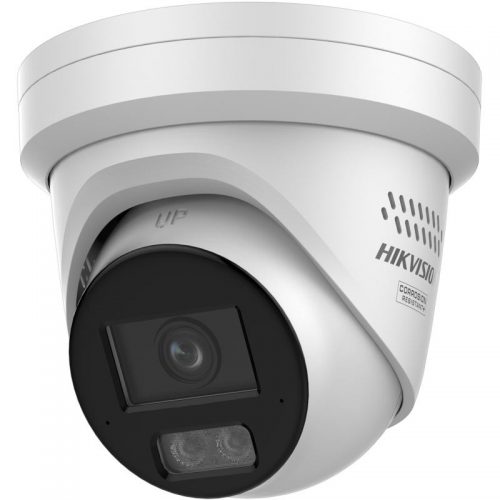
Hikvision fixed camera

Fixed camera support view

Often the cleanest second layer when the buyer wants a stronger view of the wider approach than the intercom panel alone can provide.

Front entry and gate FAQs

  • When is a Hikvision intercom on its own enough?

    Usually on a simple single entry where the site mainly wants visitor verification and door release rather than broader approach coverage.

  • Why add CCTV to an intercom entry?

    Because a separate camera usually gives a wider and more stable view of the approach, driveway, gate lane, or front-door context than the intercom panel alone.

  • Can the intercom camera replace the main CCTV camera?

    Usually no. The intercom camera is there for interaction and verification. A CCTV camera often does the broader scene and later review much better.

  • Which sites benefit most from this combined path?

    Homes with gates, offices, clinics, managed entries, rooming houses, and any front-door workflow where both interaction and visual coverage matter.

Front entry quote examples

Entry Recommended design
Home gate Intercom call station, app answering, gate release and CCTV driveway overview.
Office front door Intercom or access reader plus entry camera and reception workflow.
Warehouse gate Intercom, CCTV overview, possible ANPR and clear gate-release logic.

Related Pages

Hikvision Video Intercom Buying Guide

Use this for the deeper villa, office, apartment, and monitor workflow logic.

Hikvision Access Control Buying Guide

Use this if the front entry is also moving into a stronger credential and permissions workflow.

How to Choose a Hikvision Camera

Use this if the wider approach camera still needs a cleaner fixed, varifocal, or deterrence decision.

Practical buying scenarios

Front door: match the camera/intercom view to the visitor workflow. Gate: confirm cable, lock release, exit button and app response before ordering. Office or warehouse: plan access permissions and CCTV evidence together so door events can be reviewed later.

Quote-ready checks

  • What exact incident or workflow is this page trying to solve?
  • Which views need identification detail and which only need overview?
  • Does the recorder or management platform support the finished camera count?
  • What must be tested at handover: live view, playback, alerts, export, users and account ownership?
  • Where would this system become the wrong choice and need a different product family?

For Hikvision CCTV And Intercom For Front Entry And Gates, the strongest Hikvision quote should read like a site plan, not a box list. It should explain why each camera or recorder path is being chosen, where the buyer should avoid overbuying, and what happens if the site expands later.

Small, medium and complex examples

Site size Practical direction What to avoid
Small Keep the system simple and solve the main evidence points first. Buying specialist features before the basic views are right.
Medium Plan recorder headroom, remote access and stage-two expansion. Filling the recorder or ignoring storage assumptions.
Complex Document permissions, network design, response workflow and handover. Choosing models without a support and review plan.

This extra planning step is often what separates a useful Hikvision system from a quote that only looks good on paper.

Front entry and gate field notes

Separate the jobs: the intercom handles the call and unlock workflow. CCTV handles evidence and broader approach coverage. One device may not solve both perfectly.

Gate example: confirm cable path, power, lock or gate trigger, exit method, app answer expectations and what happens when the internet is down. Add a separate camera if the intercom angle cannot show vehicles or packages clearly.

Shared entry example: document who can answer calls, who can unlock, how visitors are handled and how footage requests are managed.

Final buyer rule

For Hikvision CCTV And Intercom For Front Entry And Gates, the final Hikvision choice should be easy to defend on site: the view is useful, the recorder is sized properly, and the handover proves the buyer can find footage later.

Front entry and gate field notes

Separate the jobs: the intercom handles the call and unlock workflow. CCTV handles evidence and broader approach coverage. One device may not solve both perfectly.

Gate example: confirm cable path, power, lock or gate trigger, exit method, app answer expectations and what happens when the internet is down. Add a separate camera if the intercom angle cannot show vehicles or packages clearly.

Shared entry example: document who can answer calls, who can unlock, how visitors are handled and how footage requests are managed.

Final buyer rule

For Hikvision CCTV And Intercom For Front Entry And Gates, the final Hikvision choice should be easy to defend on site: the view is useful, the recorder is sized properly, and the handover proves the buyer can find footage later.

Front entry and gate field notes

Separate the jobs: the intercom handles the call and unlock workflow. CCTV handles evidence and broader approach coverage. One device may not solve both perfectly.

Gate example: confirm cable path, power, lock or gate trigger, exit method, app answer expectations and what happens when the internet is down. Add a separate camera if the intercom angle cannot show vehicles or packages clearly.

Shared entry example: document who can answer calls, who can unlock, how visitors are handled and how footage requests are managed.

Final buyer rule

For Hikvision CCTV And Intercom For Front Entry And Gates, the final Hikvision choice should be easy to defend on site: the view is useful, the recorder is sized properly, and the handover proves the buyer can find footage later.

How to quote Hikvision CCTV And Intercom For Front Entry And Gates properly

The practical value of Hikvision CCTV And Intercom For Front Entry And Gates comes from how well it solves entry control on a real Australian site. A strong recommendation should talk about door rules, lock power, egress, visitor handling, mobile answering, tenancy changes and video verification, because those details decide whether the system is useful after the installer leaves.

Design the user workflow before choosing devices. The system should make it obvious who can open which door and what evidence is recorded. This is where a good buying guide should help: it should make the trade-offs visible before the customer spends money, not after the first incident exposes a weak view.

Small site

For a small Hikvision Hikvision CCTV And Intercom For Front Entry And Gates project, focus on the few views that would prove the most likely incident. It is better to have fewer well-planned cameras than more cameras that miss faces, plates, doors or night detail.

Medium site

For a medium Hikvision CCTV And Intercom For Front Entry And Gates site, separate identification views from overview views. Use stronger cameras where people, vehicles or high-value stock must be identified, and use practical overview cameras where the goal is movement context.

Complex site

For a complex Hikvision CCTV And Intercom For Front Entry And Gates site, plan the recorder, permissions and expansion path before finalising cameras. Larger jobs often fail because the hardware is good but the storage, network or user workflow was never properly designed.

What a 95/100 Hikvision quote should include

  • A short explanation of what each recommended camera is expected to prove.
  • Enough recorder storage and spare channels for realistic future expansion.
  • Notes on night performance, glare, weather exposure, mounting height and service access.
  • A simple handover plan covering app access, playback, footage export and user permissions.

For Hikvision CCTV And Intercom For Front Entry And Gates, the best buying decision is the one that still feels obvious six months later. If the buyer can understand why each device was chosen, how footage will be found, and where the system can grow, the quote is far more likely to deliver long-term value.

Final checks before ordering Hikvision CCTV And Intercom For Front Entry And Gates

Before ordering Hikvision CCTV And Intercom For Front Entry And Gates, ask the installer or sales team to describe the weakest part of the proposed design. That question is useful because every security system has a trade-off: lens width versus detail, deterrence versus discretion, recorder cost versus retention, or simplicity versus future expansion.

For Hikvision CCTV And Intercom For Front Entry And Gates, the better Hikvision purchase is usually the one with a clear explanation rather than the longest specification sheet. The quote should say which views are for identification, which are for overview, which settings need commissioning, and which parts of the system should be reviewed after the first few weeks of real use.

A final practical check for Hikvision CCTV And Intercom For Front Entry And Gates is supportability. Choose a system that can be explained to the person who will actually use it: how to open the app, find yesterday's event, export a clip, add a user, and understand when a camera or recorder needs attention. That day-to-day clarity is what separates a decent product list from a genuinely useful Hikvision security solution.

We make product support and ordering easy! Reach out to our help team :)
Trade Customers: Log In or Register to Unlock Even Better Prices.

Save & Share Cart
Your Shopping Cart will be saved and you'll be given a link. You, or anyone with the link, can use it to retrieve your Cart at any time.
Back Save & Share Cart
Your Shopping Cart will be saved with Product pictures and information, and Cart Totals. Then send it to yourself, or a friend, with a link to retrieve it at any time.
Your cart email sent successfully :)