

















Commercial
Hikvision Installer Checklist Australia
Installation planning
Quick answer
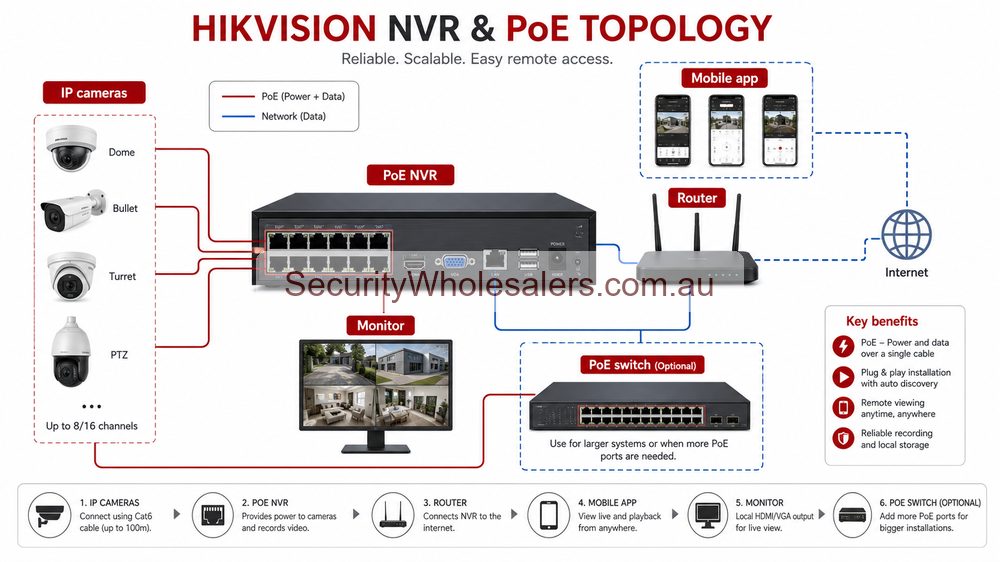
Use this checklist before ordering a Hikvision CCTV system, especially if the job also includes intercom, access control, AX PRO alarms, ANPR or thermal cameras. The aim is simple: avoid under-sized recorders, awkward camera views, poor night performance, messy app handover and expensive return visits.
Pre-quote site checklist
| Item | What to confirm | Why it matters |
|---|---|---|
| Camera purpose | Identify, overview, alert, deter, plate capture or temperature detection. | Different goals need different lenses, mounting heights and camera families. |
| Cable paths | Roof space, conduit, trenching, wireless bridges, comms cabinet and exposed runs. | Installation cost often changes more than camera cost. |
| NVR location | Secure, ventilated, serviceable and near suitable network/power. | The recorder should not be easy to steal or overheat. |
| Internet | Reliable router, upload speed, app requirements and remote support expectation. | Local recording can work offline, but modern management usually needs internet. |
| Power continuity | UPS for NVR, switches, modem/router and critical access devices. | A short power cut should not disable the evidence chain immediately. |
CCTV camera placement checklist
- Separate identification views from overview views. A high wide camera is rarely the best face-evidence camera.
- Check the actual mounting height and distance before assuming a fixed 2.8 mm lens will suit every location.
- Use motorised varifocal cameras where the scene is hard to judge on paper, such as gates, long driveways, loading docks and shopfront approaches.
- Test night lighting. ColorVu, Smart Hybrid Light and IR all behave differently depending on ambient light, reflectivity and mounting position.
- Allow for glare, headlights, roller doors, trees, signage, eaves, spider webs and rain exposure.
- Name cameras by location, not by model number, so footage can be found quickly later.
NVR, storage and network checklist
Many poor CCTV purchases start with the recorder being chosen too tightly. An 8-camera quote on an 8-channel NVR can be fine for a finished home, but it is risky for a warehouse, strata building or business likely to add more doors, yards or specialist cameras later. If the site may expand, step up the channel count early.
| Decision | Better buying habit |
|---|---|
| NVR channels | Buy for the final likely camera count, not just the first stage. |
| PoE budget | Check total PoE load, especially for PTZ, multi-sensor, outdoor and longer cable runs. |
| Storage | Set a realistic retention target based on resolution, frame rate, motion and business policy. |
| Network | Plan switches, uplinks, router, VLAN expectations and cabinet space before installation. |
| Backup | Put the recorder, PoE switch and router/modem on UPS where remote access and evidence continuity matter. |
Access control and intercom checklist
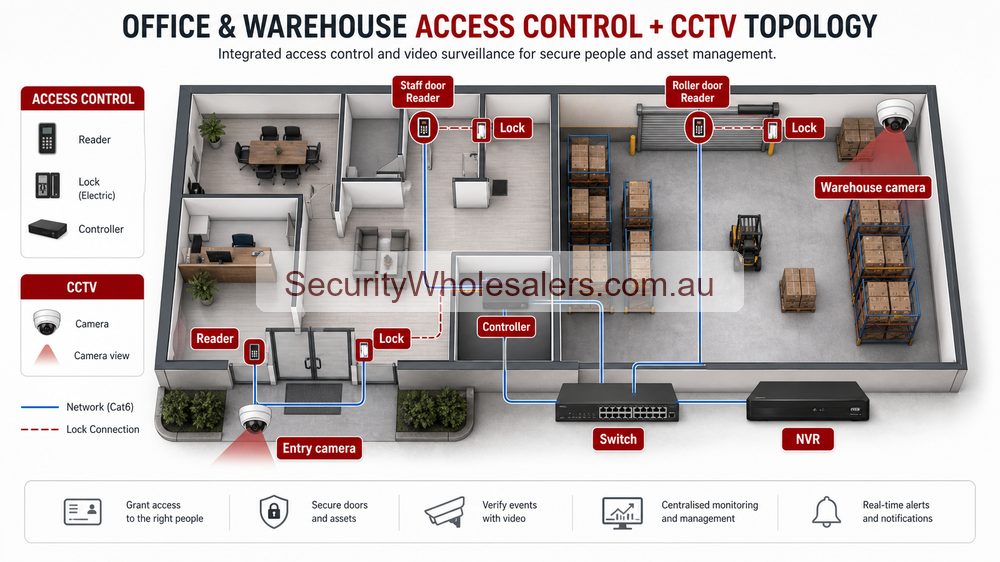
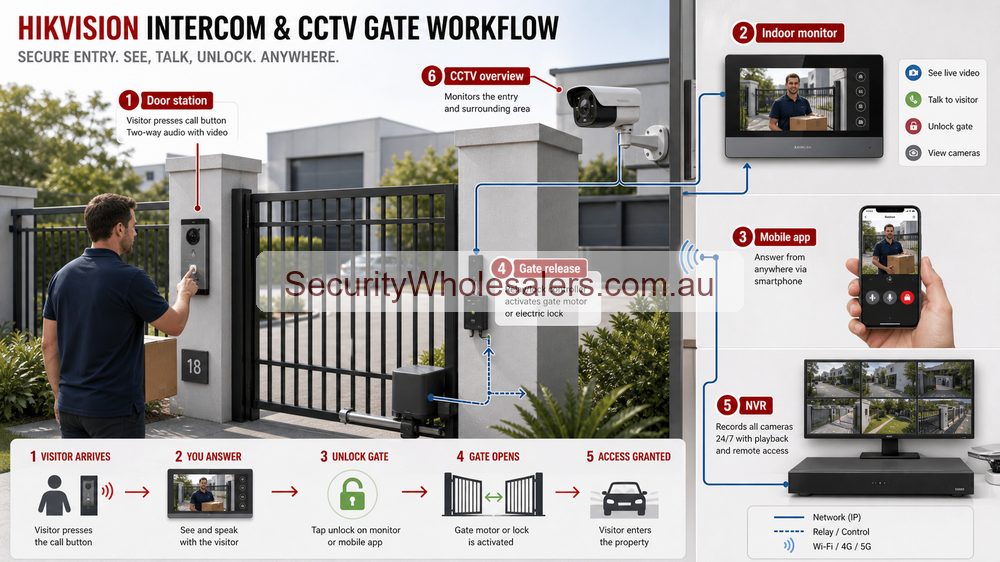
Access control and video intercom are where installation detail matters most. The camera may be simple, but the door hardware may not be. Confirm the lock type, exit button, emergency egress, door closer, strike plate, gate motor interface, lock power supply and what happens during a power failure.
- Confirm whether the door is timber, aluminium, glass, fire-rated, magnetic lock, electric strike or gate-controlled.
- Check if the site needs standalone control, software management, keypad/PIN, card/fob, mobile credential, face terminal or QR workflow.
- Plan cable and power to the door station, indoor station, lock, exit button and network point.
- Decide who can add or remove users, and document this at handover.
- For gates, confirm relay wiring, vehicle loop behaviour, pedestrian entry and what visitors should experience after hours.
AX PRO, ANPR and thermal extras
Specialist devices should be added because the site has a defined problem. AX PRO is strong for after-hours intrusion and duress workflows. ANPR is useful for controlled vehicle lanes when the angle, distance, lighting and administration are suitable. Thermal belongs on perimeter or temperature-risk jobs where visible-light cameras are not enough.
| Specialist layer | Before buying, confirm |
|---|---|
| AX PRO alarm | Sensor positions, app users, siren location, image verification, panic buttons and monitoring path. |
| ANPR | Vehicle speed, lane width, camera angle, plate size, lighting, whitelist process and spoofing risk. |
| Thermal | Detection distance, lens choice, alarm zones, visible verification and response workflow. |
| Live Guard | Whether strobe or speaker warnings are acceptable for neighbours, staff and customers. |
Handover checklist
- Test live view and playback on the NVR and app.
- Export a short video clip so you know evidence can be retrieved.
- Confirm every camera name matches the site map.
- Test day and night views, not just daytime commissioning.
- Record admin ownership, app users, installer access and how old users are removed.
- Document NVR password process, QR code custody, firmware approach and warranty records.
- For access/intercom, test lock release, exit button, fail-safe/fail-secure behaviour and after-hours calling.
- For alarm, test arming, disarming, panic/duress, image verification and who receives notifications.
Practical quote scenarios
Home or small office
6 to 8 cameras, 8-channel PoE NVR, one UPS for recorder and network, app users documented, optional intercom at the front door. Best when the site is unlikely to expand beyond the channel count.
Small warehouse
10 to 16 cameras, 16-channel NVR, fixed evidence views at doors and dispatch, motorised varifocal where framing is uncertain, possible access control on staff-only doors.
Gate, yard or mixed site
16-channel or larger planning, fixed cameras first, then ANPR, PTZ, Live Guard or thermal where the lane, yard or boundary needs a specialist response.
Buying checklist before ordering
- Final camera count and future expansion allowance are agreed.
- NVR channel count, PoE budget and storage target are realistic.
- Camera locations have been checked for height, lens, glare and lighting.
- Internet, router access, app users and email/direct-debit service accounts are prepared where remote access is expected.
- Door hardware, lock power and egress requirements are confirmed for intercom or access control.
- UPS coverage is planned for the recorder, switches and modem/router.
- You know who will maintain users, footage exports, firmware and passwords after handover.
Hikvision installer checklist FAQs
- What should be checked before buying a Hikvision CCTV system?
Check camera locations, cable paths, recorder location, PoE budget, storage target, night lighting, internet access, app users and whether the job needs intercom, access control, alarm, ANPR or thermal integration.
- Should I choose products before the installer visits?
You can shortlist products, but final camera count, lens choice, NVR size and mounting positions should be confirmed after the site conditions are known.
- What is the most common Hikvision installation mistake?
The most common mistake is buying enough cameras for today but not enough NVR channels, storage, cabling allowance or switch capacity for the finished site.
- Does Hikvision need internet?
Local recording can work without internet, but app viewing, remote support, push notifications, firmware management and some user workflows usually require reliable internet.
- Should the NVR be installed near the modem?
Not always. The NVR should be secure, ventilated, serviceable and connected to the network properly. In many commercial sites this means a cabinet, rack or secure communications area rather than an exposed desk.
- What should be tested at handover?
Test live view, playback, export, app access, alert rules, camera names, night performance, UPS behaviour, lock release, alarm events and who can remove old users.
Related Pages
How to Choose a Hikvision Camera
Use this before finalising camera models, lens types and low-light features.
How to Choose a Hikvision NVR
Plan channel count, PoE and retention properly before buying.
CCTV + Access Control for Offices and Warehouses
Use this where doors, staff areas and camera evidence need to work together.