Commercial

Hikvision Access Control Buying Guide

Hikvision access control only becomes useful when the buyer matches the door count, credential style, hardware, and management expectations to the right tier of system.

Buying Guide

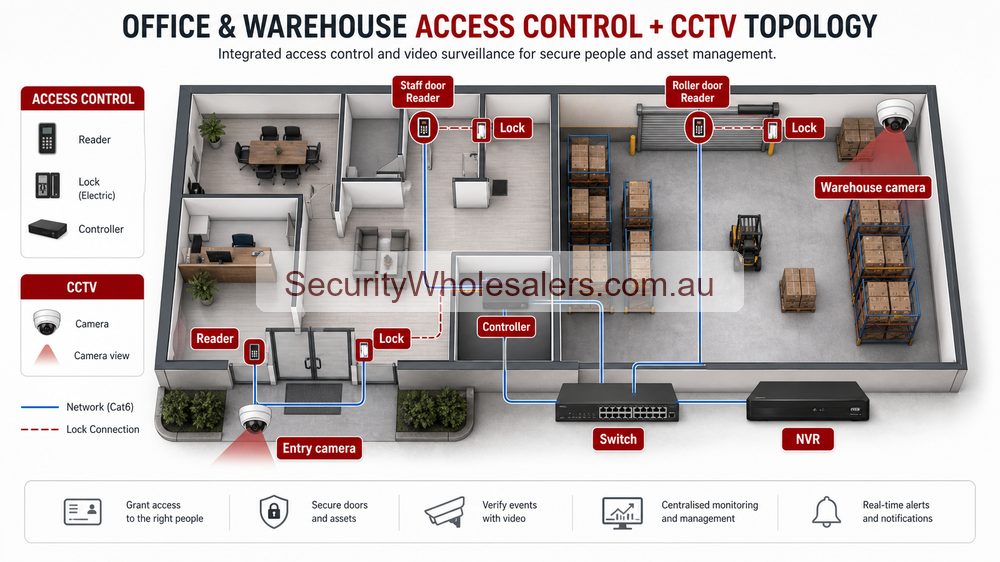
Hikvision access control and CCTV topology for office and warehouse doors
Access control becomes more useful when door events and camera evidence are designed around the same entries and staff workflows.
Hikvision access control and CCTV topology diagram
A terminal such as the DS-K1T105AM is a useful reference point for simpler Hikvision access-control jobs where the site needs a tidy all-in-one entry device rather than a larger multi-door architecture.

The Hikvision access-control question is really a tiering question

Hikvision access control spans from simpler single-door hardware through to controller-based systems that handle several doors, permissions, and lift logic. The buyer usually gets the best result by choosing the right tier early instead of trying to force a basic device into a job that is already asking management questions.

That is why this guide mirrors the deeper access-control section on the site. The practical split is still simple-door, logged 1-2 door, and larger controller-based systems with software and integrations.

Where Hikvision fits particularly well

Hikvision fits well when the site also cares about intercom, CCTV crossover, face terminals, or lift control, or when the buyer wants a brand that can cover more than one security layer as the site grows. It can work for small offices and medical centres, but also for apartment buildings, schools, warehouses, and mixed-use sites that need stronger user control later.

Installation insight: the door hardware still decides half the job

Even on a brand-led project, the installer still needs to determine whether the door is better suited to an electric strike, maglock, or a more specialised path. They need to confirm exit devices, door sensors, fire release logic, controller location, and whether the relay path should be protected on the secure side.

This is also where lift control changes the discussion. A building with front and rear doors, parking entry, and lifts is not a reader-only job. It is a controller and permissions job, and the software expectation should be discussed before the first cable is pulled.

Use the deeper access-control section for the installation playbooks

This brand guide is the bridge into the deeper access-control series already built on the site. Once the buyer knows they want the Hikvision ecosystem, the next useful move is to read the more installation-heavy pages on single doors, logged systems, large controller-based systems, and the Hikvision case studies. That is where the practical wiring and handover detail really deepens.

Relevant SecurityWholesalers Categories and Products

These Hikvision products show the main door-control tiers buyers usually compare: terminals, controllers, readers, face recognition, and lift-control hardware.

Sources and Further Reading

Access control quote scenarios

Site Design path Why
Small office Front door reader, staff credentials and entry camera. Simple controlled entry with useful visual context.
Warehouse Staff door, office door, roller-door workflow and CCTV at access points. Access events and camera footage should support each other.
Multi-tenant entry Credential management, schedules and clearer admin ownership. Permissions become the main operational task.

Access control is not only a reader on a wall. The quote should include lock type, power, exit method, fail-safe/fail-secure behaviour, user management and CCTV context.

Access-control quote examples

Site Starting Hikvision access path Important design point
Small office One or two controlled doors, credentials, exit button and door contact where needed. Confirm the lock type before choosing the reader or terminal.
Warehouse office and stock room Controlled staff entry plus restricted stock or office door. CCTV should cover the approach and event review, not only the door leaf.
Retail back-of-house Staff door control with CCTV around stock and rear access. Separate staff convenience from loss-prevention evidence.

Access control decisions before product selection

The first access-control question is not which reader to buy. It is what the door is meant to do. A staff-only office door, a warehouse entry, a gate, a lift lobby and a restricted stockroom all have different risks. Before choosing Hikvision hardware, confirm the door type, lock type, egress requirement, credential type, number of users, who will manage users and whether the site also needs CCTV evidence at the same point.

For a simple business, one or two doors may be managed with a straightforward controller and card or PIN workflow. For a warehouse, the design may include staff entry, office-to-warehouse separation and a restricted store. For a larger site, software management, multiple doors, event review and role-based access become more important than the reader itself.

Door hardware checklist

Door or entry type Planning notes
Office timber or aluminium door Confirm strike, closer, exit button, cable path and fail-safe or fail-secure behaviour.
Warehouse staff door Consider CCTV at the door, after-hours rules and whether contractors need separate credentials.
Gate Confirm relay interface, pedestrian entry, vehicle loop behaviour and manual override.
Glass or fire-rated door Check hardware suitability before promising a standard lock path.
Lift or shared building area Plan permissions, management responsibility and resident or tenant turnover carefully.

Small, medium and complex access examples

Small office

One or two doors, card or PIN credentials, simple user list and CCTV on the main entry. The goal is cleaner staff access without making administration hard.

Warehouse

Staff entry, office-to-warehouse door and restricted stockroom. Pair door events with camera coverage so managers can review what actually happened.

Multi-tenant or strata

More user turnover, more permission levels and more governance. Software management and documentation become central to the system design.

Access control works best when it is treated as an operational system, not a door gadget. The handover should include how users are added, how old users are removed, who owns the admin login, what happens in a power failure and who is called when a lock or reader fault occurs.

Credential and administration choices

Access control succeeds or fails after installation. Card and fob systems are simple and familiar, but lost credentials need to be removed. PINs are convenient, but shared PINs can become uncontrolled. Face terminals can be useful in the right workplace, but privacy, policy and user expectations need to be handled carefully. Mobile credentials can be convenient but require phone and user management discipline.

Before buying, decide whether the business wants simple local management or a more software-driven system. A small office may only need a tidy list of staff and a process for deleting users. A warehouse with contractors may need groups, schedules and different permissions. A strata building may need a clear handover model because residents change constantly.

Access control with CCTV evidence

Pairing access control with CCTV is one of the most useful Hikvision design choices. Door events answer the question of when a credential was used. CCTV helps answer who used it and what happened next. This is especially valuable at staff entrances, rear doors, restricted stores, garage gates and office-to-warehouse doors.

Access event Useful matching camera view
Staff entry after hours Face-level view at entry plus corridor or office overview.
Warehouse door opened Door evidence plus internal floor view.
Restricted stockroom access Reader-side evidence plus internal stock-area view if appropriate.
Gate release Gate overview, vehicle path and optional ANPR if the lane suits.

Fail-safe, fail-secure and power behaviour

One of the most important access-control conversations is what the door does when power fails. Some doors are designed to unlock for safety. Others stay locked to protect assets. The correct answer depends on the door, the building, egress requirements and the risk. Buyers should not guess this from a product listing.

For business doors, also consider whether a UPS should keep the controller, lock and network alive during short outages. For gates, ask what happens if the motor, reader or network is unavailable. For fire doors or emergency exits, make sure the design is assessed properly rather than treated as a normal office door.

Access-control buyer checklist

  • List each controlled door and the reason it needs control.
  • Confirm door material, frame, lock type and exit hardware.
  • Decide whether credentials are cards, fobs, PIN, face, app or a mix.
  • Define who administers users and how departing staff are removed.
  • Pair important doors with matching CCTV evidence.
  • Document power-failure behaviour and emergency egress.

This is why access control should be quoted carefully. The reader may be the visible product, but the real system includes lock hardware, cabling, controller, power, credentials, user administration and the behaviour of the door during unusual conditions.

Frequently Asked Questions

  • When is a simple Hikvision terminal enough?

    A simple terminal can be enough for a straightforward single-door job where the customer mainly wants controlled entry and does not need much reporting, growth, or software structure.

  • When should a Hikvision job move to door controllers?

    Usually when the site wants logs, schedules, several doors, stronger permissions, or a platform that can grow without replacing everything later.

  • Can Hikvision access control include lift control?

    Yes. On the right jobs, Hikvision can extend into lift permissions so residents, tenants, or staff can be restricted to the floors or areas that match their credentials.

  • Does face recognition change the rest of the design?

    It can. Face recognition affects mounting height, approach distance, lighting, privacy handling, and the need for fallback credentials. It should be treated as a design choice, not just a flashy reader upgrade.

  • What software path should a commercial Hikvision access-control job expect?

    Smaller jobs may stay simple, but once the site cares about logs, permissions, multiple doors, or stronger management, the software layer becomes part of the buying decision rather than an afterthought.

  • What should the installer confirm before quoting Hikvision access control?

    Door type, strike or maglock suitability, egress and fire behaviour, cable path to the secure side, power-supply planning, reader position, controller location, and whether the customer really needs logs, schedules, or future multi-door growth.

  • Should access control be planned with CCTV?

    Yes. CCTV around access-controlled doors helps verify events, investigate tailgating and understand what happened when credentials are used or denied.

Related Pages

Hikvision CCTV and Access Control for Offices and Warehouses

Use this if the site is really trying to combine threshold cameras with staff-only door control.

Hikvision Video Intercom Buying Guide

Choose the right Hikvision video intercom and understand the lock-release path.

Hikvision CCTV and Intercom for Front Entry and Gates

Use this if the job is moving from staff doors into visitor-facing front entry workflow.

Hikvision AX PRO vs AX Hybrid PRO

Compare Hikvision AX PRO and AX Hybrid Pro in practical deployment terms.

Hikvision Buying Guide

The main Hikvision guide for choosing the right branch of the range.

Hikvision Thermal Cameras Buying Guide

The main Hikvision thermal guide for perimeter, fire, and bi-spectrum buying decisions.

How to quote Hikvision Access Control Buying Guide properly

The practical value of Hikvision Access Control Buying Guide comes from how well it solves entry control on a real Australian site. A strong recommendation should talk about door rules, lock power, egress, visitor handling, mobile answering, tenancy changes and video verification, because those details decide whether the system is useful after the installer leaves.

Design the user workflow before choosing devices. The system should make it obvious who can open which door and what evidence is recorded. This is where a good buying guide should help: it should make the trade-offs visible before the customer spends money, not after the first incident exposes a weak view.

Small site

For a small Hikvision Hikvision Access Control Buying Guide project, focus on the few views that would prove the most likely incident. It is better to have fewer well-planned cameras than more cameras that miss faces, plates, doors or night detail.

Medium site

For a medium Hikvision Access Control Buying Guide site, separate identification views from overview views. Use stronger cameras where people, vehicles or high-value stock must be identified, and use practical overview cameras where the goal is movement context.

Complex site

For a complex Hikvision Access Control Buying Guide site, plan the recorder, permissions and expansion path before finalising cameras. Larger jobs often fail because the hardware is good but the storage, network or user workflow was never properly designed.

What a 95/100 Hikvision quote should include

  • A short explanation of what each recommended camera is expected to prove.
  • Enough recorder storage and spare channels for realistic future expansion.
  • Notes on night performance, glare, weather exposure, mounting height and service access.
  • A simple handover plan covering app access, playback, footage export and user permissions.

For Hikvision Access Control Buying Guide, the best buying decision is the one that still feels obvious six months later. If the buyer can understand why each device was chosen, how footage will be found, and where the system can grow, the quote is far more likely to deliver long-term value.

Wrap up EOFY with extra bonus savings :) Use Coupon code: EOFY26 on orders over 800.
Trade Customers: Log In or Register to Unlock Even Better Prices.

Save & Share Cart
Your Shopping Cart will be saved and you'll be given a link. You, or anyone with the link, can use it to retrieve your Cart at any time.
Back Save & Share Cart
Your Shopping Cart will be saved with Product pictures and information, and Cart Totals. Then send it to yourself, or a friend, with a link to retrieve it at any time.
Your cart email sent successfully :)