

















Commercial
Advanced Access Control Solutions
For installers guide
Use an interface schedule, not an assumed relay
For each specialist opening, record which system owns the user, which system owns safe movement, the exact input and output functions, electrical ratings, normal state, failure state, monitoring and who witnesses the final test.
Pedestrian opening solutions
Access control requests entry; the automatic-door operator controls safe movement
For owners and managers
Best for accessible public entries, clinics, offices and retail sites where authorised users need automatic opening. Decide how visitors call, how staff enter, what happens after hours and who maintains the door operator.
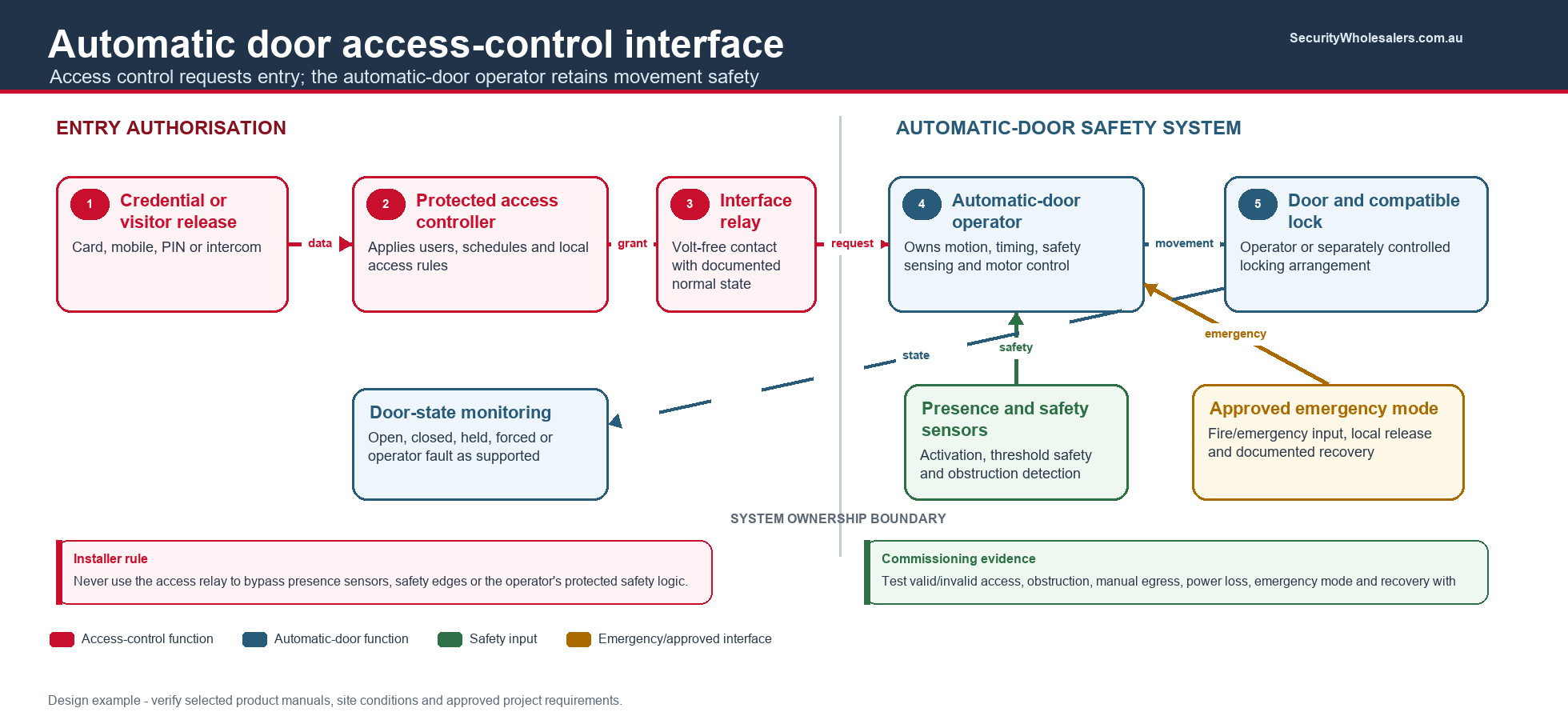
Parts and interfaces
- Access reader and protected controller
- Automatic-door operator with supported activation input
- Compatible lock or operator locking function
- Presence and safety sensors belonging to the door operator
- Door contact or operator-state monitoring
- Intercom release where visitors are admitted
- Separate access-control PSU unless the operator manual approves otherwise
Cable functions
- Reader bus and controller network
- Volt-free access-granted interface to the operator
- Lock power/control circuit where a separate lock is used
- Door-state or operator-state return
- Intercom release pair and required emergency interfaces
Commissioning: test valid and invalid entry, operator safety sensing, lock release timing, door obstruction, power loss, fire/emergency mode, manual egress, after-hours mode and recovery. Access control must not bypass operator safety inputs.
Door hardware preserves the required mechanical function while access control manages entry
For owners and managers
Useful where a frame-mounted strike or maglock is unsuitable, or where the door requires panic/exit hardware. Confirm whether monitoring, latch retraction, dogging, request-to-exit or fail-secure entry is required.
Typical parts
- Electrified mortice lock, electric trim or latch-retraction exit device
- Compatible lever, cylinder, strike plate and door preparation
- Door loop or concealed cable transfer
- Controller relay or manufacturer interface module
- Calculated PSU sized for inrush and duty
- Door contact plus latch/bolt/REX monitoring where available
Cable functions
- Flexible conductors through the approved transfer
- Lock power sized for inrush and route length
- Separate monitoring pairs for REX, latch or request-to-enter
- Door contact and reader circuits
- Emergency or fire interface only where required by the approved design
Commissioning: test handing, latch alignment, lever function, mechanical key override, cable movement, inrush voltage, continuous duty, door pressure, egress and every monitored state.
Coordinate the active leaf, inactive leaf, sequencing and monitoring
For owners and managers
Confirm whether one or both leaves are normally used, whether both form part of the required exit width and how the inactive leaf is secured.
Typical parts
- Selected lock arrangement for one or both leaves
- Door coordinator and appropriate flush bolts where applicable
- Separate contacts for each leaf
- Two cable transfers if both leaves contain powered hardware
- Controller I/O sufficient to report each meaningful state
Cable functions
- Individual lock circuits labelled by leaf
- Active- and inactive-leaf contact inputs
- REX/exit hardware monitoring
- Reader and emergency-interface circuits
Commissioning: prove correct closing sequence, latch engagement, individual leaf alarms, free egress, emergency behaviour and the result when either leaf is held open.
Access control grants passage; the lane controller manages movement and safety
For owners and managers
Choose pedestrian throughput, accessibility lane, visitor process, tailgating response, after-hours state and emergency opening. A turnstile manages flow but does not prove identity by itself.
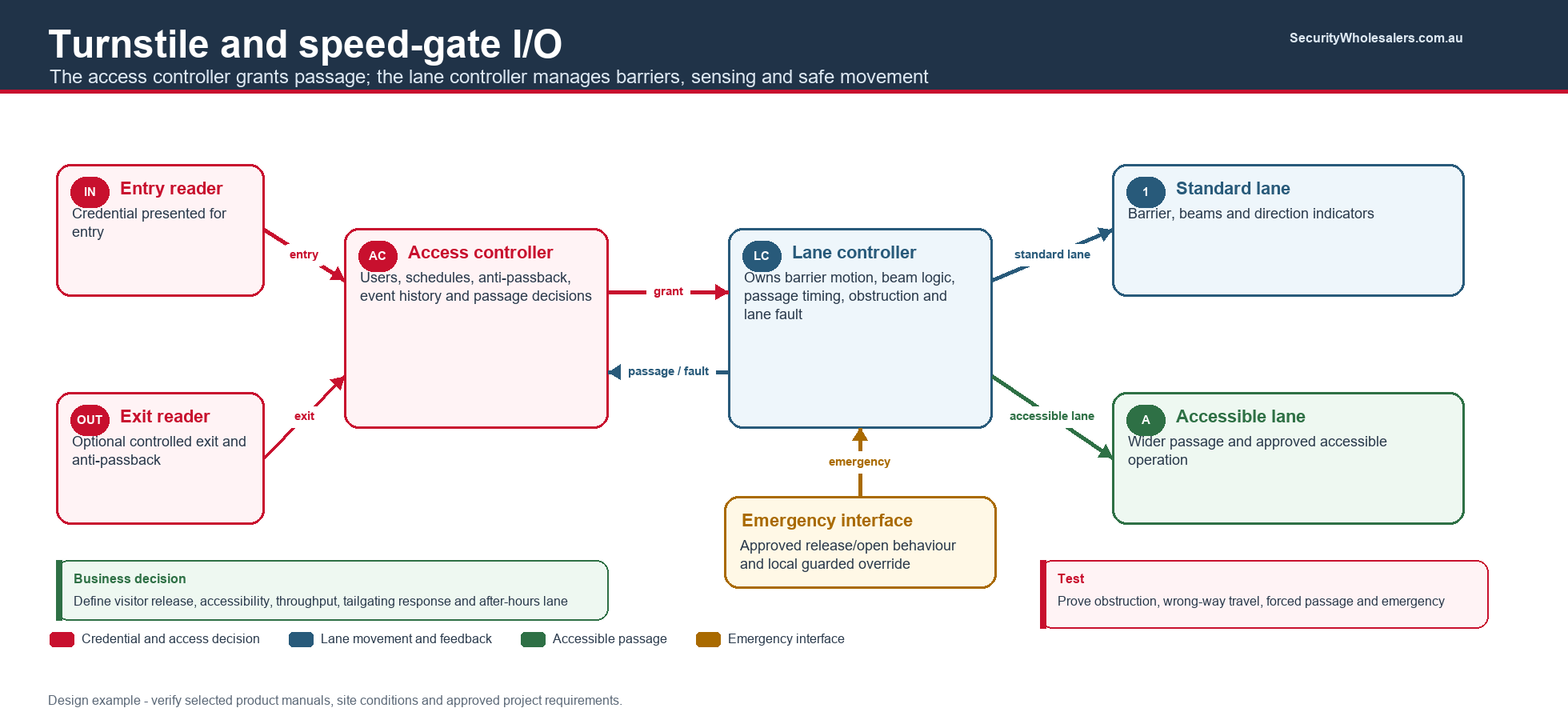
Typical parts
- Turnstile or speed-gate lanes and manufacturer lane controller
- Entry and optional exit readers
- Access controller with one logical passage per direction as required
- Accessible gate/lane and visitor release station
- Fire/emergency interface and local release arrangement
- Lane alarms or passage-confirmation outputs
- Network, software licences and operator workstation
Cable functions
- Reader buses and controller network
- Dry-contact grant inputs for each direction/lane
- Passage-complete, forced-passage and fault returns
- Emergency interface documented to the approved lane behaviour
- Mains and data separation plus any floor containment
Commissioning: test both directions, accessibility lane, consecutive credentials, rejected access, tailgating detection, obstruction, emergency release, power restoration and event correlation.
Vehicle and remote-opening solutions
Access control authorises movement; the automation controller retains safety responsibility
For owners and managers
Decide whether users present a fob, long-range credential, intercom call, keypad code or number plate. Document visitors, deliveries, after-hours access and what happens when the gate cannot close.
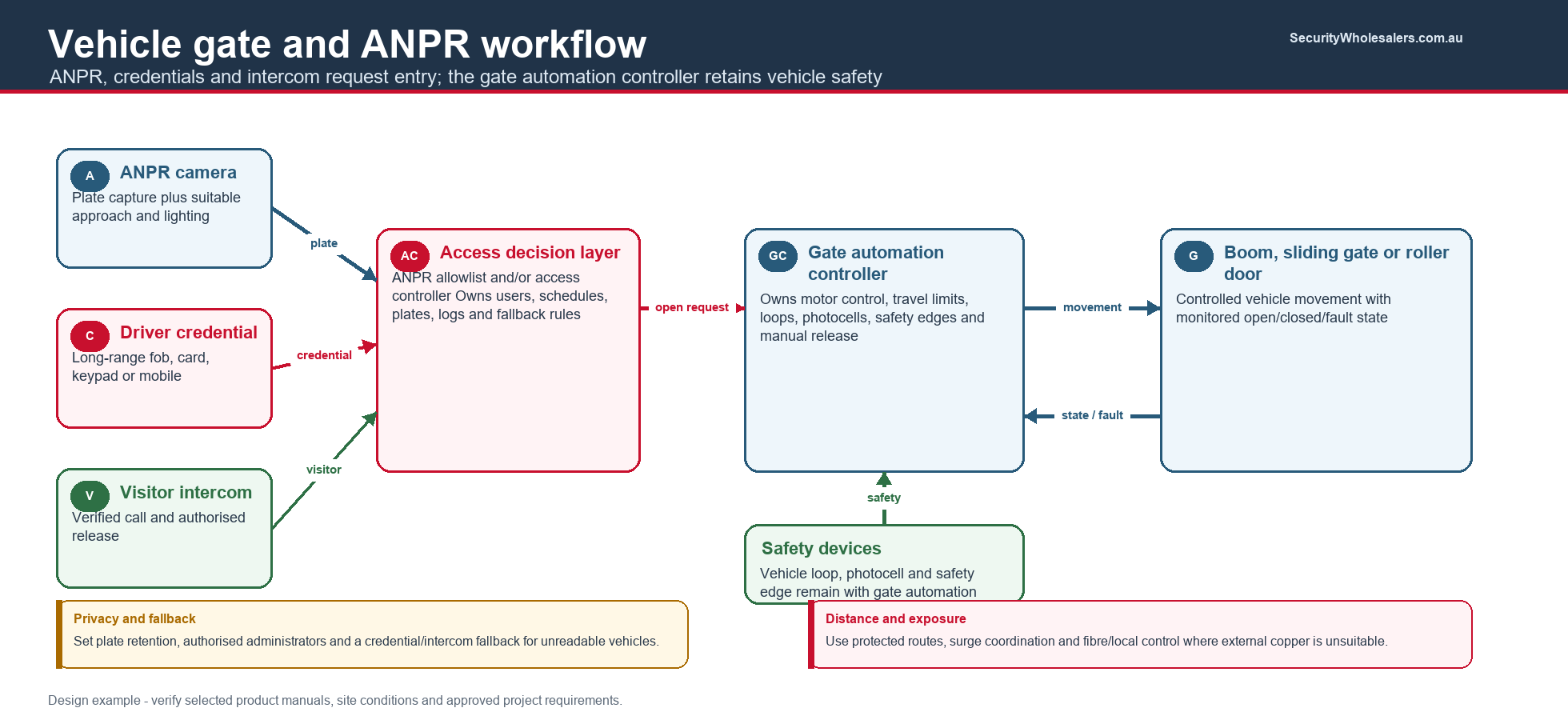
Typical parts
- Gate/door automation and compliant safety devices
- Weather-rated reader, keypad, intercom or long-range receiver
- Protected access controller or supported receiver integration
- Vehicle loops, photocells and safety edges owned by the automation design
- Gate-state contacts and automation fault output
- Surge protection, local cabinet and appropriate communications path
Cable functions
- Reader/intercom data and local power
- Volt-free open request to the automation controller
- Gate open/closed and fault return inputs
- Network, fibre or point-to-point link where distance requires
- Segregated mains, ELV and underground routes
Commissioning: test safety loops/edges, opening request, invalid credentials, obstruction, manual release, fire/emergency behaviour if applicable, communications loss, lightning/surge protection and gate-state alarms.
Number-plate recognition feeds a controlled allowlist and gate workflow
For owners and managers
Define who owns the plate list, temporary vehicles, privacy notices, false-read response and a fallback credential. ANPR is operationally convenient but should not be treated as an infallible identity factor.
Typical parts
- Purpose-selected ANPR camera and suitable illumination
- Management software or integration licence
- Gate access controller and automation interface
- Vehicle presence trigger where required
- Intercom or alternative credential
- Managed network, time service and event storage
Cable functions
- Cat6/fibre and camera power path
- Software/controller integration over approved API or relay
- Gate request and state return
- Intercom/fallback credential path
- Network segmentation and restricted management access
Commissioning: test day/night reads, approach angles, similar plates, denied vehicles, tailgating, network/server loss, time stamps, manual override and privacy retention settings.
High-security and emergency-operation solutions
Sequence two or more doors without creating an entrapment hazard
For owners and managers
Use only where the risk justifies controlled sequencing. Define normal entry, escorted passage, accessibility, maximum occupancy, emergency escape, override authority and response to a door fault.
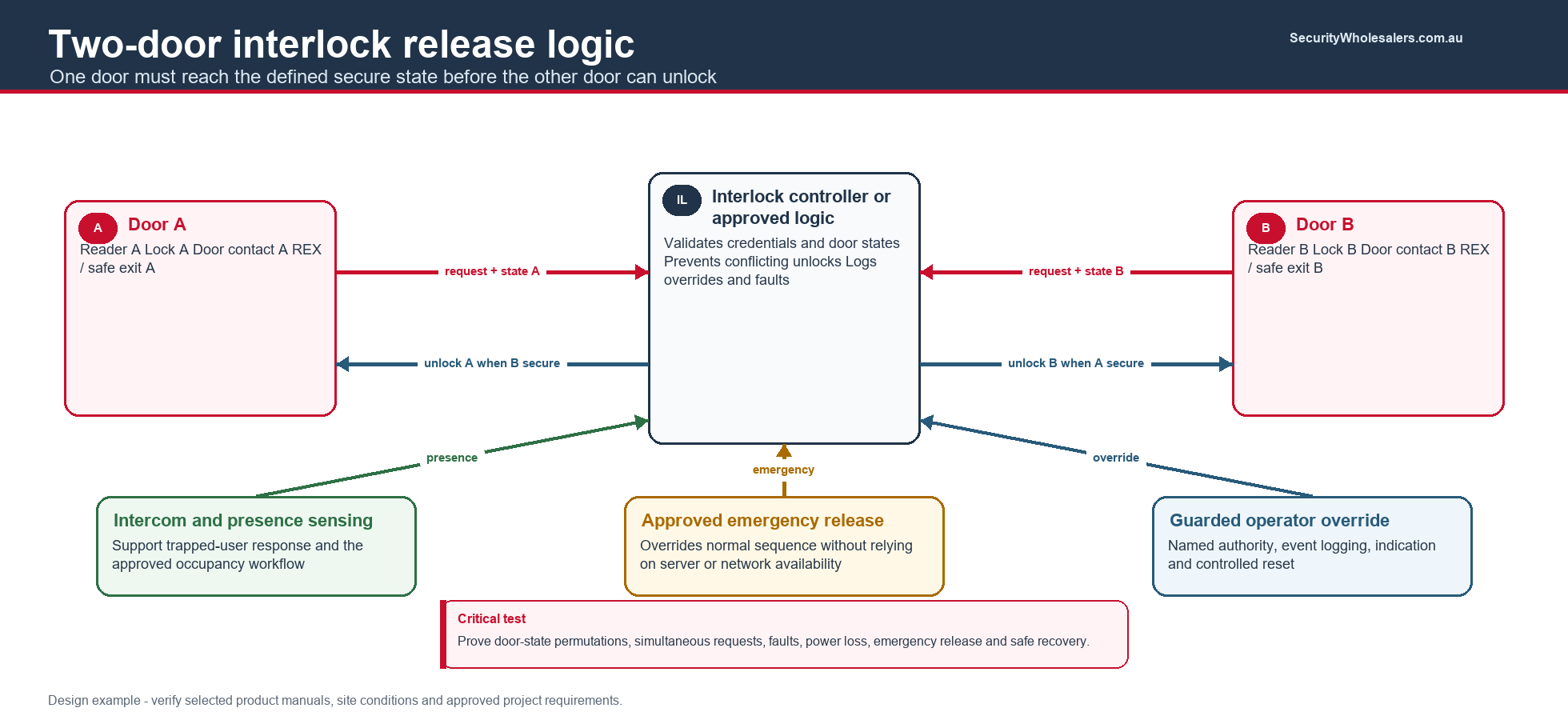
Typical parts
- Dedicated interlock logic or supported controller function
- Readers and independently monitored locks
- Door contacts and latch/bolt monitoring
- Occupancy/presence sensing where the approved design requires it
- Emergency release, intercom and guarded override
- Event logging and CCTV association where appropriate
Cable functions
- Individual reader, lock and state circuits per door
- Interlock I/O or documented controller logic
- Emergency release and fire interfaces
- Intercom, presence and alarm paths
- Network and protected power with calculated backup
Commissioning: test every door-state permutation, simultaneous requests, held/forced doors, power and network failure, emergency override, accessibility and recovery without trapping an occupant.
Protect a server, drug, records or high-value room with stronger authorisation
For owners and managers
State whether the policy means card-plus-PIN, biometric-plus-card, or two different authorised people. Set exception, duress and emergency processes before programming.
Typical parts
- Controller and reader supporting the required authentication rule
- Secure credential technology and fallback method
- Door-compatible fail-secure hardware with safe mechanical egress
- Door/latch monitoring and cabinet tamper
- Duress input if policy requires it
- Central audit, alerting and controlled administrator roles
Cable functions
- OSDP reader bus with Secure Channel where supported
- Lock, door state, REX and tamper circuits
- Alarm/duress interface and network
- Protected power and battery circuits
Commissioning: test every valid and invalid factor sequence, expired credentials, duress, offline mode, time schedules, admin changes, event export and safe exit.
Apply a documented security state without defeating evacuation
For owners and managers
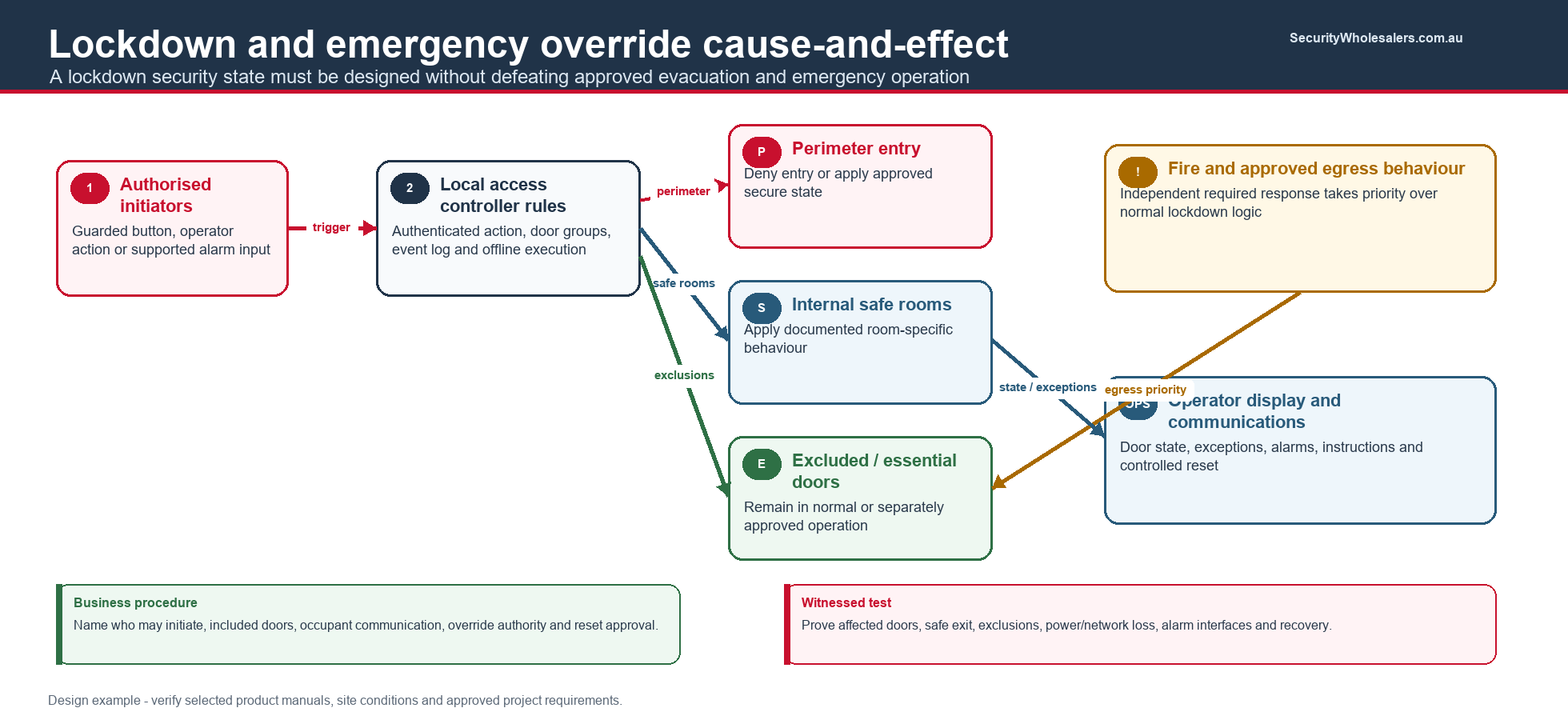
Lockdown is an emergency operating procedure, not simply a global relay. Define initiating roles, affected doors, local safe-side behaviour, public-entry response, emergency-services override, communications and reset authority.
Typical parts
- Controller/software with supported lockdown functions
- Protected initiating devices or authorised software action
- Door hardware selected for the required entry and egress state
- Alarm/public-address integration only through approved interfaces
- Door-state monitoring and operator display
- Documented override and reset controls
Cable functions
- Supervised lockdown inputs where supported
- Individual door lock and state circuits
- Alarm, intercom or notification interfaces
- Network paths designed for local operation during server loss
Commissioning: run a witnessed cause-and-effect test covering every affected door, safe egress, excluded doors, alarm/interface behaviour, communications failure, power loss, authorised override and controlled reset.
Wireless, multi-building and operational solutions
Extend managed credentials where door cabling is impractical
For owners and managers
Useful for accommodation, internal offices and heritage or difficult doors. Compare online, wireless-update and card-on-door update models; battery servicing and lost-lock communication are part of the lifecycle cost.
Typical parts
- Electronic escutcheon, cylinder or mortice lock
- Management software and required gateways/update points
- Secure credentials and enrolment device
- Mechanical override under controlled key management
- Battery stock and scheduled maintenance process
Communication functions
- Ethernet/PoE to gateways where online wireless is used
- Approved wireless coverage and channel plan
- Credential-based update path for offline locks
- No assumed real-time alarm path on offline doors
Commissioning: test credential update latency, revoked users, low battery, clock drift, emergency access, mechanical override, event recovery and a complete battery replacement cycle.
Keep door circuits local while centralising administration
For owners and managers
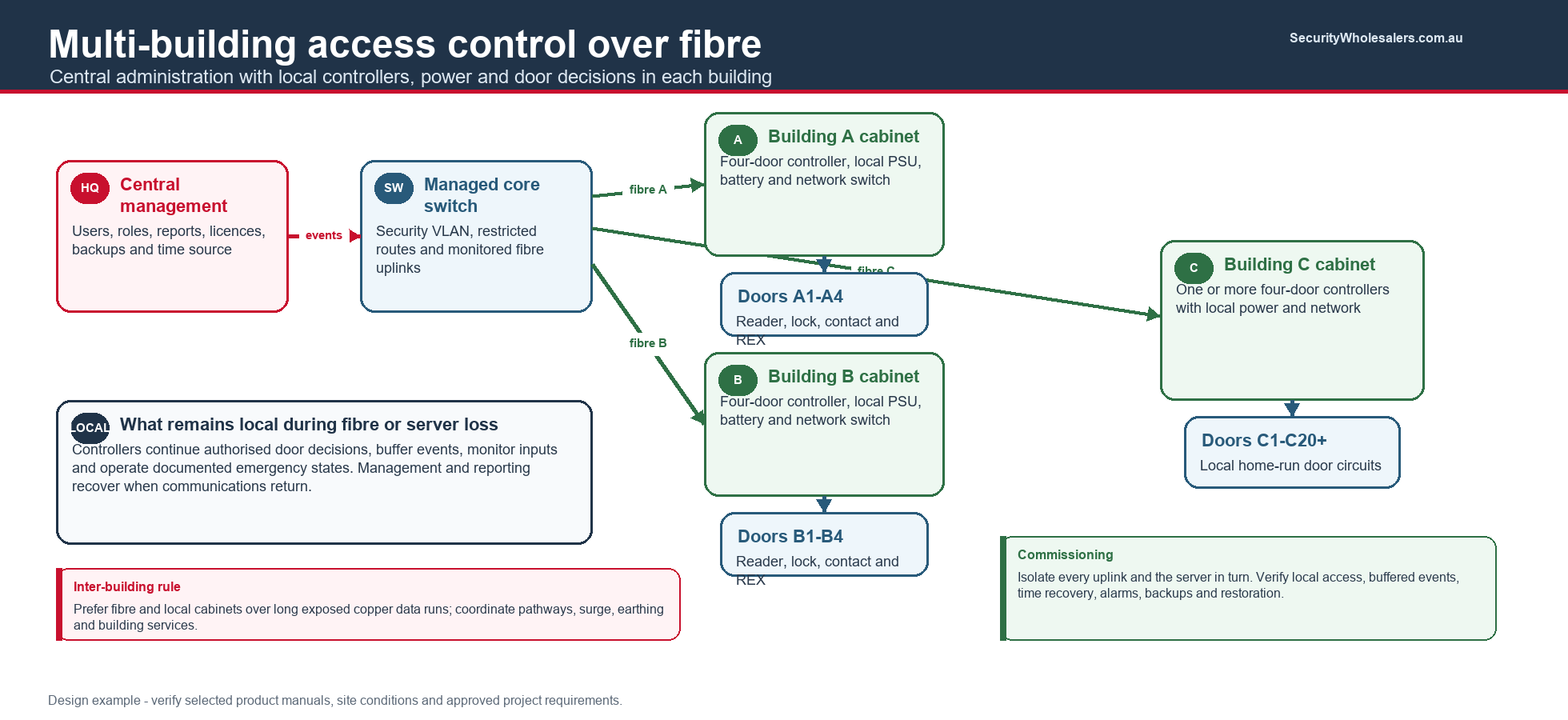
Best for warehouses, schools, factories and campuses with long distances. Decide which buildings must continue locally during fibre/server loss and who responds to faults in each zone.
Typical parts
- Local controller cabinets and calculated PSU/battery per building
- Managed network switches and fibre uplinks
- Appropriate fibre modules, patching and enclosures
- Central server/software/licensing and backup
- Time service, monitoring and remote-support controls
- Surge/earthing design for exposed external equipment
Cable functions
- Local home runs from each door to its building controller
- Fibre backbone rather than long copper inter-building data runs
- Security VLAN and restricted management routes
- Separate fire/alarm interfaces local to the responsible system
- Labelled network, power and door schedules
Commissioning: isolate each uplink and server in turn; prove local decisions, buffered events, time recovery, alarms, configuration backups, switch monitoring and restoration without uncontrolled doors.
Safety and compliance
Automatic doors, turnstiles, interlocks, required exits, fire doors and emergency modes require project-specific coordination. Access control must not assume ownership of movement safety, fire operation or building approval. Record the responsible designer, approving authority, installer and witness for every interface.
Advanced-solution handover checklist
| Evidence | Business owner receives | Installer records |
|---|---|---|
| Interface schedule | Who supports each connected system | I/O, ratings, states, cable IDs and responsible contractor |
| Cause-and-effect tests | Proof of normal and emergency behaviour | Inputs applied, outputs observed, witnesses and exceptions |
| Failure testing | Expected operation during outages | Power, network, server, device and integration loss results |
| Operations | Named owners and escalation contacts | Admin roles, backups, licences, maintenance and reset procedures |
Review information
Content owner: SecurityWholesalers access control guide team. Revision: 17 July 2026. Confirm every selected product against the current Australian datasheet, installation manual and approved project documentation.