

















Commercial
4 Door Access Control Kit
Foundation Guide
A four-door kit is often the first controller size that feels properly proportioned for a small-to-medium commercial site. It gives the site enough capacity to group related openings together, add spare room for growth, and stop pretending that every new restricted door should become a separate standalone job.
Where a four-door kit usually fits
| Site pattern | Why four doors makes sense |
|---|---|
| Office with front door, rear staff door, archive, and comms room | The site already has four distinct openings and several permission levels. |
| Clinic with front entry, staff door, records room, and treatment-support room | Visitor workflow and internal restricted rooms both matter. |
| School with reception entry, staff room, admin records, and side access | The site needs central administration and clear role separation. |
| Warehouse with office entry, staff entry, plant room, and supervisor room | The site has already moved beyond simple staff-door logic. |
Sample site scenarios
Growing professional office
A growing office with a front door, rear staff entry, meeting-floor store, and archive room often reaches the point where a four-door controller is simply the cleaner design. It avoids the site needing to rebuild the system the moment another restricted opening appears.
Mixed clinic or allied-health site
A mixed clinic with one patient-facing entry and several internal restricted openings may look small on the outside, but the internal permissions make a four-door path more realistic than several separate standalone terminals.
What a four-door kit normally includes
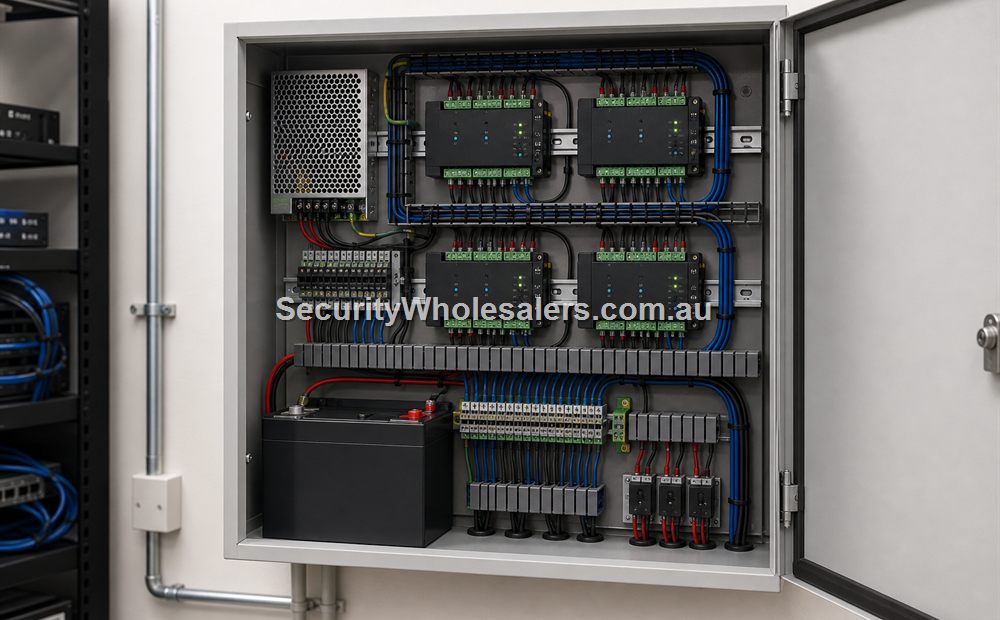
- Four-door controller such as the DS-K2704X, sized with secure cabinet and labelled terminations from the start.
- Credential devices on each controlled opening, with consistent lock, egress, and contact hardware across the site.
- Network and power planning that assumes the controller is the head-end, not an afterthought tucked into whichever room had spare wall space.
- Permission groups and schedules planned before the hardware is commissioned, so the controller is not only a bigger box with the same shared-code logic.
- UPS and service access so the site can still review and manage events cleanly during short outages.
What usually drives the step from two doors to four
- The site wants one entry plus several internal restricted openings.
- The site expects growth and does not want the next two doors to force a redesign.
- Management already wants named-user control across several parts of the building.
- The site wants cleaner cabinet layout and one controlled field-wiring approach.
Worked installer example: four-door warehouse and office controller
Doors: office front entry, warehouse staff entry, plant room and communications room. The design uses one protected four-door controller, but the permissions and hardware are specified separately for each opening.
| Door | Credential and permissions | Hardware path | Special programming |
|---|---|---|---|
| D01 Office front | All staff; visitor release by reception | Reader, strike, contact, reception release and mechanical egress | Business-hours unlock only if formally approved; visitor events retained |
| D02 Warehouse staff | Warehouse and supervisors | Weather-suitable reader, strike/electrified hardware, contact and egress | Shift schedules and held-open alert |
| D03 Plant room | Maintenance and managers | Reader, monitored lock and contact | No shared PIN; forced-open event escalated |
| D04 Communications room | IT administrators only | Reader, strike/electrified lock and contact | Access review and longer event retention |
Typical cable schedule
| From / to | Function | Design requirement |
|---|---|---|
| Controller to each reader | OSDP/RS-485 communication and reader power | Approved cable, topology, shield treatment, termination and distance from the selected manufacturer |
| Fused PSU output to each lock | Lock power | Individual circuit sized for current, inrush, distance and voltage drop |
| Each door to controller inputs | Door contact, REX and other monitored states | Dedicated labelled pairs with supervision where supported |
| Controller to network | Management, event reporting and supported integrations | Cat6, security VLAN, addressing, time source, backup and restricted administration |
| Approved building interface to controller/PSU | Emergency or fire-related behaviour where required | Documented interface designed and witnessed by appropriately qualified parties |
Power design: do not multiply a nominal 'per-door' allowance. Add the measured or datasheet normal and peak loads for every controller, reader, lock and auxiliary, apply the manufacturer's design margin, then calculate the required standby period and verify the result under load.
Relevant SecurityWholesalers product paths
- DS-K2704X as the clearest four-door controller reference point.
- Hikvision Access Control Base License Package where the site wants software-led administration.
- Door strikes and maglocks for the opening-by-opening lock path.
Related guides
Frequently Asked Questions
- When is a four-door kit the right starting point?
It is the right starting point when the site already has several meaningful openings or already knows more growth is coming soon.
- Why not just join several two-door systems together?
Because a properly sized four-door controller path is usually easier to administer, wire, and support than several small disconnected systems.
- What kinds of sites often suit a four-door kit?
Small warehouses, schools, clinics, strata buildings, and offices with restricted rooms often suit this tier well.
- Does a four-door kit automatically mean enterprise scale?
No. It is often simply the first sensible controller size that leaves room for growth without overcomplicating the project.
- What is the main four-door mistake?
Underusing the spare capacity by still quoting the building as if every door should be a separate standalone device.
- Which page should someone read next?
If the project also involves lifts, gates, or larger software-led management, the lift access guide is the next useful page.
Plan this site door by door
Download the editable workbook, list every controlled opening, then email it with matching door photos to sales@securitywholesalers.com.au. Include the site suburb, installation requirement and target timing.
Review information
Content owner: SecurityWholesalers access control guide team. Revision: 17 July 2026. Use these examples as a starting point, then confirm the details against current product manuals, approved drawings and relevant authority requirements.
NCC access and egress | ACMA cabling requirements | OAIC biometric guidance | Access control definitions