

















Commercial
Access Control Buying Guide
Overview
Access control only looks simple when the conversation is reduced to a keypad, a card reader, or a face terminal. Real projects are usually decided by the workflow behind the door: who needs access, how often users change, whether visitors are verified, what happens during a fire event, whether the lift needs to follow the same permissions, and how the site will review activity later.
Design rule: choose the complete opening, not the reader
Start with the door, lock, latch, closer and approved egress behaviour. Then choose the reader, controller, power supply and software. A credential can be accepted perfectly while the opening still fails mechanically, unlocks unsafely, has no usable audit trail, or cannot be supported after handover.
Choose the right starting path
Price a system
Start with realistic planning ranges, then identify the door details that move a job above or below the range.
Choose hardware for my door
Use the door construction, existing latch, frame, closer and exit path to narrow the lock and bracket arrangement.
Plan a multi-door site
Build a door schedule covering users, permissions, hardware, I/O, fire interfaces, cabling and future expansion.
Understand access control terminology
Use the plain-English glossary for readers, controllers, locks, egress, OSDP, REX, power and commissioning terms.
Design beyond a standard door
See worked automatic-door, mortice-lock, turnstile, interlock, ANPR, lockdown, wireless-lock and multi-building solutions.
What every complete door solution contains
| Layer | Business question | Installer question |
|---|---|---|
| Opening | Which door, gate or lift is controlled? | Door construction, handing, latch, closer, frame, fire rating, weather exposure and cable transition. |
| Locking | Should it remain locked or unlock during a fault? | Strike, maglock, electrified lock or automation input; fail mode; monitored state; duty cycle and mechanical compatibility. |
| Credential | PIN, card/fob, mobile or face? | Reader protocol, credential security, mounting, environmental rating, tamper and fallback method. |
| Control | Are named users, schedules and logs required? | Standalone terminal or protected controller; door capacity, inputs, outputs, offline operation and expansion. |
| Exit and monitoring | How do people leave, and who responds to a held door? | Mechanical egress, REX, exit button, door contact, emergency release and approved fire interface. |
| Power and network | What happens during a blackout or network outage? | Load and battery calculation, voltage drop, fused distribution, UPS, Ethernet/VLAN, time sync and remote access. |
| Operations | Who adds and removes users? | Programming, commissioning, backups, labels, as-built drawings, training and maintenance ownership. |
Worked access control solutions
These are design examples, not universal wiring instructions. Final cable types, conductor size, topology, power, locking and egress arrangements must follow the selected products, measured distances, site conditions and the approved building design.
Standalone keypad or reader with an electric strike
Best fit: one straightforward internal or rear staff door where local administration is acceptable and a central audit trail is not essential.
Typical parts
- Standalone keypad/reader-controller or separate single-door controller and reader
- Door-compatible electric strike
- Protected power supply and calculated backup battery
- Door contact where open/closed monitoring is required
- Exit device appropriate to the approved egress design
- Enclosure, fused protection, fixings, cable protection and credentials
Typical cable functions
- Reader-to-controller data cable if the reader is separate
- Two-core lock-power circuit sized from voltage, current, distance and acceptable voltage drop
- Dedicated contact and REX input pairs
- Network cable only if the controller requires IP administration
Installer checklist: measure voltage at the strike while energised; test latch alignment under door pressure; confirm loss-of-power behaviour; prove egress without relying on software; label the PSU, fuse and door cables.
Protected controller with an OSDP reader, event history and schedules
Best fit: an office, clinic, server room or warehouse entry that needs named users, prompt credential revocation and a reliable audit trail.
Typical parts
- Controller in a secure internal enclosure
- Compatible OSDP reader and secure credentials
- Strike, monitored maglock or electrified lock selected for the opening
- Door contact, REX input and required emergency-release interfaces
- Supervised PSU, battery and fused lock output
- Management software or supported cloud service
Typical cable functions
- Manufacturer-approved RS-485/OSDP reader cable and topology
- Separate lock-power cable sized by calculation
- Input pairs for door contact, REX and approved interfaces
- Cat6 from controller to the nominated security network
Installer checklist: enable OSDP Secure Channel where supported; prove controller operation with the server or internet unavailable; test valid, invalid, expired and disabled credentials; verify event timestamps and door-held-open alarms.
Central multi-door controller with common administration
Best fit: offices, warehouses, medical centres and schools with several user groups and different rules at each opening.
Typical parts
- Two- or four-door controller with capacity for expected growth
- One reader, lock, door contact and exit path per opening
- Cabinet, tamper, fused distribution and battery capacity based on the total connected load
- Software, enrolment credentials and administrator workstation
- Fire, lift, alarm, CCTV or intercom interfaces only where designed and supported
Typical cable functions
- Reader buses or home runs exactly as the manufacturer specifies
- Individual lock-power circuits rather than an undocumented shared feed
- Door contact and REX pairs identified by door number
- Network, fire-interface and integration cables documented separately
Installer checklist: calculate simultaneous lock load and standby time; test every door from credential to event report; confirm each input maps to the correct door; export configuration backups and an as-built termination schedule.
IP video intercom plus staff credentials and controlled door release
Best fit: clinics, offices, schools and shared buildings where visitors call for release while staff enter independently.
Typical parts
- IP door station, indoor monitor and/or app service
- Access reader or combined intercom/credential station
- Controller where proper user logs and schedules are required
- Lock, separate lock PSU, REX, contact and approved release hardware
- PoE switch and network capacity
Typical cable functions
- Cat6/PoE to IP intercom devices
- Dry-contact relay/interface pair between systems where required
- Separate lock-power circuit; do not assume the intercom relay should power the lock
- Contact, REX and emergency-interface pairs
Installer checklist: prove local and app calling, staff credential entry, release timing, door state and operation during internet loss. Document which system owns users, schedules and door events.
Door-specific strike or maglock solution
Best fit: retail and professional tenancies where the visible reader is simple but brackets, latch geometry, cable concealment and egress create the real work.
Typical parts
- Reader and protected controller
- Compatible strike, maglock or specialist electrified hardware
- Correct brackets, housings and cable-transfer method
- REX, door contact, emergency release arrangement, PSU and battery
Typical cable functions
- Protected reader communication cable
- Calculated lock-power run through an appropriate pathway
- Dedicated monitoring and exit-input pairs
- Approved fire/emergency interface where applicable
Installer checklist: obtain full-door, head, frame, latch, closer and exit-side photos before ordering. Confirm whether drilling, cutting or attaching hardware affects the door assembly, warranty or required performance.
Weather-rated credential reader with gate automation or lock interface
Best fit: warehouses, strata, farms and remote entries requiring staff, resident, contractor or visitor access.
Typical parts
- Weather- and vandal-resistant reader/keypad on a suitable post
- Controller in a protected location
- Pedestrian gate lock or isolated relay into an existing automation input
- Intercom where visitor release is required
- Local PSU, surge protection and appropriate enclosure
Typical cable functions
- Protected underground pathway with draw wire and documented route
- Reader data and power within supported distance limits
- Isolated trigger pair to the gate controller
- Fibre, network extension or local controller design where copper distance/exposure is unsuitable
Installer checklist: access control should request an opening; it should not bypass the gate controller's safety devices. Coordinate automation, earthing, surge, vehicle loops, emergency access and mechanical release with the relevant trades.
Installer cable and power design checklist
- Record the device voltage, normal current, peak/inrush current and duty cycle from current datasheets.
- Calculate voltage drop for each lock circuit at the actual one-way cable distance; verify voltage at the device under load.
- Calculate PSU capacity and battery autonomy using the real controller, reader, lock and auxiliary loads, with documented design margin.
- Keep controller power and lock power protection identifiable; use individually fused outputs where the design permits.
- Use OSDP/RS-485 cable type, topology, shielding and termination required by the manufacturer; do not assume Ethernet cabling is automatically correct for every reader bus.
- Document every input and output, including normal state, alarm state, supervision and the effect of cable faults.
- Agree network addressing, VLAN, time source, outbound cloud requirements, administrator MFA and backup ownership before commissioning.
- Provide labelled terminations, door numbers, cable schedule, configuration backup, credential register and witnessed test results at handover.
Hikvision four-door controller architecture
Twenty doors require at least five four-door controllers; 24 require six; 28 require seven; and 30 require eight controllers with two spare door positions. The complete design also needs secure zoned cabinets, calculated lock power, local door I/O cable runs, a managed security network, HikCentral Professional licensing for every door, backups and a witnessed test schedule.
Specialist opening library
The advanced access control solutions guide extends these examples to automatic doors, electrified mortice and exit hardware, double-leaf doors, turnstiles, vehicle gates, ANPR, interlocks, dual-credential rooms, lockdown, wireless locks and fibre-connected campuses.
Safety and privacy boundaries
Access-controlled doors in required exits or paths of travel must satisfy the applicable building and approved egress requirements. Do not copy a release circuit from another site without review. Facial templates used for automated recognition may be sensitive information under Australian privacy law; assess necessity, consent, transparency, security, retention, accuracy and a non-biometric alternative before deployment.
Primary references: NCC Part D3, OAIC facial-recognition privacy guidance, SIA OSDP overview and ASD networking guidance.
The guide is broken into the decisions that usually matter first: how many doors are involved, what type of building is being controlled, which credential method makes sense, what lock hardware the opening can accept, and how the site exits safely. That is usually a better way to choose a system than starting with isolated product names.
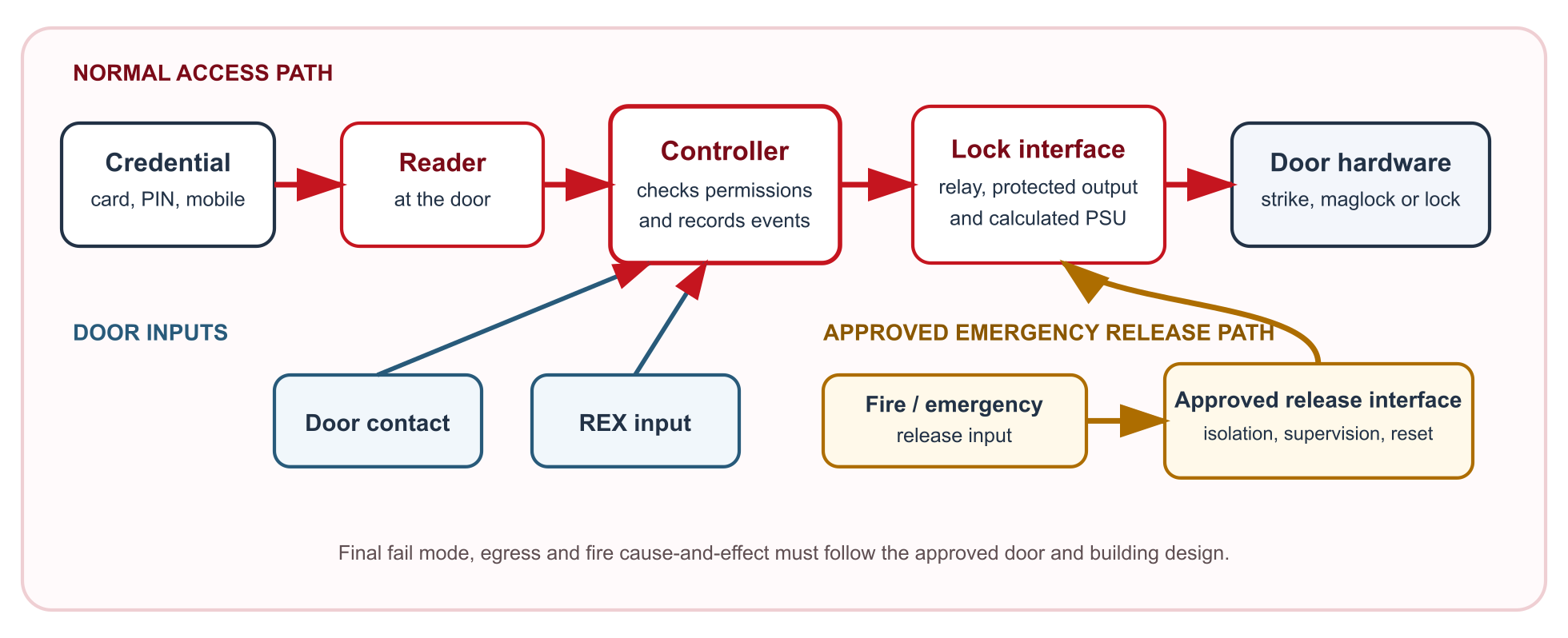
How the section is now structured
| Layer | What it solves | Best starting pages |
|---|---|---|
| Foundation and kit paths | One-door, two-door, four-door, and lift-related system sizing | Single Door Access Control Kit, 2 Door Access Control Kit, 4 Door Access Control Kit, Lift Access Control Guide |
| Sector buying pages | How the same hardware decisions change by building type and daily workflow | Access Control for Offices, Access Control for Warehouses, Access Control for Gyms |
| Decision and compliance pages | Lock choice, fail modes, credentials, fire release, and egress logic | Maglock vs Electric Strike, Fail Safe vs Fail Secure, Fire Compliance and Egress Basics for Access Control |
Sector buying pages
The sector layer is where most buyers should spend their time first. The same reader and controller can behave very differently depending on whether the building is an office, a warehouse, a gym, a school, or a strata complex. The main value in those pages is not the product names by themselves. It is the explanation of what the building is trying to control and what usually goes wrong when the access workflow is underspecified.
| Sector page | Main decision it helps with |
|---|---|
| Access Control for Offices | Shared codes versus named users, front-door visitor handling, and whether a second office door already justifies a controller path. |
| Access Control for Warehouses | Staff entries, gates, roller-door triggers, restricted rooms, shift users, and after-hours review. |
| Access Control for Gyms | 24-hour member entry, staff-only doors, anti-tailgating realities, and integration with attendance or membership workflow. |
| Access Control for Schools | Reception-first visitor handling, after-hours staff movement, and why schools usually outgrow isolated standalone doors quickly. |
| Access Control for Medical Centres | Front-door verification, staff-only rooms, restricted areas, and how access intersects with patient-facing workflow. |
| Access Control for Factories | Shift-based staff movement, plant rooms, contractor access, and how controller layout supports industrial sites. |
| Access Control for Strata Buildings | Resident lifecycle, common-property doors, basement access, intercom, and management workflow. |
| Access Control for Childcare Centres | Parent collection timing, front-door release, staff entry, and why convenience should never outrun supervision. |
Foundation kit pages
Buyers often jump from a one-door thought to a multi-door quotation without a clear step in between. The kit pages now solve that gap directly by showing what normally changes between single-door, two-door, and four-door jobs.
| Page | What it usually means in practice |
|---|---|
| Single Door Access Control Kit | One opening, modest user administration, no strong central reporting requirement, and a straightforward lock release path. |
| 2 Door Access Control Kit | Two meaningful openings, named users, schedules, and enough complexity that central event history starts to matter. |
| 4 Door Access Control Kit | Several controlled openings, spare capacity for growth, and a more intentional controller-and-cabinet layout. |
| Lift Access Control Guide | Permissions that move beyond doors into lifts, shared vertical access, and central software-led administration. |
Access control help by problem, door type and budget
These pages are for the practical questions that usually come up before parts are chosen: what suits a glass door, what works on an aluminium shopfront, what can be reused on an existing lock, what a gate needs, why a strike is not releasing, and what usually changes when keys are replaced with electronic entry.
| Cluster | What it helps solve | Best starting pages |
|---|---|---|
| Door types | Helps buyers understand how the lock path changes when the door is glass, aluminium, gate-based, or otherwise non-standard. | Access Control for Glass Doors, Access Control for Aluminium Shopfront Doors, Access Control for Gates |
| Costs and retrofit budgets | Explains what usually drives price and why an existing door can be simple or expensive depending on the lock, frame, and exit path. | How Much Does Access Control Cost?, Cost to Add Access Control to an Existing Door |
| Troubleshooting | Helps people narrow down a real door fault before they replace the wrong part. | Card Reader Not Working - What to Check, Maglock Not Releasing, Electric Strike Not Releasing |
| Upgrade and integration paths | Helps customers moving from keys into electronic access and ties access control to CCTV, intercoms, and alarms where that is part of the wider project. | How to Replace Keys with Access Control, How to Add Card Access to an Existing Door, Access Control with CCTV |
| Product and credential selection | Breaks out locks, readers, power supplies, fobs, and business-friendly credential options without forcing buyers into a manufacturer-only view. | Card Reader Buying Guide, Maglock Buying Guide, Best Fob Entry System for Business |
Where this new layer is most useful
If the customer is still asking "what suits this door?", "what will this cost?", "can this existing lock be reused?", or "why is this opening not releasing properly?", these pages are usually a better starting point than the broader sector guides. They are designed to bring the conversation back to the actual opening and the actual problem.
Decision pages that most buyers miss until too late
Many access control problems start with the hardware decision being made in the wrong order. Readers and credentials get chosen before the door, the fire path, or the egress hardware is understood. The dedicated decision pages exist so those mistakes do not have to be rediscovered after the quote is accepted.
| Decision page | Why it matters |
|---|---|
| Maglock vs Electric Strike | The lock path determines installation fit, door feel, relocking reliability, and whether the egress design stays clean. |
| Fail Safe vs Fail Secure | What the opening does on power loss has to match the actual purpose of the door and the safety path, not just installer habit. |
| Card Reader vs PIN vs Face Recognition | The credential method changes how people share, lose, forget, revoke, and administer access. |
| Fire Compliance and Egress Basics for Access Control | Access control becomes a door-behaviour question as soon as egress, release, and emergency response are involved. |
Fast rule of thumb
If the site truly only has one controlled opening, stay proportionate. Once the building has two or more meaningful openings, named users, schedules, visitor handling, or future lift and gate logic, the design should usually move into a controller-backed path early instead of pretending the site is still a single-door job.
Core SecurityWholesalers product paths
- Access Control - Main category for readers, controllers, credentials, locks, and accessories.
- Hikvision Access Control - Useful where one ecosystem needs to scale from small doors to larger controller systems.
- Intercoms - Important when visitor verification and access release belong in the same workflow.
- Door Strikes and Maglocks - Usually the first real hardware fork in the conversation.
- Hikvision Access Control Base License Package - Relevant where the site needs a proper software layer for users, schedules, and event review.
- Hikvision Face Recognition - Useful when face-based entry is genuinely part of the project rather than a theoretical feature list.
Frequently Asked Questions
- How should someone use this access control section?
Start with the core buying guide, then move into the page that matches the building type or the decision you are trying to make. The kit pages help with one-door, two-door, and four-door sizing. The decision pages explain locks, credentials, egress, and compliance.
- Does the section cover offices, warehouses, gyms, schools, medical centres, factories, strata, and childcare?
Yes. The sector pages cover each of those environments, with examples of how the access workflow changes from one site type to the next.
- Does this guide separate simple kits from larger controller systems?
Yes. The foundation pages separate single-door, two-door, and four-door buying paths, then point larger sites toward controller and lift-related guidance.
- Are maglocks, electric strikes, credential types, fail-safe logic, and fire egress covered separately?
Yes. Those decisions have their own explainer pages so buyers can work through the lock, credential, and compliance questions without mixing them into every sector page.
- Why do examples help when choosing access control?
Examples make it easier to decide which path matches a real building. A gym with 24-hour member entry, a childcare centre with controlled parent pickup, and a warehouse with shift-based staff access can all use similar hardware but need very different management logic.
- Which pages should I read if I am not sure what fits my door yet?
If you are still working out the door hardware, start with the door-type and problem pages. Glass doors, aluminium shopfronts, gates, existing locks, costs, and release faults each have their own page so the hardware can be narrowed down before buying parts.
Best product paths to compare first
Access control buying should start with the door schedule, lock type, egress rules and whether the buyer needs logs. These product paths help frame the quote before hardware is finalised.

Hikvision access control
Useful for doors where card, PIN, face terminal or controller-based access is needed.
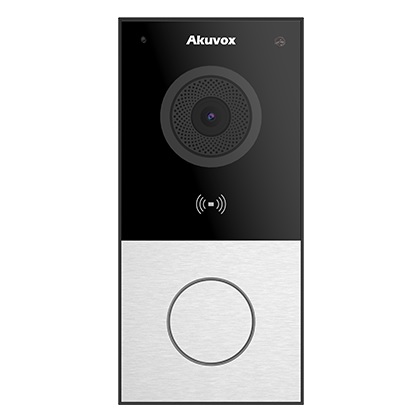
Intercom plus access
Compare where visitor calling, remote unlock and controlled entry belong in the same workflow.
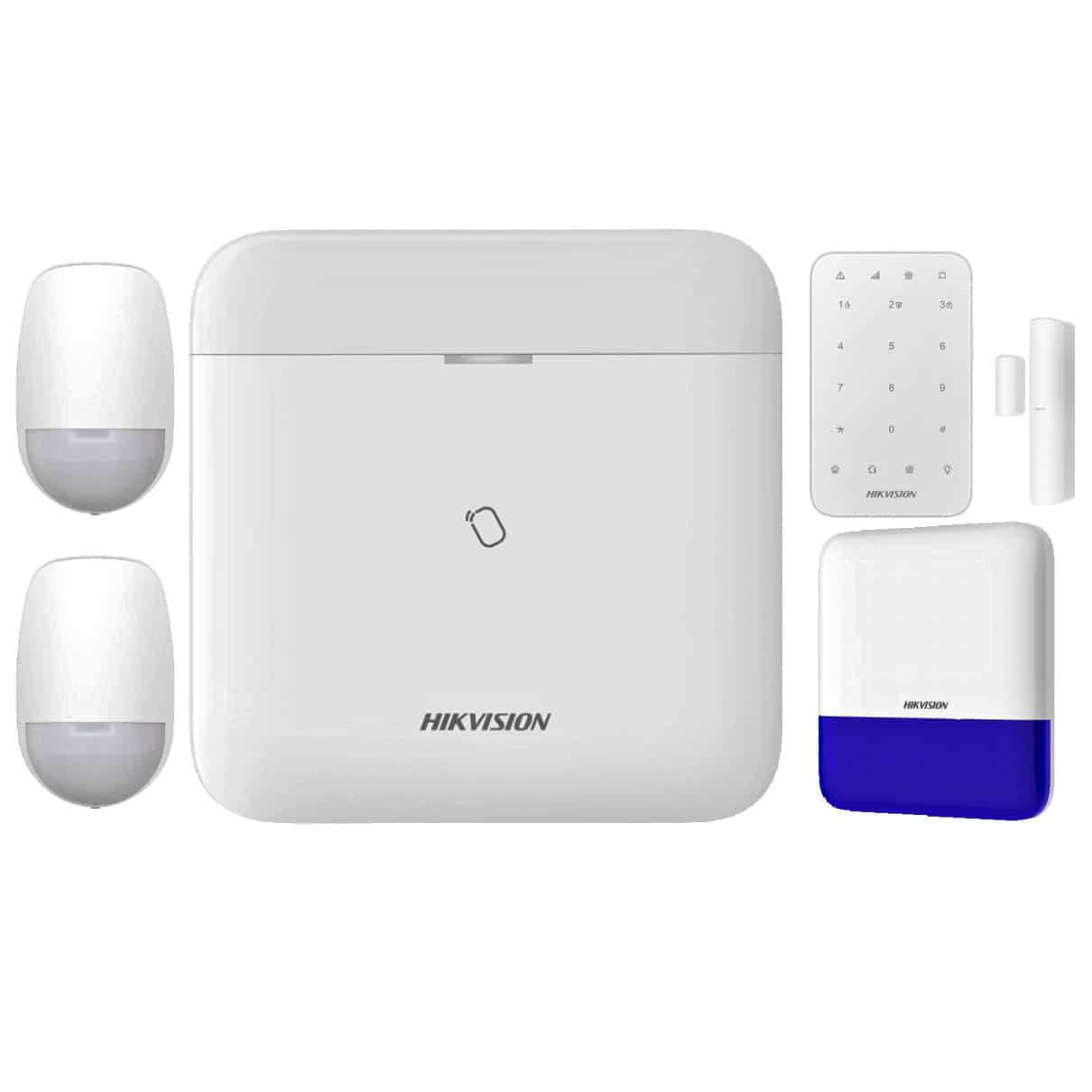
Alarm integration
Consider alarm integration when after-hours entry, duress, arming logic or staff opening procedures matter.
Quote-ready checklist
- List every controlled door, gate, lift or staff-only area.
- Confirm fail-safe, fail-secure, fire egress and emergency release requirements.
- Decide whether the buyer needs audit logs, time schedules, anti-passback or simple local entry.
- Confirm whether credentials will be cards, fobs, PINs, mobile credentials or face recognition.
- Document who adds and removes users after handover.
Review information
Content owner: SecurityWholesalers access control guide team. Revision: 17 July 2026. Use these examples as a starting point, then confirm the details against current product manuals, approved drawings and relevant authority requirements.
NCC access and egress | ACMA cabling requirements | OAIC biometric guidance | Access control definitions