Commercial

Simple Single-Door Access Control Without Logs

This path suits buyers who want one controlled door and a clean way to use cards or PINs, but do not need a strong central audit trail, a formal software platform, or large-system growth from day one.

Supporting Guide

This path suits buyers who want one controlled door and a clean way to use cards or PINs, but do not need a strong central audit trail, a formal software platform, or large-system growth from day one.

A simple one-door setup is often the right answer for a storeroom, staff side door, utility room, light commercial office, or controlled side gate where the main goal is stopping casual unauthorised entry. It can be a very sensible buying path when the user list is small, the workflow is stable, and management is not expecting detailed reporting later.

What This Buying Path Usually Includes

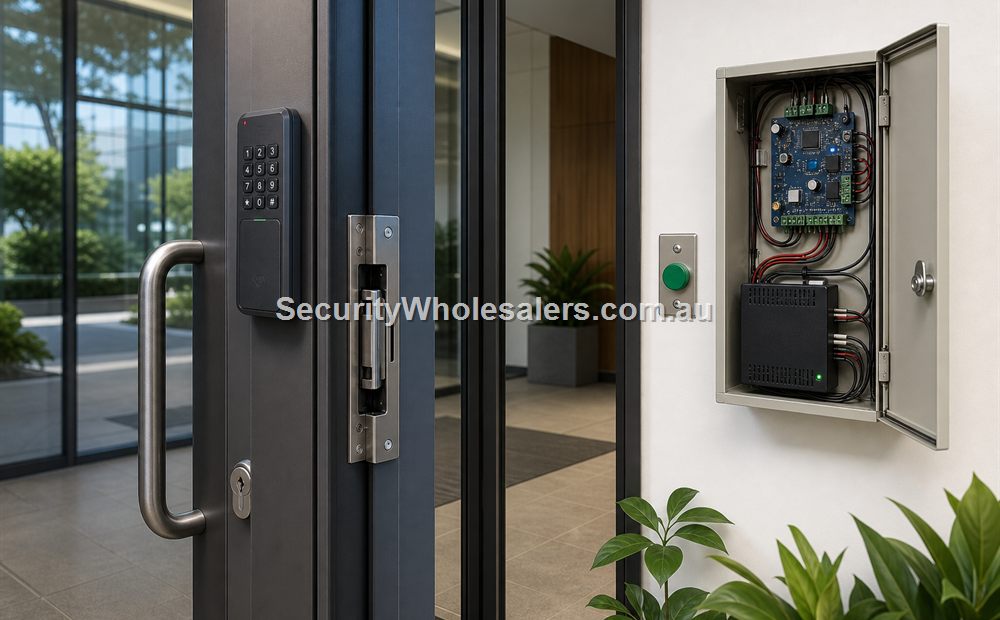
Most simple single-door systems are built around a standalone terminal, a locking device such as an electric strike or maglock, a power supply, an exit button, and sometimes a door contact. The reader handles the credential decision locally. That keeps the job simple and cost-effective compared with controller-based access control.

What this path does not usually offer is strong centralised administration. Some devices may hold local events or user data, but the buyer should not treat this class of installation as a serious auditing or reporting platform. It is a convenience and control solution first.

When This Is a Good Choice

  • One door only, with no realistic need to scale soon
  • Small user list with low staff turnover
  • No requirement for strong central logs or compliance auditing
  • No lift integration, inter-door logic, or complex schedules
  • The buyer wants practical card or PIN access at a sensible price point

When This Is the Wrong Choice

The moment the site starts asking who entered and exactly when, or wants different staff schedules, or expects contractors and temporary users to be managed neatly, the simple path starts to feel thin. It is also the wrong choice if a second door is likely soon, because the first cheap install can become the reason the site has to start again.

Simple Case Study: HA-AC-S1 on a Small Store or Side Door

A practical example is a single storeroom or side-entry project using the Hikvision HA-AC-S1 with a suitable electric strike, exit button, and local power supply. In a light commercial job, that strike might be something in the class of an FSH FES10M if the door and frame suit that style of hardware.

In this kind of job, the buyer is usually saying something like: “We just need this one door controlled properly.” It might be a workshop side entry, a storeroom holding higher-value stock, or a service passage that should not be left open to every staff member. The HA-AC-S1 style of approach is attractive because it stays compact and simple while still giving the door a proper credentialed entry point.

The key is to keep expectations matched to the system type. This is not the path for formal audit reporting, large staff changes, or multi-door growth. It is the path for one cleanly controlled door where a basic local approach is enough.

Text Diagram: Small Office or Storeroom Single Door

[Staff Card / PIN]
        |
        v
[HA-AC-S1 at door]
        |
        v
[Local power / lock relay path]
        |
        v
[Electric strike on door frame]
        |
        v
[Controlled rear office or storeroom door]
        |
        +--> [Exit button on safe side]
        |
        +--> [Optional door contact]

What the Installer Needs to Check First

A simple single-door system still needs a proper site survey. This is where installers avoid the classic mistake of quoting a terminal and only later discovering the door is the hard part.

  • What the door and frame are actually made from: aluminium, timber, glass with rail, steel, or another specialty construction.
  • Whether the door already latches and closes correctly, because access hardware cannot fix a badly aligned door.
  • Whether an electric strike, maglock, or another lock style is realistic for that opening.
  • How people will exit safely from the inside, including whether a simple exit button is enough or a proper request-to-exit arrangement is smarter.
  • Where power can be installed cleanly and whether the customer expects battery backup during short outages.
  • How the cable path will run from the door to the power supply or secure point without ugly exposed wiring.
  • Whether the site needs indoor or weather-rated hardware at the reader position.

How a Small HA-AC-S1 Installation Usually Goes Together

On a typical small office side door or storeroom job, the installer mounts the HA-AC-S1 on the entry side at a practical height, runs cabling back to the power and lock path, and fits the chosen lock hardware to the door and frame. If the door suits an electric strike, that is often the cleanest commercial answer because the door keeps a normal latch feel while still allowing controlled release.

On the secure side, the installer usually adds an exit button or request-to-exit device so staff can leave without presenting a credential. If the client wants better supervision of whether the door has been left ajar, a door contact can be added as well, even on a simple system. That is often worthwhile on stock rooms or back-of-house doors that should not be left propped open.

Example Installation Layout for a Small Professional Office

Picture a small office with one rear staff door from the car park into the tenancy. The office does not need central logs, but it does want to stop old keys circulating among former staff. In that case, the installation may look like this:

  • The HA-AC-S1 mounted outside the rear entry for card or PIN access.
  • A suitable electric strike fitted to the frame so the latch can release cleanly.
  • An indoor exit button on the safe side of the door.
  • A local 12V DC power supply in a protected internal location.
  • An optional door contact if the client wants a basic way to know if the door has been left open.

That is still a simple job, but it is no longer a surface-level one. The installer still has to verify latch compatibility, strike depth, cable path, weather exposure, and whether the power path is protected. Those practical details are usually what determine whether the finished result feels professional.

What to Explain to the Client Before Installation

Installers should be very clear about what this class of system does and does not do. It gives the customer a clean way to control a single door, issue cards or PINs, and remove old credentials without rekeying the whole opening. What it does not give them is a serious central audit platform or a clean upgrade path to complex multi-door administration.

That conversation matters because it protects both the installer and the client. If the customer is already worried about after-hours reporting, recurring staff churn, or future second-door expansion, that is the point where a simple standalone install should be re-framed as the wrong tier.

Another Practical Scenario: Front Entrance of a Medical Centre

Not every simple access job is just a reader on the wall. Some sites need a lighter standalone path, but they also need visitor communication at the door. A good example is the front entrance of a small medical centre or allied health clinic where staff want to see who is outside, speak to them if needed, and still let regular staff in without using a separate system.

That is where a product such as the Hikvision DS-KV6124-WBE1 becomes interesting. Although it sits in Hikvision’s villa-style intercom family, the feature mix makes it a strong fit for some small commercial front doors. It combines video intercom, keypad entry, card support, Bluetooth, app-based unlock, and dual lock control in one door-station style device.

In a medical-centre scenario, that means reception or staff can verify visitors before release, while authorised staff can still enter by credential, code, Bluetooth, or app depending on how the site wants to run. It is a good example of a job that is still relatively simple in scale, but not simple enough for a plain reader-only terminal.

How a Small Medical-Centre Front Door Install Usually Works

For a small clinic or consulting suite, the installer has to think about both communication and door release. The DS-KV6124-WBE1 sits at the front entry so reception or staff can see who is outside, speak to them, and trigger a release when appropriate. The door itself still needs suitable locking hardware such as a compatible strike or maglock, and the installer has to decide how the safe-side egress will work from inside the clinic.

In a better-quality install, the conversation is not just about the door station. The installer should also define which staff credentials will be used, whether mobile-app or Bluetooth unlock is appropriate, whether the front door stays freely open during business hours, and what happens after hours. That way the site gets a proper operating method rather than a fancy intercom that has never been configured around the real workflow.

Text Diagram: Medical-Centre Front Door

[Visitor / Patient] -----------------------------+
        |                                       |
        v                                       |
[DS-KV6124-WBE1 at front door]                  |
        |                                       |
        +--> [Video call / unlock request] --> [Reception / Staff]
        |
        +--> [Card / PIN / Bluetooth / app] -> [Authorised staff entry]
        |
        v
[Strike or maglock release]
        |
        v
[Clinic front door]
        |
        +--> [Safe-side egress device]

Text Diagram: Lock-Side Wiring Flow for a Simple Single Door

[Credential terminal at entry side]
                |
                +--> [Valid card / PIN / app decision]
                |
                v
        [Relay output or controller output]
                |
                v
      [Strike or maglock power path]
                |
                v
           [Controlled door]
                |
     +----------+----------+
     |                     |
     v                     v
[Exit button / REX]   [Optional door contact]
     |                     |
     +-----------> [Safe-side logic]

How the Lock Side Should Actually Be Built

Even on a small standalone door, the installer should think in terms of a full door circuit, not just a wall reader. The entry-side terminal decides whether access is allowed, but the real job is still being done by the lock release path, the safe-side exit method, and the way the door closes and re-latches afterward. If the strike preload is wrong, the closer is weak, or the safe-side exit is poorly placed, the client experiences all of that as an “access control problem” even though the credential reader may be working perfectly.

That is why a tidy single-door install normally keeps the power and lock connections on the secure side wherever possible. The installer should mount the local power supply in a protected internal location, run the field cable neatly to the terminal, and keep the release path easy to service later. On small commercial jobs, this often matters more than the badge on the wall because future faults are usually traced through the power path, relay path, or lock side before the terminal itself is replaced.

When a Simple Door Still Deserves a More Protected Layout

Some “simple” doors are still exposed enough that the installer should quote a more protected design. A back office door opening onto a public laneway, a medical-centre front door, or a storeroom with valuable stock may justify putting more of the decision and lock-side hardware on the secure side rather than trusting the exposed face of the door setup. That does not automatically mean a full multi-door controller system, but it does mean the installer should think carefully about cable exposure, lock-side tamper risk, and whether a secure relay path or monitored lock behaviour is worth adding.

  • Put the power supply where staff can service it without opening a public-side enclosure.
  • Keep lock-side joins, fuses, and relay points off the insecure side of the opening.
  • Use a door contact if the client actually cares whether the door was left open, not just whether a credential was accepted.
  • Do not let a weather-rated front-end terminal distract from poor closer, latch, or strike alignment behind the scenes.

Simple Single-Door Fault-Finding Logic

A good installer handover should leave the client with the right expectations and leave the installer with a clean fault path later. On a simple door, most callbacks fall into four buckets: credential accepted but door does not release, door releases but does not open cleanly, door opens but does not re-latch, or exit from the safe side is inconsistent. Those are different problems and they should be diagnosed in that order rather than treating every complaint as if the terminal has failed.

  • If the credential is accepted but nothing happens, check relay output, lock power, fuse path, and release timing first.
  • If the lock releases but the door still feels stuck, check preload, closer force, strike alignment, and latch condition.
  • If the door opens but does not secure again, check closer adjustment, latch position, and whether the release time is too long.
  • If staff cannot leave cleanly, inspect the exit button or REX path before touching user credentials.

Commissioning and Handover Checklist for a Simple Single Door

  • Test at least one valid card and one valid PIN.
  • Test an invalid credential so the client sees the denial behaviour.
  • Check the lock release time is long enough for practical entry but not unnecessarily long.
  • Check the exit button or request-to-exit device works every time.
  • Confirm the door closes and relatches properly after release.
  • Show the client how credentials are added and removed.
  • Explain what happens during a power failure and whether backup has been provided.

Which Small Scenarios Usually Fit This Page Best?

  • Single-door office where only staff need basic card or PIN entry
  • Storeroom or workshop side door where the site wants simple control at low complexity
  • Utility or plant room where one cleanly controlled door is enough
  • Small medical or consulting front entrance where intercom plus standalone access is more practical than a bigger logged system

Where the Money Should Go in a Simple Door Job

Buyers often spend too much time choosing the terminal and not enough time choosing the lock hardware. In reality, the difference between a smooth system and a frustrating one is often whether the strike or maglock suits the door properly, whether the exit hardware is sensible, and whether the power arrangement is stable. The hardware page in this series goes deeper on that.

Good Buying Logic

If the site truly only needs one door and simple control, keep it simple. But if the buyer already knows they want logs, cleaner credential administration, or a second door soon, it is usually better to move up a level immediately.

Relevant SecurityWholesalers Product Areas

  • Hikvision HA-AC-S1 – A strong example of a simple standalone card and PIN terminal for a straightforward door.
  • Hikvision DS-KV6124-WBE1 – A strong option when the site needs a combined intercom and standalone access-control front entry with Bluetooth and dual lock control.
  • Door Strikes – Often the best starting point for a hinged commercial or utility door.
  • FSH FES10M – An example of a compact monitored strike for a small single-door job where the door suits it.
  • Door Locks – Useful if the site is comparing strike and maglock approaches.
  • Access Cards – Relevant when the site prefers card users over PIN-only operation.

Source References

Frequently Asked Questions

  • Who should choose a simple single-door access control system?

    Sites with one door and low administrative complexity often suit this path, especially when they want basic card or PIN access without central software, formal reporting, or multi-door growth.

  • Does simple single-door access control mean the site gets no event history at all?

    Not necessarily. Some devices may keep local events, but the site is usually not buying this path for robust central logging, reporting, or long-term auditing.

  • When is a simple standalone system the wrong choice?

    It becomes the wrong choice once the site expects accountability, recurring staff changes, scheduled permissions, remote administration, or a likely second door in the near future.

  • Is the Hikvision HA-AC-S1 a useful example of this path?

    Yes. It is a good example of a straightforward card and PIN entry approach for a simple single door where the buyer wants practicality and low complexity more than deep reporting.

  • What does a simple single-door installation actually require?

    A proper single-door install usually needs more than just the keypad or reader. The installer still has to confirm the right lock hardware, power supply, exit method, door contact if required, cable path, and whether the door itself is suitable for strike or maglock hardware.

  • When is an intercom-style front door unit a better fit than a simple reader?

    An intercom-style unit is the better fit when staff need to verify who is at the door before unlocking it. That is common at small medical centres, consulting suites, and professional offices where visitor communication matters as much as staff credential entry.

*Heads up: Prices from major brands expected to increase 5–15% from May.*
We make product support and ordering easy! Reach out to our help team :)

Trade Customers: Log In or Register to Unlock Even Better Prices.

Save & Share Cart
Your Shopping Cart will be saved and you'll be given a link. You, or anyone with the link, can use it to retrieve your Cart at any time.
Back Save & Share Cart
Your Shopping Cart will be saved with Product pictures and information, and Cart Totals. Then send it to yourself, or a friend, with a link to retrieve it at any time.
Your cart email sent successfully :)

Item added to cart
View Cart Checkout