

















Commercial
Access Control with Alarm Systems
Integration Guide
Short answer
Access control and alarm systems solve different problems, but they often work best when the site plans them together. Access control manages who can enter. The alarm layer helps detect unauthorised entry or after-hours activity.
A controlled door does not automatically replace an alarm, and an alarm does not automatically manage staff access. The useful design question is where the two layers should meet.
That often matters on warehouses, factories, offices, pharmacies, and other sites with after-hours risk.
On this page:
What this means in practice
In practice, the useful overlap is around after-hours staff entry, restricted rooms, alarmed internal areas, and clearer audit of who was allowed in versus what the intrusion layer detected.
| Integration use | What it adds | What still has to be designed properly |
|---|---|---|
| After-hours staff entry | Access events explain who should have entered | Useful where authorised staff enter outside normal hours. |
| Restricted room inside an alarmed site | Alarm protects the space, access control manages authorised users | Useful for server rooms, stores, and sensitive internal areas. |
| Shared commercial building | The alarm and access layers need different responsibilities | One controls users, the other detects intrusion. |
| Warehouse or factory | Both layers often matter strongly after hours | Useful for staff entry, contractor access, and restricted plant areas. |
Real-world examples
Warehouse with alarmed office and controlled staff door
The warehouse may want the alarm to detect out-of-hours intrusion while the access system manages which staff credentials still work on the side entry.
Pharmacy with restricted internal room
An internal restricted room can still benefit from alarm logic even if access control is managing the authorised user list.
What usually works
- Use access control and alarm for the jobs they each do best.
- Plan after-hours access and alarm behaviour together.
- Decide which internal areas need both user control and alarm response.
Warehouse staff entry with alarm disarm workflow
Potential parts
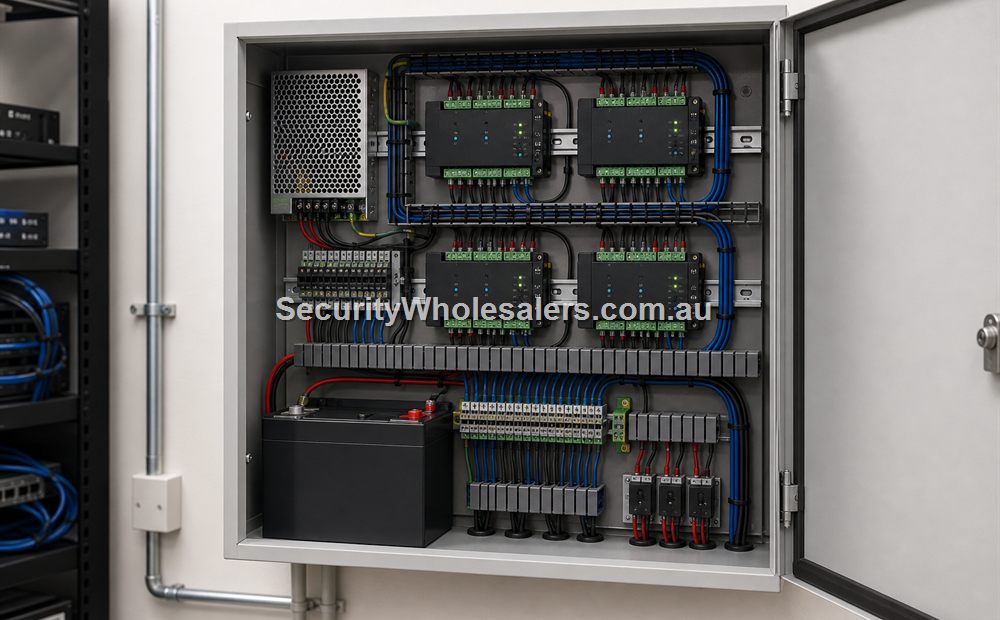
- Reader, controller, lock, contact, REX and access-control PSU/battery
- Existing or new intrusion panel with a supported integration method
- Supervised input/output or vendor software integration as approved
- Separate alarm keypad or app if policy requires explicit user disarm
Cabling and logic
- Access door circuits remain wired to the access controller
- Alarm zone and arming state remain managed by the intrusion panel
- Isolated, supervised inter-panel I/O where used; record normal, alarm and cable-fault state
- Named schedules for staff, cleaners and contractors, plus denial behaviour when the alarm remains armed
Design choice: a valid card can trigger an authorised disarm request only if the alarm platform, monitoring response and site policy support it. Many sites deliberately require a separate disarm step. Test entry, exit, late-to-close, invalid card, alarm offline and communications failure.
What to check
- Do not assume a card reader replaces alarm protection.
- Do not build a system where staff entry and alarm workflow constantly clash.
- Consider after-hours contractors and cleaners in the programming logic.
Things to check
- Expecting access control alone to perform as the full alarm layer.
- Forgetting to define what should happen on authorised after-hours entry.
- Treating restricted internal rooms as ordinary doors.
Buying considerations
- After-hours user patterns.
- Restricted internal areas.
- Need for audit trail.
- Who manages each layer.
When to ask for help
If the site already has an alarm system, explain what it does now and which doors or rooms are causing the new access-control question.
- List the doors and alarmed areas involved.
- Describe what the site wants to happen after hours.
- Send photos of the main controlled door and any restricted internal room.
Commercial site quote
If this is for an office, warehouse, school, gym, medical centre, strata building, rooming house, factory, or multi-tenant site, it is usually worth planning the full door schedule before buying hardware.
Door photo help
For Access Control with Alarm Systems, if you are not sure which parts suit the door, send a photo of the door, lock area, frame and preferred reader position. We can help point you toward the right controller, reader, lock, exit button, and power supply.
Related guides
Relevant products and categories
- Access Control Products - Main category for controllers, readers, kits, locks, and related hardware.
- Alarm systems - use the alarm category for the intrusion layer that sits beside access control.
Frequently Asked Questions
- Why use access control with alarm systems?
Because they solve different problems and can be more useful together, especially after hours.
- Does access control replace an alarm?
No. Access control manages entry, while alarm systems detect and signal intrusion.
- Where does the integration matter most?
After-hours staff entry, restricted rooms, and sites where the owner wants both user control and intrusion awareness.
- Can internal rooms use both?
Yes. Some sensitive rooms benefit from both controlled entry and alarm behaviour.
- What should I explain before asking for help?
Describe what the alarm does now and which doors or rooms need access control added.
SecurityWholesalers product paths for Access Control with Alarm Systems
Use these product paths as a practical starting point after the buying logic is clear. The right product list should follow the site design, not replace it.
Review information
Content owner: SecurityWholesalers access control guide team. Revision: 17 July 2026. Use these examples as a starting point, then confirm the details against current product manuals, approved drawings and relevant authority requirements.
NCC access and egress | ACMA cabling requirements | OAIC biometric guidance | Access control definitions