

















Commercial
Hikvision CCTV Packages Australia
Packages
Quick answer
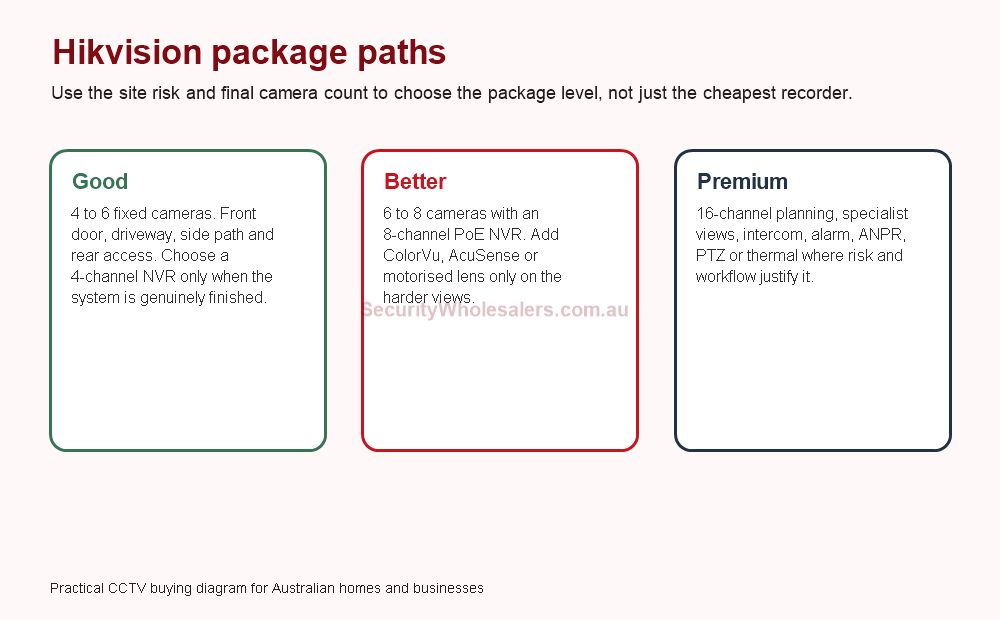
For most Australian buyers, a sensible Hikvision package is either a 4 to 6 camera starter system, a better 6 to 8 camera system with recorder headroom, or a commercial 16-channel path. The mistake is treating every package as a fixed kit before the entry points, side access, rear door, driveway, stock area and after-hours risk are counted properly.
Good, better and premium packages
| Package level | Typical inclusions | Best fit | Watch-out |
|---|---|---|---|
| Good | 4 to 6 fixed cameras, PoE NVR, basic app handover. | Small homes, compact offices and finished layouts. | A 4-channel recorder can become a problem if expansion is likely. |
| Better | 6 to 8 cameras, 8-channel NVR, selected AcuSense, ColorVu or motorised view. | Most homes with side access, small businesses and clinics. | Do not make every camera premium if only two views need the upgrade. |
| Premium | 8 to 16+ cameras, stronger NVR/storage, intercom, AX PRO, ANPR, PTZ or thermal where needed. | Warehouses, depots, strata, schools and larger commercial sites. | Specialist cameras still need a workflow and response plan. |
Package examples by site
| Site | Reasonable Hikvision package | Why |
|---|---|---|
| Small home | 4 cameras only if front, driveway, side and rear coverage are enough. | Simple and affordable, but confirm no future garage or gate view is expected. |
| Typical family home | 6 cameras on an 8-channel PoE NVR. | Leaves room for garage, shed, side gate or intercom-adjacent coverage later. |
| Small business | 6 to 8 cameras, with AcuSense and selected ColorVu where it matters. | Separates customer entry, stock, staff, rear door and after-hours views. |
| Warehouse | 16-channel planning with fixed cameras first, then specialist cameras. | Growth, storage and review workflow matter more than a cheap starting kit. |
SecurityWholesalers product directions
Hikvision cameras
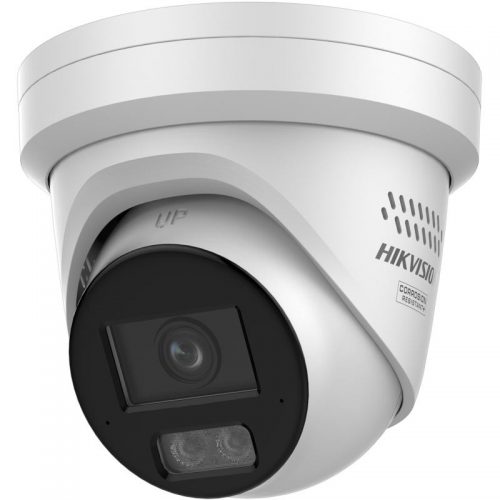
Start with fixed evidence cameras, then add specialist features where the site earns them.
How to brief a Hikvision package properly
The best package briefs start with a scene list. Ask what must be identifiable, what only needs overview, what happens after hours, who needs app access and how long footage should be retained. Only then does the camera count become meaningful. A four-camera package that misses the side gate is not really cheaper if the installer has to return later and redesign the recorder setup.
Australian homes and small businesses often have awkward side access, carports, detached sheds, rear lanes, roller doors and mixed lighting. Those details matter more than the package name. A good Hikvision package should make those decisions visible rather than hide them behind a generic kit label.
Storage and recorder planning for packages
| Package question | Practical answer | Why it matters |
|---|---|---|
| How many days of footage? | Decide the target retention before choosing drive size. | Higher resolution, audio and continuous recording can reduce retention quickly. |
| Is motion recording enough? | Often yes for homes, but businesses may want schedules or continuous recording on key views. | The recording mode changes the hard-drive requirement. |
| Will cameras be added later? | Choose recorder headroom early. | Replacing a full recorder later is more painful than buying the right NVR now. |
| Does the package need UPS? | Consider UPS for the NVR, modem/router and PoE path. | Remote access and recording can fail during short outages if only part of the system is protected. |
Package mistakes that create support calls
- Filling every NVR channel on day one and leaving no growth room.
- Choosing camera resolution without checking storage, lighting or target distance.
- Putting one wide camera where two narrower evidence views are needed.
- Adding Live Guard or bright white-light cameras near neighbours without thinking about nuisance.
- Handing over the system without app users, passwords, playback and export tested.
How SecurityWholesalers would separate package tiers
A package page becomes useful only when it helps you avoid the common trap: comparing two quotes that look similar but are not doing the same job. One quote may include an 8-channel NVR, better storage and cameras placed at actual evidence points. Another may look cheaper because it fills a 4-channel recorder and leaves the garage, side path or rear access unsolved.
| Quote detail | Cheap-looking package | Better package |
|---|---|---|
| Recorder | Just enough channels for today. | Enough channels for the finished system. |
| Camera mix | Same camera everywhere. | Standard fixed cameras first, with specialist cameras only on hard views. |
| Storage | Drive size chosen by habit. | Drive size matched to resolution, recording mode and retention. |
| Handover | App works on install day. | Users, passwords, playback, export and permissions are documented. |
Package examples with camera count and recorder size
Small home package
4 to 6 cameras. Front door, driveway, side access and rear yard first. Use an 8-channel NVR if garage, shed or gate coverage may be added later.
Better home package
6 to 8 cameras on an 8-channel NVR. Add ColorVu or Smart Hybrid Light on the driveway and entry only if night colour will actually help.
Small business package
6 to 8 cameras covering entry, counter, stock room, rear door, customer area and exterior approach. Storage and export workflow matter.
Commercial package
16-channel planning, with fixed cameras first and specialist PTZ, ANPR, access control, intercom, alarm or thermal added only where justified.
Questions to answer before accepting a Hikvision package quote
- Are the camera locations named by scene, not just counted?
- Does the NVR have spare channels if the site is likely to grow?
- Has the hard drive been sized for the retention target?
- Are night views tested for glare, neighbour impact and useful detail?
- Are app users, passwords and export instructions part of handover?
- Does the quote separate evidence cameras from specialist awareness cameras?
When a package should become a custom design
A package is useful when the site is predictable. Once the brief includes a gate, warehouse yard, multiple buildings, shared strata areas, panic buttons, access control, ANPR, PTZ or thermal, the job should stop being treated as a simple kit. Hikvision can still be the right platform, but the design needs to be built around zones, users, cabling, storage, response and future support.
The best question is not "which package is cheapest?" It is "which package is still sensible two years from now?" If you may add cameras, change staff, need footage for disputes, or connect intercom and alarms later, the recorder and network design should allow for that from the start.
Package FAQs
- Is a Hikvision 4-camera package enough?
It can be enough for a small finished layout, but many homes and businesses are safer with an 8-channel recorder because expansion is common.
- Should every camera be ColorVu or Live Guard?
No. Use premium features on the views where they change the result, such as entries, driveways, rear lanes or repeated after-hours problem points.
- What is the safest mainstream Hikvision package?
For many homes and small businesses, 6 to 8 cameras on an 8-channel PoE NVR is the safest mainstream choice.
- Do Hikvision packages include storage planning?
The recorder and hard drive should be sized around camera count, resolution, recording mode and retention target rather than guessed from the package name.
Related pages
Best Hikvision CCTV System Australia
Start here for the broad system decision.
4 Camera vs 8 Camera Systems
Use this when recorder size is the sticking point.