Commercial

Best Hikvision CCTV System for Small Business

Hikvision is often a very strong small-business option because it gives the site more room to be selective about low light, analytics, and supporting layers such as access control or intercom without jumping straight to a massive enterprise design.

Buying Guide

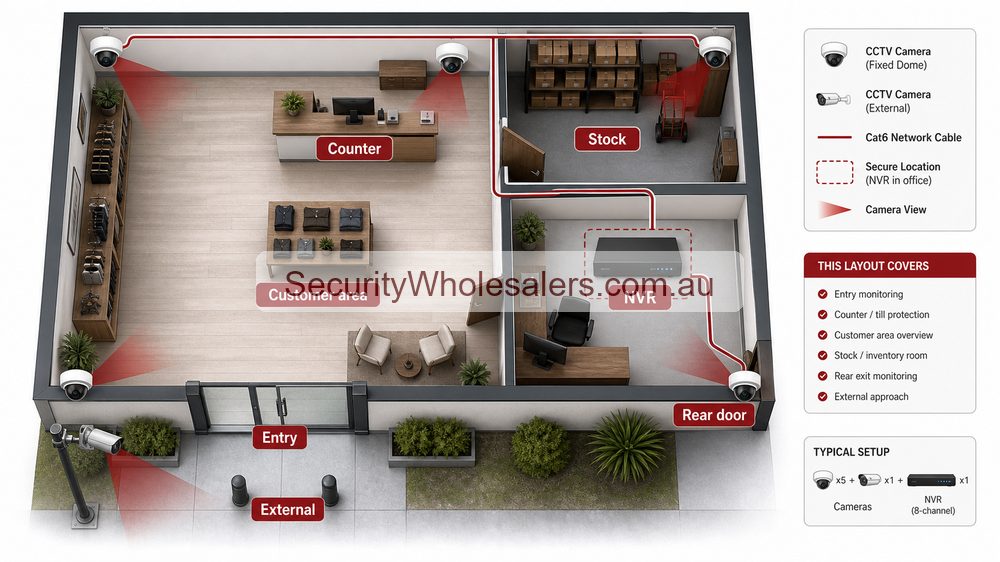
Hikvision small business CCTV layout showing entry counter customer area stock rear door external approach and NVR
Small businesses usually need clear evidence at entries, counters, stock areas, rear access and external approaches before they need specialist cameras.
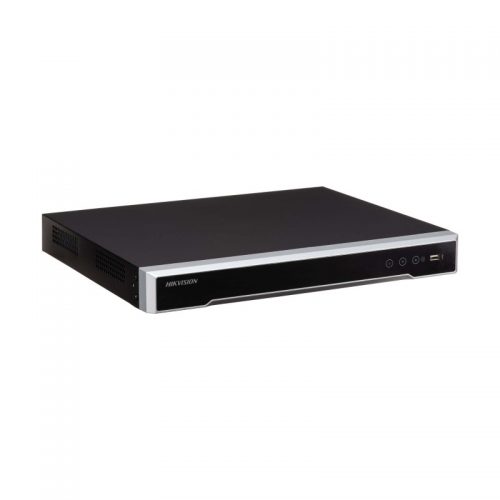
Hikvision small business NVR example
An 8-channel PoE NVR is a common small-business reference point because many shops, clinics, and offices end up with a system that is bigger than four cameras but still wants a tidy single-recorder layout.

Hikvision suits small businesses that need a little more structure

Many small businesses reach the point where a simple camera package no longer feels like enough. They may want better after-hours alerts, stronger low-light performance, more reliable review at the counter or front entry, or the option to improve staff-only door control later. That is where Hikvision often becomes the more comfortable fit.

Focus on the views that carry real business value

Most small-business systems should prioritise front entry, reception or counter, rear doors, external lanes, storage access, and any cash or dispute-prone area. A good design does not try to give every part of the site the same budget or the same camera logic.

Installation insight: the job often grows into access control or intercom

One reason small businesses lean toward Hikvision is that the CCTV conversation often leads naturally into controlled entry, back-room access, or visitor verification at the front door. If those needs are already visible, it helps to choose a brand path that can support them instead of treating CCTV as a one-off island.

Plan the recorder and power path honestly

Even a modest business can outgrow a cramped recorder quickly. If the owner expects more cameras, audio, or longer retention, use the CCTV Storage Calculator and think about UPS on the core path early rather than after the first outage or storage surprise.

Relevant SecurityWholesalers Categories and Products

These Hikvision categories and products matter on small-business jobs because they cover the decisions owners actually make: front entry, counter, after-hours external views, recorder sizing, and the option to add access control or intercom later.

  • Hikvision cameras - The right starting point for entry, office, warehouse-front, and counter coverage.
  • Hikvision AcuSense - Worth reviewing where the site wants cleaner event handling and better after-hours notifications.
  • Hikvision ColorVu - Useful for businesses that care about stronger night-time colour at key external views.
  • Hikvision NVRs - Important when the project needs sensible channel planning and room for future cameras.
  • Hikvision access control - Relevant where staff-only rooms, rear doors, or restricted areas should not stay on key-only logic forever.
  • Hikvision intercoms - Useful where the site wants visitor verification or controlled entry at the front door.

Sources and Further Reading

Small-business quote scenarios

Business Practical Hikvision design Why
Office or clinic Entry, reception, hallway, rear door and comms/store area. Access points and after-hours evidence matter more than monitoring every desk.
Retail store Entry face view, counter, floor overview, stock room, rear door and exterior approach. Transaction, stock and entry evidence need separate views.
Workshop or trade unit Roller door, office, tool area, vehicle bay, rear cage and driveway. Tools, vehicles and after-hours access usually drive the design.
Hospitality venue Entry, POS, service area, stock, rear lane, waste area and external queue/approach. Lighting, staff comfort and customer-facing areas need careful camera behaviour.

What to specify before buying

  • Which views need face detail and which only need overview.
  • How long footage should be retained for stock, incident or transaction review.
  • Who owns the Hik-Connect account and who receives shared access.
  • Whether after-hours alerts, sirens or warning lights are actually wanted.
  • Whether access control, intercom or AX PRO may be added later.

Practical buying scenarios

Small business: start with entry, counter or reception, rear door and stock/office views. Warehouse: separate roller-door evidence, dispatch, aisles, yard and office entry. Strata or shared site: document privacy, access rights, camera ownership and footage request workflow before installation.

Quote-ready checks

  • What exact incident or workflow is this page trying to solve?
  • Which views need identification detail and which only need overview?
  • Does the recorder or management platform support the finished camera count?
  • What must be tested at handover: live view, playback, alerts, export, users and account ownership?
  • Where would this system become the wrong choice and need a different product family?

For Best Hikvision CCTV System For Small Business, the strongest Hikvision quote should read like a site plan, not a box list. It should explain why each camera or recorder path is being chosen, where the buyer should avoid overbuying, and what happens if the site expands later.

Small, medium and complex examples

Site size Practical direction What to avoid
Small Keep the system simple and solve the main evidence points first. Buying specialist features before the basic views are right.
Medium Plan recorder headroom, remote access and stage-two expansion. Filling the recorder or ignoring storage assumptions.
Complex Document permissions, network design, response workflow and handover. Choosing models without a support and review plan.

This extra planning step is often what separates a useful Hikvision system from a quote that only looks good on paper.

Buyer field notes

Start with the job: identify the scene, evidence requirement, lighting, recorder size and handover expectation before selecting the model. Avoid the common mistake: buying the most interesting feature before the normal evidence views are solved.

Quote example: a useful system usually has fixed evidence cameras first, then specialist cameras only where they solve a named problem. The recorder and app workflow should support the finished site.

Final buyer rule

For Best Hikvision CCTV System For Small Business, the final Hikvision choice should be easy to defend on site: the view is useful, the recorder is sized properly, and the handover proves the buyer can find footage later.

Frequently Asked Questions

  • Why is Hikvision a strong small-business choice?

    Because many small businesses need more than a basic camera kit but not a giant enterprise project. Hikvision gives them stronger low-light, analytics, recorder, and subsystem options while still letting the design stay practical.

  • What business areas should be covered first?

    Most small businesses should start with front entry, counter or reception, cash or stock-sensitive areas, rear doors, and any external approach that becomes vulnerable after hours.

  • When does AcuSense matter most on a small-business job?

    It matters most where the business wants cleaner alerts and easier event review on business fronts, side lanes, rear entries, loading areas, or similar scenes that would otherwise produce too much motion noise.

  • When is ColorVu worth paying for on a business?

    It is worth it when a key night-time view really benefits from stronger colour context, such as a front entry, driveway, or external staff entrance.

  • Should a small business think about access control or intercom at the same time as CCTV?

    Often yes. If the business already has staff-only zones, restricted rear doors, or a visitor-facing front entry, it can be sensible to plan those layers while the broader security discussion is already happening.

  • What should the installer confirm before finalising a Hikvision small-business design?

    The real risk points, cable routes, recorder location, storage expectations, staff movement, front-door workflow, and whether the site is likely to expand into more cameras or entry control later.

  • What is the best Hikvision setup for a small business?

    Most small businesses should start with an 8-channel recorder path, fixed cameras at entry/counter/rear areas, and selective low-light or deterrence only where the risk justifies it.

  • Should a small business use Live Guard cameras everywhere?

    No. Live Guard is best for exposed after-hours positions such as rear lanes or yards. Customer-facing areas usually need calmer evidence cameras.

  • Why is the NVR important for a small business?

    The NVR controls channels, storage, PoE, search workflow and expansion. A good camera mix can become frustrating if the recorder is too small or hard to review later.

Related Pages

How to Choose a Hikvision Camera

Work out which Hikvision camera type fits the job, the lighting, and the installation.

How to Choose a Hikvision NVR

Choose the right Hikvision NVR for channel count, PoE, AI, storage, and growth.

Hikvision Access Control Buying Guide

Choose the right Hikvision access-control path and understand what the install requires.

Hikvision Video Intercom Buying Guide

Choose the right Hikvision video intercom and understand the lock-release path.

How to quote Best Hikvision CCTV System For Small Business properly

The practical value of Best Hikvision CCTV System For Small Business comes from how well it solves business CCTV on a real Australian site. A strong recommendation should talk about customer areas, staff-only areas, POS or reception, rear entries, privacy expectations and retention, because those details decide whether the system is useful after the installer leaves.

A business quote should explain public-versus-staff views, user permissions and how quickly footage can be exported after an incident. This is where a good buying guide should help: it should make the trade-offs visible before the customer spends money, not after the first incident exposes a weak view.

Small site

For a small Hikvision Best Hikvision CCTV System For Small Business project, focus on the few views that would prove the most likely incident. It is better to have fewer well-planned cameras than more cameras that miss faces, plates, doors or night detail.

Medium site

For a medium Best Hikvision CCTV System For Small Business site, separate identification views from overview views. Use stronger cameras where people, vehicles or high-value stock must be identified, and use practical overview cameras where the goal is movement context.

Complex site

For a complex Best Hikvision CCTV System For Small Business site, plan the recorder, permissions and expansion path before finalising cameras. Larger jobs often fail because the hardware is good but the storage, network or user workflow was never properly designed.

What a 95/100 Hikvision quote should include

  • A short explanation of what each recommended camera is expected to prove.
  • Enough recorder storage and spare channels for realistic future expansion.
  • Notes on night performance, glare, weather exposure, mounting height and service access.
  • A simple handover plan covering app access, playback, footage export and user permissions.

For Best Hikvision CCTV System For Small Business, the best buying decision is the one that still feels obvious six months later. If the buyer can understand why each device was chosen, how footage will be found, and where the system can grow, the quote is far more likely to deliver long-term value.

Final checks before ordering Best Hikvision CCTV System For Small Business

Before ordering Best Hikvision CCTV System For Small Business, ask the installer or sales team to describe the weakest part of the proposed design. That question is useful because every security system has a trade-off: lens width versus detail, deterrence versus discretion, recorder cost versus retention, or simplicity versus future expansion.

For Best Hikvision CCTV System For Small Business, the better Hikvision purchase is usually the one with a clear explanation rather than the longest specification sheet. The quote should say which views are for identification, which are for overview, which settings need commissioning, and which parts of the system should be reviewed after the first few weeks of real use.

A final practical check for Best Hikvision CCTV System For Small Business is supportability. Choose a system that can be explained to the person who will actually use it: how to open the app, find yesterday's event, export a clip, add a user, and understand when a camera or recorder needs attention. That day-to-day clarity is what separates a decent product list from a genuinely useful Hikvision security solution.

Wrap up EOFY with extra bonus savings :) Use Coupon code: EOFY26 on orders over 800.
Trade Customers: Log In or Register to Unlock Even Better Prices.

Save & Share Cart
Your Shopping Cart will be saved and you'll be given a link. You, or anyone with the link, can use it to retrieve your Cart at any time.
Back Save & Share Cart
Your Shopping Cart will be saved with Product pictures and information, and Cart Totals. Then send it to yourself, or a friend, with a link to retrieve it at any time.
Your cart email sent successfully :)