

















Commercial
Hikvision Buying Guide Australia
Commercial
Quick answer: what should most Australian buyers choose?
Most new Hikvision CCTV buyers should start with an IP camera and PoE NVR system, then add the right technology family only where it solves a real problem. Use AcuSense for cleaner human and vehicle alerts, ColorVu where colour at night genuinely matters, Live Guard where visible warning is appropriate, TandemVu or PTZ for larger operator-view sites, ANPR for controlled vehicle lanes, and thermal only for perimeter or heat-risk problems that normal cameras cannot solve properly.
For many homes and small businesses, the safest mainstream starting point is 6 to 8 fixed cameras on an 8-channel PoE NVR. Larger homes, warehouses, strata buildings and commercial sites often become 16-channel planning jobs earlier than buyers expect.
How to use this Hikvision buying guide
This page is the main starting point. If you are new to the Hikvision range, use it to decide the broad system setup first: IP or Turbo HD, camera family, NVR size, storage, app access and whether the project also needs intercom, access control, alarm, ANPR or thermal. Once that direction is clear, the child guides help with the narrower product choice.
| If you are trying to decide⦠| Start with this answer | Then read |
|---|---|---|
| Which Hikvision system is best overall | Start with fixed IP cameras and the correct NVR size, then add specialist features only where needed. | Best Hikvision CCTV System Australia |
| Whether a package is enough | Use a package only when the site is predictable; move to a custom design for gates, warehouses, strata or mixed systems. | Hikvision CCTV Packages Australia |
| 4 cameras or 8 cameras | Choose 4-channel only when the system is genuinely finished; use 8-channel when expansion is likely. | 4 Camera vs 8 Camera Systems |
| Which camera family to use | Choose by the problem: alerts, night colour, deterrence, overview, number plates or thermal detection. | Hikvision Camera Series Explained |
| Which recorder to use | Choose the NVR after the final camera count, resolution, PoE layout and retention target are known. | How to Choose a Hikvision NVR |
Hikvision buying roadmap
- Map the site first. List the exact views: front door, driveway, side gate, rear door, stock room, counter, roller door, car park, gate or boundary.
- Separate evidence from overview. Fixed cameras should cover repeatable evidence points. PTZ and TandemVu are support tools, not replacements for fixed views.
- Choose IP or Turbo HD. IP is usually better for new cabling, analytics and expansion. Turbo HD is mainly useful where reusing coax is the commercial win.
- Pick the camera family only where it matters. Do not pay for ColorVu, Live Guard, ANPR or thermal everywhere if only one or two views need it.
- Size the recorder properly. Channel count, PoE, HDD bays, bandwidth and storage retention should be designed around the finished system, not only stage one.
- Plan handover. App users, passwords, playback, export, firmware, camera names and admin ownership should be settled before the job is considered finished.
Not sure which Hikvision family fits? Start with the statement that sounds most like your job
This chooser is deliberately simple and WordPress-safe. Open the statement that sounds closest to your site and you will see the best fit, the next family to compare, and the most common mistake to avoid before you start product shopping.
We mainly want cleaner alerts and easier playback
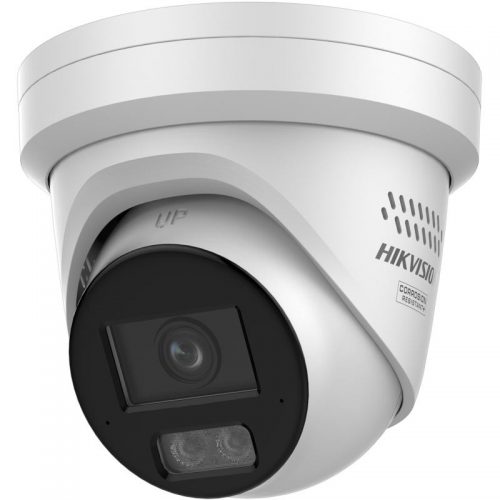
AcuSense
Usually the safest starting point when the real problem is cluttered alerts, messy playback, and too much wasted time reviewing footage.
Likely camera style: fixed turret or bullet on the views that generate the most event clutter.
Common mistake to avoid: expecting AcuSense to rescue a badly framed scene that is too high, too wide, or pointed into visual clutter.
ColorVu
Worth comparing if the same scene also suffers from weak night-time image quality and the customer cares about colour context after dark.
Read the AcuSense guide first
Then compare it against How to Choose a Hikvision Camera if you are already narrowing down fixed camera types.
We need better colour and scene detail at night
ColorVu
Usually the right fit when the key views need stronger colour and better scene context after dark.
Likely camera style: fixed ColorVu camera on the front entry, driveway, frontage, or other key night scenes.
Common mistake to avoid: forcing ColorVu onto every view when only one or two scenes really need the extra night detail.
Live Guard
Worth comparing if the same scene also needs an active warning response after hours rather than only better-looking footage.
Read the ColorVu guide first
Then compare it against ColorVu vs Smart Hybrid Light if you are still working through low-light strategy.
We want the camera to warn people off after hours
Live Guard
Usually the best fit when the site wants the camera to challenge activity after hours with speaker, strobe, or both.
Likely camera style: one or two deterrence cameras on the actual after-hours problem points, not across every view on site.
Common mistake to avoid: turning every camera into a deterrence camera when only one or two scenes really need that response.
AcuSense
Worth comparing if the customer mainly wants better notifications and cleaner review, not an active warning response.
Read the Live Guard guide first
Then compare it against the Hikvision alarm guide if the site is drifting toward broader after-hours detection.
We need one wide scene plus a tighter working view
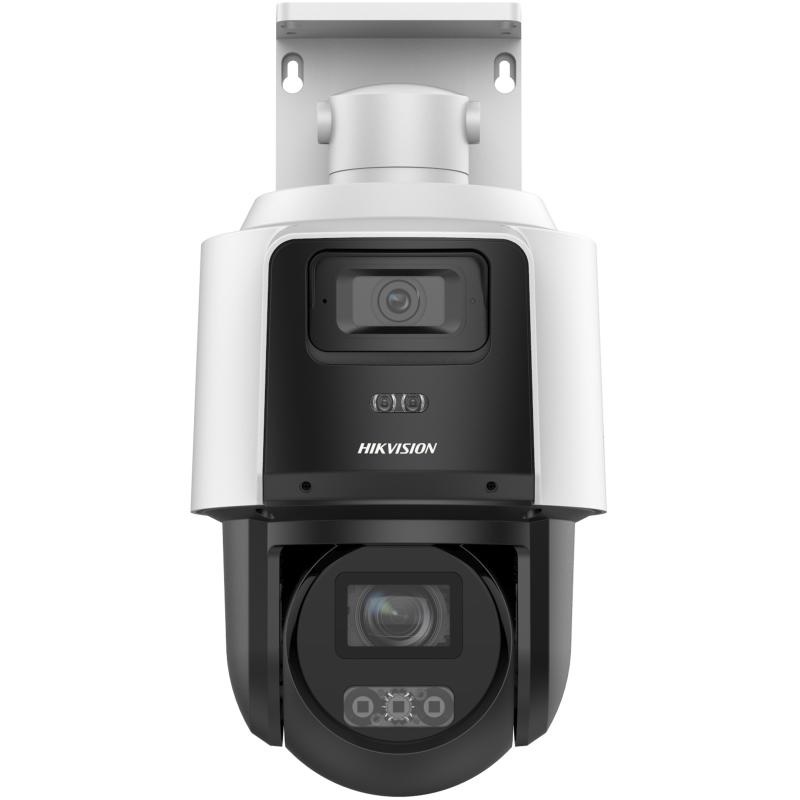
TandemVu
Usually worth discussing when one camera position genuinely needs a wide scene and a tighter working view together.
Likely camera style: one specialist overview camera supported by properly placed fixed evidence cameras.
Common mistake to avoid: using TandemVu as an excuse to skip the fixed evidence cameras the site still needs at gates, doors, and other real decision points.
Fixed or varifocal cameras
Worth comparing if the site really only needs a simpler fixed view or a motorised varifocal on a narrower scene.
Read the TandemVu guide first
Then compare it against Hikvision Thermal Cameras if the job is really about difficult perimeter detection rather than visible-light overview.
The job feels mixed and we are still narrowing it down
Best Hikvision CCTV System in Australia
If the brief still feels mixed, start with the broader buyer page and then compare the family guides rather than trying to force one feature decision too early.
Common mistake to avoid: buying around a technology label before you are clear on whether the real issue is alerts, night colour, deterrence, or broader scene management.
Hikvision Camera Series Explained
This is the best next page if you still need to compare AcuSense, ColorVu, Live Guard, and TandemVu side by side.
Sort cabling and recorder plans early
If the site may involve existing coax, multiple buildings, or a larger recorder decision, read IP vs Turbo HD and How to Choose a Hikvision NVR before locking the cameras.
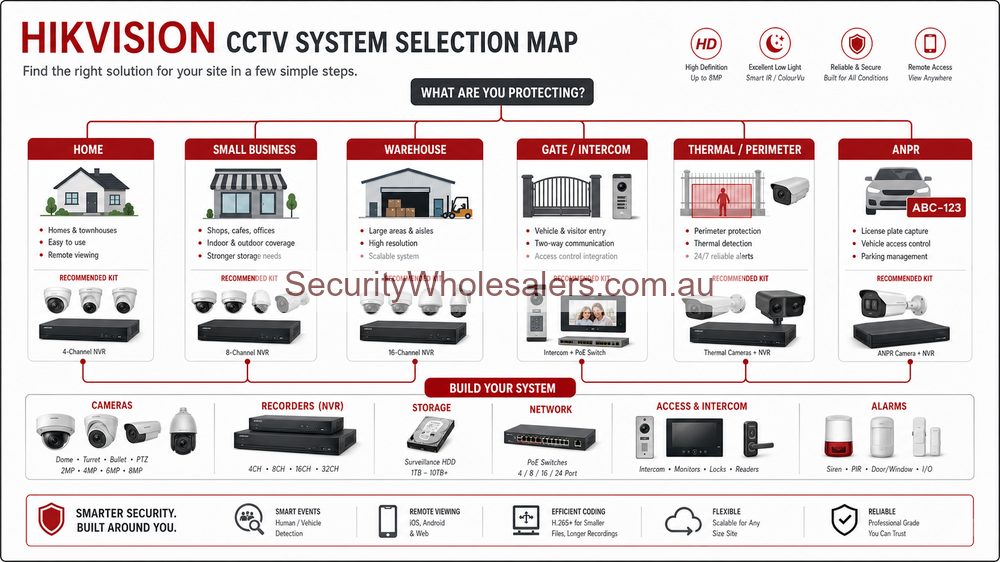
Diagram: how most Hikvision projects split out
Start with what the site is really trying to solve, then follow that into the part of the Hikvision range that shapes the hardware and installation plan.
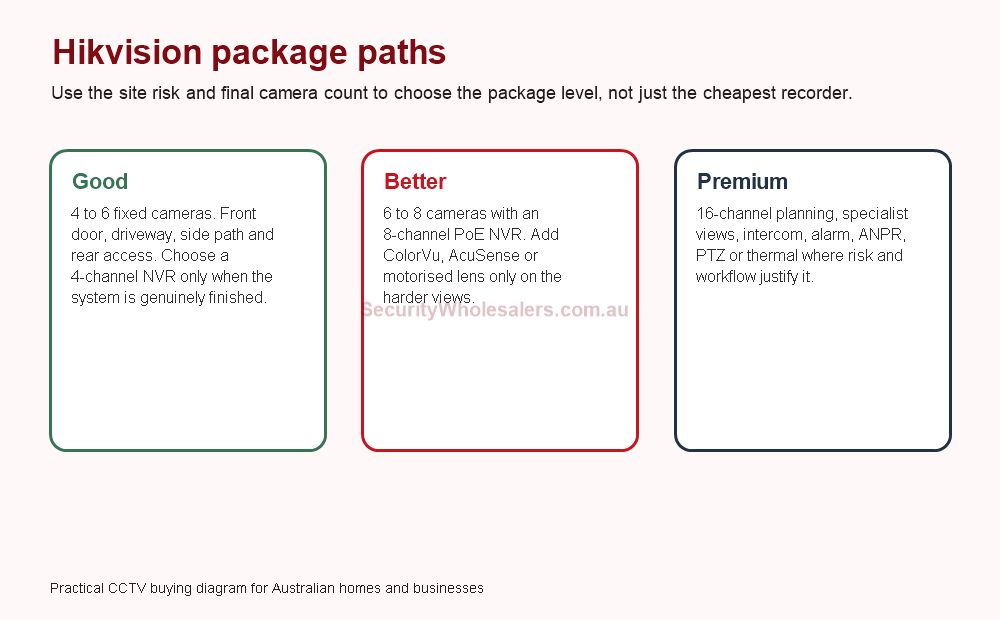
Hikvision system tiers: good, better and premium
A good Hikvision system is not automatically cheap, and a premium Hikvision system is not automatically better. The right tier depends on whether the site needs a simple evidence system, a better system with growth headroom, or a specialist design with multiple security layers.
| Tier | Typical design | Best fit | Common mistake |
|---|---|---|---|
| Good | 4 to 6 fixed IP cameras, PoE NVR, basic app handover and sensible storage. | Small homes, compact offices, simple shops and finished layouts. | Using a four-channel NVR when the owner is likely to add more cameras. |
| Better | 6 to 8 cameras, 8-channel NVR, selected AcuSense, ColorVu, Smart Hybrid Light or motorised lens. | Most Australian homes, clinics, small businesses and better residential jobs. | Making every camera premium instead of upgrading only the hard views. |
| Premium | 16-channel planning, stronger storage, intercom, access control, AX PRO, ANPR, PTZ, TandemVu or thermal where justified. | Warehouses, strata, depots, schools, larger homes, car yards and mixed-use buildings. | Adding specialist cameras before fixed evidence views and response workflow are settled. |
Best Hikvision starting points by Australian site type
| Site type | Typical Hikvision starting point | Why |
|---|---|---|
| Small home or townhouse | 4 to 6 fixed cameras, often on an 8-channel NVR if future expansion is possible. | Front door, driveway, side access and rear area matter more than buying every feature. |
| Larger home | 6 to 8 cameras, 8-channel NVR, selected low-light or deterrence cameras. | Garage, side gate, backyard, shed and driveway views add up quickly. |
| Small business | 6 to 8 cameras with entry, counter, customer area, stock room, rear door and external approach separated. | Business evidence is about workflow, not just coverage. |
| Warehouse or trade unit | 8 to 16 cameras, with fixed evidence first and specialist cameras only where needed. | Roller doors, dispatch, stock, staff entry and yard coverage should not be merged into one wide view. |
| Strata or apartment building | Common-area CCTV, intercom, garage gate coverage and clear user/admin rules. | Shared sites need governance, privacy-aware framing and access control discipline. |
| Gate or vehicle entry | Fixed overview plus intercom or ANPR only if the lane and workflow suit it. | Gate automation and number-plate capture are design problems, not generic camera upgrades. |
| Large perimeter or fire-risk site | Thermal or bi-spectrum only where detection or temperature awareness is the true problem. | Thermal is powerful, but it is not a normal low-light camera replacement. |
4 camera, 6 camera, 8 camera and 16 channel Hikvision systems
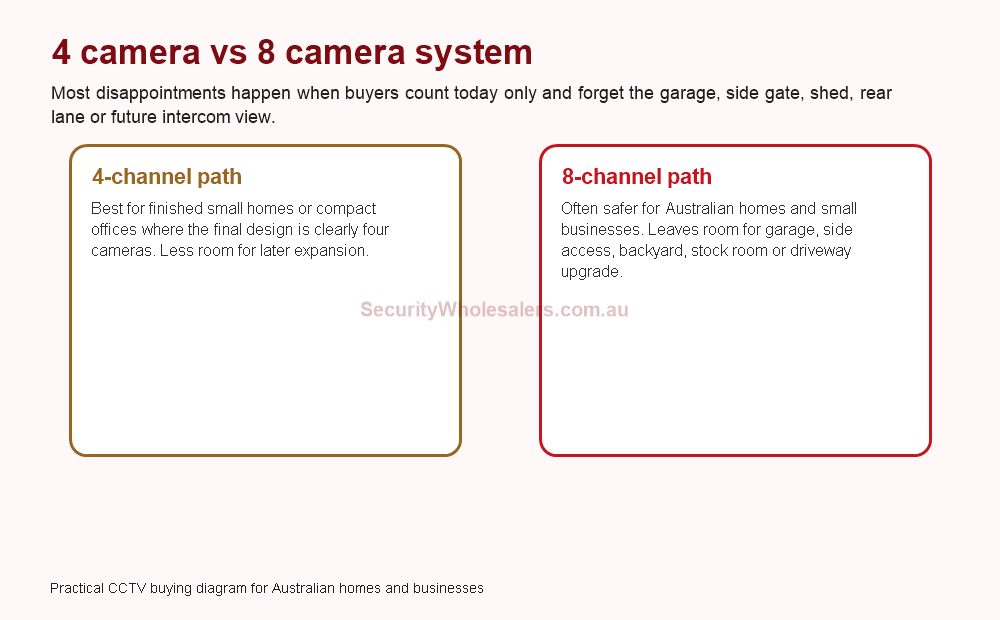
Camera count should come from the site map. A four-camera system sounds complete until you remember the garage, side gate, rear lane, stock room or driveway. That is why many practical Hikvision starter systems use an 8-channel recorder even if stage one only has four to six cameras.
4 camera system
Works for small finished layouts: front door, driveway, side path and rear yard. Risky if the owner may add garage, shed or side-gate coverage later.
6 camera system
Often a more realistic home or small-office layout once front, driveway, garage, rear, side and one internal or secondary view are counted.
8 camera system
A strong mainstream choice for homes and small businesses because it can cover entry, rear access, stock, car park and after-hours views without filling the design too early.
16 channel planning
Usually the smarter start for warehouses, larger homes, strata, schools, depots and commercial sites where expansion is likely.
Hikvision camera families in plain English
| Family | Best for | Do not use it for |
|---|---|---|
| AcuSense | Cleaner alerts, human/vehicle filtering and easier event review. | Fixing poor camera placement, glare, bad lighting or target distance. |
| ColorVu | Colour at night on entries, driveways, shopfronts and key external views. | Every dark scene, especially where white light would annoy neighbours. |
| Smart Hybrid Light | IR-first night viewing with white light when a useful event occurs. | Sites that need constant colour all night. |
| Live Guard | Visible warning with light and speaker at repeated after-hours problem points. | Quiet neighbour-sensitive locations or sites with no response owner. |
| Motorised varifocal | Awkward scenes where the installer needs to tune framing on site. | Simple fixed views where the lens choice is already obvious. |
| PTZ / TandemVu | Operator overview, zoom and larger commercial areas. | Replacing fixed evidence cameras at doors, counters, gates or roller doors. |
| ANPR | Controlled vehicle lanes, gates, depots and parking workflows. | Wide, angled or uncontrolled driveways where plate geometry is poor. |
| Thermal | Perimeter detection, heat-risk monitoring and difficult outdoor detection. | Colour evidence, face recognition or number-plate capture. |
Installation insight: sort out wiring and cabinet layout before locking the final product list
One of the biggest mistakes on brand-led projects is thinking the product range is the hard part. In reality, the difficult part is often power, cable containment, door hardware, rack space, lock release, uplink capacity, recorder location, and whether the system should be centralised or split by zone.
On a CCTV job, that means asking whether cameras should home-run to an NVR with local PoE, terminate to distributed PoE switches, or be split across buildings. On an access-control or intercom job, it means checking door type, frame type, fire and egress implications, cable path to the secure side, and whether the site wants simple local management or a more software-driven audit trail.
That is why these guides keep coming back to installation detail. Buying advice is only useful if the system can actually be commissioned properly and handed over without a mess.
Recorder, storage and app access are part of the buying decision
Hikvision buying mistakes often happen after the camera family has already been chosen. A buyer may select strong 8MP cameras but undersize the NVR, storage or UPS. Another buyer may choose the right cameras but leave app access, passwords and export workflow unclear. The system feels fine on install day, then becomes frustrating when footage is needed.
| Decision | What to confirm | Why it matters |
|---|---|---|
| NVR channels | Final camera count, not just stage-one count. | Spare channels are cheaper than replacing the recorder later. |
| PoE and network | Whether cameras home-run to the NVR or use switches. | Large sites, sheds and multiple buildings may need a distributed network plan. |
| Storage | Resolution, recording mode, frame rate and retention target. | 8MP, audio and continuous recording can reduce storage faster than buyers expect. |
| UPS | NVR, PoE switches, modem/router and critical network gear. | Remote access and recording can fail during outages if only the recorder is backed up. |
| App users | Who has admin, live view, playback and export access. | Access should be removable when staff, tenants or committee members change. |
Installation conditions that change the Hikvision recommendation
The same Hikvision camera can be excellent in one location and poor in another. Mounting height, target distance, lens, glare, lighting, cable path, network layout, weather exposure, vibration, door hardware and privacy expectations all change what should be quoted.
- Check whether the camera is meant to identify a person, read a plate, cover a general area or trigger an alert.
- Measure the target distance instead of assuming a high-resolution camera can fix a wide scene.
- Test important low-light views at night, especially driveways, rear lanes, car parks and side paths.
- Use motorised varifocal where the final framing is uncertain.
- Plan outdoor cameras for weather, glare, spiders, mounting height and cable protection.
- Confirm whether audio, deterrence lights or sirens could create privacy or nuisance issues.
- For intercom and access control, confirm door hardware, lock power, egress and secure-side relay design before ordering parts.
Common Hikvision buying mistakes
Buying by megapixels only
A high-resolution camera mounted too high or too wide can be less useful than a lower-resolution camera aimed correctly.
Filling the recorder immediately
A four-channel NVR can be fine, but not when the customer is likely to add garage, side access, rear lane or stock-room coverage later.
Using PTZ as evidence
PTZ and TandemVu help with overview and zoom, but fixed cameras should still cover repeatable evidence points.
Overusing deterrence
Live Guard and white-light features should be used carefully around neighbours, customers and staff areas.
Ignoring handover
Passwords, app users, playback and export need to be tested before the job is finished.
Adding specialist cameras too early
ANPR, thermal and access control are powerful when the geometry, workflow and response plan are right.
SecurityWholesalers quote-style examples
| Buyer request | Better Hikvision recommendation | Why |
|---|---|---|
| "I want a Hikvision kit for my home." | Map front door, driveway, garage, side access and rear yard; often 6 cameras on an 8-channel NVR. | Prevents a four-camera kit from becoming too small immediately. |
| "I need CCTV for my shop." | Entry, counter, customer area, stock room, rear door and exterior approach, usually on an 8-channel NVR. | Retail evidence needs separate views, not one wide camera. |
| "I need cameras for a warehouse." | 16-channel planning, fixed cameras first, then selected PTZ, access control, ANPR or Live Guard. | Warehouses need growth, storage and workflow more than a cheap package. |
| "I want number plate recognition." | Confirm lane width, angle, speed, lighting, privacy and plate-list management before choosing ANPR. | ANPR fails when the lane is not designed for plate capture. |
| "I want cameras and intercom at a gate." | Intercom for visitor workflow, fixed camera for wider approach, possible ANPR only if geometry suits. | The intercom camera alone rarely solves the whole gate view. |
Use the planning tools on the site as well as the product pages
Hikvision projects still benefit from neutral planning tools. If the job is camera-led, the Camera Planner helps mark the real coverage zones before hardware is locked in. If the job is recorder-led, the CCTV Storage Calculator and UPS Backup Time Calculator help turn assumptions into a usable storage and power-resilience plan.
If the design raises notice or privacy questions, the CCTV Signage Generator and CCTV Compliance Checker help keep the conversation grounded. The tools are brand-neutral, which is useful because it is still worth testing the plan rather than assuming the product range solves everything on its own.
What to read next
If you are comparing cabling strategy, the IP vs Turbo HD page is the next best read. If the site is already clearly an IP CCTV job, move into the camera and NVR guides. If the project is really about doors, visitor entry or intrusion, jump straight into the access control, intercom or alarm pages. That sequence usually gets you to a workable shortlist much faster than sitting on the pillar page too long.
Relevant SecurityWholesalers Categories and Products
These are the Hikvision areas buyers usually review first when they start matching the brand to a real project rather than a brochure headline.
- Hikvision 6MP cameras - A practical resolution step for buyers who want a stronger fixed-camera option without forcing 4K everywhere.
- Hikvision 8MP / 4K cameras - Relevant where wider scenes, more crop margin, or higher-detail identification is part of the brief.
- Hikvision NVRs - Important when the project needs proper storage planning, PoE design, and future camera growth.
- Hikvision ColorVu packages - Useful when you want a quicker way into a bundled low-light camera family.
- Hikvision Turbo HD cameras - Useful where the site wants to reuse coax or upgrade an older analogue-style install more gradually.
- Hikvision access control - Relevant where the same buyer is also solving controlled entry, staff-only doors, or lift access.
- Hikvision video intercoms - Useful where the project includes visitor entry, front-door verification, or apartment-style access.
- Hikvision AX PRO alarms - A strong fit when CCTV needs to be part of a broader intrusion, panic, or app-notification workflow.
- Hikvision AX Hybrid Pro alarms - Worth reviewing where the job needs more wired zones, structured field wiring, or larger alarm growth.
- Hikvision thermal cameras - Relevant when the site needs perimeter detection, fire-risk monitoring, or harder outdoor scenes.
Sources and Further Reading
- Hikvision Australia: Product Families
- Hikvision Australia: Network Products
- Hikvision Australia: Turbo HD Products
- Hikvision Australia: Access Control
- Hikvision Australia: Video Intercom
- Hikvision Australia: Alarm Products
- Hikvision Australia: Security Thermal Cameras
- Hikvision Australia: Audio Products
Frequently Asked Questions
-
What is the best place to start with Hikvision if you are new to the range?
Start by working out what the site actually needs first. If it is a new CCTV install with PoE cabling and stronger analytics, begin with Hikvision IP cameras and NVRs. If it is mainly about reusing existing coax, start with Turbo HD. If the real job is controlled entry, visitor verification, or alarms, it usually makes more sense to begin there rather than trying to make every decision through the CCTV side first.
-
When does Hikvision IP usually make more sense than Turbo HD?
Hikvision IP usually makes more sense on new builds, larger commercial sites, projects that want easier expansion through switches, and jobs that care more about analytics, flexible placement, and mixed device integration. Turbo HD still has a place where the real commercial advantage is coax reuse or a quicker staged upgrade.
-
Can one Hikvision project include CCTV, access control, intercom, and alarm together?
Yes, but the design should still be disciplined. A combined project works best when each subsystem has a clear job, the network and power design are planned early, and you are honest about whether they need simple standalone hardware or a more software-driven architecture.
-
How should a buyer think about installation before choosing Hikvision products?
The site survey still comes first. The installer needs to confirm door types, cable paths, switch or rack locations, recorder placement, lock power, UPS expectations, and whether the job is new cabling, retrofit, or a mix of both. Hikvision gives you a lot of options, but those options are only useful when the install has been thought through properly.
-
Does Hikvision only suit large commercial jobs?
No. Hikvision suits everything from homes and small businesses through to multi-door buildings and larger campuses. The key is choosing the right tier inside the ecosystem rather than assuming every Hikvision project needs enterprise-style hardware.
-
Which Hikvision pages should someone read next after the main guide?
Most buyers should read the IP vs Turbo HD guide first, then move to the camera or NVR guide. If the project includes entry control, alarms, or intercom, those dedicated pages should come next because they change the hardware plan early.
-
What is the best Hikvision CCTV system for most homes?
Many homes are best served by 6 to 8 fixed IP cameras on an 8-channel PoE NVR, with ColorVu, Smart Hybrid Light or Live Guard used only on the views where they genuinely improve the result.
-
Is Hikvision better as a package or a custom system?
A package is fine for predictable homes and small businesses. A custom system is usually better for warehouses, strata, gates, ANPR, intercom, access control, alarms, thermal or any site likely to expand.
-
Should I choose Hikvision ColorVu, AcuSense or Live Guard?
Choose AcuSense for cleaner alerts, ColorVu for better colour at night and Live Guard for active warning with light or speaker. Many modern cameras overlap these features, so choose by the site problem rather than the marketing family alone.
-
How many cameras should a Hikvision system have?
Small finished homes may use 4 cameras, but many homes and small businesses are safer with 6 to 8 cameras on an 8-channel NVR. Warehouses, strata and commercial sites often need 16-channel planning.
-
What is the biggest mistake when buying Hikvision?
The biggest mistake is buying by camera model or megapixel count before mapping the site. Camera placement, lens choice, NVR size, storage, lighting and handover often matter more than the headline specification.
Related Pages
Hikvision Installer Checklist Australia
Use this before ordering cameras, NVRs, intercom, access control, AX PRO, ANPR or thermal hardware.
Hikvision IP vs Turbo HD
Choose between Hikvision IP and Turbo HD based on cabling, expansion, and analytics.
How to Choose a Hikvision Camera
Work out which Hikvision camera type fits the job, the lighting, and the installation.
Hikvision PTZ Buying Guide
Work out when a PTZ genuinely helps and when fixed cameras are still the better answer.
Hikvision ANPR Cameras Buying Guide
Choose a number plate recognition camera by lane design, lens range, installation angle, and access-control workflow.
Hikvision Motorised Varifocal Cameras Buying Guide
Use this when the scene is hard to judge on paper and the installer may need tuning freedom on site.
How to Choose a Hikvision NVR
Choose the right Hikvision NVR for channel count, PoE, AI, storage, and growth.
Hikvision Access Control Buying Guide
Choose the right Hikvision access-control setup and understand what the install requires.
Hikvision 2026 Camera and NVR Picks
Use current model examples to narrow the right Hikvision camera and NVR shortlist faster.
Hikvision Face Recognition for Retail Businesses
Understand when Hikvision face-recognition hardware belongs in a retail workflow and when it does not.