

















Commercial
Best Access Control System for Small Business
Buying Guide
A small business can still be very different from a single shopfront with one side door. Some sites only need a simple standalone terminal. Others already need proper event history because there is a front door, a rear entry, and a staff-only store or records room.
What Usually Fits Best
For many small businesses, the strongest fit is a logged one- or two-door controller path rather than a bare standalone keypad. It keeps the job tidy, gives the owner a real event trail, and avoids replacing the whole setup the moment a second door or tighter staff permissions become important.
| Situation | Usually The Better Path | Why |
|---|---|---|
| One simple staff door | Standalone single-door path | Low admin burden, low cost, no heavy audit expectations. |
| Front door plus rear office or store | Logged 1-2 door controller | Cleaner permissions, schedules, and after-hours accountability. |
| Several doors or future growth expected | Controller-based system with software | Avoids replacing the whole platform once the site expands. |
Implementation Direction
A small-business job should start by separating the door roles. The front customer or staff entry may need a cleaner credential path and perhaps visitor verification. A rear store, office, or stockroom door may need tighter permissions. The installer should quote each opening as a full access point with reader, lock hardware, egress, monitoring, and a clear admin workflow rather than treating the job as just "one keypad on the wall".
What the Installer Needs to Confirm on Site
A small-business installer should start by separating the doors by role. The real question is not just how many doors exist today, but which ones need accountability, visitor handling, and room to grow without redoing the whole job six months later.
- Confirm whether the front door is staff-only, customer-facing, or visitor-facing, because that drives whether access control alone is enough or intercom also belongs in the design.
- Check each opening for door type, frame depth, latch style, closer condition, and whether an electric strike or maglock is the cleaner fit.
- Find the cable path back to the secure side of the tenancy so the controller, power supply, and any lock connections are not left exposed in public space.
- Ask who will add and remove staff, how often staff change, and whether the owner expects searchable logs or just simple entry.
- Confirm whether the site has a rear office, stockroom, or records room that should not share the same access rules as the main entry.
What This Job Normally Requires
A simple one-door office can still be a clean standalone job, but the moment a front and rear door are both meaningful, the installation should usually be quoted as a small controller system rather than two disconnected door gadgets.
- Single-door path: standalone terminal such as the HA-AC-S1, appropriate strike or maglock, exit button or request-to-exit device, door contact if monitoring is wanted, and a tidy local power path.
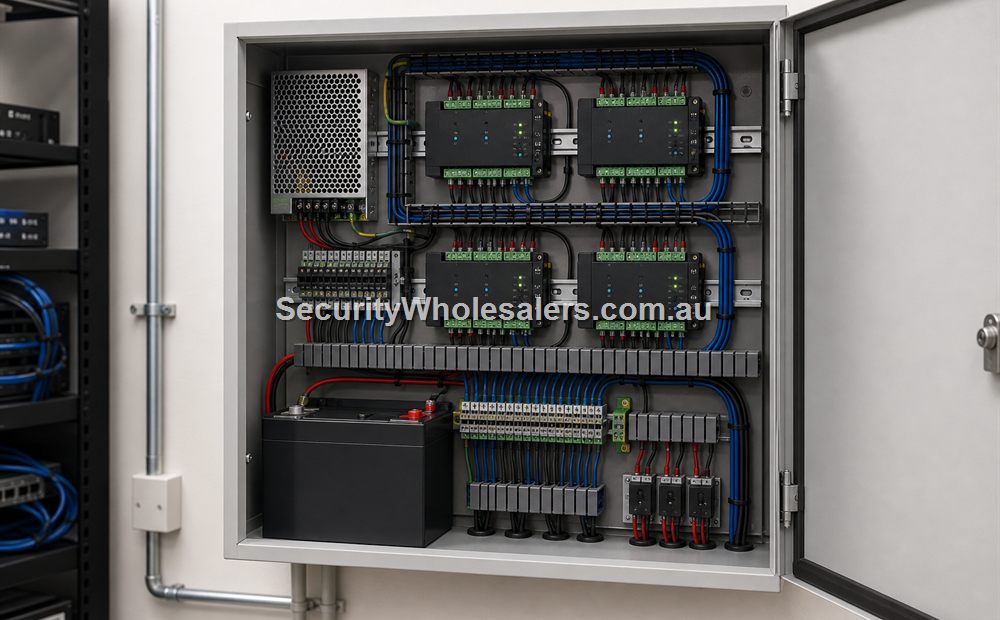
- Two-door path: controller such as the DS-K2702X-P, one reader or terminal per door, strike or maglock per opening, exit devices, door contacts, secure power supplies, and network back to the office cabinet.
- If the front door needs visitor release, add an intercom-capable device such as the DS-KV6124-WBE1 or DS-K1T502DBWX rather than trying to make a plain reader do the wrong job.
- Mount the controller and lock wiring on the secure side, and leave service slack and labelled terminations so later changes do not become a fault-finding exercise.
- If the owner expects logs during short power interruptions, allow for UPS protection on the controller, network switch, router, and any lock supply that must stay active.
Programming, Testing, and Handover
The job is not finished when the strike clicks. A small business install only feels complete once user groups, schedules, and real-world failure points are tested with the owner standing there.
- Create manager and staff users properly instead of leaving the site on one shared credential set.
- Program day mode, after-hours mode, and any schedule-based unlock periods before handover.
- Test valid entry, denied entry, safe egress, door held open, and power-fail behaviour on each opening.
- Show the owner exactly how to add a user, disable a lost credential, and review after-hours events.
- Leave a written record of lock type, door wiring, controller IP details, admin credentials, and backup expectations.
Software, Credentials, and Growth
If the site is still very simple, local setup or a smaller cloud-style path can be enough. If the business is already thinking about multiple users, recurring staff changes, contractor schedules, or central review of denied and after-hours events, then HikCentral-style management becomes the better operational answer. That way the owner is managing users and permissions, not just unlocking a door.
Common Mistakes to Avoid
- Treat each door as a complete opening with lock, egress, and monitoring.
- Decide early whether the owner needs searchable events.
- Check whether the front door also needs intercom or visitor verification.
- Leave room for a second or third door even if the site starts smaller.
- Make sure the owner understands who will add and remove users after handover.
Recommended Direction
If the business is a genuine one-door site, keep it simple. If it already has a front and rear entry, or wants accountability, move to a logged controller path immediately.
Relevant SecurityWholesalers Product Areas
- Access Control - The main category for controllers, readers, credentials, locks, and supporting hardware.
- Hikvision Access Control - A strong ecosystem when you want one family spanning standalone devices, controllers, lift hardware, and software growth.
- Hikvision HA-AC-S1 - A practical standalone card and PIN terminal for simple single-door jobs.
- Hikvision DS-K2702X-P - A strong fit when one or two doors need proper logs, schedules, and a real controller architecture.
- Hikvision Access Control Base License Package - Useful when the site needs a proper software layer for users, schedules, event review, and central administration.
- Hik-Connect Team Mode 1 Door - Relevant where a smaller site wants cloud-style management for access control and time attendance.
Related Guides in This Series
Source References
Frequently Asked Questions
-
What usually works best for small business access control?
For many small businesses, a logged one- or two-door controller path is the sweet spot because it gives useful logs and cleaner administration without forcing the site into a heavy enterprise build.
-
Is a simple standalone system enough for small business access control?
A standalone system can still suit a truly simple one-door office, side gate, or storeroom. It stops making sense once the business wants audit questions answered, has recurring staff churn, or expects a second meaningful door.
-
When do logs really matter on small business access control?
Logs matter as soon as the owner wants to know who entered after hours, who still has access, or whether a contractor or former staff member used a credential that should have been disabled.
-
When does intercom or visitor verification matter here?
Intercom becomes relevant when the front door is public-facing and staff need to verify visitors before release. Professional suites, medical tenants, and mixed-use offices often need this more than simple back-of-house doors.
-
What software usually makes sense?
Small businesses can sometimes live with browser-based or app-style management, but once several users, schedules, or multiple doors are involved, a proper software layer becomes much easier to live with.
-
What is the most common buying mistake?
A common issue is buying the cheapest reader first and only later discovering the site really needed logs, staff groups, and a growth path.
Plan this site door by door
Download the editable workbook, list every controlled opening, then email it with matching door photos to sales@securitywholesalers.com.au. Include the site suburb, installation requirement and target timing.
Review information
Content owner: SecurityWholesalers access control guide team. Revision: 17 July 2026. Use these examples as a starting point, then confirm the details against current product manuals, approved drawings and relevant authority requirements.
NCC access and egress | ACMA cabling requirements | OAIC biometric guidance | Access control definitions