Dahua WizSense vs WizMind

Most buyers do not need an abstract AI debate. They need to know whether Dahua WizSense is already enough for the site or whether the job is drifting into WizMind territory because the recorder, PTZ, or investigation workflow is becoming more demanding.

AI Tiers

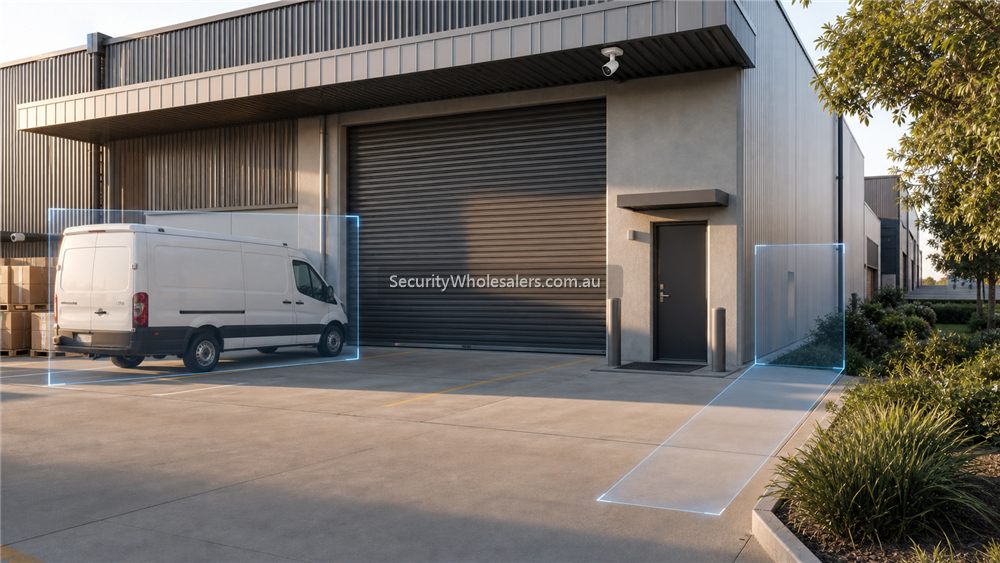
Dahua AI detection scene showing vehicle and entry coverage
WizSense is the practical AI-filtering tier for many sites. WizMind becomes more relevant when search, analytics and larger workflows justify the step up.
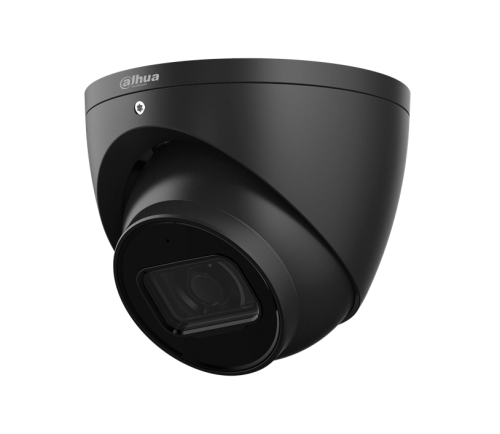
Dahua turret security camera
A practical Dahua turret camera reference point for the fixed-lens jobs that make up most home, office, and small-business installs.

The practical difference

WizSense is usually Dahua's cost-performance AI tier for many mainstream commercial jobs. It focuses on useful human and vehicle filtering, easier configuration, and broader affordability. WizMind is more project-oriented and is more likely to matter where the site wants deeper search, more specialised analytics, or a stronger AI platform around the recorder and camera combination.

That means the right question is not "which is better?" but "which one is enough for the site?" On a smaller business, lighter warehouse, or tidy office job, WizSense is often already the honest answer.

Where the split usually shows up first

  • In cameras: whether the site needs straightforward AI filtering or a more specialised project tier.
  • In PTZ: whether the site wants stronger patrol, tracking, or higher-end project behaviour.
  • In NVRs: whether the site only needs good mainstream recorder AI or wants a more advanced investigation and search workflow.

Installation insight

Installers should not oversell the higher tier just because it sounds more advanced. The more useful design question is whether the operator will really use the deeper functions later. If not, the site may be better served by spending the budget on better placement, motorised lenses where needed, or a stronger recorder and HDD plan inside the WizSense tier.

Where the site genuinely wants faster forensic review, broader AI expectations, or more demanding commercial workflows, the step into stronger WizMind or PRO gear becomes much easier to justify.

When WizMind is worth the step up

WizSense is often the right answer for normal homes, small businesses and straightforward human/vehicle filtering. WizMind becomes more interesting when the site needs stronger search, more cameras, more complex activity, better review workflow or a clearer separation between ordinary alerts and operational events.

Stay with WizSense when Consider WizMind when
The site is mainly doors, driveways, small shops or offices. The site has many cameras, busy scenes or higher review demands.
The goal is reducing nuisance alerts from people and vehicles. The goal is faster investigation, richer analytics or stronger recorder-side search.
The owner mostly uses live view, notifications and simple playback. Managers need to review incidents across multiple cameras quickly.

The best buying advice is not to upsell WizMind automatically. Use it where the extra intelligence will save time or reduce investigation pain. Otherwise, a well-installed WizSense system can be the cleaner and better-value path.

Relevant SecurityWholesalers Categories and Products

These Dahua products and categories are useful reference points because they show the real split between everyday WizSense value and heavier WizMind or PRO expectations.

Sources and Further Reading

Real-world WizSense vs WizMind examples

Suburban home: WizSense is usually the sensible choice. The buyer wants fewer nuisance alerts, useful driveway or side-path footage and straightforward DMSS access. WizMind is unlikely to pay for itself unless the site has unusual risk or more complex review requirements.

Small retailer: WizSense is still often enough if the main need is people/vehicle filtering and clear playback. WizMind becomes more attractive if the retailer has several cameras, frequent incidents, higher-value stock or managers who need to search footage quickly.

Warehouse or depot: WizMind can make more sense where the site has many cameras, yard activity, vehicles, staff movement and regular incident review. At that point, the time saved during investigation may matter more than the initial hardware difference.

How to explain the choice simply

WizSense is the practical mainstream AI path. WizMind is the stronger investigation and analytics path. If the owner mostly wants alerts and occasional playback, keep the system clean with WizSense. If the owner expects to search footage often across a busier site, start comparing WizMind cameras and recorders earlier.

WizSense vs WizMind decision ladder

Dahua WizSense vs WizMind decision ladder
Use WizSense for mainstream filtering and WizMind where investigation workflow, metadata and deeper search are actually worth paying for.

Real quote examples

Scenario Recommended tier Reason
Small retail shop, 6 cameras WizSense Entry, counter and rear-door review are the main tasks. Mainstream human and vehicle filtering is usually enough.
Warehouse, 14 cameras, regular incident review WizSense NVR or selected WizMind The recorder choice matters because managers may search footage more often.
Large commercial site with review team WizMind / PRO path Investigation speed and analytics depth become operationally valuable.

A good Dahua quote should explain which side of this line the site is on. If the site only checks playback once every few months, WizMind may be unnecessary. If the site reviews footage weekly, across many cameras, the premium path may save labour later.

Investigation workflow examples

Small business owner: if the owner checks footage only after a clear incident, WizSense is usually enough. Human and vehicle filtering helps reduce clutter without making the system expensive.

Warehouse manager: if footage is reviewed weekly for stock movement, loading disputes or after-hours events, recorder workflow becomes more important. A stronger WizSense NVR or selected WizMind path may save time.

Large commercial site: if multiple people search footage, compare events, investigate movement across cameras or need richer analytics, WizMind and PRO paths become easier to justify.

Cost control advice

The best Dahua system may mix tiers. Use mainstream WizSense fixed cameras where the scene is ordinary. Upgrade only the cameras or recorder that change the workflow. This is better than pushing every camera into a premium tier without a clear operational reason.

The practical upgrade test

Before stepping from WizSense to WizMind, ask how often footage will be searched and how expensive slow search becomes. A small shop that reviews footage twice a year may not recover the extra spend. A warehouse that investigates missing stock, vehicle movements and loading disputes every week may recover it quickly through staff time saved.

The strongest mixed Dahua design is often boring in the best way: WizSense for most fixed views, a better recorder where the site needs stronger search, and WizMind only where the analytics will be used. That approach gives the buyer a premium workflow without forcing every camera into a premium tier.

Product path for WizSense vs WizMind

For most small projects, start with Dahua 6MP WizSense-style IP cameras and an NVR sized for the finished site. Step toward Dahua PRO NVRs with Xinghan WizSeek only when the site has enough cameras, incidents or search work to justify the upgrade.

A mixed system is often best: mainstream WizSense cameras for ordinary fixed views, and a stronger recorder or selected premium camera where investigation speed is the point.

Frequently Asked Questions

  • Is Dahua WizSense enough for many business CCTV jobs?

    Yes. For many business and general commercial jobs, WizSense is already the honest and practical tier because it offers strong cost-performance and useful AI filtering.

  • When does Dahua WizMind become easier to justify?

    Usually when the site wants deeper investigation workflow, stronger search expectations, heavier analytics, or a more project-scale CCTV design.

  • Does the difference show up in cameras only?

    No. It often shows up just as much in recorders and PTZ, especially once the site starts caring about search speed, metadata, or larger-zone patrol behaviour.

  • Should installers lead with the higher Dahua tier by default?

    Usually no. It is better to match the tier to the real site need. Overselling AI tiers can make the quote more expensive without making the final system more useful.

  • What if the site wants a stronger NVR search experience later?

    That is exactly where the recorder conversation becomes more important, and where stronger WizMind or PRO NVR paths can make sense.

  • Which related guide helps with the next decision?

    Usually the NVR guide, because the recorder is often where the WizSense vs WizMind decision becomes most commercially real.

Related Pages

Dahua WizSense Cameras Buying Guide

Use this if the site is still likely to stay in the mainstream Dahua AI branch.

How to Choose a Dahua NVR

Choose the Dahua recorder path properly before locking in the camera mix.

Dahua Pro Series Cameras Buying Guide

Use this if the site is really drifting into a heavier recorder or premium Dahua branch.

Dahua Network Cameras Buying Guide

Map the Dahua network-camera range before you dive into individual models.

Dahua PTZ Buying Guide

Understand where Dahua PTZ helps, where it does not, and how to choose the right zoom and power path.

Dahua for Warehouses

Use Dahua in a warehouse context, especially where NVR scale, motorised lenses, and PTZ are real considerations.

Dahua site-specific buying worksheet

A good Dahua WizSense vs WizMind recommendation should start with the real scene before selecting the Dahua branch. The buyer should be able to explain what the chosen camera or recorder proves, why it belongs in that position, and which feature would be unnecessary on this particular site.

Scenario Better design choice Buyer watch-out
Small site Protect the highest-risk doors and vehicle paths first Avoid filling the quote with features before evidence views are solved
Medium site Plan NVR channels, storage and user access for growth Do not fill every channel on day one
Complex site Document zones, permissions and support responsibilities Hardware without a workflow becomes hard to operate

Questions to ask before ordering

  • Which view must identify a person, vehicle or event, and which view is only for context?
  • What night behaviour is acceptable for this exact location?
  • Does the recorder support the final channel count, retention target and search workflow?
  • Who owns DMSS/app access and who can export footage after handover?
  • Which Dahua feature would be wasted on this site, and which one genuinely changes the outcome?

Dahua WizSense vs WizMind: practical depth notes

Dahua WizSense vs WizMind should help the buyer choose between Dahua branches without turning the page into a model-number maze. The practical order is scene first, then feature family, then recorder, then model.

For this page, the useful buying question is where event filtering, search speed, zone tuning and recorder pairing matter. That question is more important than choosing the most impressive specification. A cheaper camera in the right place can beat a premium model mounted too high, pointed too wide or paired with the wrong recorder.

Real-world AI and search examples

Site type Practical recommendation Why it helps
Simple site Protect the main evidence point first, then add only the views that answer a likely incident question. The buyer avoids paying for coverage that looks broad but proves little.
Typical Australian small business Plan the camera, NVR, storage and app users together before model selection. The system is easier to review after theft, damage, staff disputes or after-hours movement.
More complex site Document zones, permissions, alert rules, cable paths and expansion before ordering. The install remains supportable when the site changes or another technician takes over.

Good example scenes for this decision include shops, warehouses, yards and busy entries. In each case, the final choice should explain what the view must prove, what happens at night, how footage will be found, and what the buyer should not expect the system to do.

Quote wording that is actually useful

A useful quote for Dahua WizSense vs WizMind should include a short reason for each camera or recorder choice. For example: this camera protects the rear door at face height, this recorder leaves four spare channels, this lens avoids wasting pixels on the sky, this alert is scheduled after hours only, or this user can view but not export footage. That sort of explanation gives the buyer confidence because it connects the hardware to the site.

The weak version of Dahua WizSense vs WizMind is a quote that sounds impressive but does not name the job. The strong version explains the exact view, the evidence standard, the recorder assumption and the handover test. For Dahua buyers, that plain explanation is often more valuable than another feature label because it shows how the system will actually be used after an incident.

Browse product paths after the design is clear

Dahua WizSense vs WizMind: final practical example

For Dahua WizSense vs WizMind, imagine the buyer asking what they will actually see after something happens at a shopfront, warehouse door, farm gate, office entry or rear service lane. The answer should be specific: which camera proves the approach, which camera proves the person or vehicle, how many days the recorder keeps, and who can open the app to export footage.

If the recommendation for Dahua WizSense vs WizMind cannot answer those questions, the buyer is still shopping by product name rather than buying a security outcome. The better recommendation keeps the design simple where the site is simple and adds stronger features only where they solve a named weakness.

We make product support and ordering easy! Reach out to our help team :)
Trade Customers: Log In or Register to Unlock Even Better Prices.

Save & Share Cart
Your Shopping Cart will be saved and you'll be given a link. You, or anyone with the link, can use it to retrieve your Cart at any time.
Back Save & Share Cart
Your Shopping Cart will be saved with Product pictures and information, and Cart Totals. Then send it to yourself, or a friend, with a link to retrieve it at any time.
Your cart email sent successfully :)