

















Dahua PTZ Buying Guide
PTZ
When PTZ is actually justified
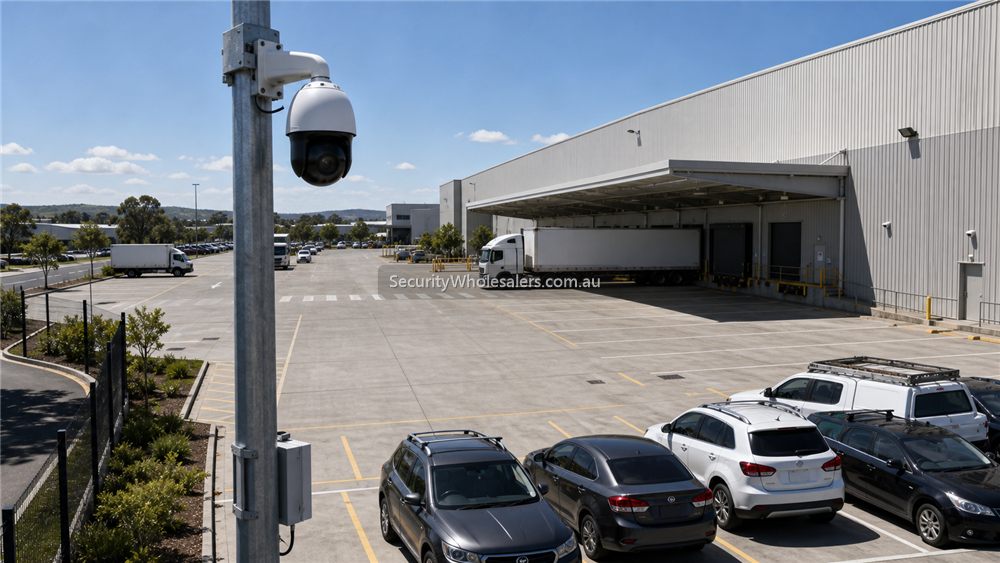
PTZ is usually justified where the site has broad grounds, yards, gates, loading aprons, or live patrol expectations that cannot be served cleanly by fixed cameras alone. It is most useful when the operator genuinely has someone or some workflow that will use presets, patrols, and event-triggered movement intelligently.
It is much less useful when the buyer is really trying to avoid paying for enough fixed evidence cameras. That usually creates a system that looks powerful in the quote but disappoints during actual incident review.
Typical Dahua PTZ design logic
[Fixed cameras cover evidence points]
    |
    +--> entries
    +--> dock doors
    +--> roller doors
    +--> lanes / choke points

[PTZ adds live overview]
    |
    +--> presets
    +--> patrols
    +--> event-triggered tracking
    +--> broader yard / perimeter sweep

Best result: fixed evidence + PTZ overview
Weak result: PTZ expected to do every job alone
How Dahua PTZ tiers usually split
Dahua's PTZ range broadly splits into smaller compact PTZ choices, more serious WizSense PTZ with stronger AI and patrol behaviour, and heavier WizMind PTZ for project-scale or more specialised roles. The right tier depends on how large the site is, how much optical zoom is needed, and whether the operator cares mainly about patrol behaviour, perimeter events, or long-range live review.
For many commercial jobs, a 4MP 25x or 32x PTZ is already enough. Larger 40x or 45x units make more sense when the site is truly large, the mounting position is forced further back, or the operator has to watch longer ranges honestly.
Installation insight
PTZ installation is often more demanding than buyers expect. Power requirements, pole or parapet stability, wind exposure, surge protection, and the need for PoE+ or another power arrangement all matter. The site also needs to confirm whether the PTZ location actually gives useful lines of sight, because extra zoom does not fix a poor mounting position.
Commissioning is equally important. The installer usually needs to build presets, test patrol routes, confirm night performance, and decide how the PTZ interacts with fixed cameras and event rules.
PTZ should support fixed cameras, not replace them
A PTZ is excellent when someone needs live control, patrol presets or a closer look across a yard. It is not a magic replacement for fixed evidence cameras. If the PTZ is looking left when an incident happens at the gate on the right, the footage may not help. For most Dahua jobs, fixed cameras cover the doors, gates and transaction points, while the PTZ adds overview and investigation support.
| Use PTZ for | Use fixed cameras for |
|---|---|
| Large yards, depots, car parks and broad apron areas. | Doors, gates, registers, loading docks and repeatable evidence points. |
| Live operator zoom, patrols and temporary focus on activity. | Always-on coverage of predictable movement paths. |
| Following a person or vehicle when the site has the right mounting and expectations. | Proof of entry, exit, delivery, damage or transaction events. |
PTZ installation checks
- Confirm mounting height and structure before choosing zoom level.
- Check whether the PTZ needs PoE, PoE+, Hi-PoE or separate power.
- Plan presets and patrols so the camera is not constantly pointing somewhere unhelpful.
- Do not promise reliable licence plate capture from a general PTZ overview.
- Use fixed cameras for choke points even when a PTZ is installed nearby.
Relevant SecurityWholesalers Categories and Products
These Dahua PTZ examples and sources are useful because they show the spread from mid-range commercial PTZ into longer-range and heavier AI-focused PTZ choices.
- DH-SD5A425XA-HNR 4MP 25x PTZ - A strong mid-range Dahua PTZ reference for commercial sites.
- DH-SD5A432XB-HNR 4MP 32x PTZ - A useful step-up path where extra zoom and WizSense AI behaviour matter.
- DH-SD6CE445XA-HNR 4MP 45x PTZ - A longer-range PTZ path for larger or more demanding sites.
- Dahua PTZ1A225-HNR-XA 25x PTZ - A good reminder that smaller or legacy PTZ paths still exist, but the role must still be justified.
Sources and Further Reading
Good PTZ quote scenarios
| Scenario | PTZ role | Fixed camera role |
|---|---|---|
| Warehouse yard | Overview, patrol presets and zooming into activity. | Gate, roller door and loading dock evidence. |
| Car yard or depot | Live inspection across rows or perimeter. | Entrances, exits, office and high-value choke points. |
| Farm shed and yard | Looking across a broad machinery or livestock area. | Gate, shed door, tank and house approach evidence. |
| School or public facility style site | Only if monitoring expectations and privacy settings are carefully scoped. | Entrances and fixed risk points should remain covered. |
A good Dahua PTZ quote explains what the PTZ will do when nobody is controlling it. Presets, patrols, auto-tracking expectations and fixed-camera backup should all be discussed before the buyer assumes a PTZ sees everything all the time.
PTZ should support fixed evidence cameras

A PTZ can look impressive in a quote, but it should not be used to replace fixed cameras at doors, gates, loading docks or stock points. If the PTZ is looking somewhere else during an incident, the evidence is gone. Fixed cameras provide dependable coverage. PTZ provides live overview, zoom, patrol and investigation support.
PTZ quote examples
- Warehouse yard: fixed gate and dock cameras first, PTZ second for live overview.
- Farm driveway: fixed gate camera first, PTZ only if the owner actively checks broader movement.
- Car yard: fixed entrance and row cameras first, PTZ for patrol and zoom support.
Frequently Asked Questions
-
When is a Dahua PTZ actually worth buying?
Usually when the site has a real live-overview or patrol need across a larger zone and fixed cameras are still in place to carry the evidentiary job.
-
Can one PTZ replace several fixed cameras?
Usually no. PTZ can support fixed cameras, but it should not be expected to replace the fixed evidence views the site still needs at entries, lanes, docks, or other critical points.
-
How much zoom is enough on a Dahua PTZ?
That depends on site scale and mounting position. Many commercial jobs are already well served by 25x or 32x. Longer zoom only helps if the mounting position and sight lines justify it.
-
Does PTZ installation need anything special?
Yes. Power path, surge protection, bracket stability, wind exposure, and commissioning of presets and patrols all matter more than they do on many fixed cameras.
-
What is the benefit of Dahua WizSense or WizMind PTZ features?
They can add stronger event-driven patrol behaviour, auto tracking, and better AI-assisted monitoring, but only if the site genuinely uses those functions.
-
Which guide should someone read next after this one?
Usually the warehouse Dahua guide or the NVR guide, because PTZ rarely makes sense in isolation from the wider camera and recorder design.
Related Pages
Dahua for Warehouses
Use Dahua in a warehouse context, especially where NVR scale, motorised lenses, and PTZ are real considerations.
How to Choose a Dahua NVR
Choose the Dahua recorder path properly before locking in the camera mix.
Dahua Network Cameras Buying Guide
Map the Dahua network-camera range before you dive into individual models.
Dahua Full-color vs Smart Dual Light
Compare Dahua's low-light approaches based on what the site actually needs after dark.