














Dahua WizSense Cameras Buying Guide

WizSense is the Dahua branch that usually answers the biggest share of everyday commercial CCTV jobs. It gives buyers human and vehicle filtering, practical fixed and motorised options, and a broad recorder path without forcing the site into heavier PRO or specialist AI territory too early.
WizSense

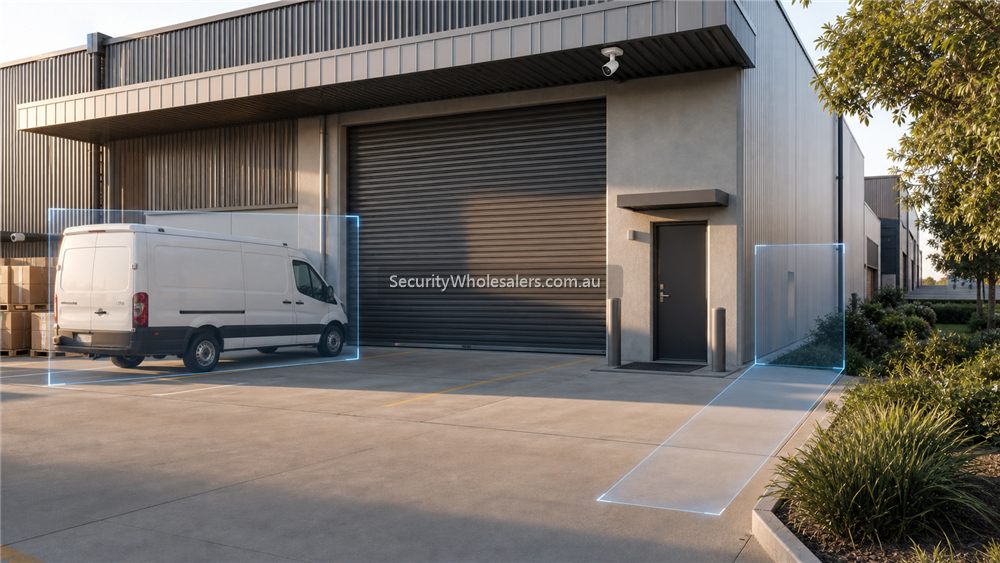
Dahua WizSense AI detection scene at warehouse roller door and pedestrian entry
WizSense is useful when human and vehicle filtering reduces noise around entries, driveways, roller doors and business approaches.

Quick answer

If the site is a shop, office, childcare centre, warehouse, workshop, medical clinic, or small yard that mainly wants cleaner alerts and easier review, Dahua WizSense is usually the first place to start.

  • Mainstream AI filtering
  • Human and vehicle detection
  • Fixed or motorised lens options
  • Works cleanly with Dahua WizSense NVRs

1. What is Dahua WizSense?

Dahua WizSense is the mainstream AI branch in the Dahua IP ecosystem. In plain terms, it is the part of the range that tries to give you useful human and vehicle classification, better search relevance, and stronger value than plain motion-based cameras without pushing you into heavier enterprise-style AI expectations.

2. Key benefits of Dahua WizSense

  • Cleaner alerts: human and vehicle classification reduces the noise from rain, shadows, headlights, and scene clutter.
  • Broad camera range: you can stay inside the same family while mixing fixed turret, bullet, dome, motorised, and selected active-deterrence paths.
  • Easier NVR pairing: WizSense cameras and NVRs usually create the most straightforward Dahua recorder path for normal commercial jobs.
  • Better value than overspecifying: many sites do not need PRO or deeper analytics if the real job is just cleaner review and smarter filtering.

3. Recommended use cases

Shops and offices

WizSense suits front doors, counters, corridors, staff doors, and rear lanes where the owner wants fewer nuisance notifications and a sensible recorder path.

Warehouses and workshops

Use WizSense for general aisles, dispatch, office entry, roller doors, and yards. Step into TiOC or a motorised branch only on the views that actually need it.

Schools and childcare

WizSense is often the honest starting point where clear review and manageable alerts matter more than aggressive deterrence.

4. Types of Dahua WizSense cameras

Type Usually best for Common caution
Turret General entries, walkways, offices, shopfronts, and most everyday internal or external scenes Do not mount too high and expect face detail to fix itself later
Bullet Driveways, longer approaches, rear lanes, yards, and external walls Choose the lens for the distance, not just the shape
Dome Public-facing internal areas and selected vandal-sensitive scenes Watch glare, dust, and IR reflection in the housing
Motorised varifocal Awkward entries, loading areas, longer corridors, and scenes where the lens must be tuned during commissioning Do not buy fixed 2.8 mm everywhere if the scene really needs a tighter view

5. Choose by resolution

  • 4MP: usually enough for many tidy internal scenes and shorter external approaches.
  • 6MP: often the sweet spot for mainstream business, school, and warehouse installs.
  • 8MP: worth considering where wider scenes, crop margin, or stronger identification detail matter.

6. Choose by smart features

  • Built-in microphone: useful on entries, counters, and selected external doors where sound adds context.
  • Smart Dual Light: use where low-light behaviour matters but the site does not necessarily want a full-time colour-first path.
  • Perimeter protection: useful on gates, lanes, and selected yard boundaries when the scene is set up properly.

7. Choosing WizSense by environment

Location Recommended camera type Reason
Front entry 6MP or 8MP turret with mic Good all-round balance of detail, audio, and mounting flexibility
Rear lane Bullet or motorised turret Lets the installer tune the scene properly for distance and lighting
Warehouse aisle Motorised turret or bullet Stops the common mistake of using a lens that is too wide to be useful
Office corridor Fixed turret or dome Keeps the design simple where the scene shape is predictable

8. Installation tips

  • Keep the lens choice honest. Many Dahua disappointments are lens mistakes, not brand problems.
  • Match camera height to the identification job. If you need useful face detail, do not mount like a streetlight.
  • Use PoE and a sensible Dahua NVR where practical so the handover stays cleaner.
  • Commission human and vehicle filtering on the live scene instead of trusting defaults.

9. Compatible recorders

For most mainstream WizSense jobs, the sensible recorder path is still a Dahua WizSense NVR sized around channel count, HDD bays, and future headroom. Move into PRO or heavier AI recorder tiers only if the search workflow, scene count, or operator expectations really justify it.

10. Current WizSense reference paths on SecurityWholesalers

These are useful current Dahua reference paths on SecurityWholesalers as checked during this guide refresh on 29 May 2026.
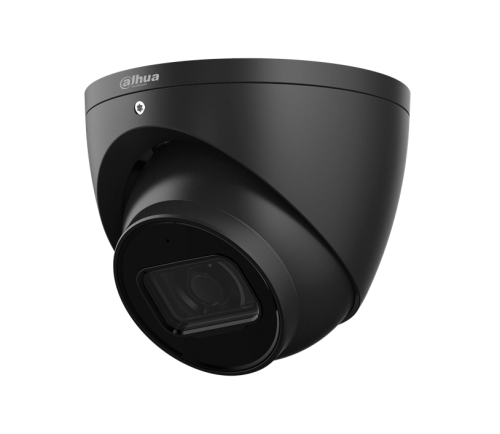
Dahua WizSense camera

Dahua WizSense Cameras

The clearest current SecurityWholesalers category for the mainstream Dahua AI camera range.

Dahua WizSense turret camera

3666 vs 3667 vs 3649

A practical model-level comparison if the buyer is already narrowing down everyday 6MP Dahua turret options.
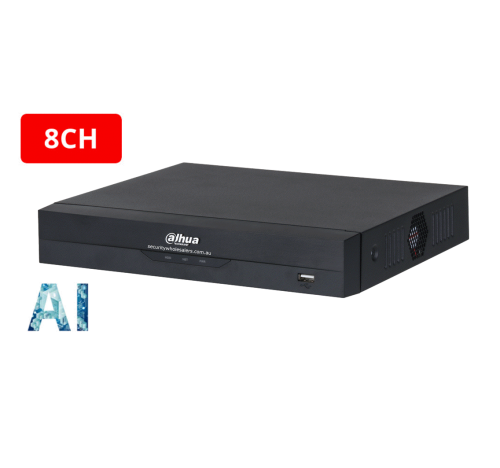
Dahua network video recorder

Dahua NVRs

Use the recorder category once you know whether the site is a 4, 8, 16, or 32 channel job.

Recommended WizSense buying paths

Simple mainstream path

Use Dahua WizSense cameras with a normal Dahua PoE NVR when the site mainly wants reliable fixed CCTV, human and vehicle filtering, and clean remote viewing without a heavier AI workflow.

Scene-upgrade path

Stay mostly in WizSense, then add one motorised lens, one stronger low-light view, or one TiOC camera only where the scene truly needs it.

Larger-site path

Use WizSense as the base camera family, then confirm whether the recorder needs to step up before you assume the cameras are the limiting factor.

Dahua buying scenarios that make the range easier

Small cafe or shop: 6 to 8 fixed cameras, an 8-channel or 16-channel NVR depending on growth, entry and counter evidence first, rear door second, then TiOC only where a warning response is acceptable after hours.

Small business warehouse: 10 to 16 cameras, 16-channel NVR, fixed evidence views at roller doors and dispatch, WizSense for efficient human/vehicle review, and PTZ only if someone benefits from live overview.

Farm or remote property: start with recorder placement, power, internet and wireless link planning. Dahua cameras can work well, but the design lives or dies on cabling, links, weather exposure and who will review footage remotely.

Higher-risk commercial site: use WizMind, PTZ, thermal or TiOC only where they solve a named operational problem. The best Dahua projects do not buy every premium feature everywhere; they assign each feature to a scene.

Dahua project checklist

  • Choose the NVR for final channel count and retention, not just the first camera stage.
  • Separate fixed evidence cameras from PTZ overview cameras.
  • Use TiOC where deterrence is useful and acceptable, not where neighbours or customers will hate it.
  • Use WizColor or Full-color where night colour matters and lighting supports the result.
  • Use thermal for detection or heat-risk monitoring, not as a normal camera upgrade.
  • Test DMSS live view, playback and account ownership at handover.

Related Pages

Dahua WizSense vs WizMind

Read this when the buyer is starting to wonder if mainstream AI is enough or if the job is drifting into a heavier project tier.

Dahua TiOC Cameras Buying Guide

Use TiOC only on the scenes that truly benefit from active deterrence.

Dahua WizColor Cameras Buying Guide

Move into WizColor when the real question is night-time colour quality rather than generic AI filtering.

How to Choose a Dahua Camera

Turn the family discussion into an actual shortlist by scene and lens requirement.

Quote worksheet for this Dahua decision

A useful quote for Dahua WizSense Cameras Buying Guide should name the exact scene first, then the product family. The conversation changes depending on whether the view is a doorway, counter, rear lane, warehouse dock, driveway, stockroom, yard or perimeter, because each one needs a different balance of detail, lighting, recorder support and review workflow.

Question Why it changes the Dahua choice
Is this view for evidence or overview? Evidence points need stable fixed cameras; overview may justify wider lenses or PTZ support.
Will the site review footage often? Frequent review makes NVR search workflow more important.
Does the site need night colour? WizColor, Full-color or Smart Dual Light should be chosen by the scene, not by the brochure.
Is warning behaviour acceptable? TiOC is useful only where strobe/audio will not create nuisance or customer issues.
Will the site expand? NVR channels, HDD bays and PoE headroom should be chosen for the finished system.

Better buying habit

Do not buy Dahua WizSense Cameras Buying Guide by model number alone. Match the model to mounting position, lighting, lens width, recorder path and review workflow. A simpler camera in the right place will often beat a premium device installed too high, too wide or without enough recorder support.

WizSense camera examples

Home driveway: WizSense helps reduce general motion clutter, but the camera still needs to frame the driveway properly. Do not rely on AI to fix a view that is too wide.

Shop entry: use a fixed turret or dome at a useful height. Human filtering helps review, but identification still depends on placement.

Warehouse door: WizSense is useful for people and vehicles around doors and loading points. Pair it with a recorder that makes playback easy for managers.

When WizSense is not enough

Step beyond ordinary WizSense when the site has frequent investigations, needs deeper search, relies on PTZ analytics or has project-scale requirements. Otherwise, WizSense is often the right commercial balance.

WizSense AI filtering worksheet

WizSense is a strong mainstream Dahua path when the buyer wants cleaner event review without moving into a heavy enterprise AI design. The camera still needs a useful angle; AI filtering cannot rescue a bad view.

Scenario Better design choice Buyer watch-out
Home driveway Human and vehicle filtering on the approach Do not make the view so wide that people become tiny
Shop entry Use a fixed turret/dome at a useful identification height AI helps review, lens placement proves the incident
Warehouse dock Use rules on doors, docks and vehicle paths Commission zones after normal site movement is understood

Questions to ask before ordering

  • Which view must identify a person, vehicle or event, and which view is only for context?
  • What night behaviour is acceptable for this exact location?
  • Does the recorder support the final channel count, retention target and search workflow?
  • Who owns DMSS/app access and who can export footage after handover?
  • Which Dahua feature would be wasted on this site, and which one genuinely changes the outcome?

Dahua WizSense Cameras Buying Guide: practical depth notes

Dahua WizSense Cameras Buying Guide should help the buyer choose between Dahua branches without turning the page into a model-number maze. The practical order is scene first, then feature family, then recorder, then model.

For this page, the useful buying question is where event filtering, search speed, zone tuning and recorder pairing matter. That question is more important than choosing the most impressive specification. A cheaper camera in the right place can beat a premium model mounted too high, pointed too wide or paired with the wrong recorder.

Real-world AI and search examples

Site type Practical recommendation Why it helps
Simple site Protect the main evidence point first, then add only the views that answer a likely incident question. The buyer avoids paying for coverage that looks broad but proves little.
Typical Australian small business Plan the camera, NVR, storage and app users together before model selection. The system is easier to review after theft, damage, staff disputes or after-hours movement.
More complex site Document zones, permissions, alert rules, cable paths and expansion before ordering. The install remains supportable when the site changes or another technician takes over.

Good example scenes for this decision include shops, warehouses, yards and busy entries. In each case, the final choice should explain what the view must prove, what happens at night, how footage will be found, and what the buyer should not expect the system to do.

Quote wording that is actually useful

A useful quote for Dahua WizSense Cameras Buying Guide should include a short reason for each camera or recorder choice. For example: this camera protects the rear door at face height, this recorder leaves four spare channels, this lens avoids wasting pixels on the sky, this alert is scheduled after hours only, or this user can view but not export footage. That sort of explanation gives the buyer confidence because it connects the hardware to the site.

The weak version of Dahua WizSense Cameras Buying Guide is a quote that sounds impressive but does not name the job. The strong version explains the exact view, the evidence standard, the recorder assumption and the handover test. For Dahua buyers, that plain explanation is often more valuable than another feature label because it shows how the system will actually be used after an incident.

Browse product paths after the design is clear

We make product support and ordering easy! Reach out to our help team :)
Trade Customers: Log In or Register to Unlock Even Better Prices.

Save & Share Cart
Your Shopping Cart will be saved and you'll be given a link. You, or anyone with the link, can use it to retrieve your Cart at any time.
Back Save & Share Cart
Your Shopping Cart will be saved with Product pictures and information, and Cart Totals. Then send it to yourself, or a friend, with a link to retrieve it at any time.
Your cart email sent successfully :)