Commercial

HiLook Alarm Buying Guide

HiLook alarm is a sensible choice where the job wants practical intrusion coverage and a manageable budget without pretending it needs a much larger platform.

Buying Guide

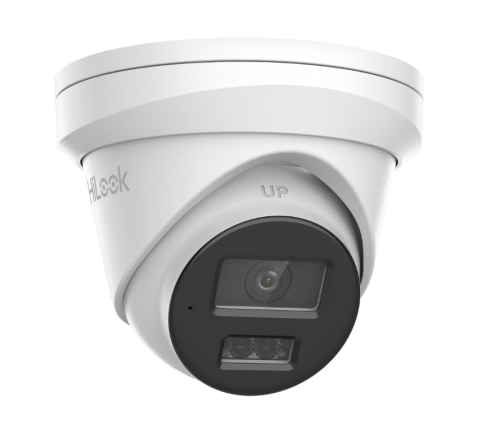
HiLook turret CCTV camera
A HiLook fixed-lens turret is usually the right starting point for straightforward homes, small offices, counters, and everyday perimeter points.

Use HiLook alarm where the brief is practical and contained

HiLook alarm works best where the site wants a practical intrusion solution and a clear user workflow without stretching into a more complex enterprise-style discussion. Homes and smaller businesses are the natural fit.

Pair the alarm to the actual risk points

A smaller alarm still deserves a proper design. That means choosing the right doors, internal routes, keypad position, siren path, and notification workflow instead of treating the kit as self-designing hardware.

Installation insight: keep the maintenance policy simple and explicit

Smaller systems fail most often when the customer assumes that once the kit is installed, the maintenance takes care of itself. A clear battery, fault-response, and communications-check routine is still part of the job.

Know when to step into fuller Hikvision alarm discussion

If the client starts asking for more serious zone growth, heavier hybrid logic, or more complex integration, that is the point where the broader Hikvision alarm ecosystem becomes the better guide path.

Relevant SecurityWholesalers Categories and Products

These products show the simpler end of the intrusion conversation: practical starter kits and keypad or zone hardware that suit homes and smaller business jobs.

Sources and Further Reading

Practical buying scenarios

Budget home

Use 4 to 6 cameras only when the property is genuinely simple. If side access, garage or rear yard matter, plan around an 8-channel NVR even if not every channel is used on day one.

Serious home

Use 6 to 8 cameras, choose Hi-Color or deterrence only where the scene needs it, and make sure playback is tested through HiLookVision.

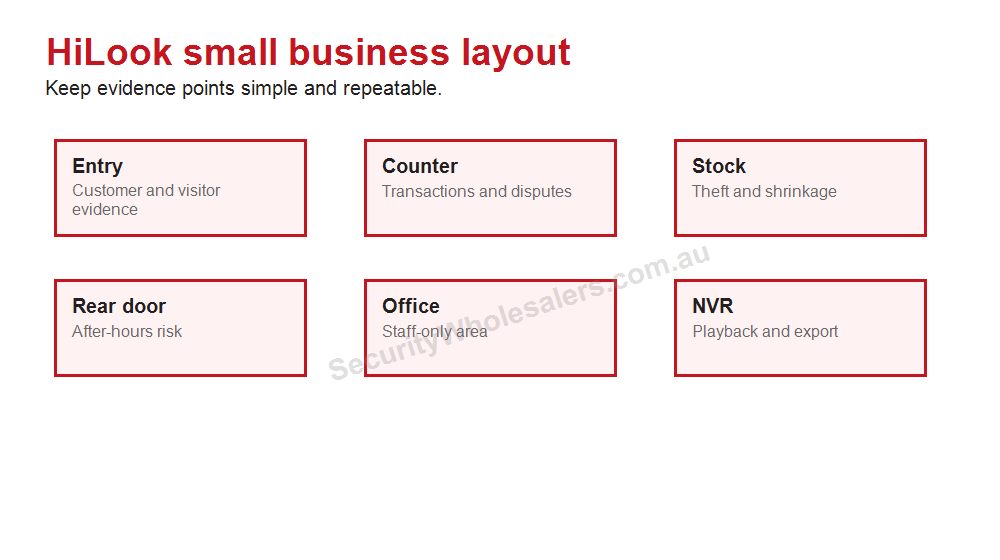
Small business

Start with entry, counter, stock, rear door and office evidence. Step up to Hikvision if analytics, access control, ANPR or a larger commercial design is needed.

Buyer checklist

  • Count coverage points before choosing a kit.
  • Leave recorder headroom where the site may grow.
  • Check night lighting before choosing Hi-Color or deterrence cameras.
  • Confirm account ownership and app handover.
  • Choose Hikvision instead when the job becomes specialist or complex.

HiLook alarm design examples

HiLook alarm zone planning diagram with entry sensors PIR keypad siren and CCTV support
A practical alarm quote protects the likely entry points first, then makes arming, alerts and verification easy for the people using it.

Small shop: front door contact, rear door contact, PIR over the main floor or stock path, keypad near staff entry and a clear after-hours arming routine. Cameras can help verify what happened, but the alarm still needs sensible zones.

Budget home or rental: keep the system simple and document who receives alerts. Avoid complicated rules that the resident will not use. The best alarm is the one that is actually armed.

When not to force HiLook alarm: if the buyer needs medical duress, many partitions, monitored response, complex automation or a deeper Hikvision AX PRO path, step up before the site is installed.

Alarm buyer checklist

  • List the doors and windows that are realistic entry points.
  • Decide which movement areas need PIR coverage after-hours.
  • Confirm how the system will be armed when the site is occupied, closed or partially used.
  • Decide who receives alerts and what they will do with them.
  • Use CCTV verification only where it adds real context.
  • Keep keypad, tag and user training simple enough that the system is actually used.

The common mistake is treating an alarm kit as a box of parts. A useful alarm is a behaviour plan: how the site is entered, how it is armed, who responds, and what evidence supports the alert.

Alarm use cases where HiLook can fit

Small retail tenancy: a simple alarm can protect the front door, rear door and main stock movement area. Add CCTV verification when the owner wants to see whether an alert is a customer, staff member, cleaner or genuine intrusion.

Home office: keep arming simple. If the system is hard to arm while the family is home, it will not be used consistently. A few well-chosen zones are better than a complicated setup that creates false alarms.

Workshop: protect roller doors, office entry and tool storage first. If the site has many partitions, monitored response expectations or multiple user groups, review a more capable alarm ecosystem before choosing HiLook.

The useful buying question is not whether HiLook can be an alarm. It is whether the alarm behaviour is simple enough for the people using it every day.

How CCTV and alarm should work together

An alarm tells the owner something may be happening. CCTV helps explain what it is. For a small HiLook-style security design, the alarm should cover the entry points and movement paths, while the cameras cover the scenes where the owner needs visual proof. Do not expect either system to replace the other.

For example, a rear door contact can trigger an alert, while a rear-door camera shows whether it was a person, delivery, cleaner or false event. A PIR in a stockroom can protect the area, while a camera helps review what moved. The combination is useful only if alerts are tuned and the owner knows how to check footage quickly.

If the site needs monitored response, duress buttons, many zones or more serious alarm logic, step into a fuller alarm discussion rather than forcing a basic HiLook path.

Final alarm rule

An alarm is only useful if people arm it, trust it and know what to do when it activates. Keep the zones understandable, keep user control simple and use cameras where visual confirmation changes the response. If the alarm behaviour becomes complicated, choose a fuller alarm path instead of forcing a simple kit.

Final practical note

For alarm buyers, false alarms are not just annoying; they reduce trust. Keep detection zones, arming routines and notification rules simple enough that the owner keeps using the system after the first month.

Frequently Asked Questions

  • What kind of site suits HiLook alarms best?

    HiLook alarms suit homes and smaller businesses that want practical intrusion coverage and a manageable system without moving into heavier enterprise alarm architecture.

  • Is HiLook alarm mainly wireless or wired?

    The useful answer depends on the specific kit and project, but many buyers will be looking at structured small-system kits rather than a very large, deeply layered panel design.

  • Can HiLook alarm work well alongside HiLook CCTV?

    Yes, especially when the site treats them as complementary layers rather than expecting one to replace the other.

  • What should the installer confirm before quoting a HiLook alarm?

    Entry points, internal detection zones, keypad location, siren location, power, communications, and whether the customer expects the system to remain small or grow significantly later.

  • When should the job step up from HiLook alarm?

    When the site needs broader expansion, deeper hybrid strategy, or more advanced alarm-platform expectations than a simpler value-led path is meant to carry.

  • Does battery and maintenance planning still matter on a smaller alarm?

    Yes. Smaller systems still need routine maintenance, sensible battery policy, and a clear understanding of what should happen during faults or outages.

Related Pages

HiLook Video Intercom Buying Guide

Choose the right HiLook intercom and understand the install path.

HiLook vs Hikvision

Compare HiLook and Hikvision in a practical, non-salesy way.

When HiLook Is Enough and When to Step Up to Hikvision

Make the practical call on whether the project belongs in HiLook or Hikvision.

HiLook Buying Guide

The main HiLook guide for matching the range to real projects.

HiLook practical buying worksheet

HiLook Alarm Buying Guide should keep HiLook practical: sensible camera count, clear recorder sizing and an app handover the owner can repeat later. The page should also be honest about when the site has grown into a Hikvision-style requirement.

Situation Practical direction Common mistake
Compact home Front, driveway, side/rear path and back entry Four cameras only works when those are truly the main views
Detached home Often six to eight useful views Plan an 8-channel NVR if expansion is likely
Small business Entry, counter, rear door, stock and external approach Staff access and playback matter as much as camera count

Value-system checks

  • Choose camera count from doors, paths, vehicles and business evidence points.
  • Size the NVR for the finished site, not just the first stage.
  • Test playback, export and mobile viewing before calling the job complete.
  • Document app ownership and user permissions.
  • Step up to Hikvision when the site needs specialist analytics, ANPR, thermal or larger commercial design.

HiLook Alarm Buying Guide: practical depth notes

HiLook Alarm Buying Guide should keep HiLook in its honest lane: straightforward value CCTV, clean recorder planning and a handover the owner can understand. If the job needs specialist analytics or a larger commercial ecosystem, the guide should say so clearly.

For this page, the useful buying question is where the scene, lens, lighting, mounting height and recorder path decide the right model. That question is more important than choosing the most impressive specification. A cheaper camera in the right place can beat a premium model mounted too high, pointed too wide or paired with the wrong recorder.

Real-world camera selection examples

Site type Practical recommendation Why it helps
Simple site Protect the main evidence point first, then add only the views that answer a likely incident question. The buyer avoids paying for coverage that looks broad but proves little.
Typical Australian small business Plan the camera, NVR, storage and app users together before model selection. The system is easier to review after theft, damage, staff disputes or after-hours movement.
More complex site Document zones, permissions, alert rules, cable paths and expansion before ordering. The install remains supportable when the site changes or another technician takes over.

Good example scenes for this decision include entries, driveways, stock areas, offices and external approaches. In each case, the final choice should explain what the view must prove, what happens at night, how footage will be found, and what the buyer should not expect the system to do.

Quote wording that is actually useful

A useful quote for HiLook Alarm Buying Guide should include a short reason for each camera or recorder choice. For example: this camera protects the rear door at face height, this recorder leaves four spare channels, this lens avoids wasting pixels on the sky, this alert is scheduled after hours only, or this user can view but not export footage. That sort of explanation gives the buyer confidence because it connects the hardware to the site.

The weak version of HiLook Alarm Buying Guide is a quote that sounds impressive but does not name the job. The strong version explains the exact view, the evidence standard, the recorder assumption and the handover test. For HiLook buyers, that plain explanation is often more valuable than another feature label because it shows how the system will actually be used after an incident.

Browse product paths after the design is clear

HiLook Alarm Buying Guide: final practical example

For HiLook Alarm Buying Guide, imagine the buyer asking what they will actually see after something happens at a townhouse, small shop, rental property or budget home. The answer should be specific: which camera proves the approach, which camera proves the person or vehicle, how many days the recorder keeps, and who can open the app to export footage.

If the recommendation for HiLook Alarm Buying Guide cannot answer those questions, the buyer is still shopping by product name rather than buying a security outcome. The better recommendation keeps the design simple where the site is simple and adds stronger features only where they solve a named weakness.

We make product support and ordering easy! Reach out to our help team :)
Trade Customers: Log In or Register to Unlock Even Better Prices.

Save & Share Cart
Your Shopping Cart will be saved and you'll be given a link. You, or anyone with the link, can use it to retrieve your Cart at any time.
Back Save & Share Cart
Your Shopping Cart will be saved with Product pictures and information, and Cart Totals. Then send it to yourself, or a friend, with a link to retrieve it at any time.
Your cart email sent successfully :)