A HiLook NVR is usually at its best when the project keeps the recorder path simple, the camera count honest, and the storage assumptions realistic.
Buying Guide
Most HiLook support problems begin at the recorder, the app handover, or the event setup, not with the camera body by itself.
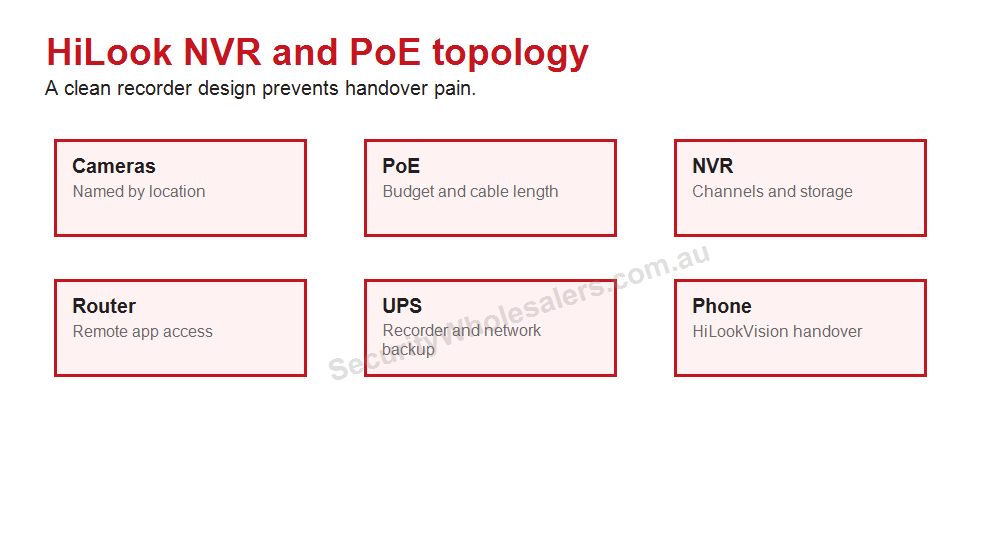
Diagram: where a HiLook NVR fits best
HiLook is strongest when the recorder path stays tidy and honest about camera count, storage and growth.
HiLook NVR design should stay simple, but not cramped
The best HiLook NVR choices are usually the ones that keep the system neat and easy to manage without boxing the customer into an immediate replacement. A simple recorder is good. A recorder that is already full and starved for storage on day one is not.
Match the recorder to the scale of the site
Four-channel recorders often suit smaller homes and offices. Eight-channel recorders often suit larger homes, light retail, and small business sites that want room to grow a little. The real discipline is to match the recorder to the genuine growth path, not just the first-stage drawing.
Installation insight: the NVR path still needs storage and UPS planning
The CCTV Storage Calculator is still worth using on HiLook jobs because audio, 6MP and 8MP cameras, and longer retention can change the result quickly. If the customer cares about keeping footage through short outages, the UPS Backup Time Calculator is still relevant too.
Keep the topology honest
HiLook NVRs are at their best when the topology stays clear. If the site is already growing into several switch locations, bigger zone count, or more complicated analytics, that can be the signal that the design is moving beyond the cleanest HiLook sweet spot.
Relevant SecurityWholesalers Categories and Products
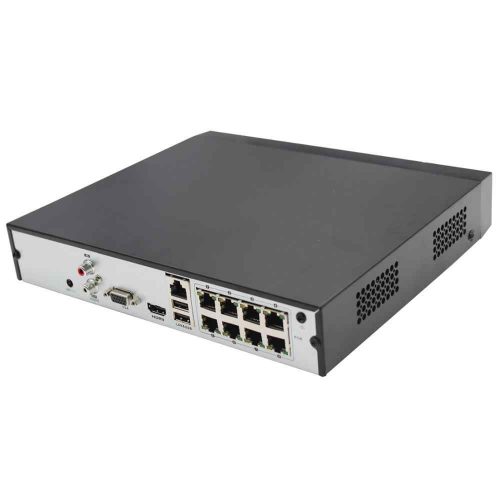
These HiLook recorders are good reference points for the kind of simple PoE NVR design many value-led home and small-business jobs need.
HiLook NVR category - The best starting point for comparing 4-channel, 8-channel, and larger HiLook recorder paths.
Use 4 to 6 cameras only when the property is genuinely simple. If side access, garage or rear yard matter, plan around an 8-channel NVR even if not every channel is used on day one.
Serious home
Use 6 to 8 cameras, choose Hi-Color or deterrence only where the scene needs it, and make sure playback is tested through HiLookVision.
Small business
Start with entry, counter, stock, rear door and office evidence. Step up to Hikvision if analytics, access control, ANPR or a larger commercial design is needed.
Buyer checklist
Count coverage points before choosing a kit.
Leave recorder headroom where the site may grow.
Check night lighting before choosing Hi-Color or deterrence cameras.
Confirm account ownership and app handover.
Choose Hikvision instead when the job becomes specialist or complex.
Choose recorder channels and storage for the finished site, not only the first camera stage.
4MP, 6MP and 8MP in plain English
Resolution path
Where it usually fits
Buying note
4MP
Budget views, narrower scenes and simple coverage.
Good where cost matters and the scene is not too wide.
6MP
Balanced home and small-business CCTV.
Often the comfortable middle path for detail and storage.
8MP
Wider scenes and buyers wanting more crop margin.
Check storage and night performance expectations.
Turret vs bullet vs kit
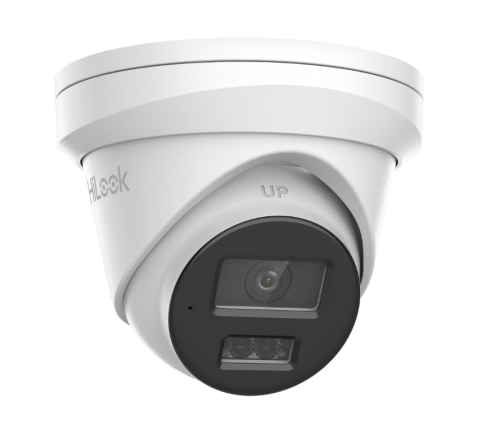
Turrets are usually the easiest default for homes and small business because they are tidy, flexible and less visually aggressive. Bullets can suit obvious deterrence or longer external approaches, but they are more visible and can be more exposed. Kits are useful when the site is predictable, but the buyer still needs to check camera count, NVR channels and storage.
NVR choice examples
The NVR is the centre of storage, camera power, playback and app handover. Choose it for the finished site.
4-channel NVR: fine for a compact, finished site where no extra views are likely. 8-channel NVR: the safer home path when the owner may add garage, side or rear cameras later. 16-channel planning: sensible for small businesses that may add stock, rear, external or office views after the first stage.
Do not choose the recorder by price alone. Check PoE ports, hard drive support, camera resolution support, remote access needs and where the NVR will physically live. A recorder hidden in a hot cupboard or shared with the wrong account can make the system painful even if the cameras are fine.
Recorder sizing without guesswork
A HiLook NVR should be chosen after the camera map is mostly known. Four channels suits a truly small finished site. Eight channels suits many homes because it allows front, driveway, side, rear, garage and future views. Sixteen channels suits businesses where the first quote may not include every stock, rear, office or external position.
The second question is storage. A buyer who only checks footage after rare events may need a different hard drive target from a shop that reviews entries and deliveries weekly. The third question is location. The NVR should not be sitting in an obvious, hot or hard-to-service position.
Use the HiLook NVR category as the recorder shortlist, then choose by channels, storage and handover needs rather than lowest price.
NVR examples by buyer
Small home: a compact NVR may be enough if the owner is certain the site will stay at four cameras. Normal home: an 8-channel path is usually more comfortable because side access, garage and rear yard views often appear later. Small business: 8 channels may be enough for a tiny tenancy, but 16-channel planning is safer where stock, office, rear and external views may be added.
Also think about the internet path. The NVR, router and phone app form one chain. If the NVR is hidden where networking is poor or power is unreliable, remote viewing will feel unreliable even if the cameras are fine.
The recorder is not exciting, but it decides whether the system is easy to live with.
Frequently Asked Questions
How should the buyer choose between a 4-channel and 8-channel HiLook NVR?
Start with the real camera count, then add realistic spare capacity. If the customer already expects more cameras, it is often smarter to move up now than replace the recorder later.
When does a simple PoE HiLook NVR make the most sense?
It makes the most sense on homes, small offices, and similar straightforward jobs where plug-and-play PoE helps keep the installation and handover clean.
Should storage still be planned carefully on a HiLook system?
Yes. Camera count, resolution, audio, retention days, and recording mode still affect the result. Value-led does not mean guesswork on storage.
What should the installer confirm before final NVR selection?
Recorder location, cabling approach, camera count, expected growth, monitor needs, UPS expectations, and whether the job should remain direct-to-recorder or move into a switch-led path.
Does HiLook support useful remote viewing?
Yes, but the remote path still depends on correct network setup, verification, and a recorder choice that suits the project.
When should a project step beyond a simple HiLook NVR path?
When the site wants more cameras, heavier analytics, more complicated topology, or broader ecosystem depth than a simple compact recorder path is meant to carry.
Compare HiLook and Hikvision in a practical, non-salesy way.
HiLook practical buying worksheet
How to Choose a HiLook NVR should keep HiLook practical: sensible camera count, clear recorder sizing and an app handover the owner can repeat later. The page should also be honest about when the site has grown into a Hikvision-style requirement.
Situation
Practical direction
Common mistake
Compact home
Front, driveway, side/rear path and back entry
Four cameras only works when those are truly the main views
Detached home
Often six to eight useful views
Plan an 8-channel NVR if expansion is likely
Small business
Entry, counter, rear door, stock and external approach
Staff access and playback matter as much as camera count
Value-system checks
Choose camera count from doors, paths, vehicles and business evidence points.
Size the NVR for the finished site, not just the first stage.
Test playback, export and mobile viewing before calling the job complete.
Document app ownership and user permissions.
Step up to Hikvision when the site needs specialist analytics, ANPR, thermal or larger commercial design.
How to Choose a HiLook NVR: practical depth notes
How to Choose a HiLook NVR should keep HiLook in its honest lane: straightforward value CCTV, clean recorder planning and a handover the owner can understand. If the job needs specialist analytics or a larger commercial ecosystem, the guide should say so clearly.
For this page, the useful buying question is where retention, user ownership, network reliability and playback decide usefulness. That question is more important than choosing the most impressive specification. A cheaper camera in the right place can beat a premium model mounted too high, pointed too wide or paired with the wrong recorder.
Real-world recording and handover examples
Site type
Practical recommendation
Why it helps
Simple site
Protect the main evidence point first, then add only the views that answer a likely incident question.
The buyer avoids paying for coverage that looks broad but proves little.
Typical Australian small business
Plan the camera, NVR, storage and app users together before model selection.
The system is easier to review after theft, damage, staff disputes or after-hours movement.
More complex site
Document zones, permissions, alert rules, cable paths and expansion before ordering.
The install remains supportable when the site changes or another technician takes over.
Good example scenes for this decision include NVR locations, routers, PoE runs and app users. In each case, the final choice should explain what the view must prove, what happens at night, how footage will be found, and what the buyer should not expect the system to do.
Quote wording that is actually useful
A useful quote for How to Choose a HiLook NVR should include a short reason for each camera or recorder choice. For example: this camera protects the rear door at face height, this recorder leaves four spare channels, this lens avoids wasting pixels on the sky, this alert is scheduled after hours only, or this user can view but not export footage. That sort of explanation gives the buyer confidence because it connects the hardware to the site.
The weak version of How to Choose a HiLook NVR is a quote that sounds impressive but does not name the job. The strong version explains the exact view, the evidence standard, the recorder assumption and the handover test. For HiLook buyers, that plain explanation is often more valuable than another feature label because it shows how the system will actually be used after an incident.
How to Choose a HiLook NVR: final practical example
For How to Choose a HiLook NVR, imagine the buyer asking what they will actually see after something happens at a townhouse, small shop, rental property or budget home. The answer should be specific: which camera proves the approach, which camera proves the person or vehicle, how many days the recorder keeps, and who can open the app to export footage.
If the recommendation for How to Choose a HiLook NVR cannot answer those questions, the buyer is still shopping by product name rather than buying a security outcome. The better recommendation keeps the design simple where the site is simple and adds stronger features only where they solve a named weakness.
Your Shopping Cart will be saved and you'll be given a link. You, or anyone with the link, can use it to retrieve your Cart at any time.
Back
Save & Share Cart
Your Shopping Cart will be saved with Product pictures and information, and Cart Totals. Then send it to yourself, or a friend, with a link to retrieve it at any time.