Real quote examples
Budget home
4 to 6 cameras, 8-channel NVR, front/driveway/rear coverage and one spare channel if possible.
Larger home
6 to 8 cameras, selected Hi-Color or deterrence view, and enough storage for practical review.
Small shop
8 cameras covering entry, counter, aisles, stock, rear door and office, with playback/export tested.
Final design example
Imagine a buyer choosing HiLook because they want a sensible system, not a complicated one. The best result usually comes from a staged plan. Stage one is the essential evidence points: front entry, driveway or customer entry, rear access and any high-risk side path. Stage two adds the views that are useful but not always urgent: garage, stockroom, shed, staff office, second side path or external approach. Stage three is where the buyer decides whether the site is still a HiLook job or whether it has grown into Hikvision.
This staged approach is useful because it protects the budget without pretending every property is tiny. A buyer can start with a smaller number of cameras while still choosing an NVR that leaves room for growth. That is often better than buying the cheapest recorder and replacing it a year later when the missing view becomes obvious.
What a good quote should explain
| Quote item |
Plain-English reason |
| Camera count |
Each camera should map to a real evidence point, not a generic corner of the building. |
| NVR channels |
The recorder should support the finished site, not only the first stage. |
| Storage |
The hard drive should match the review window the buyer actually needs. |
| App handover |
The buyer should know who owns the account, who has access and how playback works. |
| Upgrade path |
The quote should say when HiLook remains enough and when Hikvision is the better long-term choice. |
Common mistakes to avoid
- Buying a 4-camera kit when the site has six important views.
- Putting every camera too high for useful identification.
- Choosing the smallest hard drive without checking retention.
- Leaving no spare recorder channels on a site likely to expand.
- Finishing handover without testing playback and mobile-data access.
- Using HiLook for a job that clearly needs specialist Hikvision features.
HiLook is strongest when it is used honestly: practical CCTV, sensible recorder planning, clean installation and clear handover. That is enough for many Australian homes and small businesses, but the guide should always help the buyer recognise the point where spending more on the right platform will save trouble later.
HiLook product paths to understand
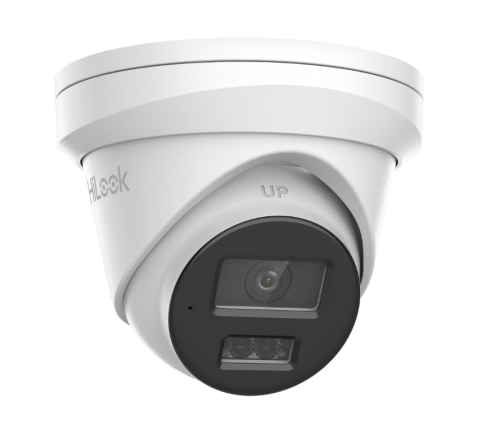
Best for ordinary home and small-business evidence views such as entry, driveway, side path, counter and rear door.
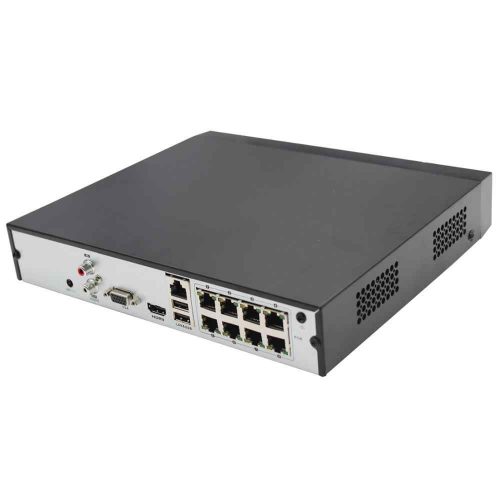
Choose recorder channels and storage for the finished site, not only the first camera stage.
4MP, 6MP and 8MP in plain English
| Resolution path |
Where it usually fits |
Buying note |
| 4MP |
Budget views, narrower scenes and simple coverage. |
Good where cost matters and the scene is not too wide. |
| 6MP |
Balanced home and small-business CCTV. |
Often the comfortable middle path for detail and storage. |
| 8MP |
Wider scenes and buyers wanting more crop margin. |
Check storage and night performance expectations. |
Turret vs bullet vs kit
Turrets are usually the easiest default for homes and small business because they are tidy, flexible and less visually aggressive. Bullets can suit obvious deterrence or longer external approaches, but they are more visible and can be more exposed. Kits are useful when the site is predictable, but the buyer still needs to check camera count, NVR channels and storage.
HiLook CCTV Packages Australia FAQs
- Is HiLook the same as Hikvision?
HiLook is Hikvision-backed, but it is positioned as a value-focused range. It suits simpler CCTV jobs more than specialist or larger integrated Hikvision projects.
- When should I step up to Hikvision instead?
Step up when the site needs deeper analytics, ANPR, thermal, larger access-control integration, complex commercial design or broader camera choice.
- Is HiLook good for small business?
Yes, when the business needs practical fixed-camera coverage, sensible NVR sizing and clean app handover rather than advanced enterprise features.
Package examples that make sense
Budget home package: 4 cameras and a 4 or 8-channel NVR can suit compact homes where front, driveway, side and rear are the only agreed views. Choose 8-channel if the owner may add cameras later.
Serious home package: 6 to 8 cameras, 8-channel recorder, front door, driveway, garage, both sides and rear yard. This is the most realistic home package because blind spots tend to appear at the sides and rear.
Small business package: 6 to 8 cameras, entry, counter, stock, office, rear door and external approach. If the business already expects more than 8 views, quote 16-channel planning rather than forcing the package to look cheaper.
How to compare HiLook packages properly
Do not compare HiLook packages only by megapixels and price. Compare camera count, NVR channels, hard drive size, camera style, night behaviour and whether the package matches the site layout. A cheaper kit with the wrong camera count is not cheaper once the owner has to replace the recorder or add awkward extra hardware.
Home package: choose around front door, driveway, side access and rear entry. Business package: choose around entry, counter, stock, rear door and office. Rental package: keep coverage external, respectful and easy to explain. Budget package: spend on the views most likely to matter after an incident.
Use the product category as a shortlist, then build the package from the property map. That is how the buyer avoids both underbuying and buying a kit that looks impressive but misses the real risk points.
Package red flags
Be careful with any package that fills every NVR channel, does not mention hard drive size, treats every camera position the same, or ignores night footage. Also be careful when a package is sold as suitable for every property. A home, cafe, workshop and rental may all use HiLook, but they need different camera maps.
A better package description should explain who it suits: compact home, larger home, small shop, office, rental or staged system. It should also explain when not to buy it. That honesty improves conversion because serious buyers can see the advice is grounded in the job, not just the box.
Use package pages as starting points, then choose the final system by coverage and recorder headroom.
Final package rule
A good package should make the site easier to plan, not hide the planning. Use packages as a starting point, then check the camera map, NVR headroom, storage and handover. If the package does not match the property, change the package rather than forcing the property to fit it.
HiLook practical buying worksheet
HiLook CCTV Packages Australia should keep HiLook practical: sensible camera count, clear recorder sizing and an app handover the owner can repeat later. The page should also be honest about when the site has grown into a Hikvision-style requirement.
| Situation |
Practical direction |
Common mistake |
| Compact home |
Front, driveway, side/rear path and back entry |
Four cameras only works when those are truly the main views |
| Detached home |
Often six to eight useful views |
Plan an 8-channel NVR if expansion is likely |
| Small business |
Entry, counter, rear door, stock and external approach |
Staff access and playback matter as much as camera count |
Value-system checks
- Choose camera count from doors, paths, vehicles and business evidence points.
- Size the NVR for the finished site, not just the first stage.
- Test playback, export and mobile viewing before calling the job complete.
- Document app ownership and user permissions.
- Step up to Hikvision when the site needs specialist analytics, ANPR, thermal or larger commercial design.
HiLook CCTV Packages Australia: practical depth notes
HiLook CCTV Packages Australia should keep HiLook in its honest lane: straightforward value CCTV, clean recorder planning and a handover the owner can understand. If the job needs specialist analytics or a larger commercial ecosystem, the guide should say so clearly.
For this page, the useful buying question is where camera count, recorder headroom and staged expansion matter. That question is more important than choosing the most impressive specification. A cheaper camera in the right place can beat a premium model mounted too high, pointed too wide or paired with the wrong recorder.
Real-world system sizing examples
| Site type |
Practical recommendation |
Why it helps |
| Simple site |
Protect the main evidence point first, then add only the views that answer a likely incident question. |
The buyer avoids paying for coverage that looks broad but proves little. |
| Typical Australian small business |
Plan the camera, NVR, storage and app users together before model selection. |
The system is easier to review after theft, damage, staff disputes or after-hours movement. |
| More complex site |
Document zones, permissions, alert rules, cable paths and expansion before ordering. |
The install remains supportable when the site changes or another technician takes over. |
Good example scenes for this decision include homes, rentals, small shops and budget-conscious sites. In each case, the final choice should explain what the view must prove, what happens at night, how footage will be found, and what the buyer should not expect the system to do.
Quote wording that is actually useful
A useful quote for HiLook CCTV Packages Australia should include a short reason for each camera or recorder choice. For example: this camera protects the rear door at face height, this recorder leaves four spare channels, this lens avoids wasting pixels on the sky, this alert is scheduled after hours only, or this user can view but not export footage. That sort of explanation gives the buyer confidence because it connects the hardware to the site.
The weak version of HiLook CCTV Packages Australia is a quote that sounds impressive but does not name the job. The strong version explains the exact view, the evidence standard, the recorder assumption and the handover test. For HiLook buyers, that plain explanation is often more valuable than another feature label because it shows how the system will actually be used after an incident.
Browse product paths after the design is clear
HiLook CCTV Packages Australia: final practical example
For HiLook CCTV Packages Australia, imagine the buyer asking what they will actually see after something happens at a townhouse, small shop, rental property or budget home. The answer should be specific: which camera proves the approach, which camera proves the person or vehicle, how many days the recorder keeps, and who can open the app to export footage.
If the recommendation for HiLook CCTV Packages Australia cannot answer those questions, the buyer is still shopping by product name rather than buying a security outcome. The better recommendation keeps the design simple where the site is simple and adds stronger features only where they solve a named weakness.
HiLook CCTV Packages Australia: final buyer note
For this HiLook decision, the safest final check is whether the owner can explain the system back in plain English: where the cameras are, what the NVR records, who controls the app, and when the site should step up to Hikvision instead of stretching HiLook beyond its best use case.


















