

















Commercial
NVR Buying Guide: How to Choose a Network Video Recorder
Recorder Guide
Quick NVR recommendation
For most four-to-six-camera homes, start with an 8-channel PoE NVR rather than filling a 4-channel recorder immediately. For eight cameras or a growing business, compare a 16-channel recorder, incoming bandwidth, hard-drive bays and analytics compatibility-not channel count alone.
Many buyers spend most of their time comparing cameras and then try to choose an NVR in the last five minutes. That usually leads to a recorder with the wrong channel count, not enough hard-drive headroom, poor network layout, or limited room for future growth. In simple terms, the recorder should be chosen early enough that it supports the actual site design rather than just accepting whatever camera list was built first.
What an NVR actually does
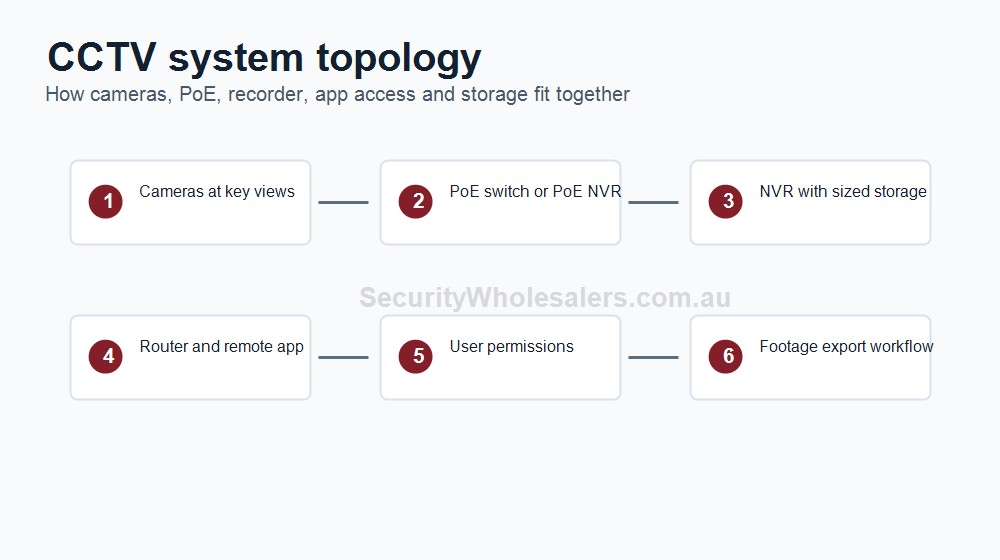
An NVR stores and manages footage from IP cameras. It handles live view, recording, playback, export, app access, user permissions, and often some part of the event-search or analytics workflow. On some systems, most of the intelligence is happening in the cameras. On others, the NVR adds more of its own search, filtering, and review capability. That is why not all 8-channel or 16-channel recorders are equal, even when they look similar on the outside.
Start with the recorder questions that matter
| Question | Why it matters | What it usually changes |
|---|---|---|
| How many cameras will the site really end up with? | Camera counts often grow once rear access, corridors, gates, or car parks are reviewed properly. | Channel count and headroom. |
| Is the site simple enough for a PoE NVR? | Small home and small-business sites often are. Larger or spread-out sites often are not. | PoE vs non-PoE recorder path. |
| How long does footage need to be kept? | Retention drives hard-drive size and bay count. | HDD bays, recorder class, and storage budget. |
| Will the site actually use advanced AI search? | Some jobs only need recording and playback. Others benefit from stronger NVR-side search and event filtering. | Standard NVR vs smarter recorder branch. |
| Is this one building or a spread-out site? | Network layout and switch position can matter more than recorder ports. | Whether PoE switches should take over the camera network design. |
Channel count: 8-channel vs 16-channel vs 32-channel vs 64-channel
Channel count should be chosen with growth headroom. The mistake we often see is buying the exact camera count for the current quote, then realising later that the site still needs one more rear door, one more corridor, one more parking angle, or one more restricted-room view.
| NVR size | Usually strongest for | What to be careful with |
|---|---|---|
| 8-channel | Homes, small shops, cafes, small offices, small medical suites | Can fill quickly once rear access, parking, or internal restricted rooms are added. |
| 16-channel | Growing small businesses, warehouses, larger offices, pharmacies, schools, strata zones | Still needs attention to storage, incoming bandwidth, and network layout. |
| 32-channel | Larger commercial sites, multi-zone buildings, broader warehouse or school layouts | Often where switch design, user permissions, and recorder resilience start to matter much more. |
| 64-channel | Large sites, campuses, major warehouses, larger strata/common-property systems, multi-building environments | Usually part of a broader network and storage plan, not just a larger version of a small recorder. |
PoE NVR vs non-PoE NVR
A PoE NVR can be the neatest answer on a smaller site where most cameras can cable back to one protected recorder location. It can simplify installation because the recorder both records and powers the cameras. This often suits homes, small shops, small offices, and similar compact layouts.
A non-PoE NVR becomes more attractive once the site spreads across several areas, buildings, floors, or remote structures. In those situations, dedicated PoE switches often create a cleaner and more serviceable camera network than dragging every cable back to the recorder just because the NVR has ports.
| Recorder path | Best fit | Typical note |
|---|---|---|
| PoE NVR | Compact homes and smaller business sites | Simple and tidy if the cable layout is realistic. |
| Non-PoE NVR | Larger or more distributed sites | Often better once switches are handling camera power and network distribution. |
Hard-drive bays and storage headroom
Hard-drive bays matter because they decide how much storage can be fitted now and how much can be added later. A one-bay recorder can be perfectly fine on a modest home or small business job, but once the system moves into higher camera counts, higher resolution, or longer retention, that headroom can disappear quickly.
It is better to think about storage as part of the site workflow. A home may only need enough review depth for missed visitors, driveway activity, and parcel disputes. A business may need more retention because incidents are reported later, managers review footage from different users, or the site wants a longer history for disputes or stock issues. The CCTV Storage Calculator is useful once the camera count, resolution, recording mode, and retention target are known.
AI by camera vs AI by NVR
Some CCTV systems rely mainly on the cameras for analytics such as human and vehicle detection. Others add more NVR-side search, filtering, review tools, or brand-specific AI workflow at the recorder. That distinction matters because two sites can both have AI cameras but a very different event-review experience.
For a straightforward home or small-business job, camera-side analytics may be enough. For a retail site, larger office, school, or more review-heavy business, the NVR may need to contribute more if the site is actually going to use smarter search functions or richer incident filtering.
Incoming bandwidth, 4K output, and remote viewing
Incoming bandwidth matters because the NVR has to handle all of the camera streams being sent to it. A recorder can have the right channel count and still be the wrong fit if the camera mix pushes beyond the recorder's realistic throughput. This matters more as resolutions increase, camera counts rise, and the system becomes more event-heavy.
4K output is useful when the site wants a sharper local monitor view, especially on higher-resolution systems. It is useful, but it is rarely the first feature that should decide the NVR. Remote viewing usually matters more. The site should be clear on who will use the app, whether several managers need access, whether remote playback matters, and whether the modem, switch, recorder, and UPS path support that workflow properly.
When RAID matters
RAID usually matters more on larger commercial systems than on small ones. Homes and many smaller businesses do not need to start with RAID as a first requirement. Larger sites, longer retention, or recorder-resilience expectations can make RAID worth discussing, especially where the site would struggle if a drive fault interrupted the recording path.
In simple terms, RAID is more about recorder resilience and storage strategy than camera quality. It belongs in the conversation once the site is already moving into a larger recorder class or a more serious commercial workflow.
When a PoE switch is the better design choice
A PoE switch becomes the better path once the site is too spread out for a neat direct-to-recorder design. Warehouses, schools, offices over several floors, apartment sites, farms, or remote sheds often end up cleaner and easier to service when cameras run to one or more local switches, then back to a non-PoE recorder. This can also make UPS planning more practical because the switch and recorder path can be protected more deliberately.
This is one of the biggest architecture decisions in larger CCTV jobs. The NVR is still central, but it should not be expected to be the one physical power point for every camera on every kind of site.
Example: four-camera home that nearly outgrew the first recorder
Situation: A homeowner initially planned for front door, driveway, side path, and rear gate coverage and assumed a basic four-channel PoE recorder would be enough.
Solution used: The design moved to an 8-channel PoE NVR with one HDD bay because the owner also wanted a garage view and the option to add a second front-angle camera later.
Why this was chosen: The extra channel headroom cost far less than replacing the recorder once the system expanded slightly beyond the original four-camera idea.
Installation notes: The recorder stayed in a simple compact layout because the home did not need a separate PoE switch path.
Example: small pharmacy with front shop, dispensary corridor, and rear delivery entry
Situation: A pharmacy needed coverage of the front customer area, till, dispensary corridor access line, rear delivery door, and staff-only transition zones.
Solution used: An 8-channel or 16-channel NVR path with more storage headroom than a small home system, plus a recorder choice that supported several internal and external cameras without immediately running out of channels.
Why this was chosen: The site had enough meaningful zones that channel count, retention, and manager review workflow mattered more than saving a small amount on the recorder.
Installation notes: The design allowed room for future expansion because pharmacy jobs often add another restricted-room or rear-lane view later.
Example: warehouse with office, loading apron, and remote shed
Situation: A warehouse site needed cameras at the office, roller doors, loading apron, parking area, and a remote storage shed across the yard.
Solution used: A non-PoE NVR with local PoE switching rather than trying to cable every camera back into the recorder ports. The recorder was sized with stronger channel and storage headroom because the site was likely to grow.
Why this was chosen: The site layout made a direct PoE NVR design awkward. A switch-based network was cleaner, more practical, and easier to expand.
Installation notes: This is the kind of job where the recorder decision and the network design are inseparable.
Useful next guides
Frequently Asked Questions
-
What does an NVR do?
An NVR stores and manages footage from IP cameras. It handles recording, playback, user access, app viewing, event review, and often some of the analytics and alert workflow depending on the brand and model.
-
Should I buy a PoE NVR or a non-PoE NVR?
A PoE NVR is often the neatest path on a smaller, simple site where most cameras can cable back to one recorder location. A non-PoE NVR is often better once the system spreads across a larger site, multiple buildings, or a switch-based network layout.
-
How many channels do I really need?
Choose a recorder with growth headroom, not just the exact camera count on the first quote. A four-camera idea often becomes six or eight once the site reviews rear access, internal corridors, or parking areas properly.
-
What is the difference between AI by camera and AI by NVR?
AI by camera means the analytics are mainly happening in the camera itself. AI by NVR means the recorder is adding its own event filtering, search, or review features. Some systems do both, but the split matters when comparing performance and feature expectations.
-
When does RAID matter on an NVR?
RAID matters more on larger commercial systems where the site has stronger retention, uptime, or recorder-resilience expectations. It is usually not a standard requirement on small four-camera or eight-camera jobs.
-
When should I use a PoE switch instead of the NVR ports?
A PoE switch often becomes the better path when cameras are spread across a larger site, remote structures, several floors, or different buildings. It can give a cleaner cable layout than forcing every camera back to the recorder cupboard.
-
Does 4K output on the NVR matter?
It can matter where the site wants a sharper local display on a monitor or where higher-resolution camera systems are being reviewed locally. It is useful, but it is rarely the first NVR feature that decides the design.
-
What is the most common NVR buying mistake?
Treating the NVR as an afterthought and choosing by channel count alone. In practice, storage headroom, incoming bandwidth, HDD bays, network layout, user workflow, and future growth all matter just as much.
SecurityWholesalers product paths for NVR Buying Guide: How to Choose a Network Video Recorder
Use these product paths as a practical starting point after the buying logic is clear. The right product list should follow the site design, not replace it.