

















Commercial
How to Choose an AXIS Camera
Buying Guide
Start with the scene, not the series name
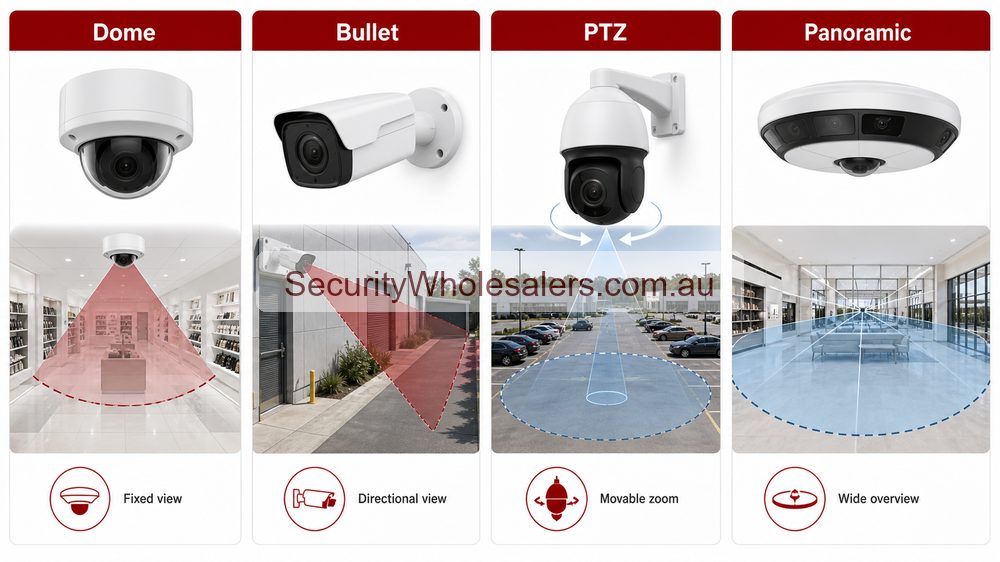
AXIS has enough range that it is easy to get distracted by the series hierarchy. That is less useful than deciding what the scene actually needs. A fixed reception ceiling view, a deep car-park approach, a mall intersection, and a truck gate are four very different jobs. They should not all be solved by the same camera shape or by the same analytics assumptions.
Main AXIS camera paths buyers actually compare
| Camera path | Usually strongest for | Typical AXIS examples |
|---|---|---|
| Compact fixed dome | Reception areas, office ceilings, retail interiors, indoor corridors, and discreet public-facing scenes | M3085-V, M3086-V |
| Outdoor all-round dome | Entries, walkways, school buildings, clinics, retail fronts, and general external commercial coverage | P3268-LVE, P3287-LVE |
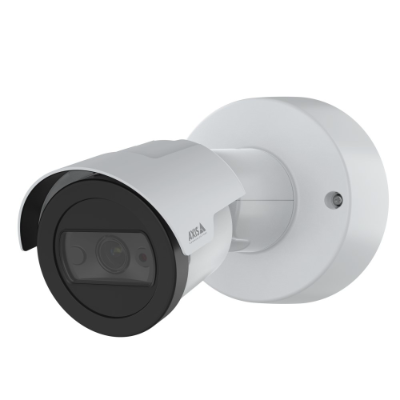
| Compact or fixed bullet | Rear doors, side access, small car parks, fence lines, and practical external fixed views | M2036-LE, P1487-LE |
| Premium outdoor bullet or box | Industrial perimeter, transport, infrastructure, longer range, harsher weather, and more demanding scene quality | Q1656-LE |
| PTZ | Live operator monitoring, large yards, public spaces, campuses, and selected hospitality or mall overview roles | M5526-E, Q6315-LE |
| Panoramic or multi-sensor | Wide context coverage, warehouse aisles, mall intersections, school courtyards, and yards needing fewer camera positions | M4308-PLE, Q6300-E |
Main AXIS feature families worth comparing
| Feature family | Why it matters | Where it is usually most relevant |
|---|---|---|
| Lightfinder 2.0 | Low-light colour retention and cleaner image behaviour in difficult scenes | Entries, car parks, lanes, transport, and external commercial scenes after dark |
| Forensic WDR | Helps with scenes containing bright and dark areas at the same time | Front doors, shopfronts, loading docks, reception entries, and glazed facades |
| OptimizedIR | Controls IR behaviour on external cameras without relying entirely on ambient light | Perimeters, rear lanes, dark boundaries, and predictable night scenes |
| AXIS Object Analytics | Human and vehicle classification plus better event handling | Sites that review alerts seriously and do not want pure motion noise |
| Audio Analytics | Adds sound-event awareness where audio is part of the operating brief | Hospitality, selected retail, foyers, and public-facing spaces |
| Remote PTRZ | Allows field-of-view adjustment after installation without sending a technician back up the ladder | Higher-end outdoor domes such as the Q36 branch |
| Axis Edge Vault | Part of the device-security story and identity protection | Enterprise, government-adjacent, education, healthcare, and any site with stronger cyber expectations |
What usually works by scene type
| Scene | What usually works | Why |
|---|---|---|
| Reception or foyer | Compact dome or all-round fixed dome | These scenes usually reward clean fixed coverage more than exotic hardware. |
| Rear door, side path, or small car park | Compact or stronger fixed bullet depending on distance and exposure | The camera body and lens direction usually matter more than headline megapixels. |
| Loading dock or yard approach | Stronger outdoor dome, bullet, or box camera | These are the scenes where build quality, low-light control, and better lens choices start to justify the AXIS premium. |
| Large open courtyard or active live-review site | Fixed evidence cameras plus PTZ or panoramic support | A steerable or wide-area camera works best when it supports a structured fixed-camera plan rather than replacing it. |
Leah's suburban medical practice
Leah needs reception coverage, one front threshold view, one rear staff door, and a short car-park approach. This does not need panoramic coverage or a heavy-duty PTZ. The practical AXIS discussion is compact indoor domes for the reception and corridor views, plus one or two stronger outdoor domes or bullets for the external scenes. P3268-LVE or P3287-LVE style domes are much more relevant than the higher-end Q-series or panoramic branches.
Nick's fabrication yard
Nick runs a fabrication yard with vehicle movements, external storage, and a gate lane. A compact indoor dome is irrelevant to the real risk points. This is the kind of site where a stronger bullet or box camera such as Q1656-LE becomes easier to justify, possibly alongside a PTZ or panoramic context camera if staff actively review the yard. The job is less about hiding cameras and more about getting stable, reviewable external evidence from exposed positions.
Grace's school entrance problem
Grace wanted one very wide camera above a main school entrance because it looked efficient. In practice, that would have weakened face detail and left the side gate and internal threshold too dependent on one scene. A better AXIS design used one stronger dedicated entry camera, one side-gate camera, and one internal movement view. That gave the site much better review value than one oversized all-purpose shot.
Common wrong-fit choices
- Using a compact fixed indoor dome on a site that really needs a stronger external varifocal camera.
- Buying a PTZ because zoom sounds attractive, even though the site has no one actively operating it and still lacks enough fixed evidence views.
- Choosing a panoramic camera where the real requirement is a tighter face or plate scene at one key approach.
- Assuming a more expensive Q-series model is automatically better, even when the environment is simple and the added capability will never be used.
- Comparing megapixels while ignoring low-light behaviour, analytics expectations, and the recorder or appliance path.
What a good AXIS camera shortlist should confirm
- Which scene is meant to provide the most important evidence later.
- Whether the site needs overview, detail, or both in separate cameras.
- Whether the mounting height supports the chosen lens and camera body.
- Whether the night scene is hard enough that Lightfinder 2.0, Forensic WDR, or stronger outdoor hardening will actually matter.
- Whether the recorder or AXIS Camera Station path will make proper use of the camera's analytics and metadata.
What the installer should confirm before locking the model
The installer should confirm mounting height, exposure, scene depth, low-light conditions, whether audio matters, whether the owner wants object classification or just recording, and whether the recorder or AXIS Camera Station branch will actually make use of the chosen camera's metadata and analytics. On AXIS jobs, good camera selection is usually tied to the overall software and review workflow, not just optics.
Relevant SecurityWholesalers Categories and Products
Sources and Further Reading
Axis camera selection by scene
| Scene | Likely camera style | Buyer note |
|---|---|---|
| Reception or indoor corridor | Dome or compact fixed camera. | Discrete design and clean evidence usually matter most. |
| Driveway or external approach | Bullet or outdoor fixed camera. | Directional deterrence and weather exposure become important. |
| Large yard or car park | PTZ or panoramic supporting fixed cameras. | Overview should not replace fixed evidence views at gates and doors. |
| Open public area | Panoramic or multisensor. | Situational awareness can be more useful than one narrow view. |
| Perimeter or low-visibility boundary | Thermal or radar-supported design. | Detection is different from identification. |
Axis camera buying mistakes
- Choosing the camera body before defining the evidence target.
- Using PTZ where fixed cameras should cover repeatable events.
- Buying specialist cameras without planning recording, analytics and operator workflow.
- Ignoring mounting height, lens choice and light conditions.
Frequently Asked Questions
- Should AXIS buyers start with dome, bullet, PTZ, or panoramic?
Start with the scene and the review task. Fixed domes and bullets handle most everyday evidence views. PTZ makes sense when live steering or zooming adds real operational value. Panoramic only makes sense where one camera genuinely needs to cover several directions at once.
- What AXIS features are most important to compare?
The main feature families are Lightfinder 2.0, Forensic WDR, OptimizedIR, AXIS Object Analytics, Audio Analytics, Zipstream, AV1 on newer models, and Axis Edge Vault. Which ones matter depends on the environment and how the footage will be used later.
- When is a compact AXIS model enough?
Compact AXIS models are often enough for indoor receptions, office corridors, small retail spaces, and modest external entry points where the scene is stable and the review task is straightforward.
- When should a buyer move up to Q-series AXIS cameras?
Q-series becomes more relevant when the site is harsher, the image-quality expectation is higher, remote adjustment matters, or the environment needs more robust hardening and stronger advanced analytics support.
- Are newer AXIS cameras mainly about resolution?
No. On newer AXIS models the real differences are often chipset generation, low-light performance, remote adjustment, analytics capacity, AV1 support, and overall device hardening rather than megapixels alone.
- What should the installer confirm before final AXIS camera selection?
They should confirm mounting height, scene depth, low-light behaviour, cable route, environmental exposure, whether audio is useful, and whether the recorder and software path will actually make use of the chosen camera's analytics.
-
Which Axis camera should most buyers start with?
Most buyers should start with fixed dome or bullet cameras on evidence points, then add panoramic, PTZ, thermal, radar or LPR only where the site need is clear.