

















Commercial
AXIS Camera Station and Appliance Systems
System Guide
Why AXIS recorder decisions become software decisions
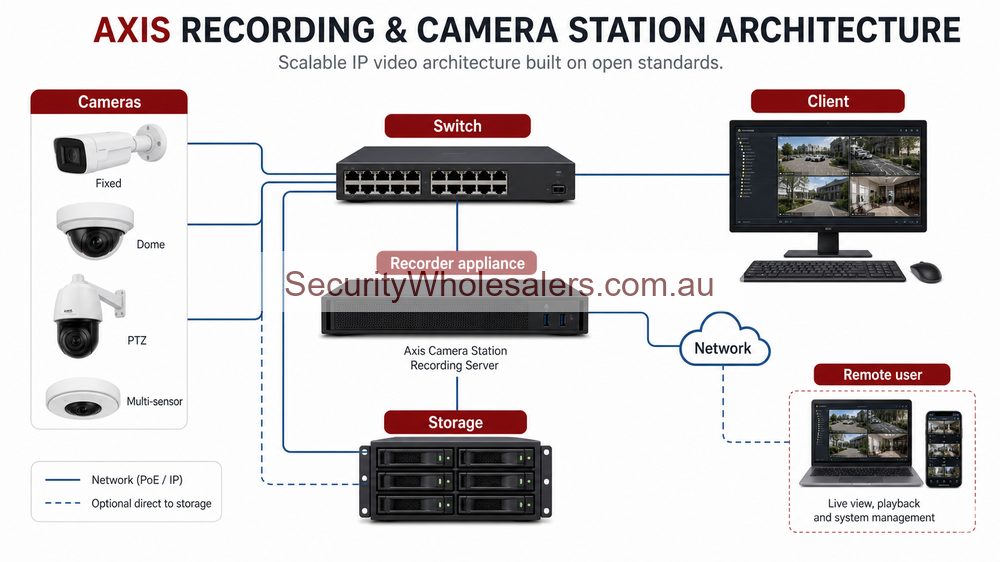
On smaller systems, a recorder can still be treated as a local storage device. On AXIS, that becomes less true once the system grows. Cameras, analytics, user permissions, event review, and device management start to depend on the software and appliance layer. That is why AXIS Camera Station matters so much. It changes how the project is managed after installation, not just how it is recorded on day one.
Main AXIS system paths on SecurityWholesalers
| System path | Usually strongest for | Typical products |
|---|---|---|
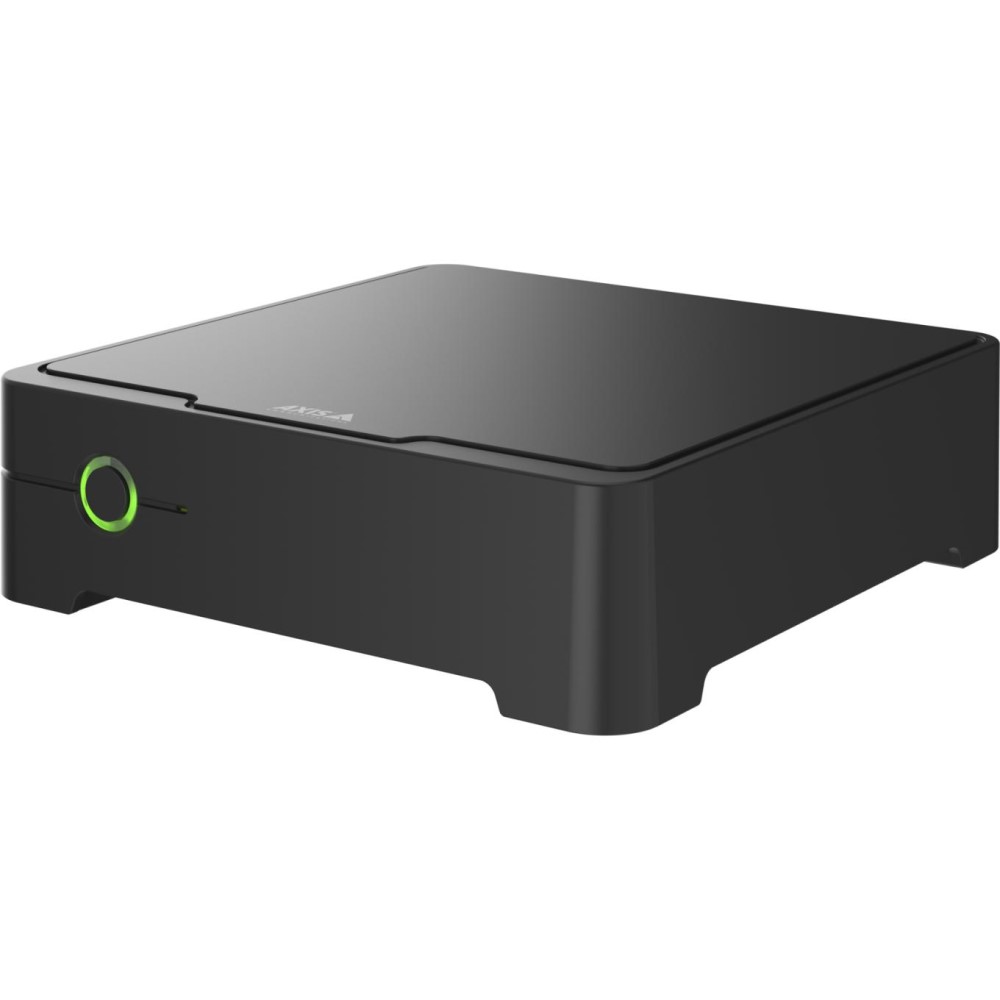
| Simple compact recorder path | Small offices, shops, clinics, and very modest single-site systems | S3008 Mk II |
| Standalone appliance path | Small-to-medium commercial systems that already want AXIS Camera Station Pro as part of the structured deployment | S2208 Mk II, S2212 Mk II |
| Rack appliance path | Larger offices, warehouses, schools, mixed commercial buildings, and multi-zone systems | S2224 Mk II, S1264 Rack |
When to stay simple and when to move into appliances
| Site condition | Stay with simple recorder | Move into appliance path |
|---|---|---|
| Very small camera count and one main reviewer | Usually yes | Usually unnecessary unless workflow is unusually strict |
| Several users with different review permissions | Often limiting | Usually stronger |
| Site will grow across more areas or buildings | Can become restrictive quickly | Usually safer long term |
| Customer wants a structured AXIS software environment from day one | Not usually the best fit | Usually the right conversation |
What AXIS Camera Station changes in practice
- User permissions become easier to structure across different staff roles.
- Device management becomes part of the system conversation, not an afterthought.
- Appliances and licences create a more validated end-to-end AXIS path.
- The site is more naturally positioned for long-term review, event handling, and support.
Allied-health clinic group
A three-tenant allied-health clinic with reception, shared corridors, and a back-of-house staff area may begin with only eight cameras, but the system has multiple user roles and a real expectation of controlled footage access. That is a stronger S2208 Mk II discussion than a pure S3008 Mk II discussion because the software and user structure matter as much as the storage.
Warehouse and front office site
A warehouse with an office, side gate, loading face, and staff parking area may only begin at twelve or sixteen cameras, but it is already behaving like a small commercial platform. That is where S2212 Mk II or S2224 Mk II becomes more sensible because the site wants headroom, appliance structure, and a clearer long-term system path.
Why some eight-camera jobs still deserve an appliance
An eight-camera site with multiple managers, formal export expectations, and a real need for structured user permissions can be a much better appliance job than a twelve-camera site with only one owner and very simple playback habits. On AXIS, the software workflow often matters more than the headline channel number.
Common AXIS Camera Station mistakes
- Assuming every job needs the appliance path because AXIS is a premium brand.
- Choosing the appliance path without confirming who will actually review, manage, and maintain the system.
- Ignoring cabinet, UPS, and user-structure planning while still expecting enterprise-style behaviour.
- Keeping the conversation about storage only when the real value sits in workflow and management.
Common AXIS appliance buying mistakes
- Choosing a simple recorder because the camera count looks modest, while ignoring that the site has multiple users and stronger management requirements.
- Choosing an appliance path with no realistic view of PoE budget, storage retention, or future camera growth.
- Treating AXIS Camera Station as just another software label instead of part of the overall system-management model.
- Buying rack appliances for a site that has no cabinet discipline, power planning, or user structure to support them properly.
Relevant SecurityWholesalers Categories and Products
Camera Station deployment scenarios
| Deployment | Best fit | Design note |
|---|---|---|
| Appliance-based | Smaller commercial or premium residential jobs. | Good where the buyer wants a neat supported recording path. |
| Server-based | Larger sites with more cameras, users and storage needs. | Plan storage, clients, network and permissions properly. |
| Multi-site | Organisations with several locations. | Management workflow and support responsibility need to be clear. |
Operational questions before buying
- Who reviews footage and how often?
- How long must video be retained?
- How many users need client access?
- Will the system expand across buildings or sites?
- What happens during power, network or storage faults?
Camera Station design checklist
- Confirm final camera count, not only stage-one cameras.
- Decide who will use the client software and how often footage is reviewed.
- Size storage around retention and scene activity, not only camera quantity.
- Plan remote access, user permissions and support ownership.
- Document what happens if the recorder, switch or internet path fails.
Axis Camera Station is strongest when the site wants a managed video platform rather than a simple recorder box. The design should explain how people will use the system after installation, not just what hardware is included.
Frequently Asked Questions
- What is AXIS Camera Station in practical terms?
In practical terms it is the software and appliance environment that turns the AXIS deployment into a managed surveillance system rather than only a collection of cameras and a recorder.
- When is an AXIS appliance better than a simple recorder?
An AXIS appliance is usually better when the site wants a more structured commercial workflow, more users, stronger software integration, included licences, and clearer long-term system management rather than only local recording.
- What is the difference between S2208, S2212, and S2224?
The practical difference is the scale and structure of the deployment. S2208 and S2212 are standalone appliance paths for smaller commercial systems, while S2224 is the more serious rack appliance step for larger and more structured sites.
- Should every AXIS job use an appliance path?
No. Some small sites are still better served by a compact recorder such as S3008 Mk II. The appliance path is strongest when the site needs more than simple local recording.
- What should buyers compare besides storage when looking at AXIS appliances?
They should compare included software licences, PoE structure, number of users, cabinet format, future growth, retention, and how the site will actually be reviewed and managed over time.