

















Commercial
Best CCTV System for Construction Sites in Australia
Return to CCTV Systems for Construction Sites hub
Commercial Buying Guide
Quick answer
For most small construction sites, the go-to starting point should be the TP-Link VIGI Solar Kit SP9030 with 4G PT camera. It is simple to deploy, easy to move, and avoids the usual delay of trying to build a temporary wired CCTV path too early.
If the site is less about visible deterrence and more about remote monitoring over a broader area, the better step-up is the Hikvision DS-2DE5425IWG-K/4G solar PTZ kit. It gives you much stronger zoom and monitoring reach, but it wants a more deliberate mounting and commissioning process.
If you want a more feature-packed solar PTZ with stronger deterrence flavour, add the Dahua 120W PTZ integrated solar monitoring kit to the shortlist as well. As listed on SecurityWholesalers on 27 May 2026, that Dahua option usually carries a 7 to 10 week lead time, so it is a better fit for planned projects than urgent next-week site protection.
Why solar is so often the right first answer
If there is no power available at the gate or compound, or if getting cable there means trenching across a temporary site, fighting around builder-board compromises, or building infrastructure you may move again in a few weeks, solar is often the cleaner answer. On small construction jobs, that is exactly why the VIGI solar kit works so well.
Which Construction CCTV Path Is Right for Your Site?
Fastest and simplest
Use the VIGI solar kit when the site is small, temporary, and you mainly need a gate, shed, container or compound watched properly this week.
This is the default answer when there is no power on site yet or cabling is too awkward to justify for a single problem point.
Best for monitoring reach
Use the Hikvision solar PTZ when the site needs broader live oversight over a frontage, access road, larger laydown area or plant zone.
This is the better answer when one elevated point really does need zoom and scene control rather than just visible deterrence.
Best for richer deterrence features
Use the Dahua solar PTZ when the project is more planned, wants a more feature-packed deterrence-style PTZ path, and can live with the longer lead time.
This is not the urgent fallback answer. It suits planned projects better than small jobs that need protection next week.
Construction site security is broader than cameras alone
On many real jobs, the strongest answer is not just one solar camera. It is a solar camera plus a staged wireless alarm path. The camera gives view and evidence. The alarm gives disturbance detection at the site office, tool container, gate or compound when someone tries a door, gate or approach after hours.
If you want the fast construction site security version of that answer, use Construction Site Security in Australia.
For Most Small Construction Sites, Start With One of These
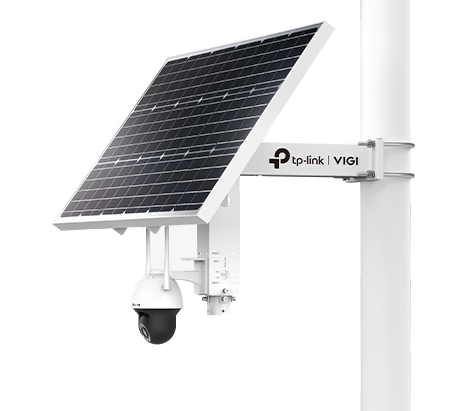
Go-to small-site pick: TP-Link VIGI Solar Kit SP9030
Main link: TP-Link VIGI Solar Kit SP9030 with 4MP Outdoor Full-Colour 4G PT Camera
Why it fits construction so well: this is a turnkey off-grid answer for remote or temporary jobs. It includes the solar panel, lithium battery, bracket and 4G camera in one path, so you are not piecing together a camera, battery and panel from different shelves.
Best for: one gate, one site office, one tool container, one temporary compound or one materials zone where you want a fast rollout and simple app access.
Why I would pick it first: it is easy to understand, easy to position, easy to relocate when the build moves, and easy to explain to a builder who just wants the site watched without waiting on trenching or fixed internet.
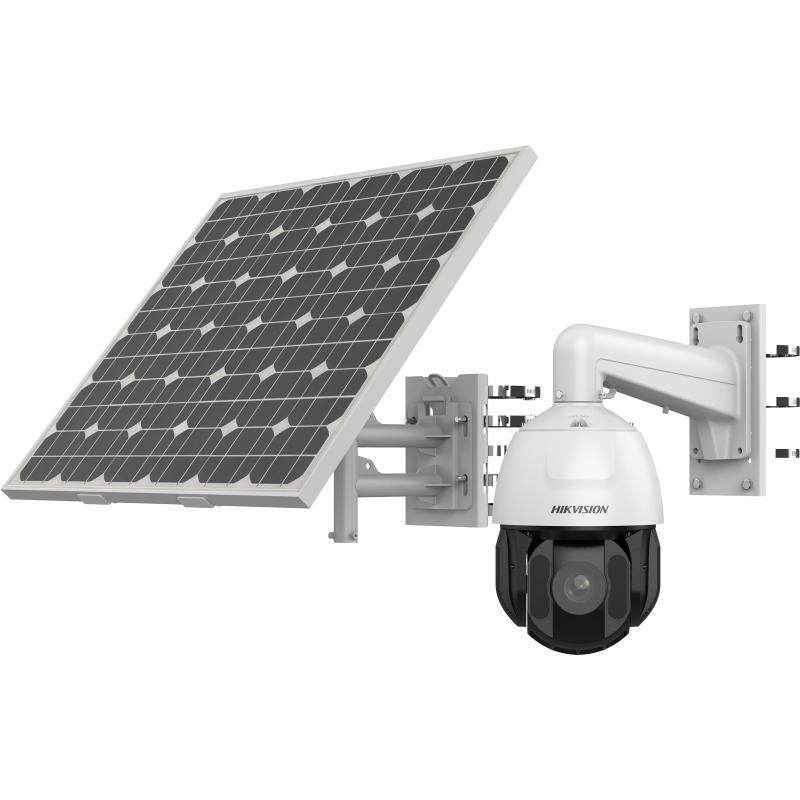
Monitoring-focused step-up: Hikvision solar PTZ
Main link: Hikvision DS-2DE5425IWG-K/4G 4MP Solar PTZ Kit
Why it is the next path: it brings 25x optical zoom, 4G connectivity, onboard storage and long-range IR, so it suits sites where the operator needs broader live oversight rather than just one obvious deterrence point.
Best for: larger gate approaches, remote haul or access roads, broader laydown areas, plant-parking zones and perimeter observation from one elevated monitoring position.
Why not make it the default for every small site: it is a more serious mount, a more serious budget, and a more serious commissioning task. Great when the monitoring job is real. Overkill when the site mostly needs one practical deterrence-led camera.
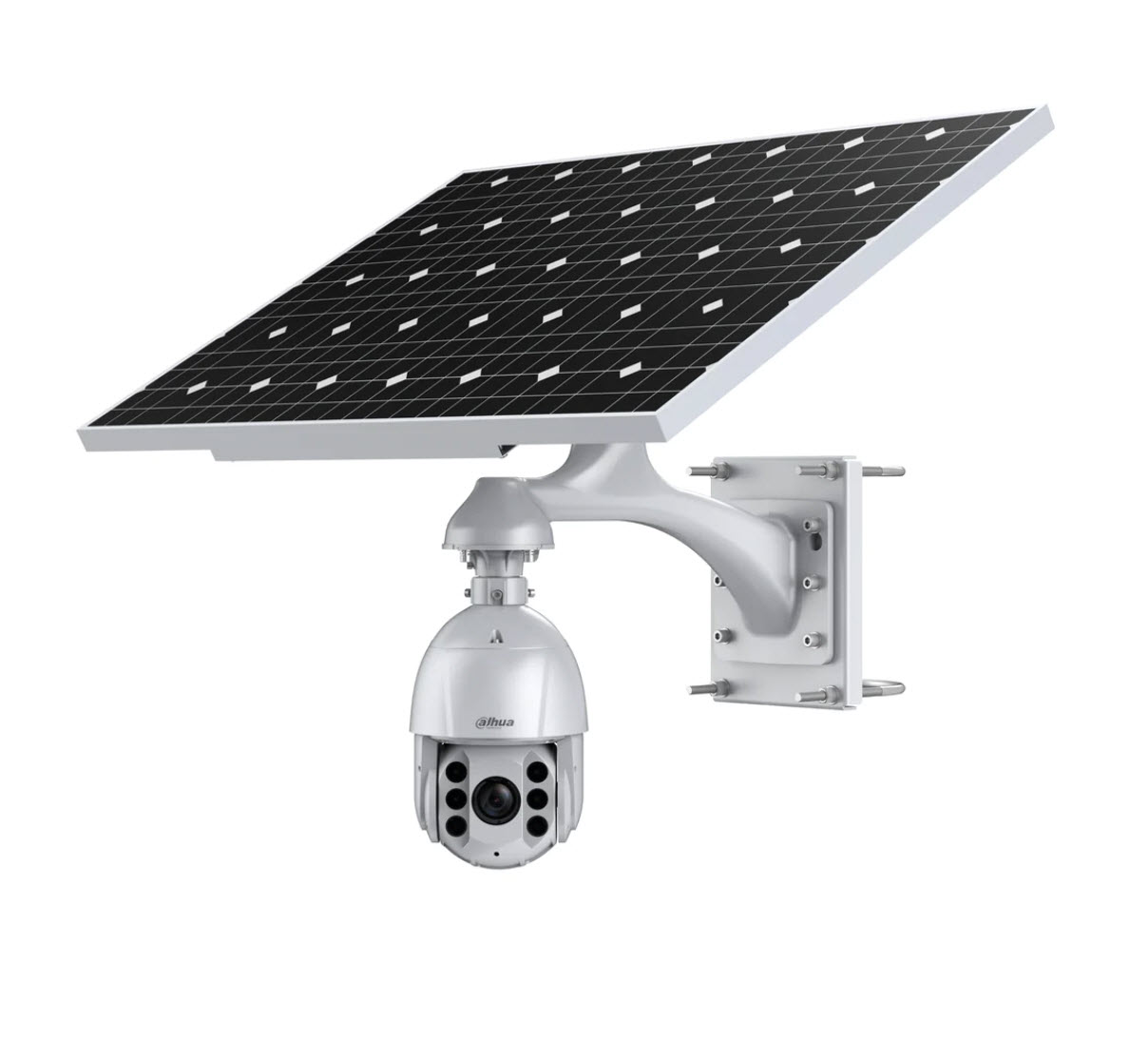
Feature-packed deterrence PTZ option: Dahua 120W solar kit
Main link: Dahua 120W PTZ integrated solar monitoring kit with 4G camera and WizSense
Why it belongs on the shortlist: this is the richer solar PTZ path if the site wants more than just passive monitoring. It is a more feature-packed deterrence-style option than the Hikvision path and suits projects where visible intervention and solar PTZ coverage are both part of the brief.
Important planning note: as listed on SecurityWholesalers on 27 May 2026, the product page says usually 7 to 10 weeks lead time. That makes it a better fit for planned projects than urgent same-week site protection.
VIGI Solar vs Hikvision Solar PTZ vs Dahua Solar PTZ
| Question | VIGI solar kit | Hikvision solar PTZ | Dahua solar PTZ |
|---|---|---|---|
| What is it best at? | Simple, fast standalone site security with minimal infrastructure. | Broader remote monitoring where the operator genuinely needs zoom and scene control. | Solar PTZ coverage where the site also wants a stronger deterrence-style feature set. |
| Where does it usually go? | Gate, site office, tool container, compound edge, temporary perimeter. | Elevated view over access roads, plant parking, larger compounds or long approaches. | Higher-risk exposed fronts, broader compounds, or planned projects where solar PTZ and deterrence both matter. |
| How easy is the install? | Very easy by construction-site standards. Mount the panel and camera, insert SIM, aim it, test the app and you are basically online. | Still far easier than trenching a site, but more deliberate. It needs a stronger pole, stronger bracket thinking, cleaner sun exposure and more careful preset setup. | Closer to the Hikvision PTZ path than the VIGI path. It is still a solar deployment, but not the quick-and-light answer for a rushed site handover. |
| What is the real trade-off? | You get fast deployment and simplicity, but not the same long-range monitoring reach as a true PTZ. | You get much stronger monitoring reach, but you should not treat it like a casual one-hour install on a flimsy temporary post. | You get a more feature-rich deterrence and monitoring package, but you also need to accept the longer lead-time profile and a more planned deployment. |
Why AX Pro Alarms Also Belong on Construction Sites
Construction sites are often too temporary and too changeable for heavy hardwired alarm logic to be the easy answer. That is why Hikvision AX Pro wireless alarms fit this environment so well. They let the site add disturbance detection around the office, tool container, compound gate or fuel cage without pretending the site is already a finished building.
Start with the AX Pro hub kit
Hikvision DS-PWA96-Kit-WB AX Pro complete alarm kit is the cleanest starting point when the site wants a proper wireless alarm branch rather than loose one-off parts.
Use outdoor tritechs on the approach
AX Pro wireless outdoor tritech detectors suit compound approaches, office-side walk-ups and container approaches where you want disturbance detection before someone reaches the door.
Use outdoor reeds on the actual opening point
AX Pro outdoor magnetic contacts are a strong fit for site-office doors, container doors, side gates and cages because they tell you that the actual opening point was disturbed.
Finish the branch properly
Add an outdoor siren and keyfobs so foremen, builders or trusted supervisors can arm and disarm the site without turning a simple after-hours alarm path into an awkward daily routine.
When alarm adds more value than another camera
- When the site office or tool container needs a real disturbance alert, not just a picture after the fact
- When one gate or compound needs to be armed after hours by the foreman or builder with a keyfob
- When the site has blind approaches where a tritech can detect movement before someone reaches the actual opening point
- When the site wants the siren and alarm event to create more pressure on the intruder than passive recording alone
Camera only vs camera plus alarm
| Path | Best when | Limitation |
|---|---|---|
| Camera only | The main job is evidence, review or visual deterrence and the site does not need a real disturbance alert. | The site may only know a door, gate or container was touched after the event. |
| Camera plus AX Pro | The site wants both footage and an after-hours disturbance layer around offices, containers, gates or compounds. | Detector placement matters. Bad placement creates nuisance alarms and makes staff stop trusting the system. |
| Larger staged security path | The site is now broad enough that cameras, alarms, recorder logic and user routine all matter together. | Needs cleaner planning than a single quick solar branch. |
At-a-Glance Recommendation Table
| Site type | Typical camera count | Recommended system | Notes |
|---|---|---|---|
| Very small temporary site | 1 to 2 cameras | Solar 4G standalone path | The VIGI solar kit is usually the cleanest answer if the job is one gate or one compound and the site just needs to get watched quickly. |
| Small site with one broad monitoring problem | 1 to 2 cameras | Solar PTZ path | The Hikvision solar PTZ path is stronger where one elevated monitoring point can genuinely watch a much bigger scene. |
| Small active site with gate and compound | 2 to 4 cameras | Two to four solar or mixed-stage cameras | Often still better as a solar-first or mixed solar-plus-wired rollout than a full NVR build too early. |
| Medium project | 4 to 8 cameras | Mixed staged design | Common path is a few fixed wired cameras where services exist, plus solar or 4G at the remote problem points. |
| Larger multi-zone build | 8 to 16+ cameras | Commercial NVR plus remote branches | At this point the recorder, switching, UPS and site stage changes all matter properly, not just the camera model. |
Best CCTV by Construction Stage
| Site stage | What usually matters most | Best starting path | Why |
|---|---|---|---|
| Vacant block or fencing-only stage | Gate, frontage, site sign-in point, early trespass risk | VIGI solar kit | Usually no power, no comms room, and no reason to build a full head-end yet. |
| Slab stage | Gate, materials, temporary shed or container | VIGI solar kit, sometimes two branches | The site is still moving and the cable path is usually not worth locking in. |
| Frame stage | Broader frontage, changing fence lines, stock and access points | VIGI first, Hikvision PTZ if one broad monitoring point is real | This is often the point where a wider monitoring job appears, but not always a full recorder job yet. |
| Lock-up stage | Doors, materials, plant, subcontractor access and after-hours entry | Mixed solar and early wired path | Some jobs start to justify a stable office or recorder point here, but remote edges may still stay solar. |
| Fit-out or small commercial build stage | Multiple entries, growing asset value, review workflow | Recorder path plus remote branches where needed | This is usually where "do we need an NVR yet?" changes from maybe to yes. |
| Civil or subdivision stage | Remote entries, plant, compound edges and changing work fronts | Hikvision solar PTZ or planned Dahua PTZ, with VIGI at tighter points | The geography is wider and one fixed little scene is often not enough. |
Real Site Scenarios
One gate plus one site shed
What I would pick: VIGI solar kit first.
Why: this is the cleanest small-site job and usually does not justify trenching or a recorder.
What I would not do: overcomplicate it with a PTZ just because the site owner likes the idea of zoom.
One gate plus one container
What I would pick: VIGI at the container or gate-side risk point, depending which question matters more.
Why: tools and copper disappear from containers long before the site is ready for a polished wired build.
What I would not do: put the branch too low where it can be reached easily.
Townhouse infill or rear-lane build
What I would pick: VIGI first, then only add a second branch if the rear lane is a real repeated problem.
Why: these sites often have awkward access and limited install space, so simple usually wins.
What I would not do: assume one wide camera can solve the front and rear at once.
Small commercial build with broader frontage
What I would pick: Hikvision solar PTZ if the operator genuinely needs broader monitoring and zoom.
Why: one broader scene may matter more than a single deterrence-style watch point.
What I would not do: let the PTZ become the only evidence view at the gate.
Two Realistic CCTV Plus Alarm Paths
One gate, one site shed, one tool container
Camera path: start with the VIGI solar kit aimed at the gate or compound approach.
Alarm path: add the AX Pro hub kit, one outdoor tritech across the approach to the shed or container, one or two outdoor magnetic reeds on the office or container door, one outdoor siren, and a couple of keyfobs for the builder and foreman.
Why this works: the camera handles view and evidence, while the alarm path creates a proper disturbance layer around the actual shed or container opening points.
Broader frontage, site office, container bank, inner compound
Camera path: use the Hikvision solar PTZ for broader monitoring of the frontage or yard, then add tighter fixed or solar views where the real evidence scenes sit.
Alarm path: base the site around the AX Pro hub, use multiple outdoor tritechs on the inner compound approaches, add outdoor reeds on the office, container bank and generator or fuel enclosure gates, plus a visible outdoor sounder.
Why this works: the PTZ handles broader live review, while the alarm zones protect the actual points of disturbance that matter after hours.
Outdoor PIR and tritech placement matters
How to minimise false alarms
- Do not aim outdoor PIRs or tritechs straight at a public footpath, public road or gate path where authorised people constantly walk past.
- Protect the real approach across the zone, not random open space that sees regular harmless traffic.
- Avoid moving mesh, flapping shade cloth, loose site-wrap and vegetation that can create nuisance events.
- Mount on a stable surface so the detector is not shifting with temporary fencing or a shaky lightweight post.
- Use reeds on the actual door or gate where the opening event matters, instead of trying to make one PIR solve every alarm job.
How These Are Usually Installed on a Real Site
VIGI solar kit install path
Typical mount: fence post, temporary pole, site-office corner post, container post or gate-side upright with good sun.
Typical setup order: confirm 4G signal, mount the bracket and panel, mount the camera, insert the SIM, power up, aim the scene, then test live view and playback from the app.
Why installers like it: no trenching, no NVR cabinet, no local switch, and no waiting for the electrician to finish a temporary power run before the site can be watched.
Hikvision solar PTZ install path
Typical mount: stronger pole or engineered mounting point with clear sun and enough rigidity that the PTZ can move without a shaky image.
Typical setup order: choose the monitoring point carefully, mount the panel and battery kit, mount the PTZ, insert the SIM, set presets and patrols, then test zoom positions during the day and at night.
Why it is still practical: it still avoids trenching and wired internet, but it needs more discipline because you are commissioning a real zoom monitoring head, not just a fixed watch point.
In practice, the job usually starts by getting the right pole or mounting point sorted first. On a small site that might be a strong gate-side post or container corner. On a cleaner longer-term setup it may be a galvanised pole in a concrete footing. Once the pole position is agreed, the installer mounts the panel where it will still see sun as the site changes, fits the camera, inserts the SIM, aims the scene and tests both live view and playback. If you want the practical detail, use Construction Site Solar CCTV Reference Layouts and Construction Site Solar CCTV Installer Checklist.
Installer Checklist on a Small Construction Job
- Walk the site and agree on the actual theft or access question first.
- Choose the pole or mount based on sightline, sun and safe access, not just whichever post is closest.
- Check 4G at the final height, not only at ground level.
- Mount the panel where future scaffolding, stock or a site shed will not shade it.
- Test live view, playback, app login and final scene aim before handover.
- Take final install photos so the site manager knows exactly what branch was handed over.
Why This Is Usually Easy to Set Up
- You do not need to build a local recorder room before the site has even stabilised.
- You do not need to trench data and power to every remote corner just to protect one problem point.
- You can move the camera branch later if the gate, fence line or compound changes.
- Commissioning is mostly about mount position, sun exposure, SIM path, app setup and scene tuning.
- It is easier to explain and hand over to a builder or site manager who just wants to know which app to open and what area the camera is covering.
Typical Small Construction Site Solar Layout
For more specific gate, shed and frontage examples, continue with Construction Site Solar CCTV Reference Layouts. If you want the exact handover order for poles, panel direction, SIM and playback testing, continue with Construction Site Solar CCTV Installer Checklist.
When to Step Beyond the Solar Standalone Path
Once the build needs several fixed views at once, or once management wants a proper multi-camera review workflow, then it makes sense to step into a recorder path. That is usually the point where the site has a stable office, a stable power path, or enough cameras that the head-end is now worth doing properly.
Until then, forcing a small construction job into a full wired CCTV build too early often creates delay, extra cost and more mess than value.
Do I Need an NVR Yet?
| Situation | Probably no | Probably yes |
|---|---|---|
| One gate or one shed problem | Standalone solar branch is usually enough. | No need to force a recorder path yet. |
| Two to four changing risk points | Sometimes still okay as mixed solar branches. | Move to NVR once the site wants stable multi-camera review and a fixed office path. |
| Stable site office and several cameras | Less likely. | This is usually the point where recorder, switching and UPS become worth doing properly. |
| Remote civil or subdivision work fronts | Often yes for standalone remote branches. | Use NVR only where a true stable head-end exists and the review workflow needs it. |
Recommended Buying Paths
Best small-site path
Main fit: the TP-Link VIGI solar kit.
Use it when: the site is temporary, the services are rough, and you need a quick answer that can move later.
Best broader site-security upgrade: pair it with an AX Pro wireless alarm kit so the office, container or compound also gets a disturbance layer.
Monitoring-focused alternative
Main fit: the Hikvision solar PTZ kit.
Use it when: the operator needs broader scene control and stronger zoom, not just a simple visible presence at one point.
Feature-packed deterrence option
Main fit: the Dahua 120W solar PTZ kit.
Use it when: the project is planned far enough ahead to accept the longer lead time and the site wants a richer deterrence-flavoured PTZ path rather than the simpler VIGI answer.
Growing site path
Main fit: a mixed build using solar standalone cameras at the remote points and a proper NVR path where stable services already exist.
Use it when: the site now has several independent risk zones and a site office or comms location worth anchoring properly.
Alarm layer: this is also where extra AX Pro tritechs, reeds, sounders and keyfobs start making sense because the site security brief is now wider than one camera branch.
What Usually Goes Wrong on Construction CCTV Jobs
- The panel ends up shaded later by scaffold, materials or a site shed that was not there on day one.
- The camera is mounted too low and sits in the easy tamper zone.
- The installer checks 4G on the ground but not at the final pole height.
- The builder assumes one PTZ replaces a proper gate or shed evidence view.
- The site forces a recorder too early and then has to undo the layout when the job changes again.
- The camera is aimed too wide because nobody stopped to ask what evidence the site actually needs later.
For the next layer of detail, continue with Temporary Power, Solar Cameras and Site Staging, Fixed, Motorised, PTZ and Deterrence Cameras, and Coverage Zones and Camera Placement.
What to Send Us for a Better Recommendation
If you want a useful answer quickly, send these
- A site photo, sketch or plan showing the gate, shed, container, frontage or laydown area.
- Whether there is any power at the risk point yet.
- Whether the site gets usable 4G signal.
- Whether the real goal is deterrence, monitoring, evidence, or a bit of all three.
- Whether the site layout is likely to change again in the next few weeks.
- Whether you are trying to watch one point or build toward a larger multi-camera system later.
After You Buy: Useful Support Guides
Construction Site Security in Australia
Useful when you want the shortest small-site versus larger-site security answer across solar cameras, PTZ options and AX Pro alarm layering.
Construction Site Solar CCTV Reference Layouts
Useful when you want practical examples for one gate, one shed, one compound or one broader frontage before the installer fixes the final pole position.
Construction Site Solar CCTV Installer Checklist
Useful when you want the real deployment order for the pole, the panel, the SIM, app setup, playback testing and final handover photos.
TP-Link VIGI Solar Camera Guide
Useful if you want a deeper read on solar sizing expectations, mounting logic and when a VIGI solar path is cleaner than trying to force a wired rollout.
TP-Link VIGI 4G Camera Guide
Useful when the SIM, app path and remote data expectations matter as much as the physical mount.
TP-Link VIGI 4G Camera Setup Checklist
Useful for installers who want a clean commissioning order for SIM, APN, signal, storage and final playback testing.
How to Download CCTV Footage for Police or Insurance
Useful after theft, trespass or equipment disputes when the site needs to keep an evidence export clean.
Hikvision AX Pro Buying Guide
Useful if the construction job now needs a proper alarm layer as well as cameras, especially around site offices, tool containers, gates and compounds.
Construction Site Alarms, AX Pro, and After-Hours Detection
Useful when the real problem is site disturbance after hours and the project needs detector placement, outdoor reeds, keyfobs and siren logic explained properly.
Construction Site CCTV FAQs
What is the best CCTV system for a small construction site?
For many small sites, the cleanest starting point is the TP-Link VIGI solar kit because it gives you a complete off-grid camera path without waiting on site power, fixed internet or a recorder cabinet.
When should I use the Hikvision solar PTZ instead?
Use the Hikvision solar PTZ when the site needs broader monitoring over a bigger area and the operator genuinely wants zoom, presets and more remote scene control rather than just a simple deterrence-led camera.
Are solar construction cameras hard to install?
Usually no. They are often easier than temporary wired CCTV because the job is mostly about choosing the right pole, the right sun exposure, a reliable SIM path and a useful viewing angle.
Do small construction sites need an NVR?
Often no. A standalone solar 4G camera can be the better answer early on. Move into an NVR path once the site grows into several cameras and a more permanent head-end makes sense.
How many cameras does a construction site usually need?
A very small site may only need one or two strong views. Many temporary sites land around two to four cameras. Bigger builds can move into four to eight or more once several risk zones need separate coverage.
Should construction sites use alarms as well as CCTV?
Often yes. On many sites the best answer is a camera for view and evidence plus a wireless alarm path for actual disturbance at the office, tool container, gate or compound.
What alarm suits a temporary construction site?
A Hikvision AX Pro wireless alarm path is usually the cleanest fit because it is easier to stage on a temporary site and suits outdoor tritechs, outdoor reeds, sounders and keyfobs without assuming the site is already a finished building.
How should outdoor PIRs or tritechs be aimed on a construction site?
Aim them across the real protected approach, not directly at a public footpath, road or busy access path. Also avoid unstable posts, moving mesh, flapping material and other common nuisance-alarm causes.