

















Hikvision AX PRO Buying Guide
Hikvision AX PRO
Where AX PRO usually fits
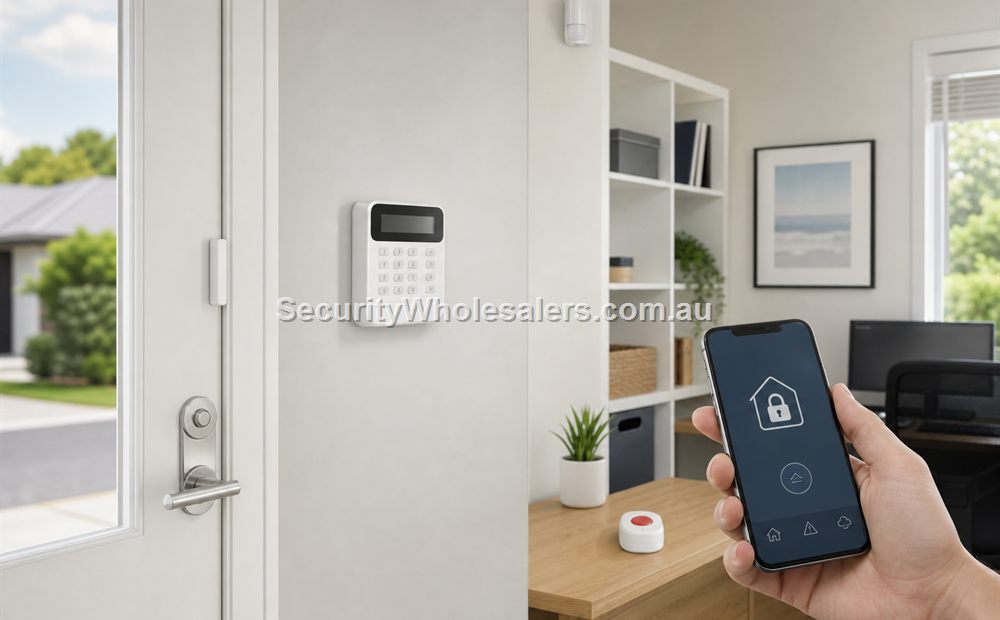
AX PRO usually fits homes, small commercial sites, detached offices, sheds, medical or retail duress add-ons, and other sites where running a lot of new alarm cable would be inconvenient or unnecessary. The appeal is not only the panel. It is the whole wireless branch: PIRs, door contacts, outside curtain detectors, keyfobs, sirens, and app workflow.
What makes AX PRO useful
| AX PRO feature | Why it matters | Typical fit |
|---|---|---|
| Wireless PIR and contact path | Keeps retrofit work lighter | Homes, offices, pharmacies, small businesses |
| Outdoor curtain and perimeter detectors | Lets the site detect movement before someone reaches the core of the building | Shops, side entries, homes, clinics, sheds |
| App-backed alerts and arm/disarm workflow | Helps the owner run the system day to day without a heavy alarm workflow | Owner-managed homes and small businesses |
| Wireless panic and duress path | Useful where staff-safety response matters | Medical, retail, small office |
Typical AX PRO detector mix on a normal site
| Detector or device | What it is usually doing | Typical location |
|---|---|---|
| Door contact | Confirms a door or window has opened | Front door, rear staff door, side entry, roller-door personnel access door |
| Standard PIR | Catches movement after entry | Hallway, office passage, reception-to-corridor path, stock-room approach |
| Pet-friendly PIR | Lets the site protect an occupied home or mixed-use area more sensibly | Family room, hallway, selected rooms with small pets |
| Outdoor curtain detector | Watches a vulnerable outside approach before the intruder reaches the door | Rear lane, side gate, clinic staff entry, shed apron |
| Keyfob, keypad, or app arm-disarm | Gives the user a practical everyday operating method | Front entry, reception, owner phone, site manager phone |
| Panic or duress button | Creates a silent or urgent alert workflow | Reception desk, pharmacy counter, consulting room, office manager desk |
Where AX PRO detectors usually go
On a simple office or clinic, the most common pattern is a contact on the front door, a contact on the rear or staff door, and one or two internal PIRs covering the path a person would actually walk after entry. That is usually more useful than sprinkling detectors through every room without thinking about the travel path.
On a small shop with a rear lane, the rear door and the internal route from that door into the stock or counter area often matter more than adding another detector to the front display area. On a detached shed or workshop, an outside curtain detector can be useful when the owner wants earlier warning before the intruder reaches the main door.
How AX PRO notifications usually work
AX PRO is often chosen because the owner wants direct app-backed alerts rather than a purely keypad-style alarm workflow. In simple terms, the owner or manager can arm and disarm the site, receive intrusion or tamper alerts, and see faults or low-battery conditions without standing in front of the panel.
That does not remove the need to plan who receives the event. A useful AX PRO setup usually has one clear primary person and one fallback person. If nobody is looking at the alert after hours, the app feature alone does not solve the response problem.
Worked examples
A suburban osteo clinic with a rear lane
Situation: A suburban osteo clinic has a front reception door, a rear staff door off a lane, several treatment rooms, and staff who do not want building work just to add an alarm. The clinic also wants one silent duress point at reception.
Solution used: AX PRO with a contact on the front door, a contact on the rear staff door, one PIR on the reception-to-corridor route, another PIR on the treatment-room corridor, an outdoor curtain detector on the rear lane approach, and a wireless duress button at reception.
Why this was chosen: The building is small enough for wireless to make sense, but the rear lane creates a clearer perimeter risk than the front door alone. AX PRO fits because the detector range, app workflow, and duress options all sit comfortably in one retrofit-friendly branch.
Installation notes: The practical attention points are detector height, rear-lane curtain alignment, and making sure the manager and owner both receive and recognise the app alerts.
A detached office next to a workshop
Situation: A detached office sits beside a noisier workshop. The owner wants to protect the office, archive room, and rear office entry, but does not want to trench or reopen the workshop walls just to run alarm cable.
Solution used: AX PRO with a front-door contact, rear-door contact, one PIR on the internal office route, a second PIR protecting the archive approach, and a siren positioned so the event is obvious to nearby workers and neighbours.
Why this was chosen: The real problem is labour and disruption, not raw zone count. AX PRO lets the installer protect the office properly without turning the project into a broader cabling program.
Installation notes: The installer still needs to place the PIRs for travel-path coverage rather than just wherever the nearest power or easiest wall happens to be.
What to be careful with
- Plan wireless device maintenance properly, especially batteries on panic and portable devices.
- Do not assume every larger business site should stay wireless-first if the zone plan is already growing complex.
- If the job wants several wired openings, more expansion, or heavier long-term structure, compare AX PRO against Hybrid Pro early.
- Do not install PIRs simply where cable would have gone on an older alarm. Place them where the travel path is most useful.
- If outside detectors are used, think about gates, pets, vegetation, and where people really approach from.
Relevant SecurityWholesalers Categories and Products
These AX PRO products are the main reference points when the job is a wireless-first Hikvision alarm project.
- Hikvision AX PRO alarms - Main AX PRO category.
- AX PRO duress and silent-alarm kit - Useful AX PRO reference where panic workflow matters.
- AX PRO wireless PIR detector - Standard internal movement detector reference.
- AX PRO pet immune PIR cam detector - Useful reference for pet-friendly residential jobs.
- AX PRO outdoor curtain detector - Useful reference where perimeter detection matters.
Sources and Further Reading
Frequently Asked Questions
-
What kind of site suits Hikvision AX PRO best?
AX PRO usually suits homes, smaller businesses, clinics, and retrofit jobs where a wireless-first approach makes practical sense.
-
Can AX PRO handle outside detectors?
Yes. That is one of the useful parts of the ecosystem, especially where rear or side approaches matter.
-
Does AX PRO send phone notifications?
It can suit buyers who want app-backed alerts, but the useful question is still who receives the event and what they will do next.
-
What detectors are most commonly used on AX PRO?
The common mix is door contacts on the main entries, PIRs on the internal travel path, and sometimes an outdoor curtain detector or a duress button where the site needs that extra layer.
-
Is AX PRO good for a shed or detached office?
Often yes, provided the communications and response workflow also make sense for that site.
-
When should AX PRO be compared seriously against Hybrid Pro?
That should happen once the system needs more structure, more wired points, or clearer long-term growth.
-
Does AX PRO work for duress buttons too?
Yes. AX PRO can be part of a panic or silent-alert workflow where that operating model is clearly planned.
Related Pages
Hikvision Hybrid Pro Alarm Buying Guide
Use Hybrid Pro when the site needs more structure, more zones, or a more wired alarm approach.
Alarm with Panic Button or Duress Button
Use this page when the alarm also needs a staff-safety or silent-alert workflow.
Wireless vs Wired Alarm Systems
Choose between wireless and wired alarm design based on the building, not just the brochure.
Quote checklist for Hikvision AX PRO Buying Guide
Before ordering, ask for a short answer to these questions. They make the quote easier to compare and reduce the chance of buying hardware that does not match the site.
- What exact problem is being solved: alarm planning, deterrence, evidence, access control, safety, compliance or convenience?
- What happens during poor light, bad weather, busy periods, after-hours events or staff changes?
- Who will administer users, review events, export evidence and test the system?
- Which part of the design is allowed to be basic, and which part must be strong because it proves the incident?
If those answers are vague, the buyer should pause before purchasing. Good security equipment becomes much more useful when the operating plan is written down before installation.
Final field note for Hikvision AX PRO Buying Guide
For Hikvision AX PRO Buying Guide, the final buying decision should be easy to explain to the person who will live with the system. The quote should identify the must-have outcome, the acceptable compromises, and the support path if users, doors, cameras, sensors or site conditions change later.
This is the difference between a list of products and a security design. The products matter, but the design is what makes them useful.
Final field note for Hikvision AX PRO Buying Guide
For Hikvision AX PRO Buying Guide, the final buying decision should be easy to explain to the person who will live with the system. The quote should identify the must-have outcome, the acceptable compromises, and the support path if users, doors, cameras, sensors or site conditions change later.
This is the difference between a list of products and a security design. The products matter, but the design is what makes them useful.
Final field note for Hikvision AX PRO Buying Guide
For Hikvision AX PRO Buying Guide, the final buying decision should be easy to explain to the person who will live with the system. The quote should identify the must-have outcome, the acceptable compromises, and the support path if users, doors, cameras, sensors or site conditions change later.
This is the difference between a list of products and a security design. The products matter, but the design is what makes them useful.
Final field note for Hikvision AX PRO Buying Guide
For Hikvision AX PRO Buying Guide, the final buying decision should be easy to explain to the person who will live with the system. The quote should identify the must-have outcome, the acceptable compromises, and the support path if users, doors, cameras, sensors or site conditions change later.
This is the difference between a list of products and a security design. The products matter, but the design is what makes them useful.