

















Dahua AirShield Buying Guide
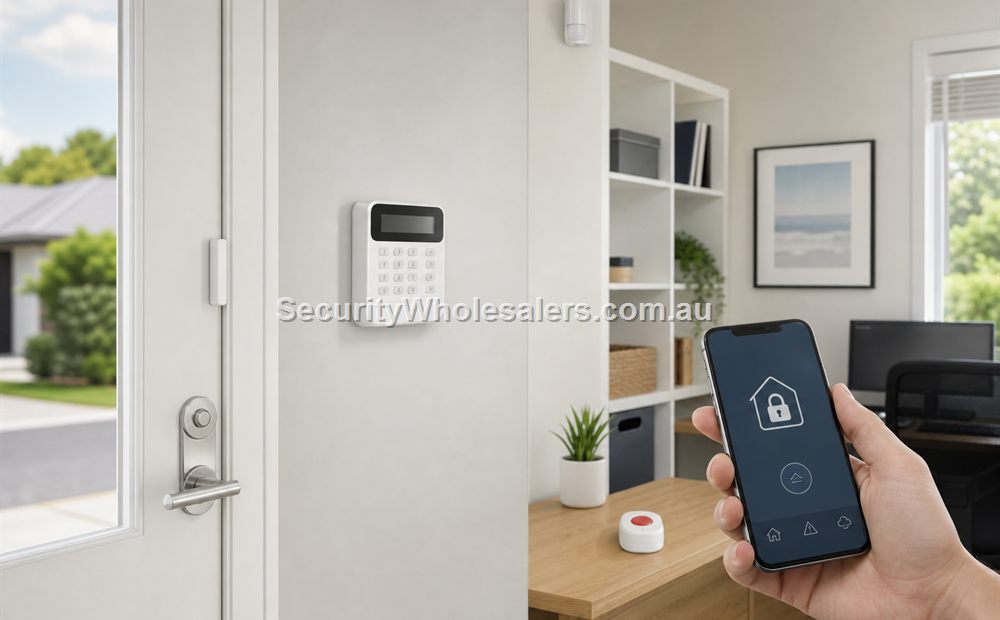
Dahua AirShield
Where AirShield usually fits
AirShield usually fits homes, smaller shops, clinics, offices, and other sites where the owner wants a wireless alarm path without stepping into a heavy traditional panel discussion. It is especially relevant when the same buyer is already looking at Dahua CCTV and likes the idea of staying in one brand conversation.
Current AirShield reference points
| Reference point | Usually strongest for | Why it is useful |
|---|---|---|
| Dahua AirShield wireless alarm kit | Homes and small businesses wanting a complete wireless starting point | Shows the basic AirShield system direction |
| Dahua AirShield wireless PIR | General internal detection | Standard motion reference in the AirShield branch |
| Dahua AirShield wireless door detector | Doors and windows where perimeter awareness matters | Useful contact reference point for smaller alarm jobs |
Typical AirShield detector mix
| AirShield device | What it is usually doing | Typical location |
|---|---|---|
| Wireless door contact | Detects the opening event at the perimeter | Front door, rear door, side service door, detached-office door |
| Wireless PIR | Catches movement once someone is inside | Hallway, consulting-room corridor, office route, stock-room path |
| Siren and alert path | Creates the local response and pushes the owner into the app workflow | Internal wall or roof area, suitable external location if used |
| Phone notifications | Delivers intrusion, fault, or arm-disarm status to the owner or manager | Owner phone, manager phone, backup contact |
| CCTV crossover | Helps confirm the event if the site already uses Dahua cameras | Front entry, rear service door, lane or side path |
Where AirShield usually makes sense
AirShield usually makes sense on straightforward wireless jobs where the owner wants a clean retrofit, simple internal detection, and app-backed alerts without moving into a larger traditional panel discussion. That is often the case on homes, clinics, small offices, or detached workspaces.
It can also make sense where the same buyer is already choosing Dahua cameras and wants the alarm to sit comfortably in the same general ecosystem. That should not be the only reason to choose it, but it is often part of the decision.
Typical AirShield installation sequence
On a normal AirShield job, the installer usually mounts the panel or hub in a sensible protected location, then places the door contacts and PIRs around the real entry points and travel paths rather than simply following room names. Wireless convenience reduces the cabling, but the detector positioning still needs to be deliberate.
After that, the system still needs app setup, user setup, alert testing, siren testing, and battery planning. Wireless does not remove commissioning. It mainly changes the labour profile during installation.
Worked examples
A beauty clinic already buying Dahua CCTV
Situation: A beauty clinic is already buying Dahua cameras for reception and the rear staff entry. The owner wants a simple after-hours intrusion layer but does not need a heavy commercial panel.
Solution used: A Dahua AirShield path with a contact on the front door, another on the rear staff door, a PIR on the route from reception into the treatment rooms, app-backed alerts to the owner, and camera views aligned to the same entry points.
Why this was chosen: The brief is practical and ecosystem continuity matters to the owner. AirShield makes sense because the detector count is modest, the site wants low-disruption wireless, and the cameras already give the owner a verification layer.
Installation notes: This works best when the alert recipients, app setup, and matching camera views are tested together instead of being commissioned separately.
A small detached home office
Situation: A detached home office stores computers and client files, but the owner has no appetite for alarm rewiring. The building needs door protection, internal PIR coverage, and clear phone alerts.
Solution used: A smaller AirShield layout with a contact on the office entry, a PIR on the internal travel path, a siren or audible local response, and app-backed alerts to the owner.
Why this was chosen: The real problem is simplicity, not panel complexity. The building is small, the risk points are clear, and a lighter wireless-first alarm is more proportionate than a structured wired system.
Installation notes: The main checks are communications reliability, siren position, and making sure the PIR is watching the entry route rather than the whole room indiscriminately.
What to compare before choosing AirShield
The main comparison points are whether the site is simple enough for a wireless-first design, how many meaningful entries need to be protected, and whether the owner wants the app workflow more than a larger structured panel. If the building is already drifting into several openings, several user groups, or heavier long-term growth, compare AirShield against a more structured alarm path early.
If the job is genuinely simple and the owner values low disruption, AirShield can be a neat fit.
What to be careful with
- Do not assume AirShield should be chosen only because the site uses Dahua CCTV.
- Check whether the site is simple enough for a wireless-first design or is already drifting into a more structured alarm job.
- As with every wireless alarm, maintenance and device testing still matter.
- Do not buy a wireless kit first and only later decide which doors and routes actually matter.
Relevant SecurityWholesalers Categories and Products
These Dahua AirShield products show the main panel, detector, and sensor direction buyers usually compare.
- Dahua AirShield alarms - Main Dahua alarm category.
- Dahua AirShield wireless alarm kit - Useful packaged AirShield starting point.
- Dahua AirShield wireless PIR - Standard motion detector reference.
- Dahua AirShield wireless door detector - Door-contact reference point.
Sources and Further Reading
Frequently Asked Questions
-
What kind of site suits Dahua AirShield best?
AirShield usually suits homes and smaller businesses wanting a wireless-first alarm path.
-
Is AirShield mainly a wireless alarm system?
Yes. The main attraction is usually the wireless system path rather than a heavily structured wired panel design.
-
What sensors are commonly used on an AirShield system?
Most AirShield jobs use door contacts on the key entries, one or more internal PIRs on the main travel path, and app-backed notifications to the owner or manager.
-
Can AirShield sit alongside Dahua CCTV?
Yes, and that is often one of the reasons buyers consider it.
-
When should a buyer look beyond AirShield?
That usually happens when the site needs a bigger or more structured alarm architecture than a simple wireless-first branch is designed to provide.
-
Does AirShield still need regular maintenance?
Yes. Wireless alarm systems still need battery checks, detector testing, and a fault-response routine.
Related Pages
Alarm with CCTV Integration
Use this page when the site needs both alarm detection and visual verification.
Wireless vs Wired Alarm Systems
Choose between wireless and wired alarm design based on the building, not just the brochure.
Alarm for Homes
Use this page to match the alarm design to the way people actually live in the home.
Quote checklist for Dahua AirShield Buying Guide
Before ordering, ask for a short answer to these questions. They make the quote easier to compare and reduce the chance of buying hardware that does not match the site.
- What exact problem is being solved: alarm planning, deterrence, evidence, access control, safety, compliance or convenience?
- What happens during poor light, bad weather, busy periods, after-hours events or staff changes?
- Who will administer users, review events, export evidence and test the system?
- Which part of the design is allowed to be basic, and which part must be strong because it proves the incident?
If those answers are vague, the buyer should pause before purchasing. Good security equipment becomes much more useful when the operating plan is written down before installation.
Final field note for Dahua AirShield Buying Guide
For Dahua AirShield Buying Guide, the final buying decision should be easy to explain to the person who will live with the system. The quote should identify the must-have outcome, the acceptable compromises, and the support path if users, doors, cameras, sensors or site conditions change later.
This is the difference between a list of products and a security design. The products matter, but the design is what makes them useful.
Final field note for Dahua AirShield Buying Guide
For Dahua AirShield Buying Guide, the final buying decision should be easy to explain to the person who will live with the system. The quote should identify the must-have outcome, the acceptable compromises, and the support path if users, doors, cameras, sensors or site conditions change later.
This is the difference between a list of products and a security design. The products matter, but the design is what makes them useful.
Final field note for Dahua AirShield Buying Guide
For Dahua AirShield Buying Guide, the final buying decision should be easy to explain to the person who will live with the system. The quote should identify the must-have outcome, the acceptable compromises, and the support path if users, doors, cameras, sensors or site conditions change later.
This is the difference between a list of products and a security design. The products matter, but the design is what makes them useful.
Final field note for Dahua AirShield Buying Guide
For Dahua AirShield Buying Guide, the final buying decision should be easy to explain to the person who will live with the system. The quote should identify the must-have outcome, the acceptable compromises, and the support path if users, doors, cameras, sensors or site conditions change later.
This is the difference between a list of products and a security design. The products matter, but the design is what makes them useful.
Real quote scenario for Dahua AirShield Buying Guide
When quoting Dahua AirShield Buying Guide, the useful starting point is site-specific security planning. The buyer should be able to confirm the users, doors, cameras, sensors, cabling, power, admin workflow and support expectations. Without those details, two quotes can look similar while solving very different problems.
For example, the right quote should be easy for the buyer to explain back in plain English. This is why a strong SecurityWholesalers guide should talk about the site, the workflow and the equipment together rather than treating the product category as a simple shopping list.
Budget-conscious path
Use the simplest reliable hardware that solves the main risk. Keep administration simple and avoid specialist features unless they change the outcome.
Balanced path
Add better management, verification or expansion headroom where the site is likely to grow. This is usually the best path for small businesses and shared buildings.
Higher-risk path
Document response, audit trail, permissions and fallback procedures. Higher-risk sites need clearer operating rules, not just stronger hardware.
The final Dahua AirShield Buying Guide quote should make the weak points visible. If cabling, power, monitoring, mobile app access, fire release, user management or future expansion are assumed rather than written down, the buyer is carrying risk that should have been solved during design.