

















Commercial
Ruijie Network Switches Buying Guide
Ruijie networking
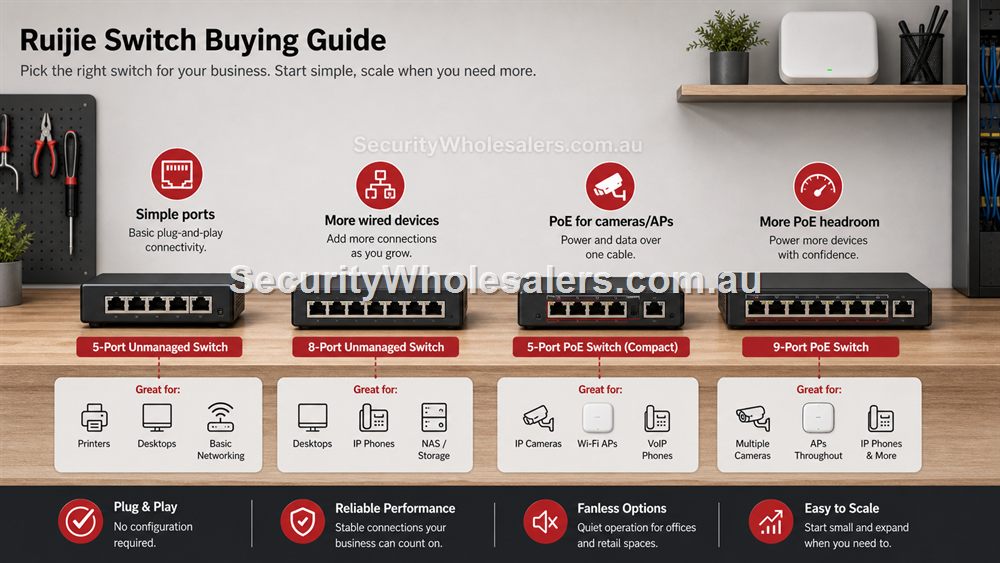
Switching terms that affect the quote
Unmanaged means plug-and-play switching with no configuration. Smart managed means the switch can offer more visibility and control, which is useful when the site needs supportability. Uplink is the connection back to the router, NVR or core network. PoE budget is the total power available for powered devices.
A good switch quote names the ports that matter: router uplink, NVR path, cameras, APs, desk devices and spare capacity. That is much more useful than saying only "8-port switch".
Unmanaged Versus Smart Cloud Managed
An unmanaged switch is right when the job is simply more wired ports. It does not need an app, a cloud dashboard or configuration. That makes it useful behind a TV, at a counter, under a desk, in a home office or in a small comms cabinet where devices only need ordinary gigabit Ethernet. The RG-ES05G-L and RG-ES08G-L are examples of this path.
A smart cloud managed PoE switch is different. It is still a switch, but it also powers devices and can provide more useful visibility. If the connected devices are cameras, ceiling access points, intercoms or other PoE equipment, the switch becomes part of the reliability story. The buyer should check PoE budget, port count, uplink position, future spare ports and whether remote status will save time later.
Sizing A Switch Properly
Do not size a switch by today's device count only. A four-camera job can become six cameras. A single access point can become two. A small office may add a printer, workstation, EFTPOS device or NVR. A good rule is to buy enough ports for the current design plus realistic expansion, while keeping the cabinet tidy enough that support does not become painful.
PoE switches also need power headroom. A switch with enough PoE ports can still be wrong if the total wattage is too low. Camera models, access point models and cable length all affect the design. When in doubt, list every powered device, estimate total watts, then leave room for startup draw and future additions.
Where Switches Usually Go Wrong
The most common switch mistake is buying the cheapest device with the correct number of ports and discovering later that the site needed PoE, cloud visibility, better labelling or more spare capacity. The second mistake is scattering small switches around the building without documenting them. That may work on day one, but it makes support harder when a camera drops out or a room loses internet.
A better design keeps the switch layout understandable. Put the main switch where the NVR, router and core cabling can be serviced. Use small switches only where they make the network simpler, such as a desk group or entertainment cabinet. Label uplinks and PoE devices. Keep spare ports visible rather than hidden behind furniture.
Ruijie switch comparison: which switch should you choose?
| Model/path | Choose it for | Do not choose it for |
|---|---|---|
| RG-ES05G-L | One desk, TV area, counter or small wired expansion point. | Cameras, APs or anything needing PoE. |
| RG-ES08G-L | A small office or room needing more ordinary gigabit ports. | A CCTV or ceiling AP install unless PoE is supplied elsewhere. |
| RG-ES205GC-P | A compact PoE job with a few cameras or an AP. | A growing site that may quickly exceed four PoE ports. |
| RG-ES209GC-P | Small-business CCTV, APs, intercoms or an 8-port PoE cabinet. | A large site needing a bigger switch architecture. |
| RG-POE-AT30 | One extra PoE device on an otherwise suitable network. | Multiple powered devices. Use a PoE switch instead. |
Cabinet Layout And Cable Discipline
Switch buying becomes easier when the physical cabinet is considered early. A switch that looks correct on paper can become awkward if the cabinet has no shelf, no ventilation, no power, no patch panel and no spare space. For small sites, a tidy shelf and labelled leads may be enough. For businesses, a simple wall cabinet or rack can save hours of future support time.
Group devices logically. Router uplink, NVR, cameras, access points, office devices and spare ports should be easy to identify. Avoid using very short patch leads that pull tight or long coils that hide labels. Leave the switch visible enough that link lights and PoE status can be checked. These physical details matter because many network faults are solved by seeing what is connected where.
When To Split Switching Across A Site
One central switch is often cleanest, but it is not always practical. A long building, warehouse, detached office or counter area may justify a second switch. The test is whether the extra switch simplifies cabling and support. A small unmanaged switch at a desk is sensible if it keeps several nearby devices off Wi-Fi. A remote PoE switch can make sense if several cameras are grouped at one end of a site.
Do not split switching just because it is convenient on the day. Every extra switch becomes another possible fault point. If a second switch is used, label the uplink, document its location and make sure it has reliable power. For PoE, confirm the local power and ventilation are suitable, especially in hot roof spaces, sheds and outdoor cabinets.
What to confirm before buying
Before ordering for this page, collect the details that will actually change the product choice. For Ruijie Network Switches Buying Guide, the useful pre-purchase notes are:
- current port count and likely future port count
- whether any connected device needs PoE
- where the switch will physically sit
- whether the switch needs cloud visibility
- uplink path back to the router or NVR
- ventilation, power and cabinet space
What not to overbuy or underbuy
Do not choose a switch only because the port count looks right. A non-PoE switch is wrong for powered cameras or ceiling APs, and a PoE switch with no power headroom can become limiting very quickly.
Maintenance and future expansion
A switch should be easy to inspect. Keep it accessible, label uplinks and PoE ports, and record any small secondary switches around the site. Unlabelled switching is one of the fastest ways to make a simple network feel complicated.
Expert buyer notes
Switches are often treated as commodity parts, but they define the support experience of the whole network. A good Ruijie switch design should leave a future technician able to trace the router uplink, the NVR path, the camera ports, the AP ports and the spare capacity within minutes.
For small sites, that might simply mean choosing the right unmanaged switch and labelling it. For CCTV and AP jobs, it usually means choosing PoE switching with enough power headroom and a known location.
Worked example: replacing a messy switch stack
A common upgrade starts with three small switches scattered around a shop: one near the router, one under the counter and one beside the NVR. It works until a camera drops out or the EFTPOS terminal loses connection. The better approach is to identify which devices are fixed, which need PoE and which can be grouped. The main cabinet may get a smart PoE switch for cameras and APs, while a small unmanaged switch remains under the counter only for nearby wired devices.
The key improvement is visibility. The shop owner does not need enterprise networking, but they do need to know which switch powers the cameras and which switch serves the counter. That is where a Ruijie switch decision becomes more than price and port count.
How to turn this into an order
For Ruijie Network Switches Buying Guide, the most useful order brief is short but specific. Start with the site type, then list the devices that must connect, the devices that need PoE, the spaces that need Wi-Fi, and any distance problem such as a gate, shed, yard or second tenancy. From there, match the requirement to products such as RG-ES05G-L 5-Port Gigabit Unmanaged Switch, RG-ES08G-L 8-Port Gigabit Unmanaged Switch, RG-ES205GC-P 5-Port Smart Cloud Managed PoE+ Switch. This keeps the purchase tied to the job rather than to a model number chosen in isolation.
Use the scenarios on this page as a sanity check. If the job looks closest to Home office desk, keep the design compact and avoid unnecessary complexity. If it looks closer to Small shop CCTV, pay more attention to expansion, labels and support. If it resembles Clinic or office, check the parts that usually cause trouble: cabling, PoE power, AP placement, bridge line of sight, internet reliability and who will manage the network later.
For a ruijie network switch order through SecurityWholesalers, include the facts that change the recommendation: camera count, AP count, switch location, router role, bridge distance, outdoor exposure, power availability and whether the site is a home, office, shop, warehouse, farm, venue or regional property. Good information before ordering prevents returns, avoids undersized hardware and makes the final installation feel deliberate.
After the Ruijie Network Switches Buying Guide hardware arrives, keep the same brief beside the installation notes. The person installing the equipment should be able to see why each Ruijie product was chosen, where it belongs, what it powers or connects, and what spare capacity has been allowed. That continuity is what turns a buying guide into a better finished network.
Recommended SecurityWholesalers product paths
RG-ES05G-L 5-Port Gigabit Unmanaged Switch
Silent, simple wired expansion for homes, desks, counters and small cabinets.
Choose this if: Choose this for a desk, counter, TV cabinet or small home office where the only problem is not enough Ethernet ports.
Best for: A desk, TV cabinet, counter, small home office or simple wired expansion point.
Why it is useful: It is quiet, simple and inexpensive, which is exactly what a basic non-PoE port expansion should be.
Watch out: It does not power cameras or APs. If PoE is needed, choose a PoE switch instead.
RG-ES08G-L 8-Port Gigabit Unmanaged Switch
A practical unmanaged switch when a room or small office needs several extra wired ports.
Choose this if: Choose this when a small room, office or cabinet needs several wired ports and there is no PoE requirement.
Best for: Small offices, home cabinets and rooms that need several extra gigabit ports.
Why it is useful: It gives more breathing room than a 5-port switch while staying simple and fanless.
Watch out: Avoid it for camera/AP power jobs unless a separate PoE plan already exists.
RG-ES205GC-P 5-Port Smart Cloud Managed PoE+ Switch
Compact PoE switching for a small camera group, an access point or a tidy front-office network.
Choose this if: Choose this if the job is genuinely compact: a few cameras, one access point, a small reception area or a local PoE point with limited growth.
Best for: Small CCTV groups, one or two access points, compact retail or office PoE jobs.
Why it is useful: It gives a buyer PoE power and smart-switch visibility without jumping straight to a larger cabinet design.
Watch out: Keep it for genuinely small jobs. If the site may reach five to eight powered devices, step up early.
RG-ES209GC-P 9-Port Smart Cloud Managed PoE+ Switch
A sensible step up when the site needs more PoE ports and more power headroom.
Choose this if: Choose this if the site has five to eight PoE devices, cameras plus an AP, or a small business cabinet where spare ports and power headroom matter.
Best for: Small-business CCTV, 6-8 camera systems, AP plus camera networks, and cleaner comms cabinets.
Why it is useful: The extra ports and larger PoE budget make it a stronger default for real jobs than a switch filled to capacity on day one.
Watch out: Still check total PoE wattage. Port count alone does not guarantee enough power for every device.
RG-POE-AT30 Gigabit PoE Injector
Useful when one camera or access point needs PoE without replacing the existing switch.
Choose this if: Choose this only when one device needs PoE and the rest of the network is already correct.
Best for: Adding one PoE camera, AP or intercom to an otherwise working network.
Why it is useful: It solves a single-device power problem without replacing a switch that does not otherwise need changing.
Watch out: Do not use injectors everywhere as a substitute for a planned PoE switch. Many injectors quickly become messy.
Real-world quote scenarios
| Scenario | Practical design | Why it works |
|---|---|---|
| Home office desk | RG-ES05G-L for a PC, dock, printer and spare port. | Silent, simple, no overcomplication. |
| Small shop CCTV | RG-ES209GC-P for cameras and possibly one access point. | PoE and visibility are worth more than a basic unmanaged switch. |
| Clinic or office | Core switch in the cabinet, smaller unmanaged switch only where a desk group needs local ports. | Keeps the network easier to trace. |
Decision table
| Switch type | Best for | Avoid when |
|---|---|---|
| 5-port unmanaged | Small port expansion at a desk, counter or home setup | The devices need PoE or remote status. |
| 8-port unmanaged | More wired ports without configuration | The network needs VLANs, PoE visibility or camera power. |
| 5-port smart PoE | Small CCTV, one AP plus cameras, compact PoE jobs | The site is likely to grow beyond the port/power budget. |
| 9-port smart PoE | Eight PoE devices or a neater small-business/CCTV cabinet | The site needs a much larger camera/AP count. |
Final buyer checklist
- Write down the router, switch, access point, bridge and PoE roles before ordering.
- Count current devices and allow realistic spare ports and PoE headroom.
- Confirm cable routes, mounting positions, power and internet service details.
- Label the installed network so future support is not guesswork.
- Keep ownership of cloud/app accounts clear at handover.
Ruijie Network Switches Buying Guide FAQs
- Do I need a managed Ruijie switch?
Not always. Use unmanaged for simple wired expansion. Choose smart managed or PoE when visibility, powered devices or supportability matters.
- Is port count enough to choose a switch?
No. Check PoE wattage, uplink needs, spare capacity, physical location and whether the switch should be visible in management tools.
- Can I use a Ruijie switch with non-Ruijie cameras or access points?
Usually yes when standards and power requirements match, but always confirm PoE requirements and network design.
- What is the difference between unmanaged and smart managed?
Unmanaged is plug-and-play. Smart managed gives more visibility and control, which helps when PoE devices, support and troubleshooting matter.
- How many spare switch ports should I allow?
For homes and small businesses, leave at least one or two spare ports where practical. For CCTV and AP jobs, allow for likely expansion.
- Do I need gigabit switching?
For modern CCTV, APs and business networks, gigabit switching is the practical baseline.