

















Commercial
Ruijie for Small Business
Ruijie networking
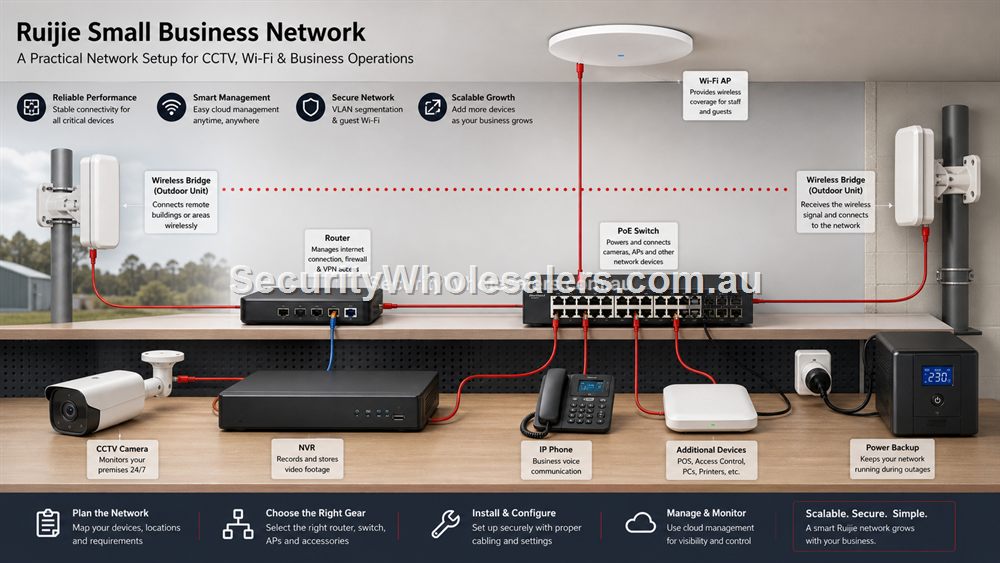
What Small Businesses Usually Need
Most small businesses do not need a complicated enterprise network. They need reliable internet, enough wired ports, good Wi-Fi where staff and customers actually use it, PoE for cameras or access points, and a support path that does not depend on remembering what was plugged in two years ago.
A retail shop may need EFTPOS, POS terminals, staff Wi-Fi, guest Wi-Fi and cameras. A clinic may need stable reception devices, consulting room coverage and privacy-conscious guest Wi-Fi. A cafe may need customer Wi-Fi, POS reliability and outdoor coverage. A warehouse may need cameras, an office AP and a bridge to a yard or outbuilding. Ruijie can cover these jobs when the network is planned as a complete system.
Keep Business Networks Understandable
The most useful small-business network is one that can be supported. That means labelled ports, documented router access, known cloud ownership, sensible switch location and a rough diagram. It also means avoiding a chain of mystery switches hidden under desks. Every extra box should have a reason.
For a business owner, supportability is not a luxury. When EFTPOS stops, cameras drop out or staff Wi-Fi fails, the question is how quickly the problem can be isolated. A smart PoE switch can help when it powers cameras or APs. A well-placed AP can reduce complaints. A bridge can solve a difficult yard link, but only if it is documented and installed properly.
Multi-Site And Repeatable Fit-Outs
For businesses with several stores or offices, consistency is valuable. A repeatable Ruijie design might use the same router path, switch size, AP placement logic and handover template at each site. That makes ordering easier and support more predictable.
Do not copy a design blindly. A narrow shop, a two-level office and a warehouse office all need different AP positions and possibly different switch sizes. The repeatable part should be the method: list devices, map coverage, size PoE, document handover and leave room for growth.
Small-business bundle selector
| Business situation | Recommended Ruijie bundle path | Why it works |
|---|---|---|
| Small retail shop | RG-EW3000GX, RG-ES209GC-P, one RG-RAP2266 if ceiling Wi-Fi is needed | Covers routing, PoE, cameras and staff/customer Wi-Fi without becoming complex. |
| Cafe with courtyard | Router, RG-ES209GC-P, indoor AP plus RG-RAP6262-G outdoor AP | Separates indoor reliability from outdoor guest coverage. |
| Warehouse office | PoE switch, office AP, bridge or outdoor AP if the yard needs network coverage | Matches office devices, CCTV and wider industrial space. |
| Multi-site small business | Repeat the router/switch/AP pattern where site layouts allow | Improves support and reordering while still allowing local differences. |
Separating Business-Critical Devices
Small businesses often mix everything on one network because it is easy at the start. Over time, that can become messy. EFTPOS, POS terminals, office computers, printers, cameras, guest Wi-Fi and staff phones all have different importance. The network does not always need complex segmentation, but it does need a plan for which devices matter most and how they are supported.
At minimum, know which switch ports feed business-critical equipment and which Wi-Fi network staff should use. If guest Wi-Fi is offered, treat it as a separate service with sensible limits. If cameras are part of the network, keep the NVR and PoE path documented. A small business network should be simple, but not vague.
A Practical Upgrade Path For Growing Businesses
A first Ruijie upgrade might be modest: replace a weak router, add a PoE switch, install one proper ceiling AP and label the cabinet. The next stage might add another AP, cameras, a bridge to a warehouse section or outdoor Wi-Fi. The important thing is that stage one does not block stage two.
Leave spare ports, avoid using every watt of PoE budget, keep AP placement logical and record cloud ownership. If the business opens another site, the same method can be repeated: map devices, choose switch size, place APs properly, document the result and keep the product path consistent where it makes sense.
What to confirm before buying
Before ordering for this page, collect the details that will actually change the product choice. For Ruijie for Small Business, the useful pre-purchase notes are:
- business-critical devices such as EFTPOS and POS
- staff and guest Wi-Fi requirements
- camera and intercom plans
- switch location and spare ports
- whether outdoor or warehouse coverage is needed
- who can approve network changes later
What not to overbuy or underbuy
Do not let a small-business network become a pile of emergency fixes. One router, then one extender, then a mystery switch, then cameras added later is how simple sites become hard to support.
Maintenance and future expansion
Keep a one-page business network note with device names, cabinet location, Wi-Fi names and support contacts. Staff turnover is normal, so the network should not depend on one person remembering everything.
Expert buyer notes
Small businesses usually value stability more than exotic features. The network should keep POS, EFTPOS, staff devices, cameras and guest Wi-Fi running without the owner needing to become a network engineer. That is where a clean Ruijie design can be very strong.
The right design should also be easy to explain to staff or a future technician. If nobody can describe what each device does, the network is already too vague.
Worked example: cafe with indoor and outdoor users
A cafe may have staff devices, POS, guest Wi-Fi, cameras and an outdoor seating area. One router behind the counter is unlikely to serve all of that well. A practical Ruijie design would use a router for the internet edge, PoE switching for cameras and APs, one indoor AP for the main area and an outdoor AP if the courtyard needs reliable coverage.
The business owner benefits because the network matches how the venue operates. Staff and POS need reliability, guests need controlled access, cameras need stable PoE and outdoor users need an AP designed for the environment. That is more useful than a generic small-business Wi-Fi upgrade.
How to turn this into an order
For Ruijie for Small Business, the most useful order brief is short but specific. Start with the site type, then list the devices that must connect, the devices that need PoE, the spaces that need Wi-Fi, and any distance problem such as a gate, shed, yard or second tenancy. From there, match the requirement to products such as RG-EW3000GX AX3000 Wi-Fi 6 Gigabit Router, RG-ES209GC-P 9-Port Smart Cloud Managed PoE+ Switch, RG-RAP2266 AX3000 Wi-Fi 6 Ceiling Access Point. This keeps the purchase tied to the job rather than to a model number chosen in isolation.
Use the scenarios on this page as a sanity check. If the job looks closest to Single retail shop, keep the design compact and avoid unnecessary complexity. If it looks closer to Two-store cafe group, pay more attention to expansion, labels and support. If it resembles Small warehouse, check the parts that usually cause trouble: cabling, PoE power, AP placement, bridge line of sight, internet reliability and who will manage the network later.
For a ruijie small business order through SecurityWholesalers, include the facts that change the recommendation: camera count, AP count, switch location, router role, bridge distance, outdoor exposure, power availability and whether the site is a home, office, shop, warehouse, farm, venue or regional property. Good information before ordering prevents returns, avoids undersized hardware and makes the final installation feel deliberate.
After the Ruijie for Small Business hardware arrives, keep the same brief beside the installation notes. The person installing the equipment should be able to see why each Ruijie product was chosen, where it belongs, what it powers or connects, and what spare capacity has been allowed. That continuity is what turns a buying guide into a better finished network.
Recommended SecurityWholesalers product paths
RG-EW3000GX AX3000 Wi-Fi 6 Gigabit Router
A modern Wi-Fi 6 router for homes and small offices that need stronger routing and wireless performance.
Choose this if: Choose this when the existing router is the weak point and the site needs a more modern Wi-Fi 6 router path.
Best for: Modern homes and small offices where the router itself needs stronger Wi-Fi and gigabit routing.
Why it is useful: It is the sensible upgrade path when the existing router is weak, old or poorly matched to current devices.
Watch out: For large buildings, pair it with wired APs rather than expecting one router to cover everything.
RG-ES209GC-P 9-Port Smart Cloud Managed PoE+ Switch
A sensible step up when the site needs more PoE ports and more power headroom.
Choose this if: Choose this if the site has five to eight PoE devices, cameras plus an AP, or a small business cabinet where spare ports and power headroom matter.
Best for: Small-business CCTV, 6-8 camera systems, AP plus camera networks, and cleaner comms cabinets.
Why it is useful: The extra ports and larger PoE budget make it a stronger default for real jobs than a switch filled to capacity on day one.
Watch out: Still check total PoE wattage. Port count alone does not guarantee enough power for every device.
RG-RAP2266 AX3000 Wi-Fi 6 Ceiling Access Point
A strong indoor Wi-Fi 6 AP for offices, homes, clinics, retail and hospitality spaces.
Choose this if: Choose this for most office, clinic, retail and home Wi-Fi upgrades where reliable Wi-Fi 6 coverage is the goal.
Best for: Most offices, clinics, homes, retail spaces and hospitality interiors today.
Why it is useful: Wi-Fi 6 remains the practical sweet spot for many sites: strong performance, mature client support and good value.
Watch out: Coverage still depends on AP placement and wired backhaul, not only the AP generation.
RG-RAP6262-G AX1800 Outdoor Wi-Fi 6 Access Point
Outdoor Wi-Fi for yards, courtyards, loading zones, schools, venues and exposed areas.
Choose this if: Choose this when the coverage problem is outside: courtyards, yards, loading areas, schools, venues or exposed staff zones.
Best for: Courtyards, yards, loading areas, schools, venues and outdoor staff/customer Wi-Fi.
Why it is useful: Outdoor APs are designed for exposure and can place coverage where an indoor AP cannot reasonably reach.
Watch out: Weather rating does not remove the need for safe mounting, PoE, cable protection and coverage testing.
RG-ES08G-L 8-Port Gigabit Unmanaged Switch
A practical unmanaged switch when a room or small office needs several extra wired ports.
Choose this if: Choose this when a small room, office or cabinet needs several wired ports and there is no PoE requirement.
Best for: Small offices, home cabinets and rooms that need several extra gigabit ports.
Why it is useful: It gives more breathing room than a 5-port switch while staying simple and fanless.
Watch out: Avoid it for camera/AP power jobs unless a separate PoE plan already exists.
RG-EST350V2 5GHz Wireless Bridge Kit
Longer-range point-to-point wireless bridging where line of sight is available.
Choose this if: Choose this for longer outdoor point-to-point links with clear line of sight and a serious need to avoid trenching.
Best for: Longer building-to-building links, farms, industrial yards and remote camera paths with clear line of sight.
Why it is useful: It can avoid trenching where distance and site layout make cable impractical.
Watch out: Line of sight, mounting height and far-end power matter more than the headline range.
Real-world quote scenarios
| Scenario | Practical design | Why it works |
|---|---|---|
| Single retail shop | 9-port PoE switch, ceiling AP, CCTV/NVR path. | Tidy, expandable and easy to troubleshoot. |
| Two-store cafe group | Repeatable router, AP and switch pattern at both sites. | Simplifies support and reordering. |
| Small warehouse | Office AP, PoE cameras, possible outdoor AP or bridge. | Matches indoor business use with security needs. |
Decision table
| Business type | Likely Ruijie design | Priority |
|---|---|---|
| Retail store | Router, PoE switch, cameras, indoor AP | POS and CCTV reliability. |
| Cafe or venue | Router, PoE switch, indoor/outdoor APs | Customer Wi-Fi and outdoor coverage. |
| Clinic | Router, switch, ceiling APs | Stable rooms and reception coverage. |
| Warehouse office | PoE switch, AP, cameras, possible bridge | Coverage plus yard/security network. |
Final buyer checklist
- Write down the router, switch, access point, bridge and PoE roles before ordering.
- Count current devices and allow realistic spare ports and PoE headroom.
- Confirm cable routes, mounting positions, power and internet service details.
- Label the installed network so future support is not guesswork.
- Keep ownership of cloud/app accounts clear at handover.
Ruijie for Small Business FAQs
- Is Ruijie suitable for small business?
Yes, especially where the buyer wants practical switching, PoE, access points, routers and bridges without overcomplicating the site.
- Should customer Wi-Fi be separate from staff devices?
For many businesses, yes. Guest Wi-Fi should be planned so visitors are not mixed casually with business devices.
- What should be documented after installation?
Router access, switch ports, AP locations, bridge locations, passwords, cloud ownership and any important network settings.
- Should a cafe use indoor and outdoor APs?
If the courtyard or outdoor seating matters, yes. An outdoor AP is usually better than trying to push indoor Wi-Fi through walls.
- What should small businesses document?
Router details, switch ports, AP locations, bridge links, cloud ownership and support contacts.
- Can Ruijie support guest Wi-Fi?
Yes, but guest Wi-Fi should be planned so visitors are separated from important business devices where appropriate.