

















Commercial
Ruijie Australia Location Guide
Ruijie networking
What Changes By Location
The Ruijie range is the same whether the buyer is in Perth, Sydney, Melbourne, Brisbane, Adelaide or a regional area. What changes is the site. Perth industrial properties may have larger yards, long wireless links and strong sun exposure. Sydney offices and strata sites may have denser buildings and more complicated ceiling access. Melbourne retail stores may care about repeatable rollouts across several sites. Brisbane and Gold Coast hospitality venues often need stronger outdoor Wi-Fi around courtyards or public areas. Regional properties may put more weight on 4G, value, stock availability and simple handover.
Good location advice should help the buyer think through those conditions. It should not be a thin city page with the same claim repeated. A real Ruijie recommendation asks what the site needs: switching, PoE, APs, wireless bridges, routers, 4G backup, CCTV support or all of the above.
Capital City Examples
For Ruijie in Sydney, many buyers are dealing with offices, strata properties, small business premises and dense buildings where AP placement matters. For Ruijie in Melbourne, multi-site retail and small business networks often benefit from repeatable router, switch and AP patterns. For Ruijie in Brisbane or the Gold Coast, outdoor Wi-Fi and humidity-aware installation can matter for hospitality and public-facing spaces.
For Ruijie in Perth, warehouse, industrial and larger-block designs often put wireless bridges and outdoor APs into the conversation. For Ruijie in Adelaide, many jobs are value-conscious office, home, regional or light industrial networks where simple deployment and stock availability matter. In each case, the buying process should still start with device count, PoE, coverage, distance and support.
Regional And Rural Australia
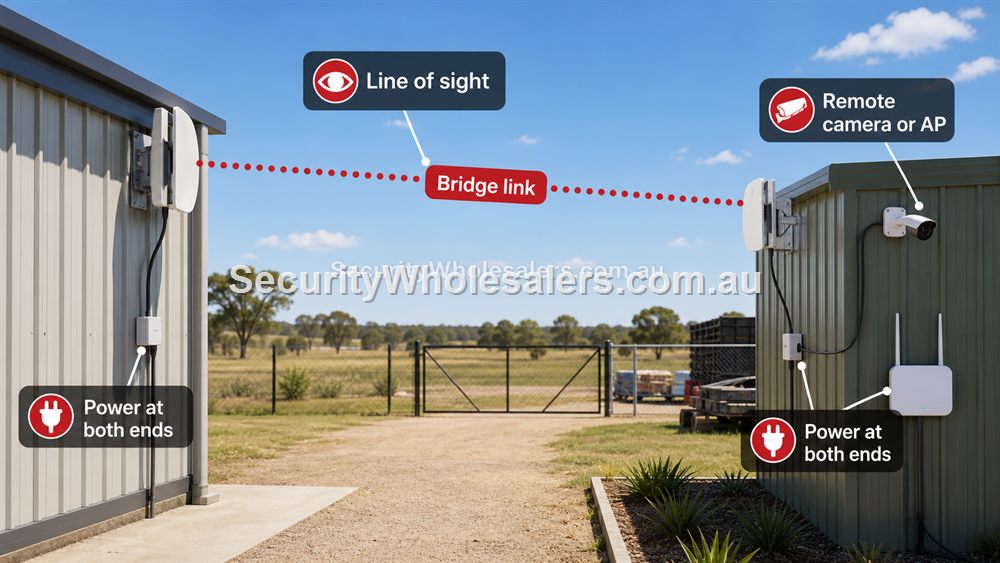
Regional buyers may need a different network shape from a city office. A farm, workshop, remote gate, machinery shed or temporary site may use a 4G router, wireless bridge, PoE switch and CCTV camera together. The limiting factors are often signal, line of sight, power and distance rather than the product brand.
For rural and regional orders, document the site carefully before buying. Measure bridge distance, check mobile coverage, confirm where power exists, decide where cameras or APs will mount, and plan how the network will be supported if a device needs replacement.
Ruijie Australia: city and regional buying patterns
| Location | Common buyer need | Useful Ruijie path |
|---|---|---|
| Sydney | Dense office, strata and retail Wi-Fi. | Ceiling APs, tidy switching and careful cabinet planning. |
| Melbourne | Repeatable retail and small-business fit-outs. | Router, PoE switch and AP pattern that can be reused. |
| Brisbane / Gold Coast | Hospitality, outdoor seating and humid exposed areas. | Outdoor APs, PoE and cable protection. |
| Perth | Industrial yards, warehouses and longer blocks. | Wireless bridges, outdoor APs and PoE camera paths. |
| Adelaide | Value-focused office, home and light industrial installs. | Simple router/switch/AP designs with clear handover. |
| Regional Australia | 4G, sheds, farms, gates and long distances. | 4G router, wireless bridge and PoE at remote end. |
How To Use City-Based Searches Properly
A buyer searching for Ruijie Perth, Ruijie Sydney or Ruijie Brisbane is usually not asking for a different product. They are asking whether the product can be supplied and whether the design will suit their local conditions. That is a fair question. The useful answer is to connect common local site types to practical network choices.
For example, the Perth buyer may be quoting a warehouse with a broad yard. The Sydney buyer may be improving office Wi-Fi in a dense tenancy. The Melbourne buyer may be rolling out several retail stores. The Brisbane buyer may have an outdoor hospitality area. The regional buyer may have a farm, workshop or shed where 4G and bridges matter. The city name is a clue, not the design.
Shipping, Stock And Support Expectations
Australia-wide buying still needs practical expectations. Confirm the product path before ordering, allow time for delivery, and make sure the installer or buyer has enough information to configure and hand over the network. A product arriving quickly is only useful if it is the right product.
For regional jobs, plan replacement access and spares more carefully. A spare injector, switch port or patch lead can save a long delay. For city jobs, the bottleneck may be ceiling access, after-hours installation or coordinating with other trades. The network design should fit the real project, not just the suburb or city.
What to confirm before buying
Before ordering for this page, collect the details that will actually change the product choice. For Ruijie Australia Location Guide, the useful pre-purchase notes are:
- city or regional delivery expectations
- building type and cabling access
- outdoor exposure and heat
- internet service quality
- whether the site needs 4G or bridges
- who will install and support the equipment
What not to overbuy or underbuy
Do not choose products because a city name appears in the search. A Perth warehouse and a Perth apartment need very different designs. Location matters because sites differ, not because the product changes by suburb.
Maintenance and future expansion
For Australia-wide orders, the best support tool is a clear pre-order brief. Include photos, distances, AP locations and device counts where possible, especially for regional or outdoor projects.
Expert buyer notes
Location pages are only useful when they talk about real conditions. The same Ruijie product can be shipped Australia wide, but the design changes when the site is a Perth yard, Sydney strata office, Melbourne shopfront, Brisbane venue, Adelaide office or regional farm.
Buyers should use city context as a clue to site conditions: density, heat, outdoor exposure, distance, cabling and support availability.
Worked example: same brand, different Australian sites
A Ruijie order for a Perth warehouse might include a bridge and outdoor AP because the site has yard coverage and distance problems. A Ruijie order for a Sydney office might include ceiling APs and a tidy switch because the problem is dense indoor coverage. A regional property might prioritise 4G, a bridge and PoE at a remote camera location.
These are all legitimate Ruijie projects, but they should not be written as the same city page with the city name swapped. The buyer deserves advice tied to site conditions: cabling, distance, weather, internet quality, density and support path.
How to turn this into an order
For Ruijie Australia Location Guide, the most useful order brief is short but specific. Start with the site type, then list the devices that must connect, the devices that need PoE, the spaces that need Wi-Fi, and any distance problem such as a gate, shed, yard or second tenancy. From there, match the requirement to products such as RG-ES209GC-P 9-Port Smart Cloud Managed PoE+ Switch, RG-RAP6262-G AX1800 Outdoor Wi-Fi 6 Access Point, RG-EST350V2 5GHz Wireless Bridge Kit. This keeps the purchase tied to the job rather than to a model number chosen in isolation.
Use the scenarios on this page as a sanity check. If the job looks closest to Ruijie Perth warehouse, keep the design compact and avoid unnecessary complexity. If it looks closer to Ruijie Sydney office, pay more attention to expansion, labels and support. If it resembles Ruijie regional farm, check the parts that usually cause trouble: cabling, PoE power, AP placement, bridge line of sight, internet reliability and who will manage the network later.
For a ruijie australia order through SecurityWholesalers, include the facts that change the recommendation: camera count, AP count, switch location, router role, bridge distance, outdoor exposure, power availability and whether the site is a home, office, shop, warehouse, farm, venue or regional property. Good information before ordering prevents returns, avoids undersized hardware and makes the final installation feel deliberate.
After the Ruijie Australia Location Guide hardware arrives, keep the same brief beside the installation notes. The person installing the equipment should be able to see why each Ruijie product was chosen, where it belongs, what it powers or connects, and what spare capacity has been allowed. That continuity is what turns a buying guide into a better finished network.
Recommended SecurityWholesalers product paths
RG-ES209GC-P 9-Port Smart Cloud Managed PoE+ Switch
A sensible step up when the site needs more PoE ports and more power headroom.
Choose this if: Choose this if the site has five to eight PoE devices, cameras plus an AP, or a small business cabinet where spare ports and power headroom matter.
Best for: Small-business CCTV, 6-8 camera systems, AP plus camera networks, and cleaner comms cabinets.
Why it is useful: The extra ports and larger PoE budget make it a stronger default for real jobs than a switch filled to capacity on day one.
Watch out: Still check total PoE wattage. Port count alone does not guarantee enough power for every device.
RG-RAP6262-G AX1800 Outdoor Wi-Fi 6 Access Point
Outdoor Wi-Fi for yards, courtyards, loading zones, schools, venues and exposed areas.
Choose this if: Choose this when the coverage problem is outside: courtyards, yards, loading areas, schools, venues or exposed staff zones.
Best for: Courtyards, yards, loading areas, schools, venues and outdoor staff/customer Wi-Fi.
Why it is useful: Outdoor APs are designed for exposure and can place coverage where an indoor AP cannot reasonably reach.
Watch out: Weather rating does not remove the need for safe mounting, PoE, cable protection and coverage testing.
RG-EST350V2 5GHz Wireless Bridge Kit
Longer-range point-to-point wireless bridging where line of sight is available.
Choose this if: Choose this for longer outdoor point-to-point links with clear line of sight and a serious need to avoid trenching.
Best for: Longer building-to-building links, farms, industrial yards and remote camera paths with clear line of sight.
Why it is useful: It can avoid trenching where distance and site layout make cable impractical.
Watch out: Line of sight, mounting height and far-end power matter more than the headline range.
RG-EW300T N300 4G LTE Wi-Fi Router
A 4G router path for backup internet, temporary sites, rural locations and simple remote connectivity.
Choose this if: Choose this for 4G backup, rural internet, temporary locations or a simple remote site where fixed internet is unavailable or unreliable.
Best for: Regional sites, temporary offices, failover internet, sheds and light remote access.
Why it is useful: A SIM-based router can keep a small site online where fixed internet is unavailable, delayed or unreliable.
Watch out: Signal and data plan decide success. Do not assume 4G is suitable for heavy continuous camera upload.
RG-EW3000GX AX3000 Wi-Fi 6 Gigabit Router
A modern Wi-Fi 6 router for homes and small offices that need stronger routing and wireless performance.
Choose this if: Choose this when the existing router is the weak point and the site needs a more modern Wi-Fi 6 router path.
Best for: Modern homes and small offices where the router itself needs stronger Wi-Fi and gigabit routing.
Why it is useful: It is the sensible upgrade path when the existing router is weak, old or poorly matched to current devices.
Watch out: For large buildings, pair it with wired APs rather than expecting one router to cover everything.
RG-RAP2266 AX3000 Wi-Fi 6 Ceiling Access Point
A strong indoor Wi-Fi 6 AP for offices, homes, clinics, retail and hospitality spaces.
Choose this if: Choose this for most office, clinic, retail and home Wi-Fi upgrades where reliable Wi-Fi 6 coverage is the goal.
Best for: Most offices, clinics, homes, retail spaces and hospitality interiors today.
Why it is useful: Wi-Fi 6 remains the practical sweet spot for many sites: strong performance, mature client support and good value.
Watch out: Coverage still depends on AP placement and wired backhaul, not only the AP generation.
Real-world quote scenarios
| Scenario | Practical design | Why it works |
|---|---|---|
| Ruijie Perth warehouse | Bridge across yard, PoE switch at office, outdoor AP if staff need yard coverage. | Matches larger-block conditions. |
| Ruijie Sydney office | Ceiling APs and labelled switch in cabinet. | Handles density and support. |
| Ruijie regional farm | 4G router, bridge to gate, PoE camera at far end. | Practical where fixed cabling is not realistic. |
Decision table
| Location pattern | Likely need | Ruijie path |
|---|---|---|
| Sydney office/strata | Dense indoor coverage | Ceiling APs, tidy switching. |
| Melbourne retail | Repeatable store networks | Router, AP and switch pattern. |
| Brisbane/Gold Coast venue | Outdoor guest Wi-Fi | Outdoor AP and PoE planning. |
| Perth industrial | Yards and outbuildings | Wireless bridges, PoE, outdoor APs. |
| Regional property | 4G and long distances | 4G router, bridge, PoE at far end. |
Final buyer checklist
- Write down the router, switch, access point, bridge and PoE roles before ordering.
- Count current devices and allow realistic spare ports and PoE headroom.
- Confirm cable routes, mounting positions, power and internet service details.
- Label the installed network so future support is not guesswork.
- Keep ownership of cloud/app accounts clear at handover.
Ruijie Australia Location Guide FAQs
- Can SecurityWholesalers ship Ruijie to my city?
Yes. SecurityWholesalers supplies Ruijie products Australia wide.
- Should I buy different Ruijie products in different cities?
Choose by site conditions, not city name. Climate, building type, cabling and distance can affect the design.
- What should regional buyers check first?
Check internet options, mobile signal, bridge line of sight, power availability and who will support the installation.
- Is Ruijie available Australia wide?
SecurityWholesalers supplies Ruijie products across Australia, with the design chosen by site conditions rather than city name.
- Does heat matter for outdoor networking?
Yes. Outdoor APs, bridges and cabinets need appropriate mounting, protection and ventilation.
- What should Perth or regional buyers check first?
Distance, line of sight, power availability, outdoor exposure and internet options.