

















Commercial
Ruijie Home Networking Buying Guide
Ruijie networking
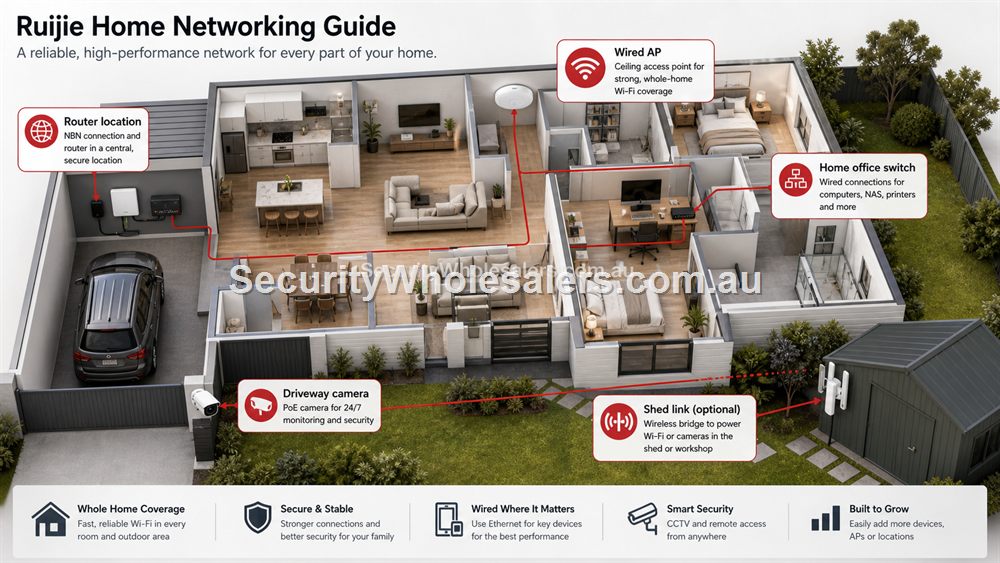
The Router Is Rarely In The Best Wi-Fi Location
Many homes have the internet connection in a garage, cupboard, front room or back corner. That location may be fine for the NBN box, but poor for Wi-Fi. A better home network often uses the router as the internet edge and adds a wired access point where coverage is actually needed.
For apartments or smaller homes, one good router may be enough. For long houses, double brick, two-storey homes or properties with a home office at the far end, a wired AP is usually better than relying on repeaters. If cameras or an intercom are being added, plan a switch at the same time rather than solving each problem separately.
Home Office, CCTV And Smart Devices
Working from home changes the network. A laptop on video calls, a dock, printer, NAS, cameras and streaming devices can quickly outgrow a basic router. A small Ruijie unmanaged switch can tidy up wired devices at a desk or entertainment area. A PoE switch becomes useful if the home has IP cameras, ceiling APs or an intercom.
For CCTV, keep the NVR, cameras and router path clear. For Wi-Fi, avoid placing APs only where cabling is easiest if that leaves bedrooms, offices or outdoor areas weak. For smart devices, remember that more Wi-Fi devices can make placement and band planning more important.
Large Blocks, Sheds And Granny Flats
Australian homes often have detached garages, sheds, gates or granny flats. If cable cannot be run easily, a wireless bridge may be a sensible way to extend the network. The same rules apply as business sites: line of sight, power at both ends, mounting and realistic distance matter.
A bridge can support a remote camera, small switch or AP at the far end. It should not be treated as a casual Wi-Fi extender. If someone lives or works in the second building, design the far end properly with enough ports and Wi-Fi coverage.
Home networking selector
| Home problem | Recommended Ruijie path | Reason |
|---|---|---|
| Weak Wi-Fi at far end of house | RG-EW3000GX plus RG-RAP2266 if Ethernet can be run | Router plus AP solves placement better than one powerful router. |
| More wired desk devices | RG-ES05G-L or RG-ES08G-L | Simple silent port expansion. |
| Home CCTV or intercom | RG-ES205GC-P or RG-ES209GC-P | PoE planning keeps cameras/APs tidy. |
| Shed or granny flat | RG-EST310V2 or RG-EST350V2 bridge path | Better than stretching ordinary Wi-Fi across a yard. |
Avoiding The Extender Trap
Many home buyers start with plug-in extenders because they are quick. They can help in light-use areas, but they often create inconsistent performance for work, streaming, gaming and cameras. A wired access point, properly placed, is usually a cleaner long-term fix. If Ethernet cannot be run, a bridge may be better for a detached building than trying to stretch household Wi-Fi through walls and across yards.
A good home upgrade should be boring in the best way: the home office connects reliably, streaming works, cameras stay online and nobody needs to reboot equipment every week. That often comes from fewer, better-placed devices rather than more gadgets.
Planning For Families, Work And Security
Modern homes can look like small businesses from a networking point of view. Parents may work from home, children may stream or game, cameras may record the driveway, an intercom may need app access and a shed may need a link. Ruijie products can support that, but the design should stay understandable for the household.
Keep the router and switch accessible. Name Wi-Fi networks clearly. Document where the AP and any bridge are installed. If loved ones or an installer may need to help later, make sure the network is not dependent on one person remembering every detail.
What to confirm before buying
Before ordering for this page, collect the details that will actually change the product choice. For Ruijie Home Networking Buying Guide, the useful pre-purchase notes are:
- where the internet enters the home
- home office and study zones
- streaming and gaming areas
- camera or intercom plans
- whether a shed or granny flat needs network access
- who will manage passwords and app accounts
What not to overbuy or underbuy
Do not keep adding Wi-Fi extenders if the home really needs a wired AP or bridge. Extenders can be convenient, but they often create inconsistent results for work, streaming and cameras.
Maintenance and future expansion
For homes, keep the design understandable. Label the switch, write down where APs and bridges are, and make sure another family member or installer can understand the setup later.
Expert buyer notes
The best home network is simple enough for the household to understand. It should not be a trail of extenders, mystery switches and passwords known by only one person. Router, AP, switch, camera and bridge roles should be clear.
This matters for work-from-home reliability, family streaming, security cameras and future upgrades such as a shed, granny flat or intercom.
Worked example: large home with work and cameras
A large home may have an NBN connection in the garage, a home office at the back, streaming in living areas and cameras around the driveway. The common mistake is to keep buying stronger routers or plug-in extenders. A cleaner Ruijie path is a suitable router, a small switch where wired devices gather, a properly placed AP for the weak end of the house and PoE planning if cameras are involved.
That design stays understandable. The router handles internet, the AP handles coverage, the switch handles wired devices and PoE handles cameras. If the household later adds a shed link or intercom, there is already a network structure to build on.
How to turn this into an order
For Ruijie Home Networking Buying Guide, the most useful order brief is short but specific. Start with the site type, then list the devices that must connect, the devices that need PoE, the spaces that need Wi-Fi, and any distance problem such as a gate, shed, yard or second tenancy. From there, match the requirement to products such as RG-EW3000GX AX3000 Wi-Fi 6 Gigabit Router, RG-EW1200 Dual-Band Wi-Fi Router, RG-ES05G-L 5-Port Gigabit Unmanaged Switch. This keeps the purchase tied to the job rather than to a model number chosen in isolation.
Use the scenarios on this page as a sanity check. If the job looks closest to Home office with weak Wi-Fi, keep the design compact and avoid unnecessary complexity. If it looks closer to Large family home, pay more attention to expansion, labels and support. If it resembles Shed camera, check the parts that usually cause trouble: cabling, PoE power, AP placement, bridge line of sight, internet reliability and who will manage the network later.
For a ruijie home networking order through SecurityWholesalers, include the facts that change the recommendation: camera count, AP count, switch location, router role, bridge distance, outdoor exposure, power availability and whether the site is a home, office, shop, warehouse, farm, venue or regional property. Good information before ordering prevents returns, avoids undersized hardware and makes the final installation feel deliberate.
After the Ruijie Home Networking Buying Guide hardware arrives, keep the same brief beside the installation notes. The person installing the equipment should be able to see why each Ruijie product was chosen, where it belongs, what it powers or connects, and what spare capacity has been allowed. That continuity is what turns a buying guide into a better finished network.
Recommended SecurityWholesalers product paths
RG-EW3000GX AX3000 Wi-Fi 6 Gigabit Router
A modern Wi-Fi 6 router for homes and small offices that need stronger routing and wireless performance.
Choose this if: Choose this when the existing router is the weak point and the site needs a more modern Wi-Fi 6 router path.
Best for: Modern homes and small offices where the router itself needs stronger Wi-Fi and gigabit routing.
Why it is useful: It is the sensible upgrade path when the existing router is weak, old or poorly matched to current devices.
Watch out: For large buildings, pair it with wired APs rather than expecting one router to cover everything.
RG-EW1200 Dual-Band Wi-Fi Router
A value router option for light home and small-office use.
Choose this if: Choose this for light-duty, value-focused home or small-office jobs where Wi-Fi expectations are modest.
Best for: Light home use, budget refreshes and smaller spaces with modest Wi-Fi needs.
Why it is useful: It can be enough when the site does not justify a higher-capacity router or separate AP design.
Watch out: Do not use it as the answer for dense business Wi-Fi, large homes or many modern clients.
RG-ES05G-L 5-Port Gigabit Unmanaged Switch
Silent, simple wired expansion for homes, desks, counters and small cabinets.
Choose this if: Choose this for a desk, counter, TV cabinet or small home office where the only problem is not enough Ethernet ports.
Best for: A desk, TV cabinet, counter, small home office or simple wired expansion point.
Why it is useful: It is quiet, simple and inexpensive, which is exactly what a basic non-PoE port expansion should be.
Watch out: It does not power cameras or APs. If PoE is needed, choose a PoE switch instead.
RG-ES08G-L 8-Port Gigabit Unmanaged Switch
A practical unmanaged switch when a room or small office needs several extra wired ports.
Choose this if: Choose this when a small room, office or cabinet needs several wired ports and there is no PoE requirement.
Best for: Small offices, home cabinets and rooms that need several extra gigabit ports.
Why it is useful: It gives more breathing room than a 5-port switch while staying simple and fanless.
Watch out: Avoid it for camera/AP power jobs unless a separate PoE plan already exists.
RG-RAP2266 AX3000 Wi-Fi 6 Ceiling Access Point
A strong indoor Wi-Fi 6 AP for offices, homes, clinics, retail and hospitality spaces.
Choose this if: Choose this for most office, clinic, retail and home Wi-Fi upgrades where reliable Wi-Fi 6 coverage is the goal.
Best for: Most offices, clinics, homes, retail spaces and hospitality interiors today.
Why it is useful: Wi-Fi 6 remains the practical sweet spot for many sites: strong performance, mature client support and good value.
Watch out: Coverage still depends on AP placement and wired backhaul, not only the AP generation.
RG-EST310V2 5GHz Wireless Bridge Kit
A shorter-range bridge kit for sheds, yards, small business outbuildings and camera links.
Choose this if: Choose this for shorter shed, gate or outbuilding links where the distance is modest and line of sight is clean.
Best for: Shorter shed, gate, yard and outbuilding links.
Why it is useful: It is a practical bridge path when the site needs a modest point-to-point link rather than a long-distance design.
Watch out: Do not aim it through trees, metal sheds or moving vehicle paths and expect stable performance.
Real-world quote scenarios
| Scenario | Practical design | Why it works |
|---|---|---|
| Home office with weak Wi-Fi | Wi-Fi 6 router and wired AP near office. | More stable video calls. |
| Large family home | Router, ceiling AP, 8-port switch for entertainment cabinet. | Reduces congestion and cable clutter. |
| Shed camera | Wireless bridge and PoE injector or small PoE switch. | Extends CCTV without a long cable run. |
Decision table
| Home problem | Ruijie path | Why |
|---|---|---|
| Poor Wi-Fi in one end of house | Router plus wired AP | Solves placement. |
| More wired devices at desk | 5-port or 8-port unmanaged switch | Simple and quiet. |
| Home CCTV | PoE switch or NVR/switch design | Cleaner camera power. |
| Detached shed or granny flat | Wireless bridge plus far-end switch/AP | Avoids trenching when line of sight is good. |
Final buyer checklist
- Write down the router, switch, access point, bridge and PoE roles before ordering.
- Count current devices and allow realistic spare ports and PoE headroom.
- Confirm cable routes, mounting positions, power and internet service details.
- Label the installed network so future support is not guesswork.
- Keep ownership of cloud/app accounts clear at handover.
Ruijie Home Networking Buying Guide FAQs
- Is Ruijie overkill for a home?
Not if the home has poor Wi-Fi, cameras, a home office or several wired devices. Keep the design simple and purposeful.
- Should I use a Wi-Fi extender?
A wired AP or bridge is usually more reliable than a chain of basic extenders, especially for work or CCTV.
- Can Ruijie help with a granny flat?
Yes, often with a bridge or cable path plus a switch or access point at the far end.
- Is Ruijie too much for a normal home?
Not if the home has poor Wi-Fi, work-from-home needs, cameras, a shed link or several wired devices. Keep the design simple.
- Should I buy a router or an access point?
Buy a router if the internet edge is weak. Add an AP if the router is simply in the wrong place for Wi-Fi.
- Can Ruijie help a granny flat or shed?
Yes, usually with a bridge or cable path plus a far-end switch or AP.