

















Commercial
Ruijie vs TP-Link vs Ubiquiti
Ruijie networking
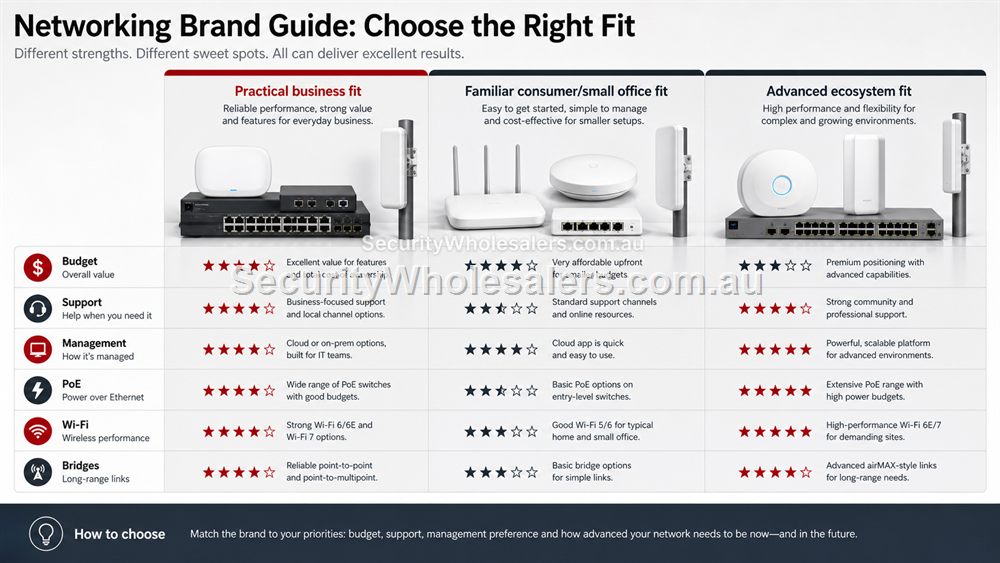
The Honest Comparison
A useful comparison should not pretend one brand wins every job. TP-Link is familiar to many home and small-business buyers and has a broad range. Ubiquiti is popular with enthusiasts, installers and businesses that like a unified ecosystem and strong visual management. Ruijie sits in a practical middle ground for many buyers who want capable switches, PoE, APs, routers and bridges without making the decision feel heavier than the site requires.
The best brand choice depends on the network. A simple home may only need a router and switch. A CCTV site may care more about PoE and bridge reliability than brand loyalty. A multi-site business may care about repeatable ordering and support. A technically confident buyer may prefer deeper ecosystem control. A less technical business may value a clean, understandable design over advanced features they will never touch.
Where Ruijie Often Makes Sense
Ruijie is worth considering when the buyer wants practical networking across switching, PoE, Wi-Fi and wireless bridging. It can suit small business, CCTV, warehouses, shops, offices, homes and regional sites where the network needs to work cleanly but does not need to become a full enterprise architecture project.
It is especially relevant when a project mixes categories: cameras need PoE, users need Wi-Fi, a shed needs a bridge and the router may need improvement. That mixed-site logic is common in Australia, particularly for warehouses, farms, hospitality venues and small businesses.
How To Choose Without Brand Bias
Write the network requirement before choosing the brand. Count devices, list PoE loads, map AP locations, note outdoor areas, decide whether bridges are needed, and confirm who will support the site. Then compare the product family against that requirement.
If a brand comparison does not mention installation conditions, management, handover and support, it is only half useful. A network that looks good in a comparison table can still disappoint if the APs are poorly placed, the switch is undersized or nobody knows who owns the management account.
Brand comparison by buyer type
| Buyer type | Ruijie fit | Compare carefully with |
|---|---|---|
| Small business needing PoE, APs and possibly bridges | Very strong practical fit. | Ubiquiti if the buyer wants deeper ecosystem management. |
| Basic home buyer | Good when the network has real design needs. | TP-Link if the need is only a simple consumer router. |
| Installer standardising repeat jobs | Strong if stock, supportability and product breadth align. | Ubiquiti or TP-Link depending on workflow and client expectation. |
| CCTV/security buyer | Strong because PoE and bridge choices are central. | Any brand that can document PoE budget and remote support clearly. |
Support Style Matters More Than Online Arguments
Brand comparisons often become emotional because buyers remember past experiences. A better approach is to ask who will support the network. A hands-on technical owner may value advanced controls. A small business may value a repeatable design that staff can explain. An installer may value stock, predictable setup and a product family that covers switches, APs, bridges and routers.
Ruijie should be compared on fit. If the job needs practical PoE, Wi-Fi and bridge options with a clear handover, it belongs on the shortlist. If the buyer wants a very specific ecosystem feature from another brand, that may steer the decision. The comparison is only useful when it is anchored to the actual site.
Total Cost Of The Network
The cheapest product is not always the cheapest network. A switch with too little PoE, an AP in the wrong spot or a bridge mounted poorly can create return visits and downtime. The total cost includes hardware, installation time, support time, future expansion and how easy the network is to understand.
When comparing Ruijie, TP-Link and Ubiquiti, compare the whole design: router, switch, PoE, AP count, bridge requirements, management, mounting and handover. That gives a more honest answer than comparing one access point against another in isolation.
What to confirm before buying
Before ordering for this page, collect the details that will actually change the product choice. For Ruijie vs TP-Link vs Ubiquiti, the useful pre-purchase notes are:
- the whole network requirement, not just one product
- management style preferred by the buyer or installer
- PoE and AP needs
- bridge or outdoor requirements
- stock and support expectations
- future expansion plans
What not to overbuy or underbuy
Do not turn the comparison into a brand popularity contest. A network should be chosen by the site, the support model and the complete product path. The best brand for one project may be unnecessary for another.
Maintenance and future expansion
Whatever brand is chosen, insist on handover quality. A clear diagram, labelled ports and ownership notes often matter more to long-term satisfaction than a small difference in specification.
Expert buyer notes
A brand comparison should finish with a design, not a winner declared in isolation. Ruijie may be the right fit for a mixed PoE, AP and bridge project. Another brand may be right for a different management preference or ecosystem requirement.
The practical test is whether the chosen brand can be installed cleanly, supported confidently and expanded without starting again.
Worked example: choosing by support model
A technical owner who enjoys managing networks may compare ecosystems differently from a shop owner who wants the network to work quietly. An installer standardising across repeat jobs may compare product availability and setup time. A CCTV buyer may care more about PoE and bridge options than about advanced Wi-Fi dashboards.
This is why Ruijie, TP-Link and Ubiquiti should be compared against the actual support model. If nobody will maintain advanced features, those features have limited value. If the site needs a practical mix of PoE, APs, routers and bridges, Ruijie may be a very sensible shortlist brand.
How to turn this into an order
For Ruijie vs TP-Link vs Ubiquiti, the most useful order brief is short but specific. Start with the site type, then list the devices that must connect, the devices that need PoE, the spaces that need Wi-Fi, and any distance problem such as a gate, shed, yard or second tenancy. From there, match the requirement to products such as RG-ES209GC-P 9-Port Smart Cloud Managed PoE+ Switch, RG-RAP2266 AX3000 Wi-Fi 6 Ceiling Access Point, RG-RAP72 BE3600 Wi-Fi 7 Ceiling Access Point. This keeps the purchase tied to the job rather than to a model number chosen in isolation.
Use the scenarios on this page as a sanity check. If the job looks closest to CCTV plus Wi-Fi warehouse, keep the design compact and avoid unnecessary complexity. If it looks closer to Apartment router replacement, pay more attention to expansion, labels and support. If it resembles Retail store rollout, check the parts that usually cause trouble: cabling, PoE power, AP placement, bridge line of sight, internet reliability and who will manage the network later.
For a ruijie vs tp-link vs ubiquiti order through SecurityWholesalers, include the facts that change the recommendation: camera count, AP count, switch location, router role, bridge distance, outdoor exposure, power availability and whether the site is a home, office, shop, warehouse, farm, venue or regional property. Good information before ordering prevents returns, avoids undersized hardware and makes the final installation feel deliberate.
After the Ruijie vs TP-Link vs Ubiquiti hardware arrives, keep the same brief beside the installation notes. The person installing the equipment should be able to see why each Ruijie product was chosen, where it belongs, what it powers or connects, and what spare capacity has been allowed. That continuity is what turns a buying guide into a better finished network.
Recommended SecurityWholesalers product paths
RG-ES209GC-P 9-Port Smart Cloud Managed PoE+ Switch
A sensible step up when the site needs more PoE ports and more power headroom.
Choose this if: Choose this if the site has five to eight PoE devices, cameras plus an AP, or a small business cabinet where spare ports and power headroom matter.
Best for: Small-business CCTV, 6-8 camera systems, AP plus camera networks, and cleaner comms cabinets.
Why it is useful: The extra ports and larger PoE budget make it a stronger default for real jobs than a switch filled to capacity on day one.
Watch out: Still check total PoE wattage. Port count alone does not guarantee enough power for every device.
RG-RAP2266 AX3000 Wi-Fi 6 Ceiling Access Point
A strong indoor Wi-Fi 6 AP for offices, homes, clinics, retail and hospitality spaces.
Choose this if: Choose this for most office, clinic, retail and home Wi-Fi upgrades where reliable Wi-Fi 6 coverage is the goal.
Best for: Most offices, clinics, homes, retail spaces and hospitality interiors today.
Why it is useful: Wi-Fi 6 remains the practical sweet spot for many sites: strong performance, mature client support and good value.
Watch out: Coverage still depends on AP placement and wired backhaul, not only the AP generation.
RG-RAP72 BE3600 Wi-Fi 7 Ceiling Access Point
A future-ready ceiling AP for higher-capacity areas where the cabling and clients can benefit.
Choose this if: Choose this when the site wants a longer refresh cycle, higher client capacity and can support a faster uplink path.
Best for: Higher-density offices, newer fit-outs and buyers wanting a longer Wi-Fi refresh cycle.
Why it is useful: Wi-Fi 7 is about capacity, efficiency and future readiness, especially when the uplink and client devices can benefit.
Watch out: It is not magic. Poor placement or a weak uplink can waste the upgrade.
RG-EST350V2 5GHz Wireless Bridge Kit
Longer-range point-to-point wireless bridging where line of sight is available.
Choose this if: Choose this for longer outdoor point-to-point links with clear line of sight and a serious need to avoid trenching.
Best for: Longer building-to-building links, farms, industrial yards and remote camera paths with clear line of sight.
Why it is useful: It can avoid trenching where distance and site layout make cable impractical.
Watch out: Line of sight, mounting height and far-end power matter more than the headline range.
RG-EW3000GX AX3000 Wi-Fi 6 Gigabit Router
A modern Wi-Fi 6 router for homes and small offices that need stronger routing and wireless performance.
Choose this if: Choose this when the existing router is the weak point and the site needs a more modern Wi-Fi 6 router path.
Best for: Modern homes and small offices where the router itself needs stronger Wi-Fi and gigabit routing.
Why it is useful: It is the sensible upgrade path when the existing router is weak, old or poorly matched to current devices.
Watch out: For large buildings, pair it with wired APs rather than expecting one router to cover everything.
RG-ES08G-L 8-Port Gigabit Unmanaged Switch
A practical unmanaged switch when a room or small office needs several extra wired ports.
Choose this if: Choose this when a small room, office or cabinet needs several wired ports and there is no PoE requirement.
Best for: Small offices, home cabinets and rooms that need several extra gigabit ports.
Why it is useful: It gives more breathing room than a 5-port switch while staying simple and fanless.
Watch out: Avoid it for camera/AP power jobs unless a separate PoE plan already exists.
Real-world quote scenarios
| Scenario | Practical design | Why it works |
|---|---|---|
| CCTV plus Wi-Fi warehouse | Ruijie switch/AP/bridge path is worth quoting. | Multiple product categories need to work together. |
| Apartment router replacement | Compare Ruijie router with simpler home options. | Do not overbuy if coverage is easy. |
| Retail store rollout | Compare repeatability, support and stock path. | Brand decision should support multiple sites. |
Decision table
| Buyer priority | Ruijie fit | Compare carefully with |
|---|---|---|
| Mixed CCTV and Wi-Fi site | Strong practical fit | PoE budget, bridge needs, AP placement. |
| Home-only basic router | Possible fit | Whether a simpler consumer router is enough. |
| Installer-managed ecosystem | Good fit for many jobs | Management workflow and standardisation. |
| Advanced enthusiast control | May or may not be ideal | Feature depth and personal preference. |
Final buyer checklist
- Write down the router, switch, access point, bridge and PoE roles before ordering.
- Count current devices and allow realistic spare ports and PoE headroom.
- Confirm cable routes, mounting positions, power and internet service details.
- Label the installed network so future support is not guesswork.
- Keep ownership of cloud/app accounts clear at handover.
Ruijie vs TP-Link vs Ubiquiti FAQs
- Is Ruijie better than TP-Link?
It depends on the job. Ruijie can be a strong fit for practical business, CCTV, Wi-Fi and bridge projects, while TP-Link may suit some simple or familiar setups.
- Is Ruijie better than Ubiquiti?
Not universally. Compare the required ecosystem, support workflow, product availability and how much management depth the site needs.
- What is the safest way to compare brands?
Describe the network first, then compare products against ports, PoE, Wi-Fi placement, bridge needs, support and handover.
- Is Ruijie better than Ubiquiti?
Not universally. Ruijie is a strong practical fit for many business, CCTV and bridge jobs; Ubiquiti may suit buyers wanting a deeper ecosystem.
- Is Ruijie better than TP-Link?
It depends on the job. TP-Link may suit simple familiar home use, while Ruijie is compelling for structured small-business, PoE, AP and bridge designs.
- What comparison matters most?
Compare the full network: router, switch, PoE, APs, bridge needs, management and handover.