

















Commercial
Ruijie for CCTV and Security Networks
Ruijie networking
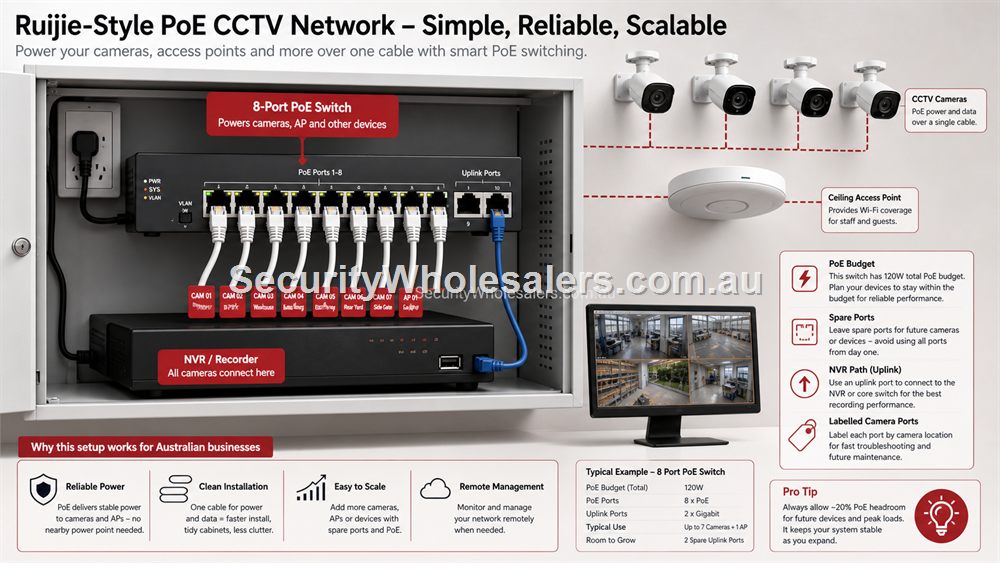
CCTV Networks Need A Stable Backbone
A camera can have excellent image quality and still perform poorly if the network is unstable. CCTV needs steady PoE power, clean cabling, reliable uplinks, a sensible NVR path and enough spare capacity for future cameras. Ruijie PoE switches and bridges can help, but they must be chosen around the recording design.
Start by locating the NVR or recording platform, then map the camera groups. Cameras near the main cabinet may be easy to cable. Cameras at a gate, roller door, shed or yard boundary may need a bridge or a remote PoE point. The network should be designed so a future technician can identify which switch or bridge supports each camera group.
Intercoms, Access Control And Mixed Security Devices
Security networks often grow beyond cameras. Video intercoms, door stations, access control panels, wireless alarm modules and management workstations may all touch the network. Some need PoE, some need stable local connectivity, and some rely on internet access for app notifications or remote support.
This is where a planned switch layout matters. It may be tempting to plug security devices into any available port, but a cleaner design puts cameras, intercoms and APs where they can be labelled, powered and traced. A PoE injector can be right for one device. A PoE switch is better when several security devices share a location.
Remote Viewing And Reliability
Remote viewing depends on the camera system, recorder, router, internet service and network path. If any part is unreliable, the user experiences the security system as unreliable. For regional and mobile-connected sites, consider upload speed, data allowance and signal. For business sites, consider whether the router and switch are on UPS power if outages matter.
Good handover includes the app account owner, network diagram, camera/NVR IP details where appropriate, switch location, PoE notes and what to do if internet service changes. That documentation is not glamorous, but it is what keeps security systems serviceable.
Security-network selector
| Security requirement | Recommended Ruijie path | Reason |
|---|---|---|
| Four-camera small site | RG-ES205GC-P or RG-ES209GC-P depending on spare capacity | PoE switching keeps camera power tidy and supportable. |
| Six to eight cameras plus AP/intercom | RG-ES209GC-P | The site needs more PoE headroom and clearer labelling. |
| Gate or remote yard camera | RG-EST310V2 or RG-EST350V2 bridge path plus far-end PoE | The remote device needs both network link and power. |
| Important business recording | PoE switch, router path and possible UPS planning | Network resilience matters when footage is important. |
Security Networks And Power Resilience
Security networks often matter most when something else has gone wrong. If the router, switch or NVR loses power, remote viewing and recording may be affected. For sites where footage is important, consider whether the network cabinet, NVR and key switches should be on a UPS. This is not required for every small system, but it is worth discussing for businesses, warehouses and remote sites.
Power resilience also includes avoiding poor installation locations. A PoE switch in a hot roof space, dusty shed or exposed cabinet may have a shorter and more troublesome life. Put security network equipment where it can be protected, ventilated and serviced.
Making Remote Support Possible
Many CCTV faults are network faults in disguise. A camera offline alert may be a failed cable, exhausted PoE budget, bridge issue, router change or internet outage. Remote support is much easier when switch ports are labelled, bridge links are named and the NVR path is known.
A support-ready Ruijie security network should have device names that match real locations. Instead of generic labels, use names such as Front Counter AP, Roller Door Camera Switch, Gate Bridge or Office PoE Switch. Clear naming turns a confusing system into one that can be explained over the phone.
What to confirm before buying
Before ordering for this page, collect the details that will actually change the product choice. For Ruijie for CCTV and Security Networks, the useful pre-purchase notes are:
- camera and intercom locations
- PoE requirements for each security device
- NVR or recorder location
- remote viewing expectations
- whether any bridge or 4G link is involved
- power backup requirements
What not to overbuy or underbuy
Do not focus only on camera image quality and ignore the network. A beautiful camera view is not useful if PoE drops, the bridge is unstable or remote viewing fails because the router path was never planned.
Maintenance and future expansion
Security networks deserve names that match real places: Gate Bridge, Front Door Intercom, Office PoE Switch and Loading Dock Camera. Clear names make remote support far more realistic.
Expert buyer notes
Security systems carry risk because failures may not be noticed until footage or access is needed. That makes network documentation more important than it looks. Label camera ports, name bridges by location, and keep the recorder path easy to understand.
A Ruijie switch or bridge is most valuable when it reduces uncertainty: which device is powered, how it connects, and where to look first when something goes offline.
Worked example: warehouse security network
A warehouse may have cameras at entries, roller doors, aisles and a yard, plus an intercom at reception. The network should be drawn around camera groups and recorder location. A central Ruijie PoE switch may cover the office and internal cameras, while a bridge or remote PoE switch may serve the yard camera if cabling is difficult.
The security outcome depends on consistency. If one camera depends on a bridge, that bridge should be named and tested. If an intercom depends on PoE, its port should be labelled. The network becomes part of the security system, not just background IT.
How to turn this into an order
For Ruijie for CCTV and Security Networks, the most useful order brief is short but specific. Start with the site type, then list the devices that must connect, the devices that need PoE, the spaces that need Wi-Fi, and any distance problem such as a gate, shed, yard or second tenancy. From there, match the requirement to products such as RG-ES209GC-P 9-Port Smart Cloud Managed PoE+ Switch, RG-ES205GC-P 5-Port Smart Cloud Managed PoE+ Switch, RG-EST350V2 5GHz Wireless Bridge Kit. This keeps the purchase tied to the job rather than to a model number chosen in isolation.
Use the scenarios on this page as a sanity check. If the job looks closest to Office CCTV plus intercom, keep the design compact and avoid unnecessary complexity. If it looks closer to Remote yard camera, pay more attention to expansion, labels and support. If it resembles Small business security refresh, check the parts that usually cause trouble: cabling, PoE power, AP placement, bridge line of sight, internet reliability and who will manage the network later.
For a ruijie cctv network order through SecurityWholesalers, include the facts that change the recommendation: camera count, AP count, switch location, router role, bridge distance, outdoor exposure, power availability and whether the site is a home, office, shop, warehouse, farm, venue or regional property. Good information before ordering prevents returns, avoids undersized hardware and makes the final installation feel deliberate.
After the Ruijie for CCTV and Security Networks hardware arrives, keep the same brief beside the installation notes. The person installing the equipment should be able to see why each Ruijie product was chosen, where it belongs, what it powers or connects, and what spare capacity has been allowed. That continuity is what turns a buying guide into a better finished network.
Recommended SecurityWholesalers product paths
RG-ES209GC-P 9-Port Smart Cloud Managed PoE+ Switch
A sensible step up when the site needs more PoE ports and more power headroom.
Choose this if: Choose this if the site has five to eight PoE devices, cameras plus an AP, or a small business cabinet where spare ports and power headroom matter.
Best for: Small-business CCTV, 6-8 camera systems, AP plus camera networks, and cleaner comms cabinets.
Why it is useful: The extra ports and larger PoE budget make it a stronger default for real jobs than a switch filled to capacity on day one.
Watch out: Still check total PoE wattage. Port count alone does not guarantee enough power for every device.
RG-ES205GC-P 5-Port Smart Cloud Managed PoE+ Switch
Compact PoE switching for a small camera group, an access point or a tidy front-office network.
Choose this if: Choose this if the job is genuinely compact: a few cameras, one access point, a small reception area or a local PoE point with limited growth.
Best for: Small CCTV groups, one or two access points, compact retail or office PoE jobs.
Why it is useful: It gives a buyer PoE power and smart-switch visibility without jumping straight to a larger cabinet design.
Watch out: Keep it for genuinely small jobs. If the site may reach five to eight powered devices, step up early.
RG-EST350V2 5GHz Wireless Bridge Kit
Longer-range point-to-point wireless bridging where line of sight is available.
Choose this if: Choose this for longer outdoor point-to-point links with clear line of sight and a serious need to avoid trenching.
Best for: Longer building-to-building links, farms, industrial yards and remote camera paths with clear line of sight.
Why it is useful: It can avoid trenching where distance and site layout make cable impractical.
Watch out: Line of sight, mounting height and far-end power matter more than the headline range.
RG-EST310V2 5GHz Wireless Bridge Kit
A shorter-range bridge kit for sheds, yards, small business outbuildings and camera links.
Choose this if: Choose this for shorter shed, gate or outbuilding links where the distance is modest and line of sight is clean.
Best for: Shorter shed, gate, yard and outbuilding links.
Why it is useful: It is a practical bridge path when the site needs a modest point-to-point link rather than a long-distance design.
Watch out: Do not aim it through trees, metal sheds or moving vehicle paths and expect stable performance.
RG-POE-AT30 Gigabit PoE Injector
Useful when one camera or access point needs PoE without replacing the existing switch.
Choose this if: Choose this only when one device needs PoE and the rest of the network is already correct.
Best for: Adding one PoE camera, AP or intercom to an otherwise working network.
Why it is useful: It solves a single-device power problem without replacing a switch that does not otherwise need changing.
Watch out: Do not use injectors everywhere as a substitute for a planned PoE switch. Many injectors quickly become messy.
RG-RAP2266 AX3000 Wi-Fi 6 Ceiling Access Point
A strong indoor Wi-Fi 6 AP for offices, homes, clinics, retail and hospitality spaces.
Choose this if: Choose this for most office, clinic, retail and home Wi-Fi upgrades where reliable Wi-Fi 6 coverage is the goal.
Best for: Most offices, clinics, homes, retail spaces and hospitality interiors today.
Why it is useful: Wi-Fi 6 remains the practical sweet spot for many sites: strong performance, mature client support and good value.
Watch out: Coverage still depends on AP placement and wired backhaul, not only the AP generation.
Real-world quote scenarios
| Scenario | Practical design | Why it works |
|---|---|---|
| Office CCTV plus intercom | 9-port PoE switch with labelled camera and intercom ports. | Easier support and expansion. |
| Remote yard camera | Bridge link back to NVR, PoE at camera end. | Solves distance without trenching. |
| Small business security refresh | PoE switch, router review, remote viewing test. | Improves the whole path, not only camera hardware. |
Decision table
| Security need | Ruijie network role | Planning note |
|---|---|---|
| IP cameras | PoE switching and uplinks | Check watts, ports and NVR path. |
| Gate camera | Wireless bridge plus PoE | Line of sight and far-end power. |
| Intercom | PoE switch or injector | Confirm power and network requirements. |
| Remote viewing | Router and stable uplink | Internet quality matters. |
Final buyer checklist
- Write down the router, switch, access point, bridge and PoE roles before ordering.
- Count current devices and allow realistic spare ports and PoE headroom.
- Confirm cable routes, mounting positions, power and internet service details.
- Label the installed network so future support is not guesswork.
- Keep ownership of cloud/app accounts clear at handover.
Ruijie for CCTV and Security Networks FAQs
- Can Ruijie networking improve CCTV reliability?
Yes, when poor switching, weak PoE planning or unstable wireless links are part of the problem.
- Should security devices be documented separately?
Yes. Label camera, intercom, access control and bridge connections so support is faster.
- Can Ruijie bridges carry camera footage?
Yes where line of sight is suitable and the bridge is installed and tested as part of the recording path.
- Can Ruijie be used for intercoms?
Yes, when the intercom uses standard network/PoE requirements and the switch has enough power and ports.
- Should security network equipment be on a UPS?
For important business or remote sites, a UPS for the router, switch and recorder is worth considering.
- What matters most for remote viewing?
Stable internet, router configuration, recorder/app setup and a reliable switch/camera path.