

















Commercial
Ruijie Wireless Bridge Buying Guide
Ruijie networking
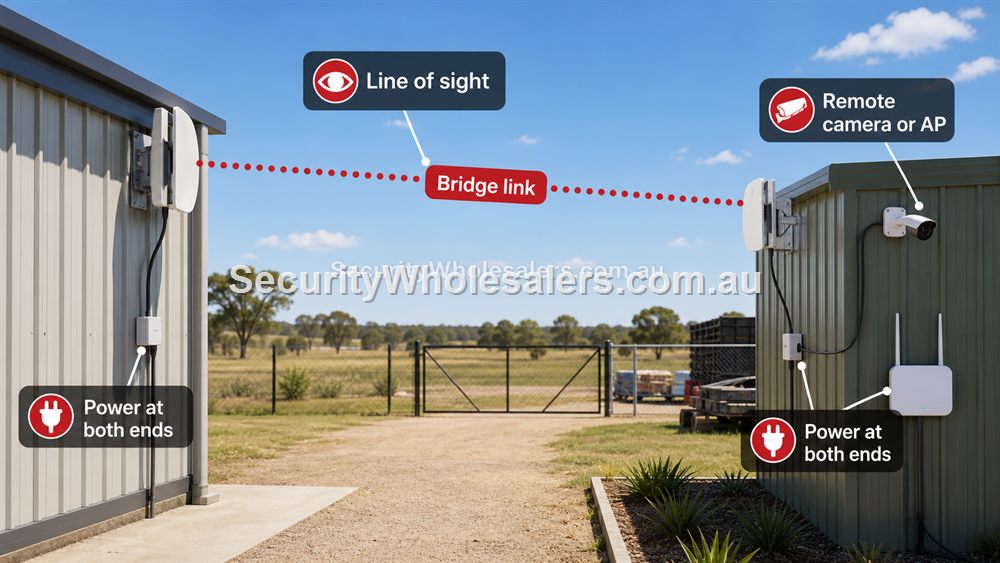
Wireless bridge theory without the jargon
A wireless bridge is a dedicated point-to-point connection. It is not the same as general Wi-Fi for phones and laptops. Think of it as an invisible Ethernet cable between two mounted radios. It can be excellent for a gate, shed, yard camera or second building, but only when the path between the two ends is suitable.
The three practical tests are line of sight, mounting stability and power at both ends. If any of those are weak, the bridge may be unreliable even if the distance sounds acceptable on paper.
What A Wireless Bridge Actually Does
A wireless bridge carries network traffic from one point to another. It is not the same as ordinary Wi-Fi for phones and laptops. It is usually used to link a main building to a shed, gate, office, remote camera pole, yard, granny flat or second tenancy where running Ethernet is difficult or expensive.
The bridge solves the data path, but the far end still needs power and the right equipment. A remote camera may need a PoE injector or small PoE switch. A remote office may need a switch and access point. A gate may need weather-safe mounting and surge-aware cabling. Treat the bridge as the middle of a network design, not the whole design.
Line Of Sight Is The Main Test
Bridge range claims assume suitable conditions. Real sites have trees, trucks, roller doors, rooflines, fences, metal sheds, other wireless noise and mounting limitations. Clear line of sight means the two bridge units can see each other without obstructions that block or weaken the signal. Mounting height often matters as much as distance.
For a short shed link, a compact bridge kit may be enough. For a longer industrial, farm or yard link, choose a stronger bridge path and be honest about mounting. If the bridge has to shoot through trees or a moving truck path, the design needs changing. A stable shorter path is better than an impressive rating used badly.
CCTV And Remote Building Planning
Bridge links are common in CCTV because cameras often need to sit where cables do not. A farm gate, warehouse boundary, loading dock or remote driveway can all be good candidates. The bridge should be tested as part of the camera recording path. If the link drops, the NVR may lose footage or remote viewing may suffer.
For a second building, decide whether the far end needs only one camera, several cameras, Wi-Fi, intercom, workstation ports or all of the above. That decides whether the far end needs an injector, unmanaged switch, PoE switch or AP. Document the far-end equipment clearly so support does not become guesswork.
Ruijie bridge selector
| Bridge path | Best fit | Critical check |
|---|---|---|
| RG-EST310V2 | Shorter shed, gate and outbuilding links. | Clear line of sight and realistic throughput expectations. |
| RG-EST330F-P | Longer single-unit bridge designs where the matching endpoint is planned. | Confirm pairing, power and mounting before ordering. |
| RG-EST350V2 | Longer point-to-point links, farms and industrial yards. | Mounting height and obstruction-free path are non-negotiable. |
Mounting Details That Decide Bridge Reliability
Bridge links are often won or lost by mounting. The units should be fixed firmly, pointed accurately and positioned to avoid trees, trucks, roof edges, roller doors and metal obstructions. A bridge mounted temporarily on a flimsy pole may test well on a calm day and fail when wind moves the pole. A bridge aimed across a yard may work until parked vehicles block the path.
Plan the mount like part of the network, not an afterthought. Check cable entry, drip loops, weather protection, power, surge exposure and access for servicing. If the far end is a gate or pole, confirm where power comes from and where any PoE injector or switch will be protected. A neat bridge install is usually cheaper than repeated troubleshooting.
Bridge Speed Versus Useful Throughput
Bridge specifications can be misunderstood. A headline wireless rate is not the same as guaranteed usable throughput in a real site. Distance, noise, alignment and obstructions reduce performance. For one camera or a small number of devices, the link may be perfectly adequate. For a second office with many users, the design needs more caution.
Think about what the bridge is carrying. A few cameras need steady upload back to the recorder. A remote office needs browsing, cloud apps and maybe VoIP. A public Wi-Fi area needs capacity during busy periods. Match the bridge to the actual traffic, then test the link under realistic conditions.
What to confirm before buying
Before ordering for this page, collect the details that will actually change the product choice. For Ruijie Wireless Bridge Buying Guide, the useful pre-purchase notes are:
- distance between bridge points
- true line of sight
- mounting height and bracket strength
- power at both ends
- what devices sit at the far end
- whether trees, vehicles or rooflines may obstruct the link
What not to overbuy or underbuy
Do not treat a bridge range claim as a promise for every site. Real links are shaped by obstructions, noise, alignment and mounting. A shorter clean link is better than a longer compromised one.
Maintenance and future expansion
Photograph the bridge direction and far-end equipment at handover. If a link later drops, those photos help identify whether the problem is alignment, power, obstruction or the device behind the bridge.
Expert buyer notes
A bridge should be designed like a link, not like a guess. Stand where each radio will mount and check what the other end can actually see. Consider parked vehicles, tree growth, roof edges, wind movement and where the far-end power supply will be protected.
If the link is carrying CCTV, treat the bridge as part of the recorder path. If it is carrying users in a remote office or shed, test it with realistic traffic rather than only checking that the link comes online.
Worked example: camera at a remote gate
A rural property may need a camera at the front gate, but trenching cable from the house is expensive. A Ruijie bridge can be a strong option if the house or shed has line of sight to the gate. The design still needs power at the gate, a protected place for any injector or PoE equipment, and a mounting position that will not move in wind.
The buyer should test the link as though it is part of the recorder, because it is. If the bridge drops, the camera path drops. A professional bridge design includes alignment, weather protection, labels and a note showing what equipment sits at each end.
How to turn this into an order
For Ruijie Wireless Bridge Buying Guide, the most useful order brief is short but specific. Start with the site type, then list the devices that must connect, the devices that need PoE, the spaces that need Wi-Fi, and any distance problem such as a gate, shed, yard or second tenancy. From there, match the requirement to products such as RG-EST310V2 5GHz Wireless Bridge Kit, RG-EST330F-P Long-Range Wireless Bridge, RG-EST350V2 5GHz Wireless Bridge Kit. This keeps the purchase tied to the job rather than to a model number chosen in isolation.
Use the scenarios on this page as a sanity check. If the job looks closest to Farm gate camera, keep the design compact and avoid unnecessary complexity. If it looks closer to Warehouse yard, pay more attention to expansion, labels and support. If it resembles Second building office, check the parts that usually cause trouble: cabling, PoE power, AP placement, bridge line of sight, internet reliability and who will manage the network later.
For a ruijie wireless bridge order through SecurityWholesalers, include the facts that change the recommendation: camera count, AP count, switch location, router role, bridge distance, outdoor exposure, power availability and whether the site is a home, office, shop, warehouse, farm, venue or regional property. Good information before ordering prevents returns, avoids undersized hardware and makes the final installation feel deliberate.
After the Ruijie Wireless Bridge Buying Guide hardware arrives, keep the same brief beside the installation notes. The person installing the equipment should be able to see why each Ruijie product was chosen, where it belongs, what it powers or connects, and what spare capacity has been allowed. That continuity is what turns a buying guide into a better finished network.
Recommended SecurityWholesalers product paths
RG-EST310V2 5GHz Wireless Bridge Kit
A shorter-range bridge kit for sheds, yards, small business outbuildings and camera links.
Choose this if: Choose this for shorter shed, gate or outbuilding links where the distance is modest and line of sight is clean.
Best for: Shorter shed, gate, yard and outbuilding links.
Why it is useful: It is a practical bridge path when the site needs a modest point-to-point link rather than a long-distance design.
Watch out: Do not aim it through trees, metal sheds or moving vehicle paths and expect stable performance.
RG-EST330F-P Long-Range Wireless Bridge
A single bridge unit option for longer camera or network links where the design calls for it.
Choose this if: Choose this when the bridge design specifically needs a longer single-unit path and the installer has confirmed the matching endpoint plan.
Best for: Longer camera or network links where the design needs a single bridge unit path.
Why it is useful: It gives another option for installers designing longer point-to-point links.
Watch out: Confirm the matching end, mounting and power design before ordering.
RG-EST350V2 5GHz Wireless Bridge Kit
Longer-range point-to-point wireless bridging where line of sight is available.
Choose this if: Choose this for longer outdoor point-to-point links with clear line of sight and a serious need to avoid trenching.
Best for: Longer building-to-building links, farms, industrial yards and remote camera paths with clear line of sight.
Why it is useful: It can avoid trenching where distance and site layout make cable impractical.
Watch out: Line of sight, mounting height and far-end power matter more than the headline range.
RG-ES205GC-P 5-Port Smart Cloud Managed PoE+ Switch
Compact PoE switching for a small camera group, an access point or a tidy front-office network.
Choose this if: Choose this if the job is genuinely compact: a few cameras, one access point, a small reception area or a local PoE point with limited growth.
Best for: Small CCTV groups, one or two access points, compact retail or office PoE jobs.
Why it is useful: It gives a buyer PoE power and smart-switch visibility without jumping straight to a larger cabinet design.
Watch out: Keep it for genuinely small jobs. If the site may reach five to eight powered devices, step up early.
RG-POE-AT30 Gigabit PoE Injector
Useful when one camera or access point needs PoE without replacing the existing switch.
Choose this if: Choose this only when one device needs PoE and the rest of the network is already correct.
Best for: Adding one PoE camera, AP or intercom to an otherwise working network.
Why it is useful: It solves a single-device power problem without replacing a switch that does not otherwise need changing.
Watch out: Do not use injectors everywhere as a substitute for a planned PoE switch. Many injectors quickly become messy.
Real-world quote scenarios
| Scenario | Practical design | Why it works |
|---|---|---|
| Farm gate camera | Bridge from house/shed to gate pole, PoE injector for camera. | Avoids a long trench when sightline is clean. |
| Warehouse yard | Bridge across yard to remote camera group. | Keeps security coverage without running cable through the yard. |
| Second building office | Bridge to switch and AP at far end. | Supports users, not just one camera. |
Decision table
| Distance/job | Bridge path | Critical check |
|---|---|---|
| Short shed or outbuilding | 1 km bridge kit style path | Clear line of sight and power at both ends. |
| Industrial yard or farm link | Longer-range bridge path | Mounting height, weather and obstructions. |
| Remote camera pole | Bridge plus injector or small PoE switch | How the camera is powered. |
| Second office/building | Bridge plus switch/AP as required | User count and far-end device count. |
Final buyer checklist
- Write down the router, switch, access point, bridge and PoE roles before ordering.
- Count current devices and allow realistic spare ports and PoE headroom.
- Confirm cable routes, mounting positions, power and internet service details.
- Label the installed network so future support is not guesswork.
- Keep ownership of cloud/app accounts clear at handover.
Ruijie Wireless Bridge Buying Guide FAQs
- Can a Ruijie bridge replace Ethernet cable?
It can where line of sight is suitable, but cable is still preferable where it is practical and cost-effective.
- Do wireless bridges need power?
Yes. Both ends need power, and any far-end camera or access point needs its own power or PoE plan.
- Will a bridge work through trees?
Trees can seriously reduce reliability. Clear line of sight is strongly preferred.
- What does line of sight mean?
The two bridge units should be able to see each other clearly without trees, buildings, vehicles or metal objects blocking the path.
- Can a bridge carry CCTV footage?
Yes, if the link is stable and sized for the camera traffic. Test it as part of the recording path.
- Is bridge range guaranteed?
No. Real range depends on mounting, noise, obstructions, alignment and conditions.