

















Commercial
Ruijie Routers Buying Guide
Ruijie networking
Router, modem and access point: what is the difference?
A modem or NBN device brings the internet service into the premises. A router manages the local network and sends traffic between the site and the internet. An access point provides Wi-Fi coverage. Many consumer routers combine routing and Wi-Fi in one box, but that does not mean the router is in the best place for wireless coverage.
For larger homes and businesses, the cleaner design is often router at the edge, switch in the cabinet and access points where users need Wi-Fi. That separation makes the network easier to improve without replacing everything.
Router Placement And Role
Many Wi-Fi problems are blamed on speed when the real issue is router location. The router often sits wherever the NBN or internet service enters the building, which may be a garage, cupboard, back room or cabinet. That can be a terrible place for Wi-Fi. In those cases, a Ruijie router can handle the edge of the network while wired access points provide proper coverage elsewhere.
A small home or apartment may be fine with a single router. A larger home, office or shop may need the router to feed a switch, and the switch to feed ceiling APs, cameras or wired devices. The more important the site is, the more the router should be treated as one part of a designed network rather than the whole solution.
4G, Backup And Temporary Sites
A 4G router can be useful for rural properties, temporary offices, construction locations, backup connectivity and sites where fixed internet is slow or delayed. It is not magic. Performance depends on carrier coverage, signal strength, antenna position, data allowance and congestion. Before relying on 4G for CCTV or business use, check the signal at the actual router location.
For CCTV, 4G backup can support remote access or alerting, but uploading many cameras continuously can burn data quickly. For a small business, 4G may keep EFTPOS or basic operations online during an outage. For a farm gate or remote shed, it may be the only practical internet path. The design should be honest about data and reliability.
When A Router Is Not Enough
A router is not a substitute for a PoE switch when cameras or ceiling APs need power. It is not a substitute for a wireless bridge when another building needs a link. It is not a substitute for proper AP placement in a large or dense building. A good router choice starts the network, but the rest of the design decides whether users feel the result.
If the buyer has cameras, several wired devices, outdoor Wi-Fi, guest Wi-Fi, a remote shed or a second floor with weak coverage, plan the router with switching and APs from the start. That often costs less than buying one powerful router, discovering it cannot bend physics, then adding equipment later in a hurry.
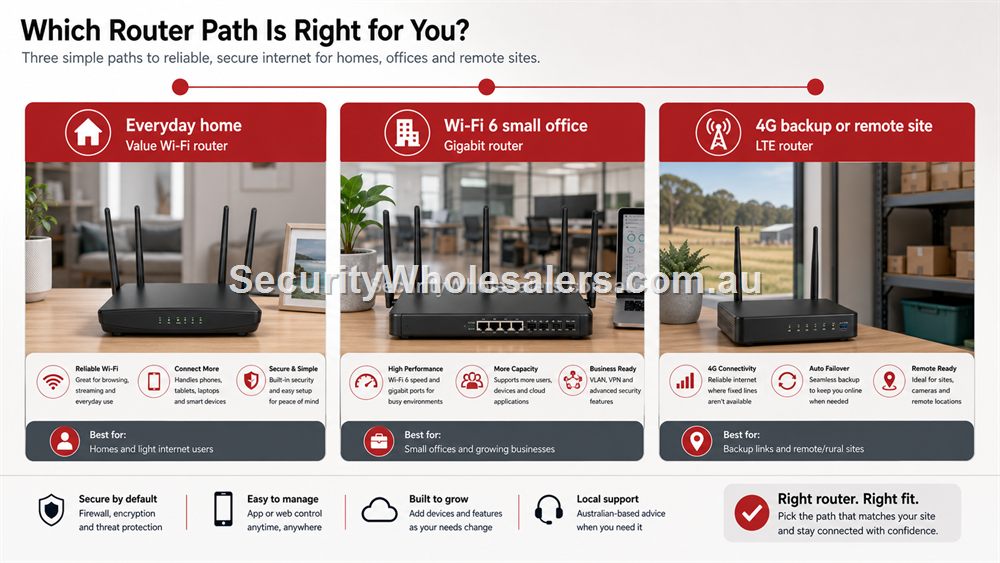
Ruijie router selector
| Router | Choose it for | Avoid when |
|---|---|---|
| RG-EW1200 | Value home/light-duty Wi-Fi where expectations are modest. | Large homes, many users, business networks or high-speed expectations. |
| RG-EW3000GX | Modern Wi-Fi 6 home or small office routing. | The actual issue is AP placement, PoE or a shed link rather than router performance. |
| RG-EW300T | 4G backup, rural sites, temporary internet and simple remote access. | Heavy continuous CCTV upload unless the data plan and signal support it. |
When To Keep The ISP Router
Sometimes the best router decision is to keep the existing ISP equipment and improve the network around it. If the router is stable, compatible with the service and only weak because it is in a poor Wi-Fi position, adding a switch and access point may be smarter than replacing everything. This is common in homes and small businesses where the internet service itself is not the problem.
Replace or upgrade the router when the existing device is unreliable, lacks required features, cannot handle the user load, has weak Wi-Fi and no clean AP path, or when 4G backup/multi-WAN style behaviour is needed. The router choice should be tied to a real problem. Otherwise buyers can spend money at the edge while the actual issue remains AP placement, switching or cabling.
Router Handover And Internet Changes
Router ownership is easy to overlook. If a business changes internet provider, replaces the modem, loses app credentials or resets equipment, the whole network can be affected. A good handover records how the router is connected, who owns the app or cloud account, what Wi-Fi networks exist, and what should be checked before an internet provider visit.
For 4G routers, document the SIM provider, data plan, signal location and whether the router is primary internet or backup. For CCTV, note whether remote viewing depends on the router configuration. These notes are small, but they prevent avoidable downtime when someone changes a plan, moves a router or replaces a service.
What to confirm before buying
Before ordering for this page, collect the details that will actually change the product choice. For Ruijie Routers Buying Guide, the useful pre-purchase notes are:
- internet service type and provider equipment
- whether the router is also expected to provide Wi-Fi
- whether extra APs or switches will be used
- 4G signal and data plan if mobile internet is involved
- remote viewing or VPN requirements
- who controls router credentials after installation
What not to overbuy or underbuy
Do not replace the router before proving the router is the problem. If the issue is poor Wi-Fi placement, adding an access point may be the better fix. If the issue is PoE, a router will not solve it.
Maintenance and future expansion
Record the router role clearly. If it is the main internet edge, note the provider details and login ownership. If it is part of a larger network, document the switch and AP paths connected to it.
Expert buyer notes
Router upgrades are most successful when the router is diagnosed as the real bottleneck. If the site has poor Wi-Fi because the router is in a garage, an AP may be the better upgrade. If cameras need power, the missing part is PoE. If a shed needs network access, the missing part is a bridge or cable path.
The router should be chosen as the edge of a planned network, not as a magic box expected to solve every site problem.
Worked example: 4G backup for a small business
A store that depends on EFTPOS may want 4G backup so an internet outage does not stop trade. The router decision should start with what must stay online: POS terminal, payment device, one office computer, cloud app access or CCTV remote viewing. That determines whether a simple 4G router path is enough or whether failover, switching and Wi-Fi need a more deliberate layout.
The buyer should also be honest about data. Backup internet for transactions and basic admin is very different from streaming multiple cameras. Ruijie router selection should follow the business impact, not just the desire to have a SIM slot.
How to turn this into an order
For Ruijie Routers Buying Guide, the most useful order brief is short but specific. Start with the site type, then list the devices that must connect, the devices that need PoE, the spaces that need Wi-Fi, and any distance problem such as a gate, shed, yard or second tenancy. From there, match the requirement to products such as RG-EW3000GX AX3000 Wi-Fi 6 Gigabit Router, RG-EW1200 Dual-Band Wi-Fi Router, RG-EW300T N300 4G LTE Wi-Fi Router. This keeps the purchase tied to the job rather than to a model number chosen in isolation.
Use the scenarios on this page as a sanity check. If the job looks closest to Townhouse with poor upstairs Wi-Fi, keep the design compact and avoid unnecessary complexity. If it looks closer to Regional shed office, pay more attention to expansion, labels and support. If it resembles Small business front counter, check the parts that usually cause trouble: cabling, PoE power, AP placement, bridge line of sight, internet reliability and who will manage the network later.
For a ruijie router order through SecurityWholesalers, include the facts that change the recommendation: camera count, AP count, switch location, router role, bridge distance, outdoor exposure, power availability and whether the site is a home, office, shop, warehouse, farm, venue or regional property. Good information before ordering prevents returns, avoids undersized hardware and makes the final installation feel deliberate.
After the Ruijie Routers Buying Guide hardware arrives, keep the same brief beside the installation notes. The person installing the equipment should be able to see why each Ruijie product was chosen, where it belongs, what it powers or connects, and what spare capacity has been allowed. That continuity is what turns a buying guide into a better finished network.
Recommended SecurityWholesalers product paths
RG-EW3000GX AX3000 Wi-Fi 6 Gigabit Router
A modern Wi-Fi 6 router for homes and small offices that need stronger routing and wireless performance.
Choose this if: Choose this when the existing router is the weak point and the site needs a more modern Wi-Fi 6 router path.
Best for: Modern homes and small offices where the router itself needs stronger Wi-Fi and gigabit routing.
Why it is useful: It is the sensible upgrade path when the existing router is weak, old or poorly matched to current devices.
Watch out: For large buildings, pair it with wired APs rather than expecting one router to cover everything.
RG-EW1200 Dual-Band Wi-Fi Router
A value router option for light home and small-office use.
Choose this if: Choose this for light-duty, value-focused home or small-office jobs where Wi-Fi expectations are modest.
Best for: Light home use, budget refreshes and smaller spaces with modest Wi-Fi needs.
Why it is useful: It can be enough when the site does not justify a higher-capacity router or separate AP design.
Watch out: Do not use it as the answer for dense business Wi-Fi, large homes or many modern clients.
RG-EW300T N300 4G LTE Wi-Fi Router
A 4G router path for backup internet, temporary sites, rural locations and simple remote connectivity.
Choose this if: Choose this for 4G backup, rural internet, temporary locations or a simple remote site where fixed internet is unavailable or unreliable.
Best for: Regional sites, temporary offices, failover internet, sheds and light remote access.
Why it is useful: A SIM-based router can keep a small site online where fixed internet is unavailable, delayed or unreliable.
Watch out: Signal and data plan decide success. Do not assume 4G is suitable for heavy continuous camera upload.
RG-ES08G-L 8-Port Gigabit Unmanaged Switch
A practical unmanaged switch when a room or small office needs several extra wired ports.
Choose this if: Choose this when a small room, office or cabinet needs several wired ports and there is no PoE requirement.
Best for: Small offices, home cabinets and rooms that need several extra gigabit ports.
Why it is useful: It gives more breathing room than a 5-port switch while staying simple and fanless.
Watch out: Avoid it for camera/AP power jobs unless a separate PoE plan already exists.
RG-ES205GC-P 5-Port Smart Cloud Managed PoE+ Switch
Compact PoE switching for a small camera group, an access point or a tidy front-office network.
Choose this if: Choose this if the job is genuinely compact: a few cameras, one access point, a small reception area or a local PoE point with limited growth.
Best for: Small CCTV groups, one or two access points, compact retail or office PoE jobs.
Why it is useful: It gives a buyer PoE power and smart-switch visibility without jumping straight to a larger cabinet design.
Watch out: Keep it for genuinely small jobs. If the site may reach five to eight powered devices, step up early.
Real-world quote scenarios
| Scenario | Practical design | Why it works |
|---|---|---|
| Townhouse with poor upstairs Wi-Fi | Wi-Fi 6 router downstairs and wired AP upstairs. | Solves coverage rather than overdriving one device. |
| Regional shed office | 4G router feeding a small switch and camera. | Practical when fixed internet is unavailable. |
| Small business front counter | Router, PoE switch and AP. | Keeps routing, power and Wi-Fi roles clear. |
Decision table
| Use case | Router path | Extra equipment likely? |
|---|---|---|
| Small home | Wi-Fi router | Maybe no, unless coverage is poor. |
| Large home | Wi-Fi 6 router plus AP or switch | Often yes. |
| Business internet edge | Router feeding switch/APs | Usually yes. |
| Backup internet | 4G router path | Depends on failover design and data needs. |
| Remote site | 4G router plus camera/AP/switch as required | Often yes. |
Final buyer checklist
- Write down the router, switch, access point, bridge and PoE roles before ordering.
- Count current devices and allow realistic spare ports and PoE headroom.
- Confirm cable routes, mounting positions, power and internet service details.
- Label the installed network so future support is not guesswork.
- Keep ownership of cloud/app accounts clear at handover.
Ruijie Routers Buying Guide FAQs
- Can a Ruijie router replace my existing router?
Often yes, depending on the internet service and required configuration. Check compatibility before changing the edge device.
- Do I need a separate access point?
If the router cannot be placed where Wi-Fi is needed, a wired AP is often the better solution.
- Is 4G good enough for CCTV?
It can be for remote access or light use, but continuous camera upload can use significant data and depends on signal quality.
- Can a Ruijie router fix poor Wi-Fi?
Only if the router location and Wi-Fi role are the actual problem. Larger sites often need access points instead.
- What is 4G backup useful for?
It is useful for EFTPOS, basic business continuity, temporary sites and rural access, but it depends on signal and data allowance.
- Should I keep my ISP router?
Sometimes yes. If the ISP router is stable and only coverage is weak, adding APs or switching may be the smarter upgrade.