

















Commercial
Ruijie Wi-Fi Access Points Buying Guide
Ruijie networking
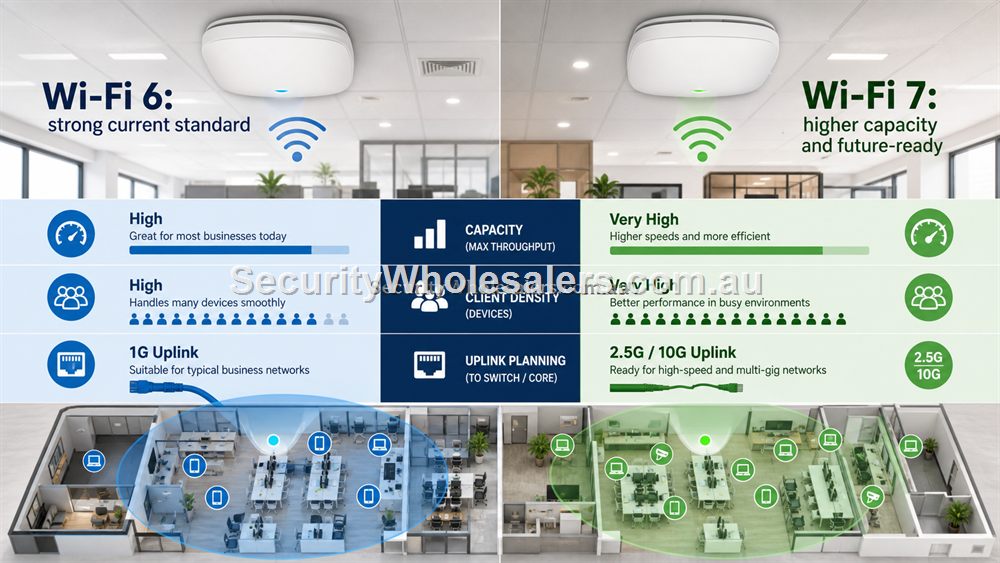
Wi-Fi 6 vs Wi-Fi 7 in plain English
Wi-Fi 6 is the practical current standard for many homes and businesses. It handles modern devices well, improves efficiency compared with older Wi-Fi generations and is usually the best value when the main job is coverage and reliability. Wi-Fi 7 is the next step for higher capacity, newer devices and longer-life fit-outs, especially where the wired uplink and client devices can take advantage of it.
The buying rule is not simply "newer is better". Choose Wi-Fi 6 when the site needs reliable coverage for ordinary laptops, phones, tablets and business devices. Choose Wi-Fi 7 when the site is higher density, more future-focused, or likely to keep the APs in place for a longer refresh cycle. In both cases, a wired backhaul and correct AP placement matter more than the number printed on the box.
Access Points Are About Placement
The access point model matters, but placement often matters more. A high-performance AP mounted in the wrong corner can underperform a sensible AP placed centrally with a wired backhaul. Ceiling APs generally work best when they are mounted where users actually need coverage, not hidden beside the router because that is where the cable already is.
For a small office, one correctly placed Wi-Fi 6 AP may be better than a powerful router sitting in a comms cupboard. For a larger office, two or three APs at lower power can provide smoother roaming than one AP trying to blast through walls. For hospitality, outdoor seating and guest density can be more important than raw maximum speed.
Wi-Fi 6 Versus Wi-Fi 7
Wi-Fi 7 is attractive where the site wants a more future-ready ceiling AP and the rest of the network can support it. It is not automatically the right choice for every buyer. Many current business devices still perform very well on Wi-Fi 6, and a well-placed Wi-Fi 6 AP can be the better value decision for ordinary offices, clinics, retail stores and homes.
Choose Wi-Fi 7 when higher capacity, newer client devices, faster uplinks and a longer refresh cycle justify the spend. Choose Wi-Fi 6 when the main problem is coverage, stability and getting APs into the right positions. In both cases, do not forget the switch: ceiling APs often rely on PoE, so the PoE switch becomes part of the Wi-Fi design.
Indoor And Outdoor Wi-Fi
Indoor APs are designed for ceilings, walls and controlled environments. Outdoor APs are designed for exposure and should be considered for courtyards, yards, loading areas, outdoor dining, school grounds and public-facing spaces. Outdoor Wi-Fi still needs cable, PoE, mounting and sensible placement. Weather rating does not solve poor line of sight, bad mounting or weak backhaul.
For mixed indoor/outdoor sites, separate the design into zones. Office staff, guest Wi-Fi, CCTV devices and outdoor users may have different needs. A venue may need strong guest Wi-Fi in a courtyard while staff devices and POS terminals need reliability inside. A warehouse may need coverage near dispatch rather than every high-rack aisle.
Ruijie access point selector
| AP | Choose it when | Main caution |
|---|---|---|
| RG-RAP2266 Wi-Fi 6 | Most offices, clinics, homes and retail spaces need reliable current-generation Wi-Fi. | Placement and Ethernet backhaul still decide the result. |
| RG-RAP72 Wi-Fi 7 | The site wants higher capacity, newer clients and a longer refresh cycle. | Do not pay for Wi-Fi 7 if the uplink, clients and density do not justify it. |
| RG-RAP6262-G outdoor Wi-Fi 6 | The users are outside or near exposed areas such as courtyards, yards and loading zones. | Weatherproof mounting and PoE cable protection still matter. |
Coverage Planning Without Overcomplicating It
Most buyers do not need a formal enterprise wireless survey, but they do need a sensible coverage plan. Mark the rooms and outdoor areas where Wi-Fi actually matters. Then mark the places where Ethernet can be run. The overlap between those two maps usually reveals where APs should go. If there is no overlap, the cabling plan needs attention before the AP model is chosen.
Walls, glass, metal shelving, cool rooms, lift shafts, mirrors and dense crowds all affect Wi-Fi. So does the number of devices. A quiet office with ten users is different from a venue with dozens of guests and staff devices. A house with double brick is different from a plasterboard home. The AP choice should reflect those conditions rather than relying on a single coverage claim.
Guest Wi-Fi, Staff Wi-Fi And CCTV Devices
Business Wi-Fi often serves different groups: staff, guests, POS devices, handheld scanners, tablets, cameras and sometimes building services. Not all of those devices should be treated the same. Guest access should usually be separated from internal business devices. Staff devices may need stability more than raw speed. CCTV should not be pushed onto Wi-Fi unless the system is explicitly designed for it.
Ruijie access points can be part of that design, but the design should start with use cases. A cafe may need a guest network with sensible limits. A clinic may need reliable staff access without exposing internal devices. A warehouse may need coverage near dispatch but not necessarily every corner. The right AP count comes from those zones.
What to confirm before buying
Before ordering for this page, collect the details that will actually change the product choice. For Ruijie Wi-Fi Access Points Buying Guide, the useful pre-purchase notes are:
- rooms and outdoor zones where people actually need Wi-Fi
- where Ethernet can be run for AP backhaul
- ceiling or wall mounting options
- expected number of users and devices
- guest Wi-Fi requirements
- whether APs will be powered by PoE
What not to overbuy or underbuy
Do not buy access points purely by maximum speed. A well-placed Wi-Fi 6 AP can beat a poorly placed Wi-Fi 7 AP for real users, especially in offices, clinics and homes with difficult walls.
Maintenance and future expansion
Name APs by location and keep a note of mounting positions. If users later complain about one area, the support person can test the correct AP rather than guessing which device serves which room.
Expert buyer notes
Wi-Fi should be judged where users actually stand, sit and work. A buyer should not approve an AP plan only because the speed near the router is good. Test the meeting room, counter, treatment room, warehouse office, courtyard or home study, because those are the areas that create complaints.
The AP model matters, but the installation plan matters just as much. Wired backhaul, sensible placement and correct power will beat a more expensive AP installed in the wrong place.
Worked example: office with complaints in the meeting room
A small office may have a fast internet plan but terrible Wi-Fi in the meeting room because the router sits in a storeroom. Replacing the router with a more powerful one may help slightly, but it may still be in the wrong place. A better Ruijie design runs Ethernet to a ceiling AP near the user area and powers it from a suitable PoE switch.
The result is more predictable because the AP is where the users are. If the office later expands, another AP can be added using the same placement logic. The buyer avoids chasing speed numbers and solves the actual coverage problem.
How to turn this into an order
For Ruijie Wi-Fi Access Points Buying Guide, the most useful order brief is short but specific. Start with the site type, then list the devices that must connect, the devices that need PoE, the spaces that need Wi-Fi, and any distance problem such as a gate, shed, yard or second tenancy. From there, match the requirement to products such as RG-RAP2266 AX3000 Wi-Fi 6 Ceiling Access Point, RG-RAP72 BE3600 Wi-Fi 7 Ceiling Access Point, RG-RAP6262-G AX1800 Outdoor Wi-Fi 6 Access Point. This keeps the purchase tied to the job rather than to a model number chosen in isolation.
Use the scenarios on this page as a sanity check. If the job looks closest to Medical clinic, keep the design compact and avoid unnecessary complexity. If it looks closer to Cafe with courtyard, pay more attention to expansion, labels and support. If it resembles Large home, check the parts that usually cause trouble: cabling, PoE power, AP placement, bridge line of sight, internet reliability and who will manage the network later.
For a ruijie access point order through SecurityWholesalers, include the facts that change the recommendation: camera count, AP count, switch location, router role, bridge distance, outdoor exposure, power availability and whether the site is a home, office, shop, warehouse, farm, venue or regional property. Good information before ordering prevents returns, avoids undersized hardware and makes the final installation feel deliberate.
After the Ruijie Wi-Fi Access Points Buying Guide hardware arrives, keep the same brief beside the installation notes. The person installing the equipment should be able to see why each Ruijie product was chosen, where it belongs, what it powers or connects, and what spare capacity has been allowed. That continuity is what turns a buying guide into a better finished network.
Recommended SecurityWholesalers product paths
RG-RAP2266 AX3000 Wi-Fi 6 Ceiling Access Point
A strong indoor Wi-Fi 6 AP for offices, homes, clinics, retail and hospitality spaces.
Choose this if: Choose this for most office, clinic, retail and home Wi-Fi upgrades where reliable Wi-Fi 6 coverage is the goal.
Best for: Most offices, clinics, homes, retail spaces and hospitality interiors today.
Why it is useful: Wi-Fi 6 remains the practical sweet spot for many sites: strong performance, mature client support and good value.
Watch out: Coverage still depends on AP placement and wired backhaul, not only the AP generation.
RG-RAP72 BE3600 Wi-Fi 7 Ceiling Access Point
A future-ready ceiling AP for higher-capacity areas where the cabling and clients can benefit.
Choose this if: Choose this when the site wants a longer refresh cycle, higher client capacity and can support a faster uplink path.
Best for: Higher-density offices, newer fit-outs and buyers wanting a longer Wi-Fi refresh cycle.
Why it is useful: Wi-Fi 7 is about capacity, efficiency and future readiness, especially when the uplink and client devices can benefit.
Watch out: It is not magic. Poor placement or a weak uplink can waste the upgrade.
RG-RAP6262-G AX1800 Outdoor Wi-Fi 6 Access Point
Outdoor Wi-Fi for yards, courtyards, loading zones, schools, venues and exposed areas.
Choose this if: Choose this when the coverage problem is outside: courtyards, yards, loading areas, schools, venues or exposed staff zones.
Best for: Courtyards, yards, loading areas, schools, venues and outdoor staff/customer Wi-Fi.
Why it is useful: Outdoor APs are designed for exposure and can place coverage where an indoor AP cannot reasonably reach.
Watch out: Weather rating does not remove the need for safe mounting, PoE, cable protection and coverage testing.
RG-ES205GC-P 5-Port Smart Cloud Managed PoE+ Switch
Compact PoE switching for a small camera group, an access point or a tidy front-office network.
Choose this if: Choose this if the job is genuinely compact: a few cameras, one access point, a small reception area or a local PoE point with limited growth.
Best for: Small CCTV groups, one or two access points, compact retail or office PoE jobs.
Why it is useful: It gives a buyer PoE power and smart-switch visibility without jumping straight to a larger cabinet design.
Watch out: Keep it for genuinely small jobs. If the site may reach five to eight powered devices, step up early.
RG-ES209GC-P 9-Port Smart Cloud Managed PoE+ Switch
A sensible step up when the site needs more PoE ports and more power headroom.
Choose this if: Choose this if the site has five to eight PoE devices, cameras plus an AP, or a small business cabinet where spare ports and power headroom matter.
Best for: Small-business CCTV, 6-8 camera systems, AP plus camera networks, and cleaner comms cabinets.
Why it is useful: The extra ports and larger PoE budget make it a stronger default for real jobs than a switch filled to capacity on day one.
Watch out: Still check total PoE wattage. Port count alone does not guarantee enough power for every device.
Real-world quote scenarios
| Scenario | Practical design | Why it works |
|---|---|---|
| Medical clinic | Two ceiling Wi-Fi 6 APs with PoE switching. | Reliable staff coverage and better roaming than one router. |
| Cafe with courtyard | Indoor AP plus outdoor AP for seating area. | Stops outdoor users dragging down indoor placement. |
| Large home | Router plus one wired ceiling AP at the weak end of the house. | More reliable than a plug-in extender chain. |
Decision table
| Area | Ruijie AP path | Design note |
|---|---|---|
| Small office | Wi-Fi 6 ceiling AP | Central placement beats router-in-cupboard Wi-Fi. |
| High-capacity modern fit-out | Wi-Fi 7 ceiling AP | Check uplink and client capability. |
| Outdoor courtyard | Outdoor Wi-Fi 6 AP | Weather-safe mounting and PoE are essential. |
| Warehouse edge | Outdoor or well-placed indoor AP depending on exposure | Do a coverage walk, not a guess. |
Final buyer checklist
- Write down the router, switch, access point, bridge and PoE roles before ordering.
- Count current devices and allow realistic spare ports and PoE headroom.
- Confirm cable routes, mounting positions, power and internet service details.
- Label the installed network so future support is not guesswork.
- Keep ownership of cloud/app accounts clear at handover.
Ruijie Wi-Fi Access Points Buying Guide FAQs
- How many Ruijie access points do I need?
It depends on floor area, walls, user count, mounting options and whether Ethernet can be run to each AP.
- Is a ceiling AP better than a router?
For many offices and larger homes, yes. A wired ceiling AP can be placed where coverage is needed, while routers often sit where the internet service enters.
- Do Ruijie access points need PoE?
Many access points are designed to be powered by PoE, so check the AP and switch requirements before ordering.
- Do Ruijie APs need Ethernet?
For best results, use wired Ethernet backhaul. Wireless repeating is usually a compromise compared with a properly placed wired AP.
- How do I know if I need Wi-Fi 7?
Choose Wi-Fi 7 when the site has newer clients, higher density or wants longer refresh life. Many sites are still better served by well-placed Wi-Fi 6.
- Can one AP cover a whole office?
Sometimes, but office shape, walls and user density matter. Two well-placed APs can outperform one AP in a poor location.