

















Commercial
Ruijie PoE Switches for CCTV
Ruijie networking
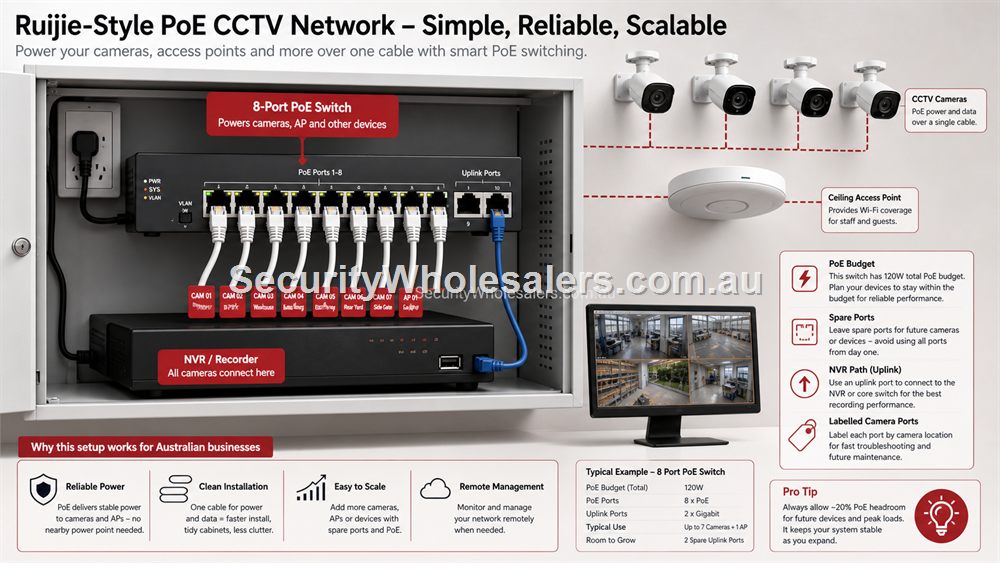
PoE budget explained
PoE budget is the total amount of power a switch can deliver across its powered ports. A switch may have enough ports but still be wrong if the total wattage is too low. Cameras, intercoms and access points can draw different amounts of power, and some draw more during startup, infrared use or heavy operation.
For CCTV, allow headroom. A system that uses every PoE port and nearly every watt on day one has no comfortable upgrade path. A better design leaves spare ports and spare power for the camera that gets added after the first blind spot is discovered.
PoE Is Power Planning, Not Just Networking
A PoE switch sends data and power through the same Ethernet cable. That is convenient, but it means the switch must be chosen for power budget as well as ports. Four cameras might look like a small job, but if the site later adds a stronger camera, an access point or a second doorway, the original switch may be too tight. A better CCTV quote leaves sensible spare capacity.
The NVR path also matters. Some camera networks use an NVR with built-in PoE ports. Others use an external PoE switch because it gives more flexible cabling, easier cabinet placement or a better way to mix cameras and access points. There is no single answer. The right choice depends on cable routes, cabinet space, NVR location and whether the site will grow.
Choosing Between A Small PoE Switch And A Larger One
A compact PoE switch can suit a gate, office corner, small shop, reception area or single camera group. It keeps the local run short and can be a clean way to power a few devices. A larger PoE switch suits a central cabinet where multiple cameras, access points and other PoE devices terminate. Centralising can make support easier, provided the cable runs are practical.
For CCTV, the decision should include camera count, total PoE watts, uplink speed, NVR connection, spare capacity, cable labelling and whether the site needs remote status. If a camera fails, the support person should be able to tell whether the issue is camera, cable, PoE power, switch or network path.
Wireless Bridges In CCTV Networks
Some CCTV sites have a gate, shed, loading zone or yard camera where trenching cable is expensive. A Ruijie wireless bridge can be a practical path when there is clear line of sight and power at both ends. The bridge does not remove the need for planning. It still needs mounting height, alignment, weather-safe installation and a way to power the far-end camera or small PoE switch.
For a farm, warehouse or industrial block, the bridge link should be treated as part of the recording path. If the bridge is unstable, the camera is unstable. Keep the link clear, avoid mounting behind metal clutter, allow for movement and check the actual distance rather than relying on a rough guess.
PoE CCTV selector: exact buying paths
| Camera/AP count | Recommended path | Why |
|---|---|---|
| 1 PoE device | RG-POE-AT30 injector | Solves one device without replacing a working switch. |
| 2-4 PoE devices | RG-ES205GC-P | Compact smart PoE path with enough simplicity for small systems. |
| 5-8 PoE devices | RG-ES209GC-P | More ports and PoE budget for real small-business CCTV. |
| Remote camera | Bridge plus far-end injector or PoE switch | The camera needs both data path and power at the remote end. |
| Cameras plus AP | RG-ES209GC-P unless the job is tiny | APs and cameras together justify more headroom. |
PoE Headroom For Real Camera Networks
A CCTV network should not run with no power margin. Cameras may draw more during infrared operation, startup or when additional features are active. A site may later add a camera at a doorway, loading zone or blind spot. If the switch is already at the edge of its budget, the upgrade becomes messy. A little headroom is usually cheaper than replacing a switch prematurely.
Headroom also helps with mixed devices. A PoE switch might power cameras, a video intercom and a ceiling AP. Those devices do not all behave the same way. Some draw more power than expected, some are business-critical, and some are easier to move than others. List each powered device, then choose the switch around the whole load rather than the camera count alone.
NVR Built-In PoE Versus External PoE Switching
NVRs with built-in PoE ports can be convenient for compact systems because cameras plug straight into the recorder. External PoE switching can be better when camera cables terminate in a different cabinet, when the site needs bridges or APs, when cable routes are spread out, or when the buyer wants more flexibility in the network layout.
The decision should follow the building. A small shop with all camera runs landing near the NVR may be simple. A warehouse with cameras at multiple ends, an office AP and a remote gate camera may be cleaner with external PoE switching and a documented uplink to the recorder. Neither path is automatically superior. The better path is the one that can be installed neatly and supported later.
What to confirm before buying
Before ordering for this page, collect the details that will actually change the product choice. For Ruijie PoE Switches for CCTV, the useful pre-purchase notes are:
- camera count today and likely camera count later
- each camera or intercom PoE requirement
- whether the NVR has built-in PoE or needs external switching
- camera groups that sit away from the main cabinet
- bridge requirements for gates, yards or sheds
- whether the recorder and switch need UPS power
What not to overbuy or underbuy
Do not buy a PoE switch with every port and watt already consumed on day one. CCTV systems often grow after the first blind spot is found, so headroom is part of a professional design.
Maintenance and future expansion
For CCTV, label switch ports by camera location rather than by generic port number only. A future fault is much easier to solve when port 4 is known as Rear Roller Door Camera instead of just another cable.
Expert buyer notes
The most useful CCTV PoE designs are boring after installation. Cameras stay powered, the NVR path is known, spare ports exist, and no one has to hunt through a cabinet full of mystery injectors. That is why PoE planning is one of the highest-value parts of a camera quote.
When in doubt, choose the switch that gives the site room to finish properly, not the cheapest switch that barely works on paper.
Worked example: eight cameras and one access point
An eight-camera small business system often looks simple until an access point, intercom or gate camera is added. If the buyer chooses a switch that only just covers the eight cameras, there may be no practical room for the extra PoE device. A more professional Ruijie PoE design checks camera draw, leaves power margin and decides whether the AP belongs on the same switch or on a different network path.
The NVR should also be considered. If all cables return to the NVR area, a central PoE switch can be tidy. If two cameras sit at a remote roller door or shed, a small far-end PoE point or bridge may be cleaner. Good CCTV networking is about the recording path, not just powering cameras.
How to turn this into an order
For Ruijie PoE Switches for CCTV, the most useful order brief is short but specific. Start with the site type, then list the devices that must connect, the devices that need PoE, the spaces that need Wi-Fi, and any distance problem such as a gate, shed, yard or second tenancy. From there, match the requirement to products such as RG-ES205GC-P 5-Port Smart Cloud Managed PoE+ Switch, RG-ES209GC-P 9-Port Smart Cloud Managed PoE+ Switch, RG-POE-AT30 Gigabit PoE Injector. This keeps the purchase tied to the job rather than to a model number chosen in isolation.
Use the scenarios on this page as a sanity check. If the job looks closest to Cafe with four cameras, keep the design compact and avoid unnecessary complexity. If it looks closer to Warehouse with cameras at roller doors, pay more attention to expansion, labels and support. If it resembles Farm gate camera, check the parts that usually cause trouble: cabling, PoE power, AP placement, bridge line of sight, internet reliability and who will manage the network later.
For a ruijie poe switch cctv order through SecurityWholesalers, include the facts that change the recommendation: camera count, AP count, switch location, router role, bridge distance, outdoor exposure, power availability and whether the site is a home, office, shop, warehouse, farm, venue or regional property. Good information before ordering prevents returns, avoids undersized hardware and makes the final installation feel deliberate.
After the Ruijie PoE Switches for CCTV hardware arrives, keep the same brief beside the installation notes. The person installing the equipment should be able to see why each Ruijie product was chosen, where it belongs, what it powers or connects, and what spare capacity has been allowed. That continuity is what turns a buying guide into a better finished network.
Recommended SecurityWholesalers product paths
RG-ES205GC-P 5-Port Smart Cloud Managed PoE+ Switch
Compact PoE switching for a small camera group, an access point or a tidy front-office network.
Choose this if: Choose this if the job is genuinely compact: a few cameras, one access point, a small reception area or a local PoE point with limited growth.
Best for: Small CCTV groups, one or two access points, compact retail or office PoE jobs.
Why it is useful: It gives a buyer PoE power and smart-switch visibility without jumping straight to a larger cabinet design.
Watch out: Keep it for genuinely small jobs. If the site may reach five to eight powered devices, step up early.
RG-ES209GC-P 9-Port Smart Cloud Managed PoE+ Switch
A sensible step up when the site needs more PoE ports and more power headroom.
Choose this if: Choose this if the site has five to eight PoE devices, cameras plus an AP, or a small business cabinet where spare ports and power headroom matter.
Best for: Small-business CCTV, 6-8 camera systems, AP plus camera networks, and cleaner comms cabinets.
Why it is useful: The extra ports and larger PoE budget make it a stronger default for real jobs than a switch filled to capacity on day one.
Watch out: Still check total PoE wattage. Port count alone does not guarantee enough power for every device.
RG-POE-AT30 Gigabit PoE Injector
Useful when one camera or access point needs PoE without replacing the existing switch.
Choose this if: Choose this only when one device needs PoE and the rest of the network is already correct.
Best for: Adding one PoE camera, AP or intercom to an otherwise working network.
Why it is useful: It solves a single-device power problem without replacing a switch that does not otherwise need changing.
Watch out: Do not use injectors everywhere as a substitute for a planned PoE switch. Many injectors quickly become messy.
RG-EST310V2 5GHz Wireless Bridge Kit
A shorter-range bridge kit for sheds, yards, small business outbuildings and camera links.
Choose this if: Choose this for shorter shed, gate or outbuilding links where the distance is modest and line of sight is clean.
Best for: Shorter shed, gate, yard and outbuilding links.
Why it is useful: It is a practical bridge path when the site needs a modest point-to-point link rather than a long-distance design.
Watch out: Do not aim it through trees, metal sheds or moving vehicle paths and expect stable performance.
RG-EST350V2 5GHz Wireless Bridge Kit
Longer-range point-to-point wireless bridging where line of sight is available.
Choose this if: Choose this for longer outdoor point-to-point links with clear line of sight and a serious need to avoid trenching.
Best for: Longer building-to-building links, farms, industrial yards and remote camera paths with clear line of sight.
Why it is useful: It can avoid trenching where distance and site layout make cable impractical.
Watch out: Line of sight, mounting height and far-end power matter more than the headline range.
Real-world quote scenarios
| Scenario | Practical design | Why it works |
|---|---|---|
| Cafe with four cameras | 5-port or 9-port PoE switch, NVR near router, one spare port for future AP or camera. | Simple and supportable. |
| Warehouse with cameras at roller doors | 9-port PoE switch in cabinet, bridge or second PoE point for remote yard if needed. | Keeps high-value areas covered without messy cabling. |
| Farm gate camera | Wireless bridge back to house or shed, far-end PoE for the camera. | Practical where trenching is not realistic. |
Decision table
| CCTV design | Recommended path | Reason |
|---|---|---|
| One extra PoE device | PoE injector | Avoids replacing a working switch for one camera/AP. |
| Two to four cameras | Compact smart PoE switch | Enough ports and cleaner power planning. |
| Five to eight cameras | 9-port smart PoE switch | More practical PoE headroom and spare planning. |
| Remote gate camera | Wireless bridge plus PoE at far end | Avoids trenching where line of sight is available. |
Final buyer checklist
- Write down the router, switch, access point, bridge and PoE roles before ordering.
- Count current devices and allow realistic spare ports and PoE headroom.
- Confirm cable routes, mounting positions, power and internet service details.
- Label the installed network so future support is not guesswork.
- Keep ownership of cloud/app accounts clear at handover.
Ruijie PoE Switches for CCTV FAQs
- Can a Ruijie PoE switch power CCTV cameras?
Yes, when the camera PoE standard and total wattage fit the switch budget. Always check both port count and power.
- Should cameras and office devices share a switch?
They can, but CCTV networks should be documented carefully and may need separation depending on the site.
- When should I use a wireless bridge for CCTV?
Use one when cable is impractical and there is reliable line of sight between buildings, gates or yards.
- How much PoE headroom should I leave?
As a practical rule, avoid running the switch at its limit. Leave enough spare wattage for startup draw, infrared use and one or two likely additions.
- Can I mix cameras and access points on one PoE switch?
Yes, if the switch has enough ports and PoE budget and the network is documented properly.
- Is an NVR with built-in PoE better?
It can be simpler for small systems, but external PoE switching is often cleaner for spread-out sites or mixed camera/AP networks.