

















Commercial
Ruijie Buying Guide Australia
Ruijie networking
Networking definitions buyers should know
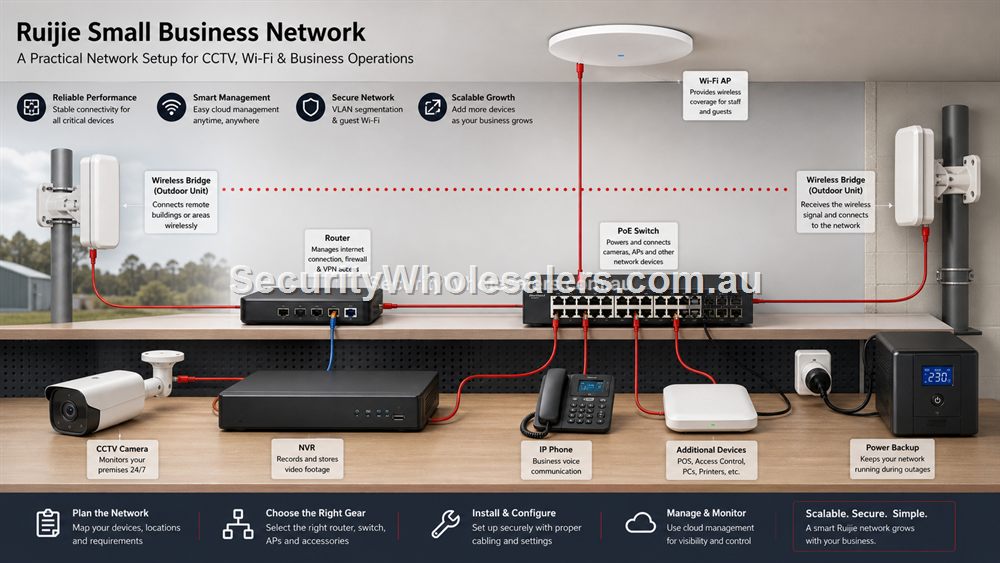
Router: the device at the internet edge that connects the local network to the internet and often handles Wi-Fi, firewall and addressing. Switch: the device that gives wired devices Ethernet ports. PoE switch: a switch that also sends power through Ethernet for cameras, access points and intercoms. Access point: a dedicated Wi-Fi device placed where users need coverage. Wireless bridge: a point-to-point link between buildings, gates or sheds.
The reason these definitions matter is simple: each product solves a different problem. Buying a stronger router will not power cameras. Buying a PoE switch will not automatically fix poor Wi-Fi placement. Buying an access point will not connect a shed unless there is a cable or bridge path. The best Ruijie designs put each device in its proper role.
Start With The Job, Not The Model Number
Ruijie is easiest to choose when the site is described in plain English first. A buyer may need more wired ports behind a counter, PoE power for cameras, ceiling Wi-Fi for an office, a 4G fallback router, or a wireless link to a shed. Those are different jobs. They may all use Ruijie products, but the right hardware and the installation checks are different.
For CCTV, the main questions are camera count, PoE wattage, NVR location, uplink speed, future expansion and whether any cameras sit away from the main building. For Wi-Fi, the questions are building shape, wall material, ceiling access, user density, roaming expectations and whether Ethernet can be run to each access point. For business networking, the questions are supportability, labelling, cloud ownership, spare ports and how easily the network can be understood six months after installation.
How The Ruijie Range Fits Together
Unmanaged Ruijie switches are best when the site simply needs more gigabit ports and no PoE. Smart cloud managed PoE switches suit camera and access point projects because the switch is not just a data path; it is also the power source. Routers sit at the internet edge and matter most when the existing modem/router is weak, poorly located or unable to support the way the site is used. Access points should be chosen for coverage and capacity, not only headline speed. Wireless bridges solve a different problem again: connecting two locations where cable is difficult, expensive or not worth trenching.
A strong Ruijie design draws those parts as one network. Internet comes in, the router or gateway handles the edge, the switch distributes data and PoE, access points serve the users, bridges carry the network to another building, and CCTV devices record or stream through a stable path. When the drawing makes sense, the product list becomes much easier to defend.
Australian Buying Scenarios
A Sydney office may need neat ceiling access points and a switch that can support phones, printers, workstations and cameras without becoming a cable mess. A Melbourne retail group may care about repeatable store fit-outs and simple remote visibility. A Brisbane or Gold Coast hospitality venue may need outdoor Wi-Fi that still behaves around courtyards, shade structures and busy guest periods. A Perth industrial site may need a wireless bridge across a yard or a PoE camera link at a gate. Regional buyers may care most about stock, value, 4G backup and a network that can be maintained without a specialist visiting for every small change.
The product does not change by city, but the site conditions do. Distance, heat, building materials, outdoor exposure, cabling access, internet quality and available installers all shape the buying decision. SecurityWholesalers ships Ruijie products Australia wide, so this guide focuses on helping the buyer choose correctly before ordering.
Fast product selector: what should most buyers short-list first?
| Buyer problem | Start here | Move up when |
|---|---|---|
| A few extra wired ports | RG-ES05G-L or RG-ES08G-L | PoE, management or more structured support is needed. |
| Cameras or ceiling APs need power | RG-ES205GC-P for small jobs, RG-ES209GC-P for larger small-business jobs | The camera/AP count may grow or the site needs more PoE headroom. |
| Office Wi-Fi is weak | RG-RAP2266 Wi-Fi 6 ceiling AP | The site is higher density or wants Wi-Fi 7 future readiness. |
| Outdoor Wi-Fi or courtyard coverage | RG-RAP6262-G outdoor AP | The area is exposed or users are outside the building envelope. |
| Shed, gate or second building | RG-EST310V2 or RG-EST350V2 bridge path | Distance, line of sight or throughput requirements increase. |
| Rural or backup internet | RG-EW300T 4G LTE router | The site needs higher routing, failover or more complex business continuity. |
How To Build A Shortlist Before Ordering
A useful shortlist has three columns: what the device must do, what would be nice to have, and what would create unnecessary complexity. For example, a small retail store might require four PoE camera ports, one indoor AP, a router that can handle the internet service, and enough spare ports for a future printer or EFTPOS move. It may like cloud visibility, but it probably does not need a heavy enterprise design. A farm gate camera might require a bridge, PoE at the far end and a weather-safe mounting plan. It does not need the same AP strategy as an office.
This is also where buyers should decide whether the job is a single-product fix or a network refresh. A single-product fix is appropriate when one part is clearly missing, such as a small switch for a desk or a PoE injector for one camera. A refresh is better when the site has several pain points at once: weak Wi-Fi, scattered switches, camera dropouts, no spare ports and no documentation. Ruijie is often strongest in that middle zone because switches, PoE, APs, routers and bridges can be planned together.
What A Good Ruijie Quote Should Include
A quote should name the product, but it should also explain why the product belongs in the design. If a PoE switch is quoted, the buyer should see the intended powered devices and spare capacity. If an access point is quoted, the buyer should know where it will be mounted and how it will be powered. If a wireless bridge is quoted, the buyer should understand the distance, line of sight and far-end equipment. If a router is quoted, the buyer should know whether it is replacing the internet edge or simply improving Wi-Fi.
The strongest quotes also include a handover path. That can be simple: a one-page network sketch, port labels, device names, cloud/app ownership and notes about future expansion. The point is not paperwork for its own sake. The point is that a network should still make sense after the installer has left and the business or household has added one more camera, printer, workstation or access point.
What to confirm before buying
Before ordering for this page, collect the details that will actually change the product choice. For Ruijie Buying Guide Australia, the useful pre-purchase notes are:
- the internet service and router position
- the number of wired devices, cameras and access points
- which areas need Wi-Fi rather than just where the router sits
- whether any shed, gate or second building needs a bridge
- who will own the cloud/app account after handover
- how many ports and watts should be left spare
What not to overbuy or underbuy
Do not buy one impressive device and expect it to solve every network problem. If the project involves CCTV, Wi-Fi, a shed link and business devices, it needs a small network design rather than a single hero product.
Maintenance and future expansion
For a mixed Ruijie site, the best maintenance habit is a simple map. Show the router, main switch, APs, bridge links, NVR and remote devices. Add labels that a non-technical owner can understand. This turns future upgrades into a controlled job rather than detective work.
Expert buyer notes
A final way to test a Ruijie design is to ask what happens when something fails. If a camera drops offline, can the owner identify the switch port? If Wi-Fi is weak in one room, can the AP serving that area be named? If a shed link fails, does anyone know where both bridge radios are mounted? If the answer is yes, the design is not just technically better; it is easier to live with.
For SecurityWholesalers customers, this is the difference between buying parts and buying a supportable network. The strongest Ruijie order is the one where the product list follows a clear map.
Worked example: mixed business site
Imagine a small trade business with a front office, a warehouse, six cameras, one outdoor camera looking over the loading area and poor Wi-Fi in the admin room. A weak buying path would be to purchase a bigger router and hope it reaches everywhere. A better Ruijie path is to keep the design modular: router or gateway at the internet edge, smart PoE switching for cameras and APs, one indoor AP for the office, and a bridge or outdoor-rated path if the loading camera cannot be cabled cleanly.
That design is useful because each problem has a clear owner. If the office Wi-Fi is poor, look at the AP. If a camera drops, look at the PoE switch port, cable or bridge. If remote access fails, check the router and internet service. The buyer is not just purchasing Ruijie hardware; they are buying a network that can be explained, supported and expanded.
How to turn this into an order
For Ruijie Buying Guide Australia, the most useful order brief is short but specific. Start with the site type, then list the devices that must connect, the devices that need PoE, the spaces that need Wi-Fi, and any distance problem such as a gate, shed, yard or second tenancy. From there, match the requirement to products such as RG-ES205GC-P 5-Port Smart Cloud Managed PoE+ Switch, RG-ES209GC-P 9-Port Smart Cloud Managed PoE+ Switch, RG-ES05G-L 5-Port Gigabit Unmanaged Switch. This keeps the purchase tied to the job rather than to a model number chosen in isolation.
Use the scenarios on this page as a sanity check. If the job looks closest to Four-camera shop, keep the design compact and avoid unnecessary complexity. If it looks closer to Warehouse with yard camera, pay more attention to expansion, labels and support. If it resembles Large home office, check the parts that usually cause trouble: cabling, PoE power, AP placement, bridge line of sight, internet reliability and who will manage the network later.
For a ruijie buying guide order through SecurityWholesalers, include the facts that change the recommendation: camera count, AP count, switch location, router role, bridge distance, outdoor exposure, power availability and whether the site is a home, office, shop, warehouse, farm, venue or regional property. Good information before ordering prevents returns, avoids undersized hardware and makes the final installation feel deliberate.
After the Ruijie Buying Guide Australia hardware arrives, keep the same brief beside the installation notes. The person installing the equipment should be able to see why each Ruijie product was chosen, where it belongs, what it powers or connects, and what spare capacity has been allowed. That continuity is what turns a buying guide into a better finished network.
Recommended SecurityWholesalers product paths
RG-ES205GC-P 5-Port Smart Cloud Managed PoE+ Switch
Compact PoE switching for a small camera group, an access point or a tidy front-office network.
Choose this if: Choose this if the job is genuinely compact: a few cameras, one access point, a small reception area or a local PoE point with limited growth.
Best for: Small CCTV groups, one or two access points, compact retail or office PoE jobs.
Why it is useful: It gives a buyer PoE power and smart-switch visibility without jumping straight to a larger cabinet design.
Watch out: Keep it for genuinely small jobs. If the site may reach five to eight powered devices, step up early.
RG-ES209GC-P 9-Port Smart Cloud Managed PoE+ Switch
A sensible step up when the site needs more PoE ports and more power headroom.
Choose this if: Choose this if the site has five to eight PoE devices, cameras plus an AP, or a small business cabinet where spare ports and power headroom matter.
Best for: Small-business CCTV, 6-8 camera systems, AP plus camera networks, and cleaner comms cabinets.
Why it is useful: The extra ports and larger PoE budget make it a stronger default for real jobs than a switch filled to capacity on day one.
Watch out: Still check total PoE wattage. Port count alone does not guarantee enough power for every device.
RG-ES05G-L 5-Port Gigabit Unmanaged Switch
Silent, simple wired expansion for homes, desks, counters and small cabinets.
Choose this if: Choose this for a desk, counter, TV cabinet or small home office where the only problem is not enough Ethernet ports.
Best for: A desk, TV cabinet, counter, small home office or simple wired expansion point.
Why it is useful: It is quiet, simple and inexpensive, which is exactly what a basic non-PoE port expansion should be.
Watch out: It does not power cameras or APs. If PoE is needed, choose a PoE switch instead.
RG-ES08G-L 8-Port Gigabit Unmanaged Switch
A practical unmanaged switch when a room or small office needs several extra wired ports.
Choose this if: Choose this when a small room, office or cabinet needs several wired ports and there is no PoE requirement.
Best for: Small offices, home cabinets and rooms that need several extra gigabit ports.
Why it is useful: It gives more breathing room than a 5-port switch while staying simple and fanless.
Watch out: Avoid it for camera/AP power jobs unless a separate PoE plan already exists.
RG-EW3000GX AX3000 Wi-Fi 6 Gigabit Router
A modern Wi-Fi 6 router for homes and small offices that need stronger routing and wireless performance.
Choose this if: Choose this when the existing router is the weak point and the site needs a more modern Wi-Fi 6 router path.
Best for: Modern homes and small offices where the router itself needs stronger Wi-Fi and gigabit routing.
Why it is useful: It is the sensible upgrade path when the existing router is weak, old or poorly matched to current devices.
Watch out: For large buildings, pair it with wired APs rather than expecting one router to cover everything.
RG-EW300T N300 4G LTE Wi-Fi Router
A 4G router path for backup internet, temporary sites, rural locations and simple remote connectivity.
Choose this if: Choose this for 4G backup, rural internet, temporary locations or a simple remote site where fixed internet is unavailable or unreliable.
Best for: Regional sites, temporary offices, failover internet, sheds and light remote access.
Why it is useful: A SIM-based router can keep a small site online where fixed internet is unavailable, delayed or unreliable.
Watch out: Signal and data plan decide success. Do not assume 4G is suitable for heavy continuous camera upload.
RG-RAP2266 AX3000 Wi-Fi 6 Ceiling Access Point
A strong indoor Wi-Fi 6 AP for offices, homes, clinics, retail and hospitality spaces.
Choose this if: Choose this for most office, clinic, retail and home Wi-Fi upgrades where reliable Wi-Fi 6 coverage is the goal.
Best for: Most offices, clinics, homes, retail spaces and hospitality interiors today.
Why it is useful: Wi-Fi 6 remains the practical sweet spot for many sites: strong performance, mature client support and good value.
Watch out: Coverage still depends on AP placement and wired backhaul, not only the AP generation.
RG-RAP6262-G AX1800 Outdoor Wi-Fi 6 Access Point
Outdoor Wi-Fi for yards, courtyards, loading zones, schools, venues and exposed areas.
Choose this if: Choose this when the coverage problem is outside: courtyards, yards, loading areas, schools, venues or exposed staff zones.
Best for: Courtyards, yards, loading areas, schools, venues and outdoor staff/customer Wi-Fi.
Why it is useful: Outdoor APs are designed for exposure and can place coverage where an indoor AP cannot reasonably reach.
Watch out: Weather rating does not remove the need for safe mounting, PoE, cable protection and coverage testing.
RG-EST350V2 5GHz Wireless Bridge Kit
Longer-range point-to-point wireless bridging where line of sight is available.
Choose this if: Choose this for longer outdoor point-to-point links with clear line of sight and a serious need to avoid trenching.
Best for: Longer building-to-building links, farms, industrial yards and remote camera paths with clear line of sight.
Why it is useful: It can avoid trenching where distance and site layout make cable impractical.
Watch out: Line of sight, mounting height and far-end power matter more than the headline range.
Real-world quote scenarios
| Scenario | Practical design | Why it works |
|---|---|---|
| Four-camera shop | Router, 5-port or 9-port PoE switch, NVR, one indoor AP if customer or staff Wi-Fi is needed. | Keeps CCTV and Wi-Fi powered from a tidy central point. |
| Warehouse with yard camera | Main PoE switch, wireless bridge to the remote side, small PoE end point at the far camera location. | Avoids trenching while still planning power and uplink. |
| Large home office | Wi-Fi 6 router, wired ceiling AP in the weak end of the house, small unmanaged switch at the desk. | Solves placement and wired-device problems without overbuilding. |
Decision table
| Need | Likely Ruijie path | Watch-out |
|---|---|---|
| Simple wired expansion | RG-ES05G-L or RG-ES08G-L unmanaged switch | No PoE or remote management. |
| CCTV or access points | Smart cloud managed PoE switch | Check total PoE budget, not just port count. |
| Large indoor Wi-Fi area | Ceiling Wi-Fi 6 or Wi-Fi 7 APs | Ethernet backhaul and placement matter more than claims on the box. |
| Remote shed or gate | Wireless bridge kit | Line of sight and mounting height decide success. |
| Backup or rural internet | 4G router path | Check signal and data plan before relying on it. |
Final buyer checklist
- Write down the router, switch, access point, bridge and PoE roles before ordering.
- Count current devices and allow realistic spare ports and PoE headroom.
- Confirm cable routes, mounting positions, power and internet service details.
- Label the installed network so future support is not guesswork.
- Keep ownership of cloud/app accounts clear at handover.
Ruijie Buying Guide Australia FAQs
- Is Ruijie good for CCTV networks?
Yes, Ruijie can be a strong choice for CCTV networks when the switch, PoE budget, uplinks and NVR path are planned properly.
- Does SecurityWholesalers ship Ruijie Australia wide?
Yes. SecurityWholesalers supplies Ruijie products to buyers across Australia, including capital cities and regional locations.
- Should I choose a PoE switch or a PoE injector?
Use a PoE switch when several devices need power and data. Use an injector when one device needs PoE and the existing network otherwise works.
- Is Wi-Fi 7 always the best Ruijie option?
No. Wi-Fi 7 is useful for future-ready or higher-capacity sites, while Wi-Fi 6 remains the sensible fit for many homes and offices.
- Does Ruijie need a controller?
Many Ruijie Reyee products are designed for app/cloud-style management rather than requiring a dedicated hardware controller, but the right management path depends on the model and site design.
- Can Ruijie be used with Hikvision or Dahua cameras?
Yes, Ruijie switches and bridges can be used as network infrastructure for IP cameras when PoE, cabling and network requirements match.
- Is Ruijie suitable for installers?
Yes, especially when the installer wants practical switching, PoE, AP and bridge options that can be documented and handed over clearly.
- What is the biggest Ruijie buying mistake?
Buying by headline speed or port count without checking PoE budget, placement, line of sight, uplinks and future expansion.