

















Commercial
Video Intercoms for Wheelchair Users and Limited Mobility
Door access
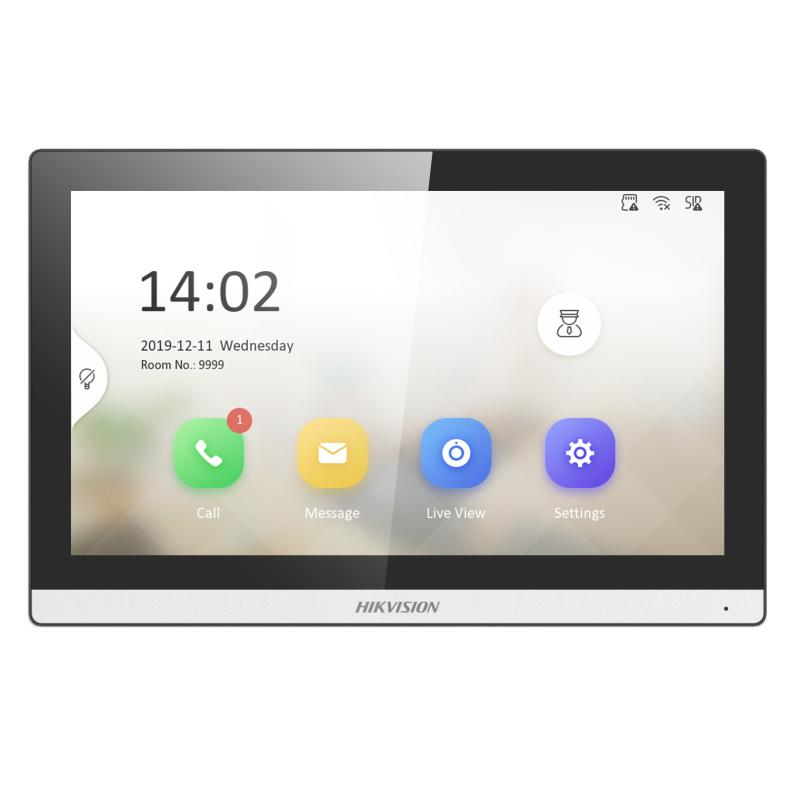
Hikvision indoor station
Place the indoor station where it can be seen and reached from the person's normal position, or use app answering where appropriate.
Design decisions
| Decision | Accessible approach | Risk |
|---|---|---|
| Indoor screen placement | Mount for wheelchair sightline, reach and cable safety. | Installing at standing height only. |
| App access | Give access to the person and chosen responders. | Family answering everything without the person's control. |
| Door release | Use only if the person wants it and visitor rules are clear. | Remote unlock for unknown visitors or unverified workers. |
| Support-worker entry | Use roster rules, agreed access method and entry camera if appropriate. | Shared codes that are never changed. |
Good intercom workflows
- Visitor presses intercom.
- The person answers from wheelchair, bed, chair or phone if possible.
- If the person wants help, a chosen responder can answer through the app.
- Unknown visitors are asked to leave details or return by appointment.
- Door release is used only for trusted people under agreed rules.
Quote scenarios
| Need | Intercom design | Do not forget |
|---|---|---|
| Wheelchair user cannot reach front door quickly. | Indoor monitor at wheelchair sightline, app access, front door station and entry camera view. | Mounting height and cable route matter. |
| Person is bed-based part of the day. | App answering plus indoor station near main position if useful. | Test from bed and chair, not just hallway. |
| Support workers arrive on a roster. | Use intercom plus documented access method and no shared forever-code. | Update rules when staff change. |
Frequently asked questions
Should remote unlock be included?
Only if the person wants it and there are strict rules for trusted visitors, support workers and emergencies.
Where should the indoor station be mounted?
At the person's usable sightline and reach, not a default standing height.
Quote-ready design standard
A complete specification for Video Intercoms for Wheelchair Users and Limited Mobility
Video Intercoms for Wheelchair Users and Limited Mobility should produce a verifiable operating result, not merely a list of devices. For disability home security, the project team is the resident, family, support workers and the installer. They should agree what must happen during a normal event, who acts when an alert or recording is available, and what the fallback is when power, internet, a mobile phone or the first responder is unavailable.
For Video Intercoms for Wheelchair Users and Limited Mobility, the central design priority is accessible visitor handling. In practical terms, test call presentation, answer controls, audio clarity, remote answering, door-release authority and a safe fallback when internet or mains power is unavailable. This avoids the common purchasing error of selecting equipment first and discovering after installation that the important face, plate, doorway, button position, responder or recording period was never properly covered.
For Video Intercoms for Wheelchair Users and Limited Mobility, document constraints involving reach, dexterity, fatigue, communication method, consent and responder availability. The installer can then check product compatibility, cable or radio performance, power and network capacity, mounting, accounts and commissioning. Product pages describe capabilities; the site design and witnessed tests prove whether those capabilities solve this particular requirement.
Zone-by-zone outcome schedule
| Priority zone or position | Required outcome | Acceptance evidence |
|---|---|---|
| Bed And Normal Resting Position | recognise the person, event or request | accessible visitor handling |
| Wheelchair Or Mobility-Aid Position | receive an actionable alert with the correct zone | day/night or real-user performance |
| Entry And Intercom Point | retain usable context before and after the event | privacy and authorised access |
| Transfer And Circulation Route | operate without an unsafe reach or blind spot | communications and power resilience |
| Agreed Shared Living Area | recover predictably after power or communications failure | documented response ownership |
For Video Intercoms for Wheelchair Users and Limited Mobility, mark these zones on a floor plan or photographs and number them consistently. The same names should appear in the quotation, device or camera labels, app, recorder or alarm zones, test sheet and incident procedure. Clear naming turns later references such as "check camera 4" or "button 2" into instructions an end user can actually follow.
Reference connection and response flow
For Video Intercoms for Wheelchair Users and Limited Mobility, this is a functional reference, not a universal terminal diagram. Confirm exact ports, cable type, PoE budget, alarm input behaviour, radio range, battery type, firmware and compatible accessories against the selected model documentation. Fixed data cabling should be specified and installed for the building conditions; mains, fire, egress and regulated work belong with appropriately licensed trades.
Cable, connector and resistor schedule
| Connection | What to specify or buy | Critical limit or check |
|---|---|---|
| Wireless panic, alarm or sensor device | No signal cable is run to the device; it uses the compatible supervised radio system and specified battery. | Still complete a final-location range test, record battery type and interval, and confirm what low-battery and lost-device supervision looks like. |
| Wired dry-contact panic button | Commonly 4-core or 6-core stranded alarm/security cable: a zone pair, a tamper pair where used, and spare conductors or indicator power where the design needs them. | This is not a universal pinout. Confirm conductor size, loop resistance, terminal allocation and cable fire/environment rating with the panel and button manuals. |
| End-of-line resistors | The alarm panel input programming decides whether EOL or dual-EOL resistors are required and their exact values. Fit them at the end device when the manufacturer topology requires it. | Never choose a resistor by colour guess, reuse a value from another alarm brand, or bridge it at the panel merely to clear a fault. Wireless AX PRO buttons do not need a field-wired zone resistor. |
| IP intercom or CCTV device | Cat6 solid-copper U/UTP for Ethernet and PoE, with a maximum 100 m complete copper channel and enough switch PoE budget. | A door lock should not automatically be powered through spare data pairs. Use the controller and lock manufacturer's nominated supply, protection and cable. |
| Panel, power supply and communications | Use the nominated plug pack or compliant power supply, supervised backup battery where supported, and Ethernet or SIM service required by the design. | Fixed 230 V work must be performed by an appropriately licensed electrician. Record who owns the internet, SIM and app accounts. |
The Video Intercoms for Wheelchair Users and Limited Mobility quotation should replace vague labels such as "data cable" or "security cable" with the exact cable construction, conductor count and size, environment rating, route, termination, maximum distance and endpoints. Label both ends to match the connection flow and as-installed plan.
What to put in the equipment and works schedule
| Schedule item | Information the buyer needs | Do not accept |
|---|---|---|
| Devices and accessories | Exact model, quantity, location, mounting accessory, environmental rating and compatible controller or recorder. | "Camera", "button" or "security cable" without a model, purpose and connection path. |
| Cabling and power | Cable standard and conductor count, route, maximum distance, PoE class or power supply, battery backup and who provides the outlet. | An unlabelled allowance that does not distinguish data, low-voltage power, alarm input and licensed mains work. |
| Network and accounts | Switch ports and PoE budget, internet requirement, local recording during outage, account owner, users, multifactor security and offboarding. | Installer-owned credentials or remote access that nobody in the household or organisation administers. |
| Recording or notification | Retention target or responder path, event labels, primary and backup contact, escalation timing and evidence export method. | Unmeasured claims such as "plenty of storage" or "alerts go to the app". |
| Commissioning and handover | Named acceptance tests, as-installed plan, settings backup, manuals, warranty details, maintenance interval and a user demonstration. | A live image or single button press treated as complete commissioning. |
Commissioning test an end user can witness
- Stand, sit or position the real user at each nominated zone and reproduce the normal action, arrival or incident question.
- Confirm the correct device name, alert, image or recording appears without relying on the installer to interpret an unclear label.
- Repeat the test in the most difficult expected condition: night lighting, closed doors, normal machinery, busy trade, limited reach or a responder phone on mobile data.
- Disconnect internet and then simulate the agreed power-failure test. Record what continues locally, what stops, who is notified and the available backup runtime.
- Have the primary responder unavailable and prove that the backup path works. Export one sample incident or complete one response drill.
- Record pass or fail, corrective work and retest date. Keep this sheet with the as-installed plan rather than relying on memory.
Incident walkthrough and failure fallback
For Video Intercoms for Wheelchair Users and Limited Mobility, use a plain-language rehearsal. An event begins at bed and normal resting position. The user or system creates an alert or recording, the controller or recorder identifies the correct zone, and the named responder checks the agreed information. If the first path is unavailable, the backup responder or local recording path takes over. The responder then follows the documented action - attend, call, deny entry, preserve footage or escalate - without asking a vulnerable person or staff member to improvise under pressure.
A failure affecting Video Intercoms for Wheelchair Users and Limited Mobility must also have an owner. Low battery, lost camera, storage warning, changed router, expired account, obstructed view or unanswered notification should create a maintenance action with a due date. A system that silently degrades cannot be considered complete simply because it worked on installation day.
SecurityWholesalers product paths to compare
- AX PRO duress kit - compare the current range against the written requirements on this page; confirm compatibility and availability before purchase.
- Hikvision intercoms - compare the current range against the written requirements on this page; confirm compatibility and availability before purchase.
- HiLook CCTV kits - compare the current range against the written requirements on this page; confirm compatibility and availability before purchase.
For Video Intercoms for Wheelchair Users and Limited Mobility, these links are comparison starting points, not a claim that every current model suits every site. Provide the schedule above when asking SecurityWholesalers to confirm the compatible panel, recorder, devices, storage, mounting and accessories. For model-specific terminals or integrations, use the current manufacturer manual and an experienced installer.
Australian safety, privacy and accessibility boundary
For Video Intercoms for Wheelchair Users and Limited Mobility, Security equipment can support independence and verification, but it is not a substitute for clinical care, a medical alarm service, emergency planning or the resident's informed consent.
When applying Video Intercoms for Wheelchair Users and Limited Mobility, do not point cameras into neighbouring private areas or use audio, biometric identification, covert recording or staff monitoring merely because a device supports it. Check the current rules and obtain site-specific advice where the use is sensitive. Never obstruct required egress or treat security equipment as a substitute for safety engineering.
Frequently asked buying questions
What should be decided before buying equipment for Video Intercoms for Wheelchair Users and Limited Mobility?
For Video Intercoms for Wheelchair Users and Limited Mobility, agree the required outcome, priority zones, users, privacy boundary, response owner and failure fallback. The decisive focus is accessible visitor handling; equipment should follow that written brief.
How should Video Intercoms for Wheelchair Users and Limited Mobility be tested?
Test Video Intercoms for Wheelchair Users and Limited Mobility with a witnessed acceptance process: seated and standing reach test, missed-call test, remote-app test and manual entry fallback. Record the result, device or camera name, date and person responsible for correcting any failure.
What information should be sent with a quote request?
For Video Intercoms for Wheelchair Users and Limited Mobility, send a marked plan or photos, distances, construction type, internet and power details, the five priority zones, required retention or response time, and the people who need access. State any constraints involving reach, dexterity, fatigue, communication method, consent and responder availability.
Can the system keep working during an outage?
For Video Intercoms for Wheelchair Users and Limited Mobility, only if the design includes the required backup. Confirm UPS runtime for controllers, recorder, switches and router; supervised batteries for alarm devices; local recording behaviour; and the action taken when communications fail.
Who should administer the system after handover?
For Video Intercoms for Wheelchair Users and Limited Mobility, name one accountable owner and at least one backup. The resident, family, support workers and the installer should know who approves users, receives health alerts, tests the system, reviews incidents and removes access when circumstances change.