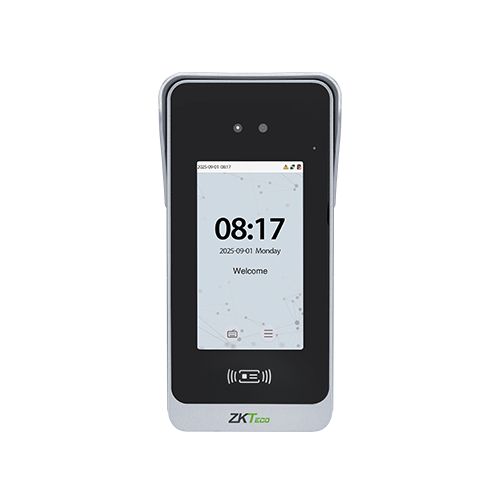
ZKTeco SpeedFace M4 IP66 facial access control terminal
Product Overview
The ZKTeco SpeedFace M4 is a wall-mounted access control terminal for staff entrances, reception-controlled doors and other managed entry points. It combines visible-light facial authentication with card and password verification through an on-screen keypad. Palm verification is an optional configuration. If your project calls for palm authentication, confirm that the unit supplied includes that option before ordering.
The terminal uses a 5-inch colour display and a 2 MP binocular camera with wide dynamic range. Its IP66-rated enclosure suits indoor or outdoor mounting within the specified operating conditions. The terminal provides connections for door hardware such as an electric lock, door position sensor and exit button, along with Wiegand input and output and ZKTeco RS485 for compatible readers.
Key Capabilities
Visible-light facial authentication
Enrolled users can present their face at the terminal without touching the screen. Mask detection and dedicated anti-spoofing features are supported. Test recognition under the lighting conditions and approach angles at the actual door.
Choice of credentials
Use face, card or a password entered through the virtual keypad. Confirm the fitted card module if the site already issues cards or fobs, since available modules support different frequencies and credential formats.
Optional palm authentication
Palm-enabled configurations support up to 3,000 palm templates. Plan the enrolment process and confirm feature availability on the supplied unit if palm verification is part of your access policy.
On-device storage
The published specifications list up to 10,000 face templates, 10,000 cards and 200,000 transaction records. Consider how often the site will retrieve logs and how administrators will remove credentials when staff leave.
Door hardware interfaces
Connect compatible locking hardware, a door sensor and an exit device as required by the system design. Wiegand input and output and ZKTeco RS485 support integration where the connected equipment and credential configuration match.
Best For
- Staff entrances that need touchless face authentication with a credential fallback.
- Sites that need an IP66 terminal at an external doorway.
- Installers adding a terminal to a managed access control system after checking reader and software compatibility.
Installation and Compatibility
Choose a mounting location that lets users approach the camera naturally and avoids strong backlighting. The datasheet gives a face authentication distance of 40 to 140 cm. Plan the cable entry and protect connections from weather. Confirm the terminal power option, lock power supply, door sensor and exit hardware with the installer before running cabling. Test authorised entry, denied credentials and free exit during commissioning.
Choosing the Right Model
Confirm which credential methods are essential before selecting the terminal. For a retrofit, give your installer a sample card and the existing controller model so they can check the credential format and interface. Check the supported software version and any licensing requirements if you need central user management or reporting. If migrating from older ZKTeco terminals, plan for a tested migration or re-enrolment because older face templates may require conversion.
For a shared entrance, decide who will administer enrolment, remove credentials and retrieve access logs. Confirm how the site will handle biometric information and provide an appropriate card or password option for people who will use a different credential. During handover, record the hardware configuration and software version so replacements can be matched later.
Technical Specifications
| Model |
SpeedFace M4 |
| Datasheet order ID |
AC01-SP30H-P25 |
| Display |
5-inch colour LCD, 1280 × 720 |
| Camera |
2 MP binocular WDR |
| Operating temperature |
−10°C to +50°C |
| Ingress rating |
IP66 |
| Networking |
TCP/IP. Wi-Fi and IEEE 802.3at PoE are optional. |
| Dimensions |
212.41 × 103.83 × 50.60 mm |
FAQs
- Does the SpeedFace M4 include palm authentication?
Palm recognition is optional. Confirm the configuration for your order if you need it.
- Can I power it over Ethernet?
IEEE 802.3at PoE is an option in the datasheet. Check that the supplied variant has PoE before specifying it.
- Will my existing cards work?
Compatibility depends on the fitted reader module and the card technology and format. Provide the card specification or a sample for checking before ordering.
Additional Information