Product SKU: HV-SPC-2010
Product Overview
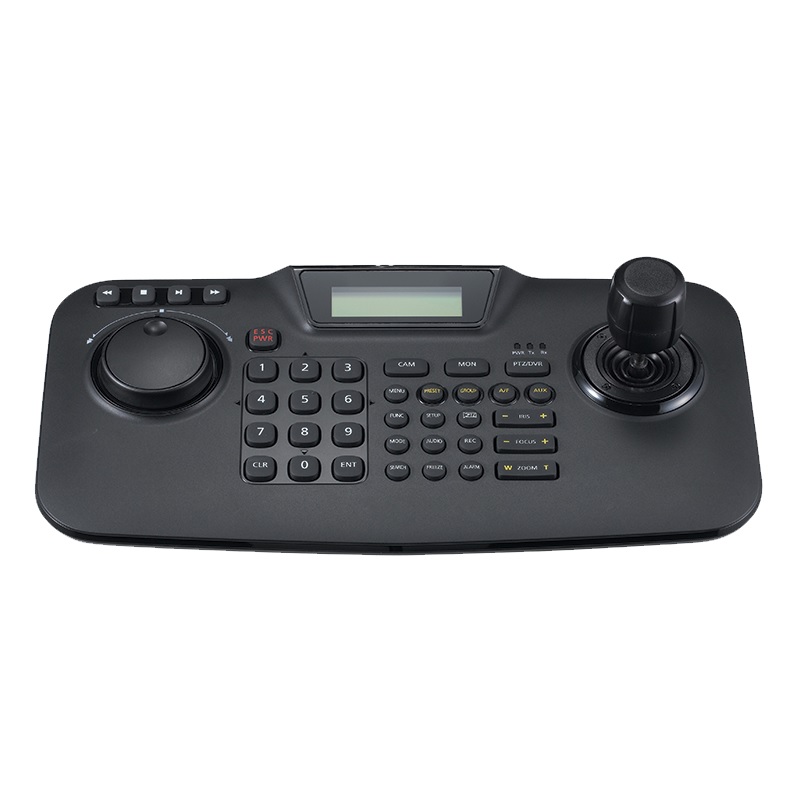
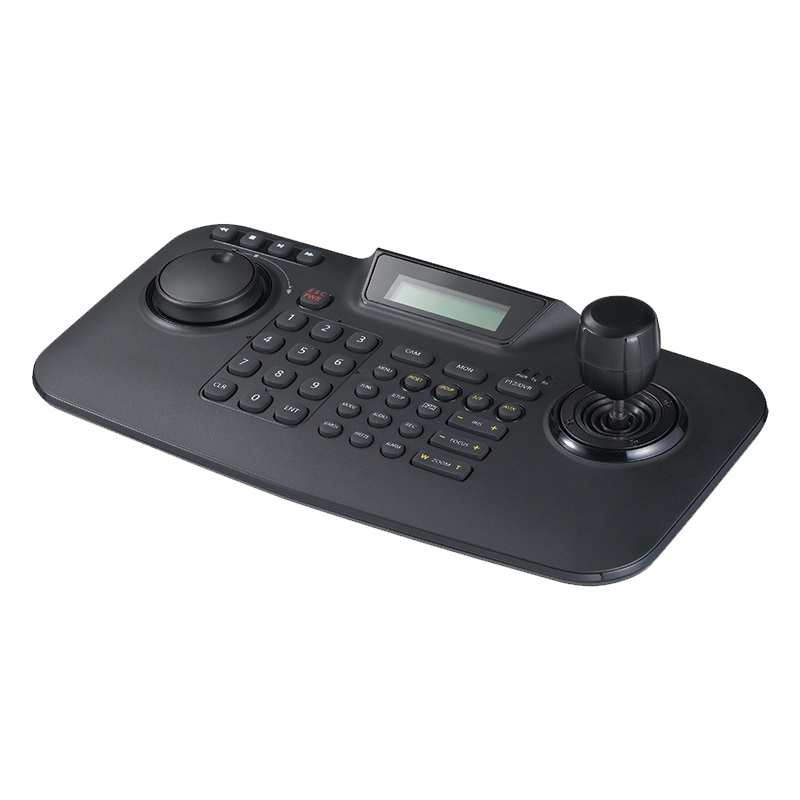
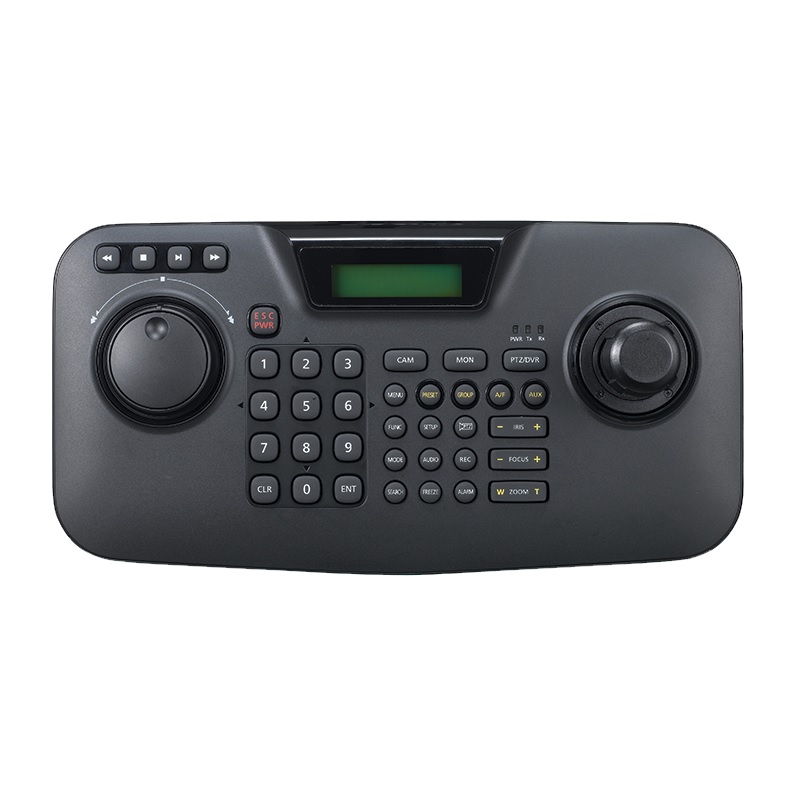
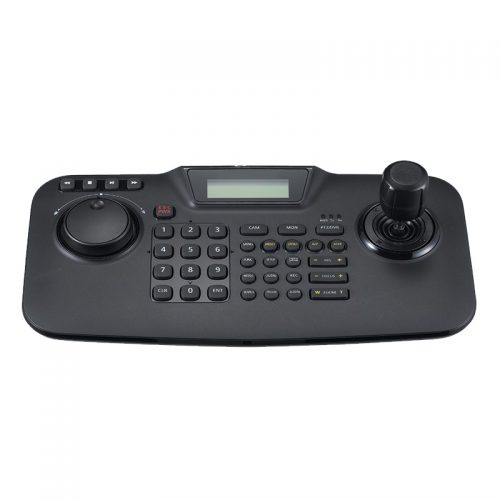
Built for operators who need direct, hands-on control over PTZ cameras and DVR systems, the Hanwha Vision HV-SPC-2010 is a professional-grade keyboard controller suited to security control rooms, monitoring desks, and multi-camera surveillance operations. It supports up to 255 PTZ cameras alongside DVR control from a single unit, making it a practical choice for installers and operators managing mid-to-large scale deployments. The HV-SPC-2010 features a 3D joystick for precise pan, tilt, and zoom input, a built-in jog shuttle for intuitive DVR playback navigation, and a 16 x 2 character LCD display for on-screen status feedback. OSD menu access allows configuration adjustments without leaving the control station. RS-485 and RS-422 connectivity ensures broad compatibility across supported Hanwha systems. Customisable hotkeys provide fast access to camera presets and frequently used functions, reducing operator response time during active monitoring.
Key Capabilities
3D Joystick PTZ Control
The 3-axis joystick delivers smooth, proportional control over pan, tilt, and zoom functions. Operators can track movement or position a PTZ camera with precision, reducing the lag and over-correction that comes with using software-only interfaces on a mouse or touchscreen.
Controls Up to 255 PTZ Cameras
A single HV-SPC-2010 can address up to 255 PTZ cameras as well as connected DVR systems. This capacity suits larger commercial or institutional installations where multiple PTZ units are deployed across a site and need to be managed from a central operator position.
Built-in Jog Shuttle
The jog shuttle wheel is designed for DVR playback control, allowing operators to scrub through recorded footage at variable speeds with tactile feedback. This makes reviewing incidents significantly faster than relying on a mouse-driven timeline slider on a monitor interface.
RS-485 and RS-422 Connectivity
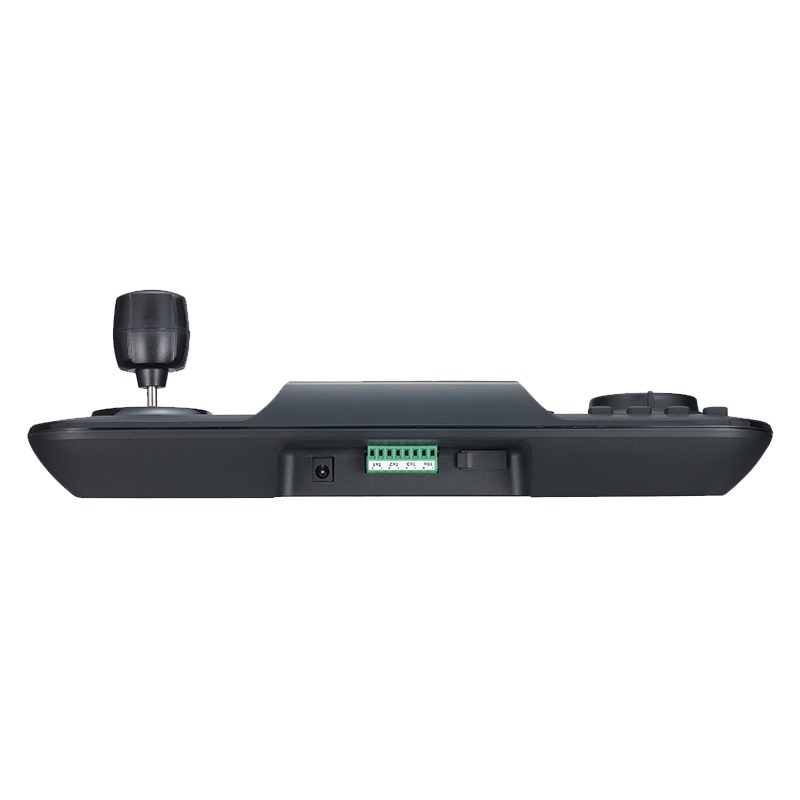
Support for both RS-485 and RS-422 serial protocols ensures compatibility across a range of Hanwha PTZ cameras and DVR hardware. These industry-standard interfaces allow the keyboard to integrate into existing cabling infrastructure without requiring additional adapters in most deployments.
16 x 2 LCD Display and OSD Access
The onboard 16 x 2 character LCD provides real-time status information including active camera ID and operational mode. Combined with OSD menu access, operators can review and adjust camera settings directly through the keyboard without switching focus to a separate monitor or VMS interface.
Best For
- PTZ-Heavy Installations: Sites running multiple PTZ cameras benefit from the 3D joystick and 255-camera address capacity, giving operators direct physical control that software interfaces cannot replicate for speed and responsiveness.
- Control Room Monitoring Desks: The ergonomic keyboard layout and LCD display make the HV-SPC-2010 suited to staffed monitoring positions where operators need to switch between cameras and review footage without leaving a central station.
- DVR Footage Review Workflows: The built-in jog shuttle is specifically useful for operators who regularly scrub through DVR recordings to locate incidents, providing tactile speed control that is faster and more intuitive than on-screen controls.
- Installations Using RS-485 or RS-422 Cabling: Where existing serial infrastructure is already in place, the HV-SPC-2010 connects without requiring protocol converters, simplifying integration into compatible Hanwha system environments.
Why Choose the HV-SPC-2010
The HV-SPC-2010 addresses a practical gap in surveillance operations: software-based PTZ control through a VMS mouse interface is imprecise and slow under pressure. The dedicated 3D joystick on this controller gives operators proportional, tactile PTZ movement that is far more accurate for tracking subjects or adjusting framing quickly. The jog shuttle adds real operational value for DVR review workflows, letting staff scrub recordings efficiently during incident investigation. With support for up to 255 cameras and dual RS-485/RS-422 serial connectivity, the HV-SPC-2010 suits both mid-size and larger deployments where multiple PTZ units need to be addressed from a single control point. Customisable hotkeys reduce the steps required to reach camera presets or frequently used functions. Available at Security Wholesalers, the HV-SPC-2010 is a straightforward, purpose-built controller for teams that need reliable, hardware-level PTZ and DVR control at their monitoring desk.
Buyer Decision Tips
Check Protocol Compatibility Before Purchasing: The HV-SPC-2010 communicates via RS-485 and RS-422 serial connections. Before installing, confirm that your PTZ cameras and DVR hardware support one of these protocols and that the correct cable runs are in place between the controller and the connected devices. IP-only PTZ cameras controlled exclusively over a network interface will not be addressed by this keyboard’s serial output.
Key Features & Technical Specifications
| Product Name |
Hanwha Vision HV-SPC-2010 PTZ, DVR Control Keyboard |
| SKU |
HV-SPC-2010 |
| Camera Control Capacity |
Up to 255 PTZ cameras |
| DVR Control |
Yes |
| Joystick Type |
3D joystick (pan, tilt, zoom) |
| Jog Shuttle |
Built-in jog shuttle for DVR playback control |
| Display |
16 x 2 character LCD |
| OSD Menu Access |
Yes |
| Communication Protocols |
RS-485, RS-422 |
| Hotkeys |
Customisable hotkeys for presets and functions |
| System Compatibility |
Superior compatibility with Hanwha Vision PTZ and DVR systems |
| Brand |
Hanwha Vision |
Ideal Use Cases
Security Control Rooms
Staffed monitoring stations handling multiple PTZ cameras benefit from the HV-SPC-2010’s 3D joystick and 255-camera address capacity. Operators can switch between camera positions and control PTZ movement without relying on a mouse, keeping response times low during active incidents.
Large Commercial and Institutional Sites
Hospitals, university campuses, shopping centres, and transport hubs operating PTZ-heavy systems can consolidate control through a single HV-SPC-2010 unit, addressing up to 255 cameras with RS-485 or RS-422 serial connections already built into the infrastructure.
Incident Review Workflows
Security teams reviewing DVR footage after an event benefit from the built-in jog shuttle, which allows variable-speed scrubbing through recordings. This is faster and more precise than using a software timeline, particularly when locating a specific moment across long recording periods.
Hanwha Vision System Integrations
Installers deploying Hanwha Vision PTZ cameras and DVR hardware can integrate the HV-SPC-2010 directly via RS-485 or RS-422, taking advantage of the keyboard’s OSD access and customisable hotkeys to configure and operate cameras from a single ergonomic control point.
Choosing the Right Model
- Choose this model if: You are operating Hanwha Vision PTZ cameras and DVR hardware over RS-485 or RS-422, need to control up to 255 cameras from a single operator position, and require physical joystick and jog shuttle control for efficient PTZ management and DVR playback review.
- Choose a different model if: Your PTZ cameras are controlled exclusively over IP networks via a VMS, as the HV-SPC-2010’s serial output is not suited to IP-only control workflows. Similarly, if your deployment only involves a small number of fixed cameras with no PTZ units, a dedicated keyboard controller may offer more functionality than your system requires.
FAQs
- How many PTZ cameras can the HV-SPC-2010 control at once?
The HV-SPC-2010 supports up to 255 PTZ cameras, addressed via RS-485 or RS-422 serial connections. Each camera is assigned an address within the system, and the operator selects the active camera through the keyboard to take direct joystick control over its pan, tilt, and zoom functions.
- What serial protocols does the HV-SPC-2010 support?
The keyboard supports both RS-485 and RS-422 serial communication protocols. These are the standard interfaces used by Hanwha Vision PTZ cameras and DVR systems. If your installation uses one of these protocols, the HV-SPC-2010 can typically connect directly to existing cabling without requiring additional converters.
- Can the HV-SPC-2010 control DVR playback as well as PTZ cameras?
Yes. The HV-SPC-2010 is designed for both PTZ camera control and DVR system operation. The built-in jog shuttle is specifically intended for DVR playback, allowing operators to scrub through recorded footage at variable speeds. This makes it a dual-purpose controller suited to monitoring desks where both live PTZ tracking and incident review are regular tasks.
- What does the 16 x 2 LCD display show during operation?
The onboard LCD provides real-time status information such as the currently selected camera ID and the active operational mode. It gives operators at-a-glance confirmation of which camera they are controlling without having to look away from the main monitor, which is particularly useful in multi-camera environments where switching between units happens frequently.
- Is this controller suitable for a staffed security monitoring desk?
Yes. The HV-SPC-2010 is well suited to a control room or security monitoring desk environment. Its ergonomic layout, physical 3D joystick, jog shuttle, customisable hotkeys, and LCD display are all designed for an operator who spends extended periods actively managing cameras and reviewing footage. Part of the Security Wholesalers range, it is stocked for professional installer and integrator customers setting up operator-focused control positions.
- Does the HV-SPC-2010 work with IP-based PTZ cameras over a network?
The HV-SPC-2010 communicates through RS-485 and RS-422 serial interfaces. It is not designed to control PTZ cameras that operate exclusively via IP network commands. If your PTZ cameras are managed entirely through a VMS over a LAN, this keyboard’s serial output will not interface with them. Confirm your camera’s supported control protocol before integrating this controller into your system.
Additional Information