Product Overview
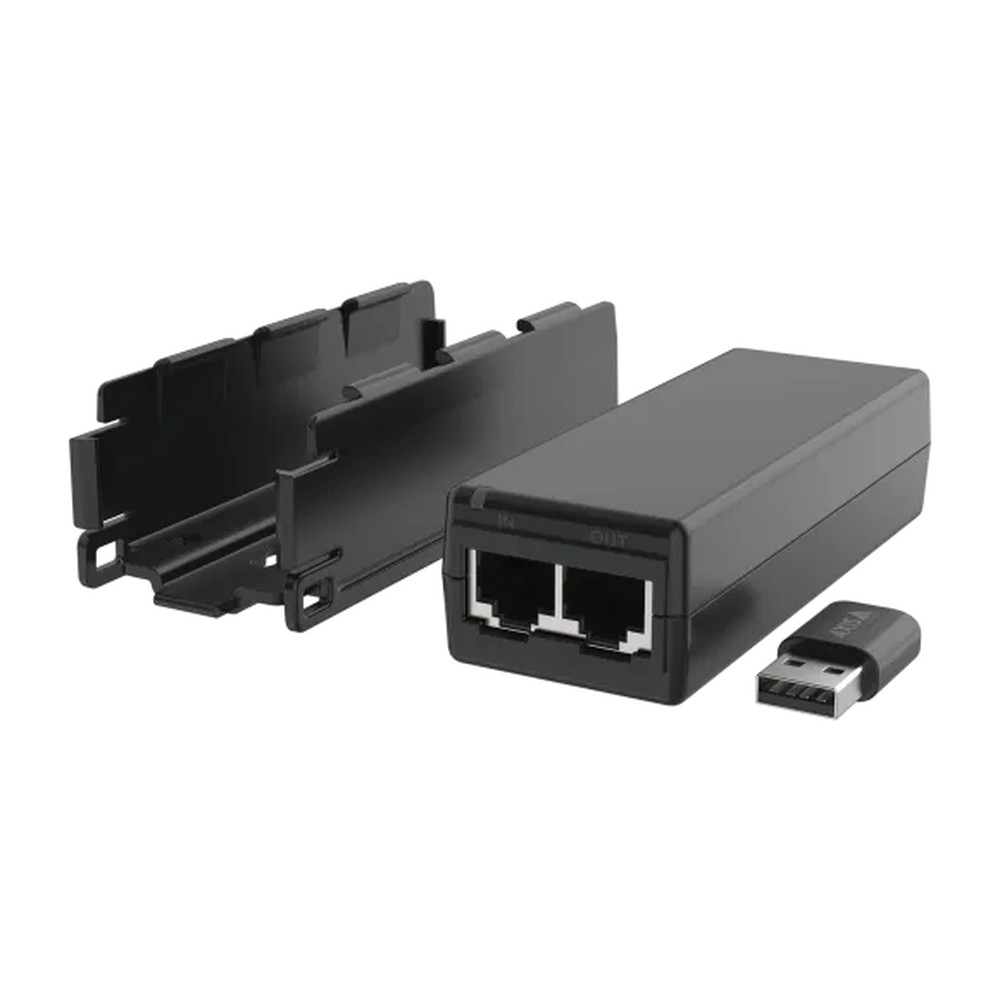
For installations where running Ethernet cable to an AXIS M1075-L Box Camera is not practical, the Axis TM1901 Wireless Kit provides a purpose-built solution. Designed exclusively for use with the M1075-L, this kit bundles a compact 802.11ac wireless adapter with a dedicated power injector, allowing the camera to connect to existing wireless infrastructure without requiring a cabled data or PoE run. Featuring support for both 2.4 GHz and 5 GHz frequency bands, the adapter is compatible with 802.11ac/b/g/n/a wireless standards, giving installers flexibility when working within different network environments. The power injector accepts 100-240 V AC input, making it suitable for standard Australian mains power. Operating conditions are rated for 0°C to 35°C, positioning this kit for use in controlled indoor environments. The Australian regional variant (02627-006) ships complete with the wireless adapter, power injector, power cable, and installation guide, all backed by a 5-year Axis warranty.
Key Capabilities
Dual-Band 802.11ac Wireless
Supporting both 2.4 GHz and 5 GHz networks via 802.11ac/b/g/n/a standards, this adapter connects the M1075-L to modern wireless infrastructure. The 5 GHz band is particularly useful in environments with heavy 2.4 GHz interference, such as busy office floors or retail spaces.
Included Power Injector
The bundled power injector accepts 100-240 V AC at 50-60 Hz, allowing the M1075-L to draw power directly from a standard mains outlet. This removes the dependency on a PoE switch or PoE-capable network infrastructure at the installation point.
Camera-Specific Compatibility
Engineered specifically for the AXIS M1075-L Box Camera, the TM1901 kit integrates without additional adapters or workarounds. This purpose-built compatibility reduces installation complexity and ensures the wireless connection is validated against the camera’s requirements.
Compact Adapter Form Factor
The wireless adapter measures just 29.5 x 15 x 8 mm and weighs 3.3 g, allowing it to sit discreetly at the camera without adding visual bulk. This matters in customer-facing or aesthetically sensitive indoor locations where minimal cable presence is preferred.
Best For
- Cable-Restricted Indoor Locations: Where structural constraints or tenancy agreements prevent cabling runs, the wireless adapter connects the M1075-L to the network without wall penetrations or trunking.
- Mains-Powered Wireless Deployments: The included 100-240 V AC power injector suits situations where a mains power outlet is available but no PoE switch or data port is nearby.
- Temporary or Flexible Camera Positioning: Where the M1075-L may need to be repositioned periodically, a wireless connection avoids the need to re-route or extend Ethernet cabling each time.
Why Choose the Axis TM1901 Wireless Kit
Generic USB wireless adapters or third-party Wi-Fi bridges introduce compatibility uncertainty and additional configuration steps that a validated, camera-specific kit avoids. The TM1901 Wireless Kit is designed and warranted by Axis Communications for use with the AXIS M1075-L Box Camera, ensuring the wireless connection is supported within the Axis ecosystem. The dual-band 802.11ac adapter provides access to the less congested 5 GHz band, which is a practical advantage in multi-tenancy buildings or commercial environments with many competing wireless devices. The power injector eliminates the need for a PoE infrastructure at the mounting point, simplifying deployment in locations with mains access but no network port. At just 3.3 g, the adapter adds no meaningful physical load. With a 5-year Axis warranty and Australian regional approval, this kit is available at Security Wholesalers for installers and end users running M1075-L deployments where wired connectivity is not feasible.
Package Inclusions
- 1 x Wireless adapter (802.11ac/b/g/n/a, 2.4 GHz and 5 GHz)
- 1 x Power injector (100-240 V AC, 50-60 Hz, 1.9 m cable)
- 1 x Power cable
- 1 x Installation guide
Buyer Decision Tips
Confirm Your Wireless Environment First: The TM1901 kit operates within 0°C to 35°C, which limits it to controlled indoor settings. Before ordering, verify that your wireless network can accommodate the M1075-L at the intended mounting location, particularly for 5 GHz band coverage which has shorter range than 2.4 GHz. If the camera will be installed in a building with thick concrete or masonry walls, test wireless signal strength at the planned position before committing to a wireless deployment.
Key Features & Technical Specifications
| Product Name |
Axis TM1901 Wireless Kit |
| Part Number |
02627-006 (AU regional variant) |
| Compatible Camera |
AXIS M1075-L Box Camera |
| Wireless Standards |
802.11ac/b/g/n/a |
| Frequency Bands |
2.4 GHz and 5 GHz |
| Power Injector Input |
100-240 V AC, 50-60 Hz |
| Cable Length |
1.9 m |
| Wireless Adapter Dimensions |
29.5 x 15 x 8 mm |
| Power Injector Dimensions |
106 x 40 x 27 mm |
| Wireless Adapter Weight |
3.3 g ±0.25 g |
| Power Injector Weight |
100 g |
| Operating Temperature |
0°C to 35°C |
| Storage Temperature |
-20°C to 75°C |
| Safety Certifications |
IEC/EN/UL 62368-1 |
| Warranty |
5 years (Axis Communications) |
| Box Contents |
Wireless adapter, power injector, power cable, installation guide |
Ideal Use Cases
Heritage or Leased Buildings
Where drilling or cabling is restricted by heritage regulations or lease conditions, the TM1901 kit allows the AXIS M1075-L to connect wirelessly using existing Wi-Fi infrastructure, with power supplied via the included mains injector.
Retail Fit-Outs with Limited Network Points
In retail environments where network ports are limited or positioned away from camera mounting locations, the dual-band 802.11ac adapter provides a clean wireless connection to the M1075-L without additional switching infrastructure.
Temporary Event or Pop-Up Surveillance
For short-term camera deployments at events or temporary trading sites, the TM1901 kit eliminates the need to run and retrieve Ethernet cabling. The camera can be positioned, powered from mains, and connected to the wireless network quickly.
Office Spaces with Suspended Ceilings
In open-plan offices with limited cable pathways, the compact 29.5 x 15 x 8 mm adapter allows the M1075-L to connect wirelessly at ceiling level, powered by a mains outlet, without requiring conduit runs back to a network switch.
Choosing the Right Model
- Choose this kit if: You are deploying an AXIS M1075-L Box Camera in an indoor location where Ethernet cabling is not available or practical, and you have access to a 2.4 GHz or 5 GHz wireless network and a standard mains power outlet within reach of the 1.9 m power cable.
- Choose a wired deployment if: The installation environment has reliable Ethernet infrastructure already in place. A wired connection will consistently deliver lower latency and higher throughput than Wi-Fi, and avoids any exposure to wireless interference or signal dropout that can affect video continuity.
- Consider your temperature range: The TM1901 kit is rated to a maximum of 35°C. If the camera location regularly exceeds this, such as in plant rooms, unventilated roof spaces, or external positions, this kit is not appropriate and a wired connection with suitable cabling should be used instead.
FAQs
- Which camera is the Axis TM1901 Wireless Kit compatible with?
The TM1901 Wireless Kit (02627-006) is designed specifically for use with the AXIS M1075-L Box Camera. It is not a generic wireless accessory and is not confirmed as compatible with other Axis camera models. If you are deploying a different Axis model, check the relevant camera’s accessories page for validated wireless options.
- Does the kit support both 2.4 GHz and 5 GHz networks?
Yes. The wireless adapter supports 802.11ac/b/g/n/a standards and can connect to both 2.4 GHz and 5 GHz wireless networks. The 5 GHz band is generally less congested in environments with many competing wireless devices, though it has shorter effective range than 2.4 GHz. Choose the band that provides the strongest and most stable signal at the camera location.
- What does the power injector do, and what power supply does it require?
The power injector powers the AXIS M1075-L via the kit’s cable without requiring a PoE switch or PoE-capable network port. It accepts 100-240 V AC at 50-60 Hz, which is compatible with standard Australian mains power. The cable between the injector and the camera is 1.9 m long, so the outlet needs to be within that distance of the camera mounting position.
- Can this kit be used outdoors?
No. The TM1901 Wireless Kit has an operating temperature range of 0°C to 35°C, which is suited to controlled indoor environments only. No IP or IK ingress protection rating is confirmed for the kit components. Using the kit in an outdoor or uncontrolled environment risks damage from temperature extremes, moisture, or dust and would void warranty coverage.
- What warranty does the TM1901 Wireless Kit carry, and where is it available in Australia?
The TM1901 Wireless Kit is covered by a 5-year Axis Communications warranty. The 02627-006 part number is the Australian regional variant, certified to IEC/EN/UL 62368-1 safety standards. It is offered through Security Wholesalers as part of the Axis accessories range, supplied with the wireless adapter, power injector, power cable, and installation guide included in the box.
Cabling Considerations
- Power Cable Run: The power injector cable is 1.9 m in length. The mains power outlet must be within this distance of the camera mounting position, or a compliant extension arrangement must be used. No additional Ethernet run is required between the camera and the network.
- Mains Power Requirements: The power injector accepts 100-240 V AC at 50-60 Hz, which is compatible with standard Australian mains outlets. No special power conditioning is required under normal indoor operating conditions.
- Wireless Signal Path: There is no data cable run required from the camera to the network. Ensure the wireless access point providing the 2.4 GHz or 5 GHz signal has adequate coverage at the camera mounting location before finalising placement. Thick concrete or masonry walls between the camera and the access point can significantly reduce 5 GHz signal strength.
- Wiring Tips: Keep the power injector in a clean, ventilated indoor location within the 0-35°C operating range. Do not route the power cable through wall cavities or ceiling spaces where ambient temperatures may exceed the rated limit. Label the wireless network connection in the camera configuration to avoid accidental disconnection during future network maintenance.
Additional Information
AXIS 02627-006 Datasheet