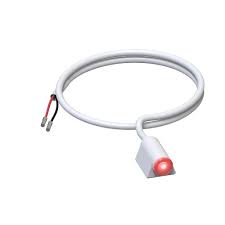
AXIS I/O Indication LED | External Recording Status Indicator | Pack of 4
The AXIS I/O Indication LED is a simple external LED indicator designed to show when an Axis camera is active or recording. Suited to healthcare, retail, transport, public areas and privacy-sensitive environments, it provides a clear visual cue that surveillance is in operation. This product is sold as a pack of 4 units. Part number: 01765-001.
Key Features
Recording Status Indicator: Provides a clear visual signal when an Axis camera is active or recording.
Broad Application Suitability: Designed for use in healthcare, retail, transport and other privacy-sensitive environments.
Simple Installation: Connects directly to compatible Axis cameras via the I/O port for straightforward setup.
Pack of 4: Each purchase includes 4 individual LED indicator units.
In environments where people need to know when they are being monitored, the AXIS I/O Indication LED provides a clear, configurable visual signal that a connected Axis camera is active, recording, or responding to a triggered event. Supplied as a pack of 4 units under part number 01765-001, this compact accessory connects to the I/O port of a compatible Axis camera and can be configured through the camera’s own settings. When triggered, it displays a red LED, giving a direct and unambiguous indication of surveillance activity. It supports event-based activation, including motion detection and audio detection, so the LED can light up only when a specific condition is met rather than continuously. Installation is straightforward using an adhesive strip and a single cable, making it practical for retrofitting into existing Axis deployments without additional infrastructure. It is well suited to healthcare rooms, retail spaces, public corridors, transport hubs, and any location where visible recording status is a legal, ethical, or operational requirement.
Key Capabilities
I/O Port Integration
Connects directly to the I/O port of a compatible Axis camera via a single cable. No separate power supply or controller is required, keeping installation clean and contained within the existing camera setup.
Event-Triggered Activation
The LED can be configured to activate in response to camera events including motion detection and audio detection. This allows the indicator to alert bystanders only when surveillance is actively triggered, rather than signalling continuously throughout the day.
Privacy Compliance Signalling
A clearly visible red LED signal helps organisations meet obligations around notifying individuals when surveillance is in operation. This is particularly relevant in healthcare, interview, and treatment settings where consent and transparency are required.
Adhesive-Strip Mounting
Quick to position using an adhesive strip, with no drilling or bracket hardware required. The compact form factor allows discreet surface mounting near the camera in locations where wall or ceiling modification is not practical.
Best For
Healthcare and Treatment Rooms: Provides visible confirmation of when a patient or client is being monitored, supporting privacy transparency in clinical and care environments.
Retail and Commercial Areas: Acts as a deterrent indicator in stores, rear exits, and staff-only zones by making the recording status immediately visible to anyone in the space.
Transport Hubs and Public Corridors: Supports visible surveillance signage obligations in high-traffic public areas where individuals should be informed of active monitoring.
Existing Axis Camera Deployments: Designed as a retrofit accessory for compatible Axis cameras with I/O ports, allowing installers to add recording status indication without replacing cameras or adding separate hardware.
Why Choose the AXIS I/O Indication LED (01765-001)
The 01765-001 is a purpose-built accessory from Axis Communications, engineered to integrate directly with compatible Axis cameras rather than relying on generic third-party indicators. Because it connects through the camera’s I/O port and is configured within the camera’s own settings, the LED behaviour is tied directly to camera events rather than operating independently. This means the visual signal is accurate and responsive, whether the camera is continuously recording, triggered by motion, or activated by audio. The pack-of-4 format makes it cost-effective for multi-room deployments such as clinic suites, retail chains, or transport facilities where consistent signalling across multiple cameras is needed. The adhesive-strip mounting and single-cable connection reduce installation time significantly on sites where multiple units are being fitted. Available through Security Wholesalers, the 01765-001 carries the Axis 3-year manufacturer warranty. Note that a 30-day lead time applies, so plan procurement accordingly for time-sensitive projects.
Buyer Decision Tips
Compatibility Check Before Ordering: The AXIS I/O Indication LED requires the connected Axis camera to have a functioning I/O port. Not every Axis camera model supports this connection. Before purchasing, confirm that your specific Axis camera model has an available I/O port and is listed as compatible with this accessory. Also factor in the 30-day lead time when planning installations with a fixed completion date.
Key Features & Technical Specifications
Part Number
01765-001
Pack Quantity
4 units per pack
Indicator Type
External LED (red)
Connection Method
Single cable to camera I/O port
Compatible Systems
Compatible Axis cameras and I/O-capable Axis devices (check model compatibility before ordering)
Configuration
Configured via the connected Axis camera’s settings
Hospitals, clinics, and aged care facilities benefit from the LED’s ability to show patients and residents exactly when monitoring is active, supporting duty-of-care obligations and privacy transparency requirements.
Retail and Loss Prevention
A clearly lit recording indicator near a camera in a retail environment acts as a visible deterrent. The event-triggered activation means the LED draws attention at the moment motion or audio is detected in the monitored area.
Transport and Public Spaces
Airports, train stations, bus depots, and public corridors where signage obligations apply can use this accessory to provide a clear, live indication that surveillance is operating, without relying on static signage alone.
Interview and Consultation Rooms
Legal, medical, and HR interview environments where it must be demonstrably clear to all parties that recording is taking place can use the 01765-001 as a live status indicator connected directly to the room’s Axis camera.
Choosing the Right Model
Choose this model if: You are working with compatible Axis cameras that have available I/O ports and need a pack of 4 recording status indicators that integrate directly with the camera’s event configuration, particularly in healthcare, retail, or public-facing environments.
Choose a different approach if: Your cameras do not have I/O ports, or you are working with non-Axis cameras. In those cases, a standalone recording indicator light or a separate signage-based solution would be more appropriate, as the 01765-001 requires direct I/O port connectivity to an Axis device.
FAQs
Is the AXIS I/O Indication LED a camera? No. The 01765-001 is a standalone LED indicator accessory only. It does not capture, record, or transmit video. It is designed to connect to a compatible Axis camera or I/O-capable Axis device and visually signal when that camera is active, recording, or responding to a configured event.
How many units are included in this purchase? This listing supplies a pack of 4 AXIS I/O Indication LED units under part number 01765-001. This makes it well suited to multi-room or multi-camera installations where consistent recording status indication is needed across several locations.
What does the LED actually display? When triggered, the indicator displays a red LED. The activation condition is configured through the connected Axis camera’s own settings, so the LED can be set to show continuously during recording, or only when a specific event such as motion detection or audio detection occurs.
Does every Axis camera work with this accessory? No. The 01765-001 requires the camera to have a compatible I/O port. Not all Axis camera models include this port. Always verify compatibility with your specific Axis camera model before ordering. Contact Security Wholesalers if you need assistance confirming whether your camera model is supported.
How is the LED physically mounted? Installation uses an adhesive strip to fix the LED to a surface, combined with a single cable connection to the camera’s I/O port. No drilling or mounting brackets are required, which makes it straightforward to position near the camera in a range of indoor locations.
Is there a lead time for this product? Yes. A 30-day lead time applies to the 01765-001. This should be factored into project timelines, particularly for installations with a fixed completion date such as healthcare fit-outs, retail refurbishments, or staged transport infrastructure upgrades.
Additional Information
No additional downloads available for this product.
All AXIS Communications IP cameras and recording devices (NVRs/DVRs) are covered by a
3-year back-to-base manufacturer warranty.
Note: Disk drives are limited to a 3-year warranty.
Our warranty is limited to the replacement of faulty items or parts
and does not include damage caused by incorrect fitting of parts or accessories.
(a) Australian Consumer Law (ACL)
Certain legislation, including the Australian Consumer Law (ACL) in the Competition and Consumer Act 2010 (Cth), and similar consumer protection
laws and regulations may confer you with rights, warranties, guarantees, and remedies
relating to the provision of goods or services to you by us via the Site which cannot
be excluded, restricted, or modified. Our liability is governed solely by the ACL and
these Terms.
(b) Goods
If you are a consumer as defined in the ACL, the following notice applies to you:
“Our goods come with warranties and guarantees that cannot be excluded under the
Australian Consumer Law (Consumer Guarantees). You are entitled to a replacement or
a refund for a major failure and for compensation for any other reasonably foreseeable
loss or damage. You are also entitled to have the goods repaired or replaced if the
goods fail to be of acceptable quality and the failure does not amount to a major
failure.”
(c) Our Warranties
To the extent permitted by law, we exclude all express and implied warranties,
and all material and work is provided to you without warranties of any kind,
either express or implied. We expressly disclaim all warranties including but
not limited to implied warranties of merchantability and fitness for a particular
purpose.
(d) Manufacturer Warranties
Certain products, including particular models of IP security cameras and DVR/NVR
equipment, may come with a manufacturer’s warranty. The manufacturer’s warranty is
in addition to but may overlap with any rights and remedies you may have under
applicable law, including any Consumer Guarantees. If you are not considered a
“consumer” within the meaning of the ACL, the manufacturer’s warranty may be your
sole remedy. Many manufacturers’ warranties do not apply in a business or commercial
setting. Please contact the manufacturer if you would like to make a claim under
the manufacturer’s warranty.
(e) Repair, Replacement, or a Refund
If you wish to seek repair, replacement, or a refund for a product, please
contact us and we will explain the requirements to you. This may include you
providing evidence of the faulty product to us.
(f) Refund
You are not entitled to a refund for change of mind. If you are entitled to a
refund, we will only provide it once evidence of the faulty product is received
by us, or once we have received the product at our warehouse and inspected it
to assess whether it is eligible for a refund under these Terms. Any refund we
make will be by the same payment method used to purchase the product.
(g) Installed Products
Subject to this clause, we will not accept for return any product that has been
used, connected, installed, attempted to be connected or installed, or if your
product is custom-made or is a special buy product.
(h) Packaging
You must adequately package any product you are returning for our collection
to ensure that it is not damaged during return delivery to our warehouse. You
are also responsible for arranging the return delivery and the costs involved.
(i) Duty of Care
You have a duty of care for the product while it is in your possession. If
you damage products and then subsequently return them, you may be liable to pay
to repair the product to its original condition. In these circumstances, where
a repair is not economically viable, no refund will be made.
At SecurityWholesalers.com.au, we prioritise fast and reliable delivery across Australia. Whether you’re ordering for home or business, you can expect professional service, tracked shipments, and speedy fulfilment — every time.
✔ FREE Shipping Australia-Wide on Orders Over $100
Enjoy free express shipping on all orders over $100. For orders under $100, a flat rate of $20.00 applies. We proudly offer nationwide delivery using trusted courier partners for your peace of mind.
✔ Same-Day Despatch for Fast Delivery
Place your order before 10am (Sydney time) on any business day and we’ll do our best to despatch it the same day, subject to stock availability. We receive new stock into our warehouse every second day, so we always strive to ship the freshest arrivals directly to you. Most orders are received within 1-3 business days via the Express Post network, covering Australian capital cities and major metro areas. Deliveries to regional locations typically take 2–5 business days.
For urgent orders, please contact our customer care team to expedite the delivery and ensure that we can get your equipment to your project site on time.
✔ Reliable Couriers You Can Trust
We primarily use StarTrack Express for fast, secure shipping. Depending on warehouse availability, we may also use Toll or Couriers Please — whichever gets your order to you fastest.
✔ Order Processing & Tracking
Orders are processed Monday to Friday (excluding public holidays) and shipped within 24 hours. Tracking numbers are emailed to you by 11pm on the day your order ships. You can monitor your delivery through:
✔ Missed a Delivery?
If you’re not home at the time of delivery, your parcel will be left in a secure location if considered safe. If not, a collection card will be left and the parcel will be held at the nearest depot or post office for pickup.
✔ Need Help?
If you haven’t received your order within 4 business days, please contact us with your full name and order number. We’ll follow up promptly. Also, be sure to check your email spam folder for shipping notifications or attempted delivery messages.
Trade Discounts Available
Want even more savings? Register instantly for a Trade Account and, once approved, you’ll gain access to exclusive discounts on a wide range of products. It’s our way of supporting installers, resellers, and industry professionals with better pricing and priority service.
Your Shopping Cart will be saved and you'll be given a link. You, or anyone with the link, can use it to retrieve your Cart at any time.
Back
Save & Share Cart
Your Shopping Cart will be saved with Product pictures and information, and Cart Totals. Then send it to yourself, or a friend, with a link to retrieve it at any time.
Your cart email sent successfully :)
AXIS I/O Indication LED – External Recording Status Indicator