Product Overview
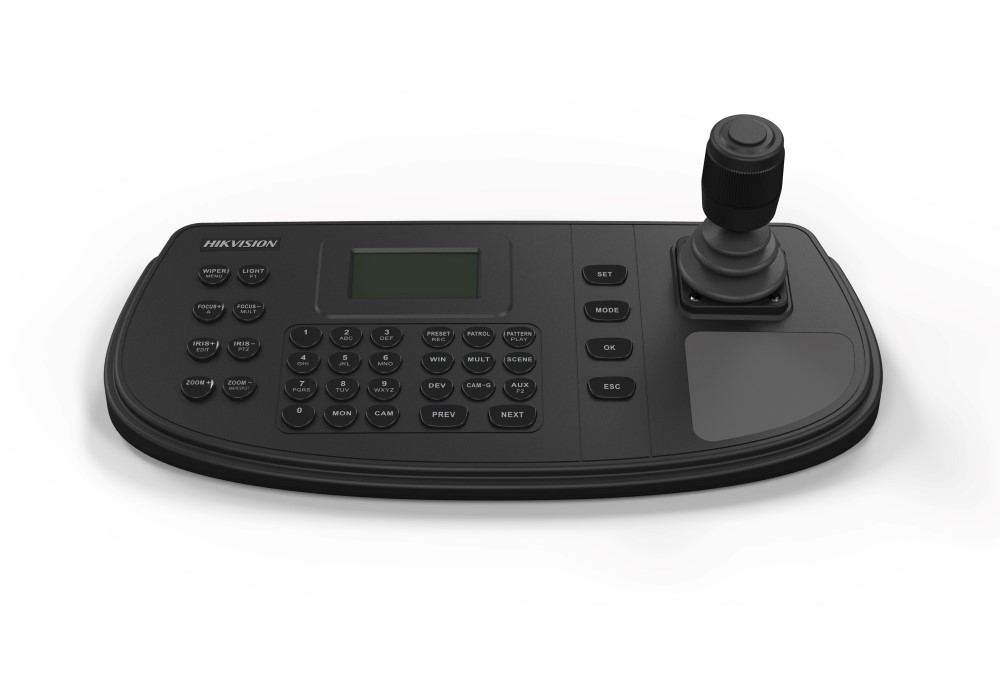
Control rooms and security operations centres handling large-scale Hikvision deployments need a dedicated hardware interface that keeps operators in command without relying solely on software clients. The DS-1200KI is a professional network keyboard built around a 4-axis joystick, giving operators direct tactile control of PTZ cameras, video recorders, video wall controllers, decoders, and matrix access gateways across a single unified interface. Featuring a 128 x 64 display and web browser-based configuration, the DS-1200KI can manage up to 1000 connected devices in keyboard operation mode. It connects via network or serial port, supporting RS-232, RS-422, and RS-485 interfaces alongside USB. User access is managed through 16 accounts, comprising 1 administrator and 15 operators. This EXPORT version is suited to commercial and enterprise surveillance deployments requiring structured operator roles, hardware-level PTZ precision, and scalable device management across Hikvision-based systems.
Key Capabilities
4-Axis Joystick PTZ Control
The 4-axis joystick allows operators to pan, tilt, zoom, and focus PTZ cameras with physical precision that a mouse or touchscreen cannot replicate. This is particularly important in live monitoring environments where response speed and fine movement control directly affect situational awareness.
Up to 1000 Device Management
In keyboard operation mode, the DS-1200KI supports management of up to 1000 devices. This makes it practical for large enterprise campuses, transport hubs, or multi-building sites where a single operator workstation must reach a broad device inventory without switching between multiple control applications.
Multi-System Connectivity
The keyboard connects to MVC, VAG, video wall controllers, decoders, DVRs, and PTZ dome cameras via network or serial interfaces including RS-232, RS-422, and RS-485. This flexibility allows integration into both IP-based and legacy serial infrastructure within a mixed Hikvision environment.
16-Account User Management
With 1 administrator and 15 operator accounts, the DS-1200KI supports structured access control across shifts and roles. Administrators can manage system configuration while operators retain functional control of cameras and video walls, supporting accountability in multi-operator control rooms.
USB Configuration and Image Storage
System firmware upgrades and configuration import/export are handled via USB flash disk, simplifying maintenance without requiring network access to the keyboard itself. Captured still images can also be saved directly to a FAT32-formatted USB drive, creating a local evidence capture workflow at the operator console.
Best For
- Control Room PTZ Operation: Operators managing live PTZ cameras benefit from the 4-axis joystick for precise directional and zoom control that software interfaces cannot match in speed or feel.
- Large-Scale Hikvision Deployments: Sites with up to 1000 Hikvision devices can be managed through a single keyboard, reducing the need for multiple client workstations in enterprise or multi-building environments.
- Video Wall Management: Operators can perform shortcut switching of cameras and camera groups directly on connected video wall controllers, improving response time during incidents.
- Multi-Operator Security Centres: The 16-account system with defined administrator and operator roles suits shift-based control rooms where access levels need to be enforced per user.
Why Choose the DS-1200KI
Software-based PTZ control is adequate for occasional use, but dedicated operator workstations in professional monitoring environments require hardware that delivers consistent tactile feedback and immediate response. The DS-1200KI separates itself from software-only control through its 4-axis joystick, 128 x 64 onboard display, and serial port compatibility across RS-232, RS-422, and RS-485, allowing it to reach both modern IP infrastructure and legacy serial-connected equipment. The capacity to manage up to 1000 devices in a single keyboard session means larger facilities do not need to segment their operator tooling. Web browser configuration keeps setup straightforward without specialist software, and USB-based image capture provides a direct evidence workflow at the console. The EXPORT model is specifically intended for commercial deployments outside China, available at Security Wholesalers as part of the professional Hikvision peripherals range.
Buyer Decision Tips
Buyer Tip: The DS-1200KI connects to Hikvision devices via network or serial port. Before purchasing, confirm which connection method your existing system supports. If your DVRs or PTZ cameras use RS-485 serial control, verify that the cable runs and baud rate settings are compatible with the keyboard. For purely IP-based systems, network connectivity via a switch is the simpler path and allows you to reach the full 1000-device capacity in keyboard operation mode.
Key Features & Technical Specifications
| Model |
DS-1200KI |
| Display |
128 x 64 screen |
| Joystick |
4-axis |
| Serial Interfaces |
RS-232, RS-422, RS-485 |
| USB |
Yes – for firmware upgrade, configuration import/export, and image storage |
| Network Connectivity |
Yes – network access and web browser configuration supported |
| Maximum Managed Devices |
Up to 1000 (in keyboard operation mode) |
| User Accounts |
16 total – 1 administrator, 15 operators |
| Compatible Devices |
PTZ dome cameras, DVRs, Multi-functional Video Center (MVC), Matrix Access Gateway (VAG), Video Wall Controllers, decoders |
| DVR Connection |
Via network or serial port with front panel button operation support |
| Image Capture Storage |
FAT32 USB flash disk |
| Configuration Method |
Web browser |
| Power Supply |
12VDC |
| Version |
EXPORT |
Ideal Use Cases
Security Operations Centres
Dedicated control rooms with multiple operators benefit from the DS-1200KI’s 16-account management structure and joystick precision. Shift supervisors can hold administrator access while monitoring staff operate within their defined operator roles.
Transport and Transit Hubs
Airports, train stations, and bus terminals with large camera counts spread across multiple zones benefit from the keyboard’s ability to manage up to 1000 devices in a single session, allowing operators to switch between camera views and PTZ positions without changing control tools.
Video Wall Control Environments
When connected to a Hikvision Video Wall Controller or decoder, the DS-1200KI supports shortcut switching of camera and camera group views, giving operators fast visual management of large display arrays during incidents or routine monitoring.
Mixed IP and Serial Environments
Sites running a combination of network-connected devices and older serial-connected equipment can use the DS-1200KI’s RS-232, RS-422, and RS-485 ports alongside its network interface to control both infrastructure types from a single console without adding conversion hardware.
Enterprise Campus Surveillance
Large commercial properties with DVRs, PTZ cameras, and video management systems across multiple buildings can be consolidated under one keyboard interface. Web browser configuration and USB-based system management reduce the time needed for routine maintenance and firmware updates.
Choosing the Right Model
- Choose this model if: Your deployment uses Hikvision PTZ cameras, DVRs, video wall controllers, or decoders and you require hardware joystick control with multi-operator account management and the ability to manage up to 1000 devices from a single network keyboard.
- Choose a different model if: Your site has only a small number of fixed cameras with no PTZ control requirements. A software-based VMS client may be sufficient and more cost-effective for simpler installations without dedicated operator workstations or video wall infrastructure.
- Consider serial compatibility before purchasing: If your existing infrastructure relies entirely on network-connected devices, the serial interfaces on the DS-1200KI will go unused. Confirm that the network-based management pathway covers your full device range before committing to this keyboard over a simplified control solution.
FAQs
- How many devices can the DS-1200KI control at once?
In keyboard operation mode, the DS-1200KI supports management of up to 1000 connected devices. This includes PTZ cameras, DVRs, video wall controllers, decoders, Multi-functional Video Centers, and Matrix Access Gateways, making it suitable for large-scale commercial and enterprise deployments where a single control point needs broad reach.
- What serial interfaces does the DS-1200KI support?
The keyboard includes RS-232, RS-422, and RS-485 serial interfaces in addition to USB and network connectivity. This allows it to connect to both modern IP infrastructure and legacy serial-controlled devices within the same installation, without requiring separate interface converters at the operator workstation.
- Can multiple operators use the DS-1200KI with different access levels?
Yes. The DS-1200KI supports 16 user accounts, structured as 1 administrator and 15 operators. The administrator account manages system configuration and account settings, while operator accounts provide functional access to camera control and video wall switching. This structure suits shift-based control rooms where role separation is required.
- How is the DS-1200KI configured and updated?
Initial configuration and ongoing management are performed via a web browser, allowing administrators to set up devices and accounts without installing dedicated software. Firmware upgrades and configuration file import/export are handled using a USB flash disk, which also serves as local storage for captured still images saved in FAT32 format.
- Is the DS-1200KI compatible with Hikvision video wall and matrix systems?
Yes. The keyboard is specifically listed as compatible with Hikvision’s Multi-functional Video Center (MVC) and Matrix Access Gateway (VAG), as well as video wall controllers and decoders. Operators can perform shortcut switching of cameras and camera groups directly on video wall displays, which is useful during incident response where rapid view changes are needed.
- What does the EXPORT designation mean for the DS-1200KI?
The EXPORT version is intended for markets outside China. If you are purchasing through Security Wholesalers for use in Australia or internationally, this is the correct variant for your region. Ensure your installation uses a compatible 12VDC power supply appropriate for your local mains voltage when deploying the keyboard.
Additional Information