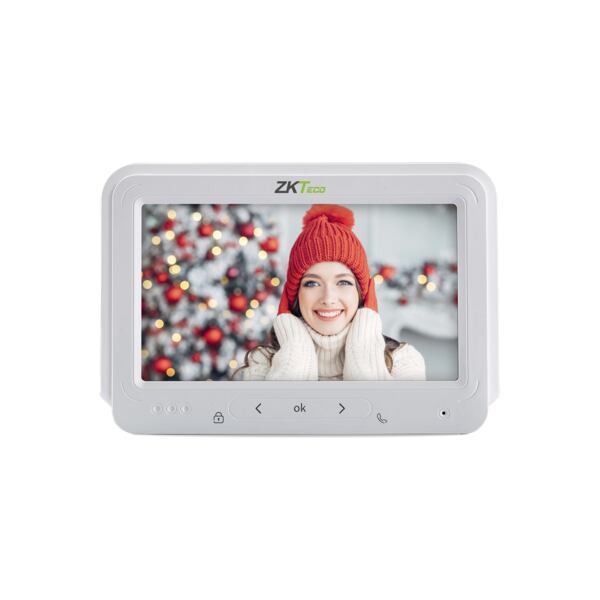
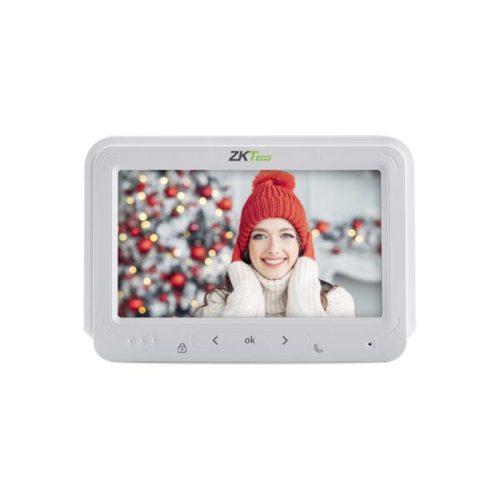
ZKTeco VT07-A50L 7-Inch 4-Wire Indoor Video Intercom Monitor
Product Overview
The VT07-A50L is the indoor monitor supplied with the VK07-A50L kit. It provides a fixed indoor point for viewing and answering visitors through a compatible outdoor door station. Use it as a replacement monitor or as an additional answering point in a supported system.
The monitor combines a 7-inch IPS display with two-way audio and local photo and video recording. Optional dual lock control depends on the locking hardware and how the intercom is wired.
Key Capabilities
Screen
7-inch IPS LCD, 1024 × 600. The screen gives occupants a dedicated answering point that can be mounted near a kitchen, reception desk or another regularly occupied area. Check the planned viewing position before fixing the bracket.
Connection
Four-wire analogue. This is designed for the compatible ZKTeco four-wire system. For an existing run, check the conductor assignments at both ends against the wiring diagram before connecting power.
Recording
Manual and automatic photo and video recording. The recording functions can capture footage locally at the monitor. Decide how recorded files will be reviewed and set the available recording options during commissioning.
Local storage
TF/microSD card up to 128 GB. Check the required card type and capacity before ordering storage. Make sure the intended recording mode and playback work on the installed monitor before handing it over.
Power supply
15 V DC, 1.2 A. Plan a suitable power outlet or supply position within reach of the monitor. Follow the manufacturer's diagram if the system includes additional monitors or outdoor stations.
Installation and Compatibility
Plan a wall mounting position and an appropriate power supply. Check the manufacturer’s wiring diagram and any expansion requirements before reusing existing cables.
Before replacing a component, identify the model number on the existing door station and indoor monitor and note the wiring layout. Check mounting dimensions, cable condition and termination requirements before removing existing hardware. For an expansion, check the system limits and wiring arrangement for the number of connected devices.
After installation, place a test call from the outdoor station and confirm the picture and two-way audio at every intended answering point. Where fitted, test recording and playback as well as each lock-release function. Record the connected model numbers and cable layout so future replacements are easier to verify.
Choosing the Right Model
Confirm the outdoor station model and wiring before ordering. For both the monitor and a compatible outdoor door station, choose the VK07-A50L kit.
This listing supplies the individual component for the compatible intercom system. Check whether the original equipment, cable and installation hardware can be reused. If you are starting from an empty site, the matching kit includes both the outdoor station and indoor monitor, making it easier to specify the core equipment together.
For installations that release an electric strike or gate, confirm the lock type, voltage and control arrangement with the installer before ordering. Additional locking hardware or power supplies may be required for the proposed design. Check whether the site needs a fixed indoor answering point and whether the selected system supports the number of entrances and answering positions you want.
Technical Specifications
| Screen |
7-inch IPS LCD, 1024 × 600 |
| Connection |
Four-wire analogue |
| Recording |
Manual and automatic photo and video recording |
| Local storage |
TF/microSD card up to 128 GB |
| Power supply |
15 V DC, 1.2 A |
FAQs
- Is this a complete intercom kit?
This is an individual component from the VK07-A50L system. The full VK07-A50L kit includes the VE01-A50L outdoor station and VT07-A50L indoor monitor.
- Can I use this with an existing four-wire intercom?
Confirm the exact model and documented wiring compatibility first. Four-wire systems can use different connections and signalling even where the cable has the same number of conductors.
Additional Information
Download the official VT07-A50L datasheet (PDF)