Product SKU: DHI-NKB1000-E
Product Overview
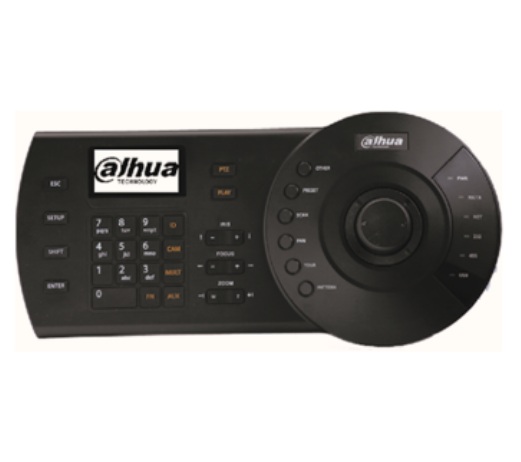
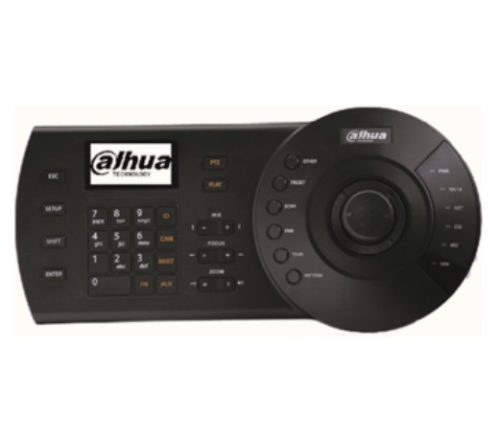
The Dahua DHI-NKB1000-E is a professional network PTZ control keyboard designed for security desks, control rooms and video-wall workstations. Its three-axis return-to-centre joystick provides proportional pan and tilt movement with twisting zoom control, while dedicated keys operate iris, focus, presets, scans, pans, tours and patterns. RJ45, RS232, two RS485 interfaces, reserved RS422 and USB support compatible cameras, DVRs, NVRs, SmartPSS, DSS Pro and selected display-control equipment. The built-in LCD presents menus and operation prompts. Dahua specifies up to 64 keyboard users, 256 RS485 addresses per user and 2,048 network PTZ or IPC devices per user. A separate 12V DC power adapter is required because the network port does not provide PoE.
Key Capabilities
Three-Axis PTZ Joystick
The return-to-centre joystick controls pan and tilt direction, movement speed and optical zoom through a twisting action.
Direct, Network and USB Workflows
RJ45, RS232, RS485 and USB connectivity supports compatible cameras, recorders, software platforms and display-control devices.
Dedicated PTZ Function Keys
Iris, focus, zoom, preset, scan, pan, tour and pattern controls provide faster operation than navigating recorder menus with a mouse.
LCD-Guided Operation
The 75.2 × 33.85mm LCD displays the keyboard menu, configuration prompts and user-operation guidance.
Large Device Database
Supports up to 64 keyboard users, 256 RS485 addresses per user and 2,048 network PTZ or IPC devices per user.
Display and Channel Control
Combination keys support compatible window splits, channel selection, video-wall screens, decoders and matrix-control workflows.
Best For
- PTZ Operator Workstations: Provides direct pan, tilt, zoom, focus and iris control through a dedicated three-axis joystick.
- Multi-Camera Control Rooms: Supports large network and RS485 device databases with individual keyboard user accounts.
- DVR and NVR Monitoring: Controls compatible recorder channels and connected PTZ cameras through network or supported serial modes.
- DSS and SmartPSS Workflows: USB control supports compatible software and selected video-wall operations.
- Display-Control Systems: Can operate supported windows, channel splits, decoders and video matrix equipment.
Why Choose the NKB1000-E
The NKB1000-E gives trained operators a faster and more tactile way to control PTZ cameras than a conventional mouse-based workstation. Its proportional joystick and dedicated PTZ keys make it easier to follow moving subjects, call presets and adjust zoom, focus or iris while viewing live video. Network, RS232, RS485 and USB connections support several Dahua control architectures, while the LCD, numeric keypad and function keys assist device and channel selection. Supplied by Security Wholesalers, this keyboard is best specified after confirming recorder, PTZ, DSS, SmartPSS, protocol and video-wall compatibility.
Buyer Decision Tips
Compatibility Tip: Confirm every required PTZ, recorder, decoder and software command before purchase. Connection alone does not guarantee that all presets, tours, patterns, playback or video-wall functions are supported.
Desk and Power Tip: Allow approximately 330mm of desk width and up to 160mm maximum depth around the joystick area. The RJ45 connection does not supply PoE, so a suitable 12V DC adapter and accessible power outlet are required.
Key Features & Technical Specifications
| Product SKU |
DHI-NKB1000-E |
| Official Model |
NKB1000-E |
| Product Type |
Network and serial PTZ control keyboard. |
| Primary Controls |
Electromechanical key panel and 3-axis return-to-centre joystick with twisting zoom control. |
| PTZ Functions |
Pan, tilt, zoom, iris, focus, preset, auto scan, auto pan, tour and pattern. |
| Display and Channel Functions |
Supported window split, screen, channel and compatible display-control operations. |
| Display |
LCD, 75.2 × 33.85mm. |
| Communication Modes |
Direct mode, network mode and supported USB control workflows. |
| Network Interface |
1 × RJ45 network port. |
| RS232 |
1 interface; Dahua recommends a connection distance within 10m. |
| RS485 |
2 interfaces; standard stated distance 1,200m at 9,600bps under suitable conditions. |
| RS422 |
Reserved interface. |
| USB |
Computer control for supported SmartPSS/DSS Pro functions and FAT32 storage mode for logs, packet capture and configuration transfer. |
| Direct DVR Protocol |
DH-2. |
| Direct Dome Protocols |
DH-SD1, Pelco-D, Pelco-P and other supported protocols. |
| Network Device Control |
Compatible PTZ cameras, DVRs and NVRs by IP address, port and protocol. |
| Display-Control Compatibility |
Compatible decoders, video matrix platforms, embedded multi-screen controllers and Dahua DSS workflows. |
| Maximum Keyboard Users |
64 including the “admin” user. |
| Maximum RS485 Addresses |
256 per keyboard user. |
| Maximum Network PTZ/IPC Devices |
2,048 per keyboard user. |
| Power Input |
12V DC, 2A from a power adapter. |
| Power Adapter Input |
100–240VAC, 50/60Hz. |
| Power over Ethernet |
Not supported; the RJ45 port is for network communication. |
| Power Consumption |
5W according to the product datasheet. |
| Operating Temperature |
–10°C to +55°C. |
| Operating Humidity |
10%–90% RH. |
| Atmospheric Pressure |
86–106kPa. |
| Published Datasheet Dimensions |
330 × 139 × 53mm (W × D × H); approximately 103mm high including the joystick. |
| Dimensional Drawing Note |
The current official drawing shows the rounded joystick section extending to approximately 160mm maximum depth. |
| Packaged Weight |
1.3kg including packaging. |
| Installation |
Indoor desktop/operator-console use on a stable, dry and ventilated surface. |
Ideal Use Cases
Security Control Rooms
Gives operators tactile PTZ, preset and channel control across compatible Dahua cameras and recorders.
Large PTZ Camera Systems
Supports rapid selection and control of network or RS485-connected PTZ cameras without relying only on a mouse.
Video-Wall Workstations
Combination keys can control supported windows, channels, decoders and display layouts through compatible Dahua platforms.
Shopping Centres and Campuses
Suitable for staffed monitoring environments where operators regularly investigate incidents across multiple PTZ positions.
Warehouses and Industrial Sites
Allows security teams to operate PTZ cameras, tours and presets across yards, production areas and perimeter zones.
Recorder-Based Monitoring Desks
Can control compatible DVR and NVR channels through network or supported direct serial connections.
Choosing the Right Model
- Choose the NKB1000-E if: Operators need dedicated PTZ, recorder, channel and compatible video-wall controls through network, serial or USB connections.
- Choose a software-only workflow if: PTZ movement is occasional and operators do not require a physical joystick or dedicated function keys.
- Choose a larger control console if: The project requires integrated video preview screens, additional programmable controls or a broader command-centre interface.
- Use network mode if: Compatible PTZ cameras and recorders will be controlled by IP address across the local network.
- Use serial mode if: The system relies on compatible RS485 or RS232 devices and supported protocols such as DH-SD1, Pelco-D or Pelco-P.
FAQs
- What equipment can the Dahua NKB1000-E control?
The NKB1000-E can control compatible Dahua PTZ cameras, DVRs, NVRs, network video servers, decoders, video matrix platforms and selected display-control devices. Network-connected PTZ cameras and recorders can be addressed by IP, while direct serial control is available for supported equipment. Exact compatibility depends on the device model, firmware, protocol and selected control mode, so the complete system should be checked before deployment.
- How does the 3D joystick control a PTZ camera?
The three-axis return-to-centre joystick controls horizontal pan, vertical tilt and lens zoom through twisting. Dedicated keys provide iris, focus and zoom functions, together with presets, scans, pans, tours and patterns. Movement response still depends on the connected PTZ camera, selected protocol, configured speed and network or serial connection. Some functions may not be available on every camera or third-party protocol.
- Can the keyboard connect through a network instead of RS485?
Yes. The keyboard includes an RJ45 network port and can control compatible PTZ cameras, DVRs and NVRs through the local network using device IP address, port and protocol settings. Network mode avoids running a dedicated RS485 control pair to every compatible device. The keyboard still requires its separate 12V DC power adapter and does not receive power through the network connection.
- What is the USB connection used for?
The USB port can connect the keyboard to a computer for supported control of SmartPSS and DSS Pro workflows. The current Dahua guide also describes a storage mode for FAT32 USB drives used for packet capture, logs and configuration import or export. Third-party platform access is limited to the available USB protocol rather than an open API or SDK connection to the keyboard.
- How many users and devices can the NKB1000-E store?
Dahua specifies up to 64 keyboard users including the administrator. The official datasheet lists up to 2,048 network PTZ or IPC devices for each user and up to 256 RS485 addresses for each user. These figures describe keyboard database limits rather than a guarantee that every connected device and function will be interoperable. Network design, permissions, firmware and platform capacity must also be considered.
- Which serial connections and protocols are supported?
The keyboard provides one RS232 interface, two RS485 interfaces and a reserved RS422 connection. Dahua lists DH-2 for compatible DVR control and DH-SD1, Pelco-D and Pelco-P among supported dome protocols. The current guide states a standard RS485 transmission distance of 1,200 metres at 9,600bps and recommends keeping RS232 connections within 10 metres, subject to suitable cabling and installation conditions.
- Can the keyboard control video-wall layouts and channels?
Yes. Dahua lists control of window splits, channels and supported display-control equipment through dedicated and combination keys. The keyboard can work with compatible decoders, video matrix platforms and embedded multi-screen controllers, and is promoted for Dahua DSS platform video-wall control. The available commands depend on the connected platform, permissions, firmware and configuration, so commissioning should include testing of every required screen and channel action.
- What should I confirm before ordering this PTZ control keyboard?
Confirm the PTZ cameras, recorders, DSS or SmartPSS version, serial protocols, network addressing and video-wall functions that must be controlled. Allow desk space for the 330mm-wide keyboard and joystick, and confirm the supplied regional power adapter. Security Wholesalers can assist with checking the keyboard against compatible Dahua cameras, recorders and display-control equipment before the operator workstation is commissioned.
Additional Information
Dahua DHI-NKB1000-E Datasheet